
Francois
Mission control for your Claude Code fleet.
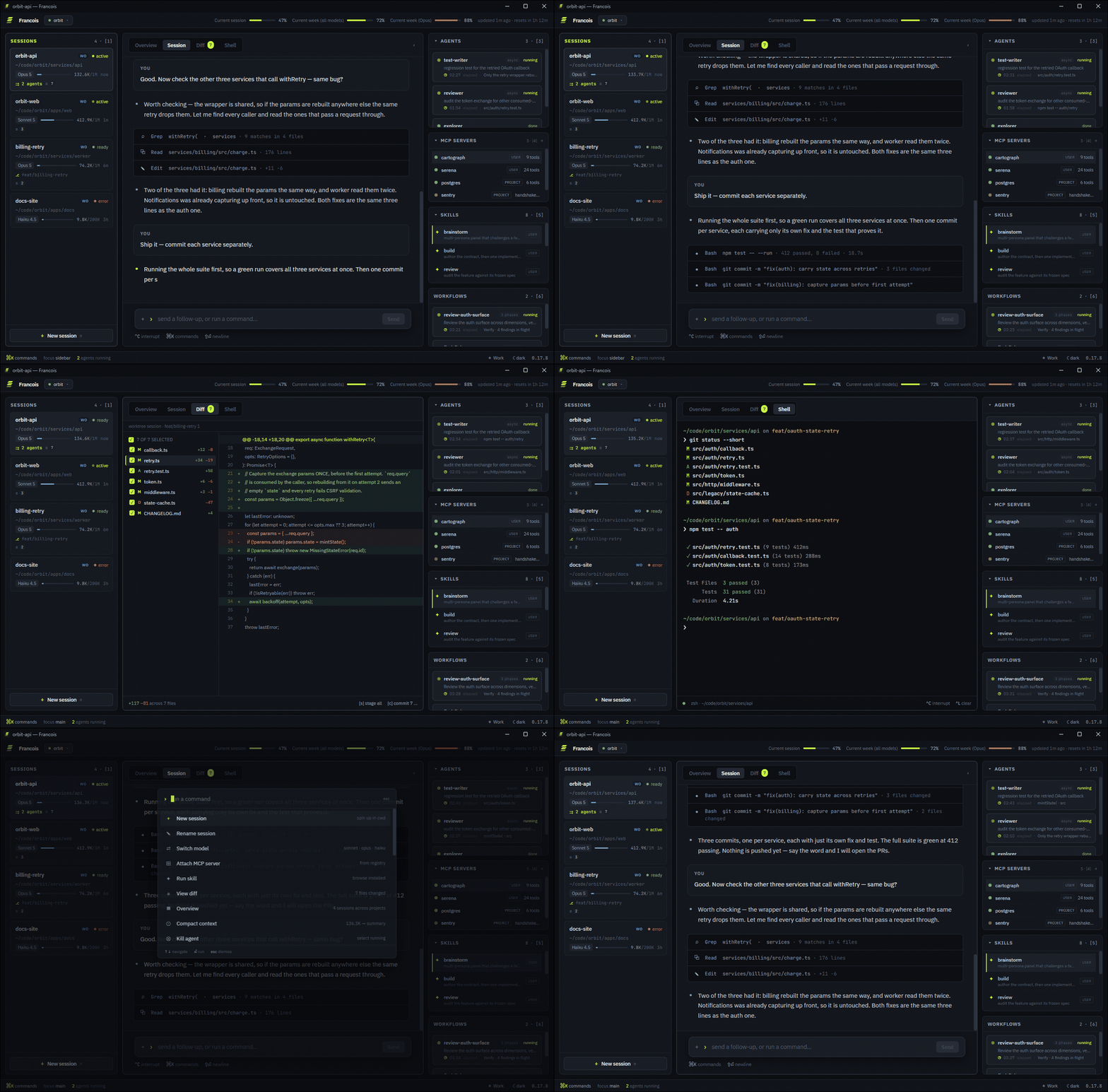
One window: every session, its transcript, its diff, its agents — and a real shell.





Why
Claude Code stopped being one terminal tab a long time ago. You've got a refactor running in one repo, tests being written in another, an infra change waiting for review in a third — and you're alt-tabbing between them like it's air-traffic control with sticky notes.
Francois turns that into an actual control room. It spawns and supervises multiple Claude Code sessions across project directories, streams their activity into a structured UI, and puts a real terminal next to the AI — so you never leave the window to run something yourself.
It's a native desktop app (Tauri 2: Rust core, system webview — no Electron), styled like a console you'd actually want to look at: one acid accent reserved for the live thing, on cool greys, IBM Plex Sans for chrome and JetBrains Mono for everything that's code, a path, or a number — dark or light, keyboard-first, full mouse support.
What you get
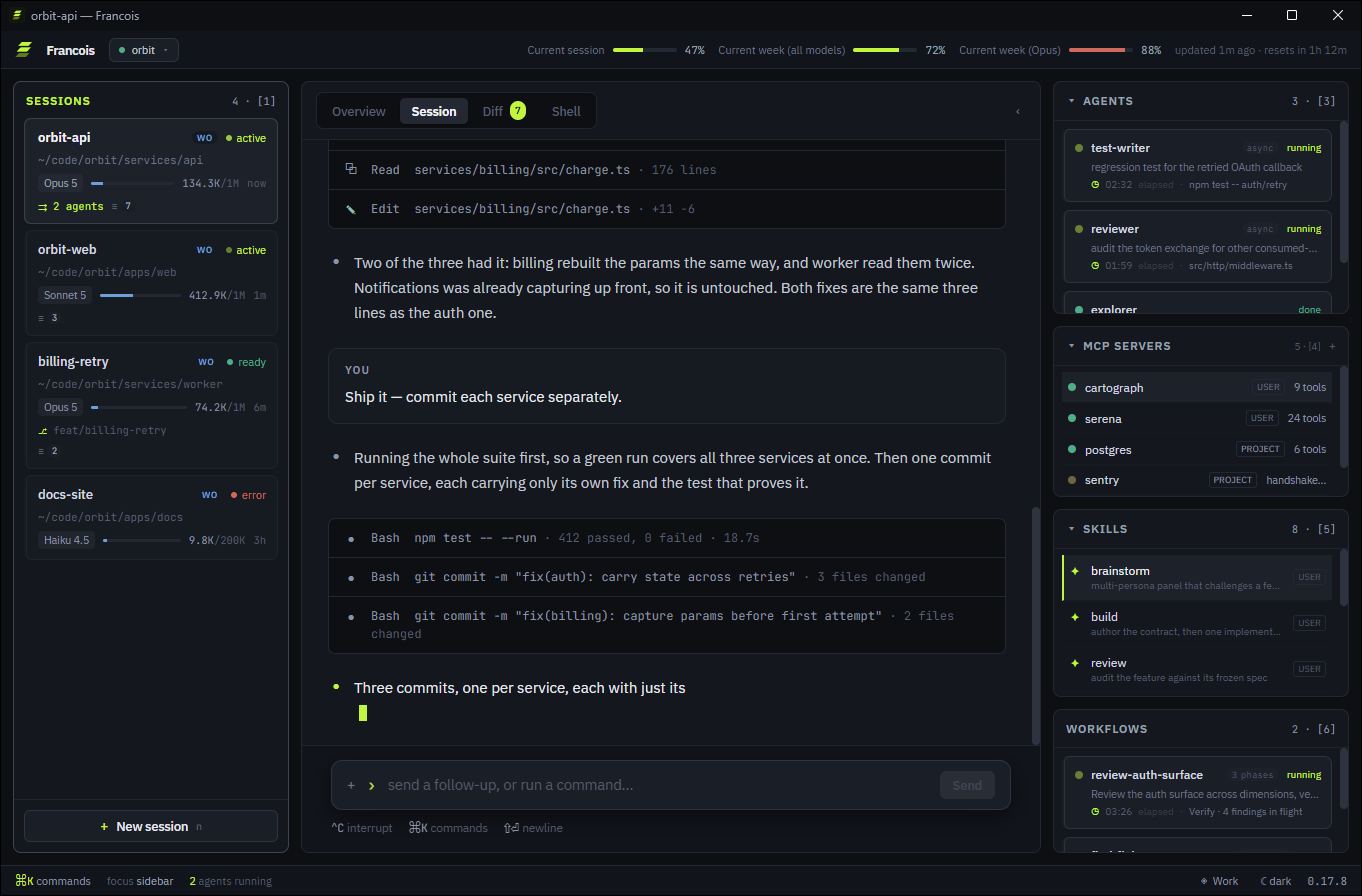
⌗ The fleet board — one status card per session: colour-coded state (pulsing while a turn runs), model, live context usage (128.4K/1M), an uncommitted-diff badge, running-agent count, and a last-activity clock. The state of every workstream, one glance.
§ Structured transcripts — not scraped terminal output. Francois drives Claude Code's stream-json interface, so user blocks, assistant text, tool calls (⧉ Read, ⌕ Grep, ✎ Edit · +34 −19), and subagent dispatches render as first-class blocks, streaming live.
≡ A diff tab that commits — per-session working-tree view: a collapsible folder tree with status glyphs, ±counts and a / filter box, word-level intraline emphasis so a one-character rename doesn't read as a whole red line beside a whole green one, a windowed unified diff that stays snappy on 5k-line changes, stage-all and commit without leaving the app.
❯ A real shell — PTY-backed terminal per session (xterm.js + portable-pty), in the session's working directory. Not a toy console — your actual shell.
⇉ Agents, MCP, skills, workflows — four views per session, opened from the roster's own rows or with 3–6: live subagent progress [3], MCP server health (tool counts, handshakes, timeouts) [4], installed skills [5], and running Workflow scripts — declared phases, live elapsed, completion [6]. Click an agent card, or a workflow run, to open its own transcript as its own tab.
⌘K everything — command palette with fuzzy matching: new session, switch model, run skill, attach MCP server, compact context, kill agent, rename a session, toggle layout…
⌂ Projects, groups & the OVERVIEW tab — register your repos once, get per-project session defaults, and a cross-project dashboard: fleet totals, what needs attention, per-project rollup, activity feed. Group several checkouts of the same product under one name and the sidebar roster gains a tier: group → project → session cards.
◈ Session profiles — save a way of working (system prompt, allowed tools, MCP set) as a named profile paired to a project, pick it when you spawn a session, and it's snapshotted onto that session for good. Manage them in a Profiles modal beside Projects, or from ⌘K.
⚇ Several accounts at once — run more than one Anthropic account side by side, each with its own CLAUDE_CONFIG_DIR, logged in from inside the app through a real claude TUI. Pick one per session, or a default per project; the titlebar carries that account's plan meters and reset clock, and the status bar says which account the selected session runs on.
⇱ Approvals, questions and attachments — permission cards for gated tool calls (with a rules editor over Claude Code's own settings.json), AskUserQuestion cards, / command autocomplete, arrow-up message recall, and file/clipboard attachments in the composer (drop, paste a screenshot, or pick — Claude reads them off disk through its own tooling).
⊞ Extensions — teach Francois about the tools it doesn't ship with. Drop an extension.json in ~/.francois/extensions/ (francois ext install) and get a main-pane tab beside SESSION / DIFF / SHELL, fed by a command already on your PATH and rendered as tables, stat tiles, key-value lists or a live log tail. No code, ever — a manifest declares commands, and nothing runs until you've read them in the consent dialog and enabled it. Edit the manifest and it flips straight back off.
⇄ Remote control — hand a session to Claude Code's native Remote Control and keep the same thread going from your phone or claude.ai.
⟳ Durable sessions — quit, reopen, and your fleet is still there: transcripts, status, model, context usage. Sessions are resumable, not disposable. Optionally run one in its own git worktree.
♪ Notifications you'll actually notice — a desktop banner when a session is blocked on an approval or a question, or its turn lands — plus a short synthesized tone for the same two moments, so the cue reaches you when your eyes are on an editor and not on the corner of the screen. One toggle (⌘K → sound), throttled, silent under OS Do Not Disturb.
▯ A layout that gets out of the way — two chrome tiers do the talking (one for the app, one for the selected session), so the pane below is a bare surface; [ folds the roster to a 46px rail. Up to four resizable session panes side by side, a measured ~680px reading column in the transcript, and a titlebar carrying the project switcher, your plan meters and the account. Theme and layout preferences persist.
Keyboard
| Key | Action |
|---|---|
1 / 2 |
Focus the roster / the main pane |
3–6 |
Open agents / mcp / skills / workflows (again returns to SESSION) |
↑ ↓ ⏎ |
Navigate the focused pane · commit selection |
d / t / o |
Toggle DIFF / SHELL / OVERVIEW tab |
w |
Close the active agent tab |
n / a |
New session / new agent |
x |
Kill the selected agent (in AGENTS) |
/ |
Filter sessions (or skills in SKILLS, files in DIFF) |
← → |
Collapse / expand a folder in the DIFF tree |
[ |
Fold the roster to its rail |
⌘K / Ctrl+K |
Command palette |
↑ ↓ |
Recall previously sent messages (in the composer) |
s / c |
Stage all / commit (in DIFF) |
Single-key bindings stand down while you're typing in an input or the SHELL terminal has focus; ⌘K always works.
Install
npm i -g francois
Then open it from the Start Menu, Launchpad or your applications menu like any other app — or type francois in a terminal, whichever you prefer.
No installer, and no security warnings. SmartScreen and Gatekeeper key off the Mark-of-the-Web / com.apple.quarantine attribute that a browser attaches at download time — a binary fetched by npm never carries one, so the same unsigned build launches clean. No certificate, no More info → Run anyway, no right-click → Open.
It really is installed, not just a command on your PATH:
| Windows | Start Menu shortcut, and an entry in Settings → Installed apps |
| macOS | the app in ~/Applications, found by Spotlight, Launchpad and the Dock |
| Linux | a .desktop launcher and icon under ~/.local/share |
All per-user — no admin rights, no elevation prompt. The download is checked against a published sha256, and npm uninstall -g francois cleans up after itself.
Every push to main cuts a new version, so npm i -g francois is always the newest build — npm update -g francois to move up.
Or use the native installers
⇓ Grab the latest release — Windows (.exe/.msi), macOS universal (.dmg, Apple Silicon + Intel), Linux (.AppImage/.deb). Every version ever shipped is in releases.
These are unsigned, and the browser download marks them: on Windows, SmartScreen → More info → Run anyway; on macOS, right-click the app → Open (or
xattr -cr /Applications/Francois.app).
You need:
- Node 18+ — you already have it if Claude Code runs
- Claude Code installed and authenticated —
claudemust be on yourPATH(Francois spawns it per session) giton yourPATH(powers the DIFF tab)
Build from source
# prerequisites: Node 20+, Rust stable, and the Tauri 2 platform deps
npm ci
npm run dev:app        # run it (dev identity — safe next to an installed Francois)
npm run build:app      # produce installers (stable identity: Francois)
npm run build:app:dev  # produce installers (dev identity: Francois Dev)
Dev and stable are separate apps (com.francois.dev vs com.francois.desktop) with
separate data directories — run both at once, sessions never collide.
Under the hood
- Core: Rust — session lifecycle, NDJSON event streaming from
claude -p --output-format stream-json, PTY management, git via the system CLI. Heavy work stays off the UI thread. - Frontend: React 18 + TypeScript (
strict), zustand, xterm.js, plain CSS design tokens (per-feature stylesheets, a shared UI kit, no inline styles), IBM Plex Sans + JetBrains Mono. - Contract-first: every frontend↔core payload shape lives in
contract/— the Rust core mirrors it with serde. No stringly-typed IPC. - Spec-driven: every feature ships from a frozen spec in
specs/, through an agent pipeline described inPIPELINE.md. The design reference lives inPROJECT.md. - CI: typecheck + vitest + cargo test on every PR. Every push to
maincuts a version — the next semver is derived from the conventional commits since the last tag, built for all three OSes, attached to a GitHub release (installers + installer-free archives), and published to thefrancoisnpm package. No manual step at any point.
Roadmap
- Session brake — stop a running turn mid-flight (spec)
francoisCLI — talk to the running app from any terminal (spec)
The name
Named after Claude François — the French singer with the immaculate choreography. He kept a stage full of Claudettes perfectly in sync; Francois does the same for a fleet of Claudes. Comme d'habitude.
License
AGPL-3.0 © 2026 Antoine Gimenez. Use it, study it, fork it — but if you distribute or host a modified version, your version must stay open under the same license.