English | 中文
cc-code
Terminal coding agent powered by open-source models — Rust-built, Claude Code compatible
DeepSeek-V4-Pro + Mimo-2.5Pro + GLM-5.1 driven, zero migration from .claude/ config.





npm install -g @cc-claw/code
🌐 Official Website: cc-claw.com
Why cc-code · Auto Mode · Core Capabilities · Install · Nobody Coding · Acknowledgments
❤️Sponsor
Click to collapse
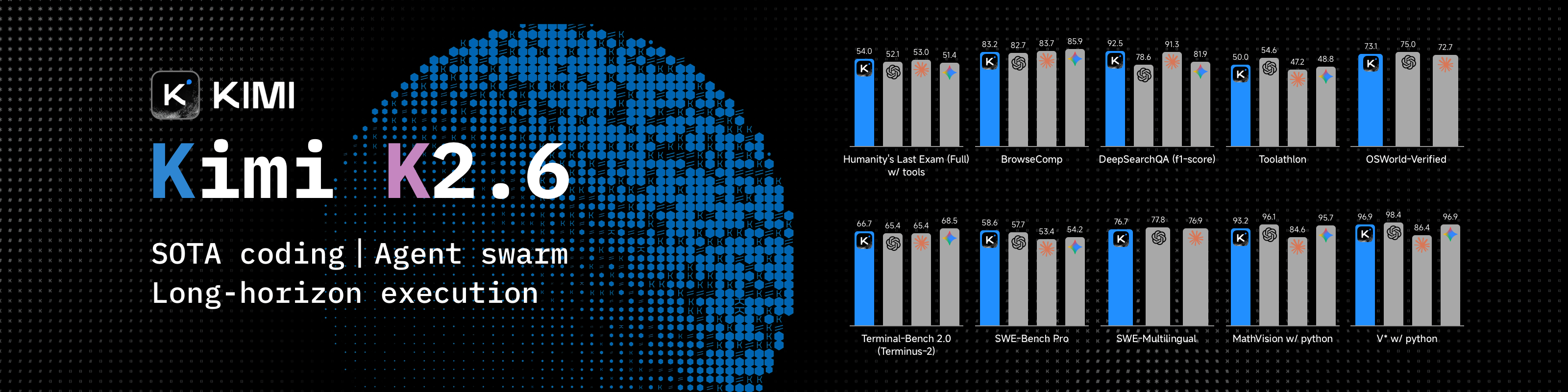
Kimi K2.6 is an open-source, native multimodal agentic model from Moonshot AI, built for long-horizon coding, coding-driven design, and swarm-based task orchestration. It handles complex end-to-end engineering work across front-end, DevOps, performance optimization, and full-stack workflows. Register here
 |
Top-tier model MiMo V2.5 from Xiaomi. Register with invite code: both get ¥10 API credit + 10% off first order. Invite code: JBEYTF. Register here (auto-filled on registration · credit valid for 40 days) |
 |
GLM Coding Plan from Zhipu AI — top-tier coding model in China, compatible with 20+ mainstream tools, best value. Join now |
Why cc-code?
| Comparison | Other Terminal Agents | cc-code |
|---|---|---|
| Runtime | Node.js / Bun, easily eats 1GB RAM | Rust native, fast startup, ~50MB memory |
| Model Lock-in | Locked to one LLM | Switch freely: Anthropic, OpenAI-compatible, DeepSeek, GLM |
| Prompt Cache | Recompute every turn, wasting tokens | Frozen system prompt, 95-99% cache hit rate |
| Tool Loading | All tools stuffed into every request | Core tools resident, rest lazy-loaded via Tool Search |
| IDE Integration | Terminal only | ACP protocol, Zed and other IDEs connect directly |
| Claude Code Ecosystem | Incompatible | Use .claude/ config, agents, skills, hooks, MCP directly |
| Safety Gate | Prompts you for every risky command | JEV semantic gate — a dedicated LLM judge that only prompts when it isn't sure |
Auto Mode: The JEV Semantic Gate
Auto is the default permission mode (fail-closed). Instead of asking you about every call, it decides in two layers:
- Deterministic layer — your own rules, the built-in hard-deny list, and a read-only fast lane. Zero cost, no credentials required.
- JEV semantic gate — a dedicated LLM judge (
JEV_MODEL, defaultopenrouter/typesafe/jev-1.13) reached over its own endpoint (JEV_ENDPOINT) with its own key (JEV_API_KEY). It scores each call against a set of conditions and pops a single confirmation prompt only when the call lands in the uncertain band.
No credentials configured? The deterministic layer still runs and an LLM classifier takes over as fallback; when there is no confirmation channel (sub-agents, -p) the call is denied. The session model is never involved — judging is offloaded to JEV, so safety checks don't spend your context tokens. Shift+Tab toggles between Auto and Bypass.
Core Capabilities
| Capability | Description |
|---|---|
| Rust Native | Fast startup, low memory, zero runtime overhead |
| Context Optimized | System prompt frozen + dynamic content isolated, no token waste |
| Multi-LLM Support | Anthropic / OpenAI-compatible APIs, DeepSeek, GLM — switch freely |
| Claude Code Compatible | .claude/ config, agents, skills, hooks, MCP, sub-agents all reusable |
| Streaming Markdown | Code blocks, tables, diffs rendered in real-time |
| ACP Protocol | Connect to Zed and other IDEs, or build your own "Cloud Code" platform |
| Auto Compact | Long sessions auto-compressed, stays fast and cheap |
| Sub-Agent Concurrency | Background sub-agents run in parallel with fork and background modes |
| HITL Approval | Sensitive operations intercepted by the JEV semantic gate — a dedicated LLM judge that only prompts when it isn't sure |
| Dual-Engine File Search | Grep/Glob prefer the external ripgrep binary, falling back to the built-in Rust engine |
v0.6.x New Features
Interface language: TUI and CLI help support English and Simplified Chinese. Use /lang en or /lang zh-CN to save your preference. Without a saved language, startup detects LC_ALL, LANGUAGE, LC_MESSAGES and LANG; unsupported locales fall back to English. See CHANGELOG for unreleased changes.
Typing UX aligned with Claude Code (v0.6.166): Suggestion overlays (slash commands / skills / @ files) are now interactive while the agent is running — arrows/Tab navigate, Enter completes only a selected candidate, Esc dismisses the overlay first and interrupts the agent on a second press. "Send now" (steer) with a foreground command running waits a 2s grace period, then moves it to the background automatically. The status-bar permission label now shows a ⏵⏵ prefix. See CHANGELOG.
Sub-agent cancellation (v0.6.139): Just tell the main agent to stop a sub-task — it calls Agent(action="stop", task_id="bg-…") to cancel by exact task_id (no fuzzy matching, so look-alike sibling tasks are never stopped by mistake). The receipt carries the task summary so the agent can confirm what it stopped; the timeline prints • Agent "x" was stopped by main Agent, and the drawer row turns into a red filled ● with stopped by main Agent (keyboard stops show stopped by user). While waiting, the main viewport shows ✻ Waiting for N background agents to finish.
Sub-agent prompt cards (v0.6.139): Press Ctrl+O in the main viewport to switch detailed mode; the launch summary of background sub-tasks then turns from the compact tree into classic tool cards — ● Agent(task preview) + └ Backgrounded agent + └ Prompt: followed by the full instruction text (6-column hanging indent, wrapped). Press Ctrl+O again to collapse. See CHANGELOG for unreleased changes.
| Feature | Version | Description |
|---|---|---|
| Unified Tool Truncation Hint Style | v0.6.175 | All tool-output truncation hints (Bash, local ! shell commands, error summary rows) now share the unified … +N lines (ctrl+o to expand) format (singular: … +1 line, single-line wrap overflow: … (ctrl+o to expand)), fully aligned with diff and new-file code preview styles (#661). Same release completely decouples candidate popups from viewport height measurement, eliminating full-screen latching and blank gaps on 24-row terminals (#659). |
| Reliable Write Content Previews | v0.6.174 | New-file and overwrite previews no longer disappear when UI notifications arrive after the write; append previews no longer duplicate added content. Main and sub-agent writes share a snapshot captured before execution (#654). |
| URL Background Matches the Status Bar | v0.6.173 | Tool-result and ! output URLs explicitly use the terminal's default background, keeping their ANSI Cyan appearance consistent with status-bar model names (PR #656). |
| Welcome Card Shows Model Tier & Update Notice | v0.6.172 | The empty-session card now names what you are actually running: the title splits into an ACCENT brand and a MUTED version, a model · (effort effort) subtitle appears when both are known (omitted entirely rather than inventing defaults), and when a newer release exists the start hint is replaced by Update available! <current> → <latest> plus To update, run: cc-code update. The check (cc-tui/src/app/update_check.rs) runs once per process in the background against the GitHub release list — npm-v* tags only, prereleases skipped, highest semantic version wins, the whole request capped at 3s — and the event loop only ever reads the cached result, so rendering never waits on the network; any failure stays silent and the card looks normal. Disable with CC_CODE_DISABLE_UPDATE_CHECK=1; disabled automatically under cargo test. Same release: an empty session no longer shows the meaningless Cache - · MEM 19MB pair in the status bar, and the card border closes correctly in both locales with its height pinned at 7 rows (#653). |
| Compact Startup & Growing Terminal Viewport | v0.6.171 | The terminal starts below the shell output and scrolls only the rows needed as input, replies and panels grow; fullscreen locks once the allocated content fills the host height. The welcome card stays in the scrollable UI prefix, so it scrolls away naturally and never collapses the layout back. Copy, link and highlight coordinates follow the non-zero viewport origin, and exit clears only the rows the app owns (#652). |
| ANSI Cyan URL Link Colour in Tool Results | v0.6.170 | URLs inside tool results and ! shell-command output were drawn in theme::cur().ide (dark #4782C8), so the link colour drifted with /theme and sat too close in lightness to the body text_soft, making URLs slow to spot while scanning. style_urls() now pins Color::Cyan with an underline — it no longer follows the theme, matching the status bar's model name and branch name. Covers both call sites: format_prefixed_text() (every ⎿-prefixed tool result row — Bash / Read / Grep / Glob) and format_shell_output_lines() (!command output). URL detection keeps the CC OutputLine.tsx::URL_IN_JSON contract and trims trailing ) ] } , ; . :; it is still visual only (no OSC 8 — ratatui cells cannot carry escape sequences and sanitize_display_text() strips \x1b), with clicking provided by the terminal's own URL detection. Markdown links ([text](url) → theme.link() = SAGE #4EBA65) are a separate path and unaffected (#649). |
| Viewport-Lazy Detail Rendering | v0.6.169 | /config → Detail Render selects auto (default), cache, or virtual, applied immediately and saved as config.detail_render_strategy. Virtual rendering materializes only the current window and shares a 16 MiB rendered-product budget across variants; source history, metadata and a huge visible message remain separate memory costs. See CHANGELOG for behavior and boundaries (#629, PR #648). |
| Bash Output JSON Pretty-Printing (OutputLine Decorator) | v0.6.168 | Bash / MCP tool results now pass through an OutputLine decorator aligned with CC: single-line JSON is expanded to a 2-space indented pretty print behind a precision guard (if a compact re-serialization differs from the original, the line is kept verbatim, so big integers and 1.10-style literals are never rewritten), non-JSON lines take a fast path, and content over 10,000 chars skips formatting entirely; wrapping and truncation share one ruler — pre-wrap by display width, 3 visible lines plus a … +N lines (ctrl+o to expand) hint when collapsed. Same batch: diff deletion rows gained three-tier background shading, tool paths display the CC way, and the status bar labels Edit operations correctly (#642). |
URL Link Colour in Tool Results & ! Output |
v0.6.167 | URLs inside tool results and ! shell-command output are found by a hand-written prefix scanner (no regex dependency; trailing ) / ] / } punctuation is trimmed back off) and rendered in the theme's link colour with an underline. ! output is split by its existing ANSI colouring first and linkified per segment, so command colours survive; this is visual only (no OSC 8), with clicking still provided by the terminal's own URL detection (#640). |
| Instant Ctrl+O Toggling (Render-Key Cache) | v0.6.166 | Toggling detail mode used to clear every message's render hash and re-render + re-wrap the entire history — about 6.9s at 270 messages and 239s at 10,000 messages (debug measurements). The render thread now keys each message by content hash combined with only the detail/diff dimensions that message type is actually sensitive to, keeps both the detail and collapsed variants of every message, and caches wrapping per message segment (segment keys carry a per-line epoch, so a ticking Running… (Xs) indicator invalidates exactly its own segment): hot toggles drop to ~33ms and 1.38s respectively, and a regression test pins mid-execution toggles (streaming tail + running tools) to byte-identical fresh renders (#626, PR #631). Same release: diff and markdown rendering aligned with CC (per-line syntect highlighting with Monokai Extended themes, blank lines between markdown blocks now come only from the source text), Glob walks no longer follow symlinks and carry entry/time caps (#636), the typeahead popup is fully navigable while the agent is running, and steering past a foreground command gets a 2-second grace period before auto-backgrounding (#638). |
Older releases (v0.6.0 – v0.6.163) are listed in the CHANGELOG.
Install
Binaries available for macOS (x86_64 / Apple Silicon), Linux (x86_64 / aarch64), and Windows (x86_64).
npm (Recommended)
npm install -g @cc-claw/code
[!WARNING] On npm 12+ (released July 2026), this command alone is not enough. npm now blocks dependency
postinstallscripts by default — and that script is what downloads the platform binary. The install reports success, but runningcc-codethen fails withspawnSync ...cc-code.exe ENOENT. Allow the script explicitly:npm install -g --allow-scripts=@cc-claw/code @cc-claw/codeTo allow it for all global installs instead:
npm config set allow-scripts=@cc-claw/code --location=userUsing pnpm or bun? They block build scripts too — run
pnpm approve-builds(or allowlist the package), otherwisecc-codeships without its binary.
Upgrade
npm update -g @cc-claw/code
On npm 12+, pass the same flag: npm update -g --allow-scripts=@cc-claw/code @cc-claw/code.
macOS / Linux (Script)
curl -fsSL https://raw.githubusercontent.com/cc-claws/cc-code/main/scripts/install.sh | bash
Windows (PowerShell)
irm https://raw.githubusercontent.com/cc-claws/cc-code/main/scripts/install.ps1 | iex
How We Built cc-code with Nobody Coding
Nobody Coding means exactly what it sounds like. No human wrote a single line of cc-code — not the architecture, not the TUI, not the harness tuning that makes open-source models reliable in an Agent loop. Humans decide what. AI figures out how. You're not pair programming — you're product managing an engineer that never sleeps. 99% of cc-code was built this way.
Recent commits are almost entirely DeepSeek, Mimo, and GLM. Claude was just there in the beginning.
Typical Workflow
| When you... | Pipeline kicks off |
|---|
Repository Structure
cc-code/
├── cc-agent/                # Core: Agent loop, tool system, persistence, telemetry
│   └── README.md              # Agent framework guide
├── cc-middlewares/           # Middleware: filesystem, terminal, MCP, Hooks, etc.
│   ├── README.md              # Middleware overview
│   └── CLAUDE.md              # Development guide and traps
├── cc-tui/                  # TUI application (Ratatui)
│   ├── README.md              # TUI usage guide
│   └── CLAUDE.md              # Development guide and traps
├── cc-acp/                  # ACP service layer: bridges TUI/IDE with Agent
│   └── README.md              # ACP architecture and data flow
├── cc-widgets/              # Widget component library
│   └── README.md              # Component list and examples
├── cc-lsp/                  # LSP client library
│   └── README.md              # LSP operations and config
├── langfuse-client/           # Langfuse telemetry client
│   └── README.md              # Telemetry config and usage
├── npm/                       # npm package: postinstall script + shell wrapper
│   └── README.md              # npm package docs
├── scripts/
│   ├── install.sh             # macOS / Linux installer
│   └── install.ps1            # Windows installer
├── spec/                      # Design docs and specs
│   ├── global/                # Global architecture docs
│   ├── issues/                # Issue analysis docs
│   └── archive/               # Archived feature specs
├── docs/                      # Long-form docs (prd, adr, designs, acp)
├── human/                     # Manual walkthrough checklists
├── CLAUDE.md                  # Project development guide
├── CHANGELOG.md               # Version changelog
├── CONTRIBUTING.md            # Contribution guide
├── DEVLOG.md                  # Development log (milestones)
├── README.md
├── README_ZH.md
├── TUI-STYLE.md               # TUI command / shortcut / interaction reference
└── LICENSE                    # Apache 2.0
Acknowledgments
| Project | Description |
|---|---|
| Peri (KonghaYao) | This project is forked from Peri, distributed under Apache 2.0. Credit to the original author. |
| Superpowers & Matt Pocock's Skills | Skill suites driving cc-code's AI engineering workflow |
| ACP | Open protocol for agent-IDE communication |
| rmcp | Rust MCP client library |
| Ratatui & Tokio | TUI framework and async runtime |
| Langfuse | LLM observability |
| Zed | First ACP-compatible IDE, proved the protocol works |
Star History
License
Apache License 2.0 — free to use, modify, and distribute, including commercial use.