Curie




Open-source (Apache 2.0), self-hostable delivery platform for production AI agents. Connect
Slack — the first channel it speaks, with email and Teams next — author a Claude-Code-format
plugin bundle (skills + tools + MCP), deploy it as a versioned bot identity and run it anywhere -
in your development environment on your laptop or in production on your own Kubernetes cluster.
Configure your model, so you can point an agent at Anthropic, OpenRouter, or a local model through
Ollama. Get traces, evals, budgets, and git-driven deploys for free. One CLI, curie, drives all of
it.
New here? Quickstart gets you a first agent reply in a few minutes.
Run curie try for a first reply without configured credentials or prompts. Run
curie try --keep to retain the standard bundle at ./curie-demo for normal
curie skill commands. The Quickstart covers the full parity ladder.
Join the Curie Discord community to connect with other builders.
Table of contents
- Why your agent breaks when it leaves your laptop
- Quickstart
- Which target do I want?
- Status
- Contributing to Curie
- License and trademarks
- Where do I go next?
Why your agent breaks when it leaves your laptop
Local and production environments are usually different - a different Python version, a missing tool, a credential that exists in one place and not the other. Curie closes that gap with one mechanic: the same plugin bundle climbs three tiers.
skillruns it directly, as a single container, no platform in front.localruns it through the full platform via Docker Compose.clusterruns it through that same full platform on Kubernetes.
Here, skill names the runner only tier. An authored bundle skill is the
artifact at skills/<name>/SKILL.md.
An environment difference then shows up as a bug while progressing through these tiers, not a surprise your users hit - letting you iterate fast locally and ship with confidence.
All three tiers run an immutable bundle snapshot: local and cluster assign that snapshot a
version, while skill identifies it by its content digest. What makes skill the fast loop is that
it packs and boots that snapshot straight from your working directory in one command, with no
platform in front.
Curie provides an environment guarantee while climbing the three tiers. It is not a behavior guarantee: production traffic can still behave differently than your test cases, and no platform can honestly promise otherwise.
See ARCHITECTURE.md for the platform architecture and how the pieces fit together, or open the
interactive architecture atlas
to explore current and planned flows, maturity-rated seams, ADRs, and versioned snapshots.
See the target table below for what each tier actually runs.
Quickstart
Just want a bot in Slack? docs/your-first-slack-agent.md
is the short path: what to get first, four commands, and the six mistakes that
cost people an hour. The walkthrough below is the longer one, and teaches the
parity ladder as it goes.
Want a labelled GitHub issue to become a pull request?
docs/guides/dark-factory-quickstart.md
takes you from nothing to a factory-opened pull request on a new repository,
on a laptop kind cluster.
Prerequisites
- Docker + Compose v2: for the dev stack and the local runner container.
- kubectl + helm: only for the cluster-install path.
Building and deploying your first agent with Curie
Get an Anthropic API key and export it once:
export CURIE_CREDENTIALS=sk-ant-...
Every step below reuses this same credential and the same bundle. If you don't have Docker installed, install Docker and make sure it's running - it is needed for steps 1-2.
1. Build and test
curl -fsSL https://raw.githubusercontent.com/curie-eng/curie/main/get-curie.sh | bash
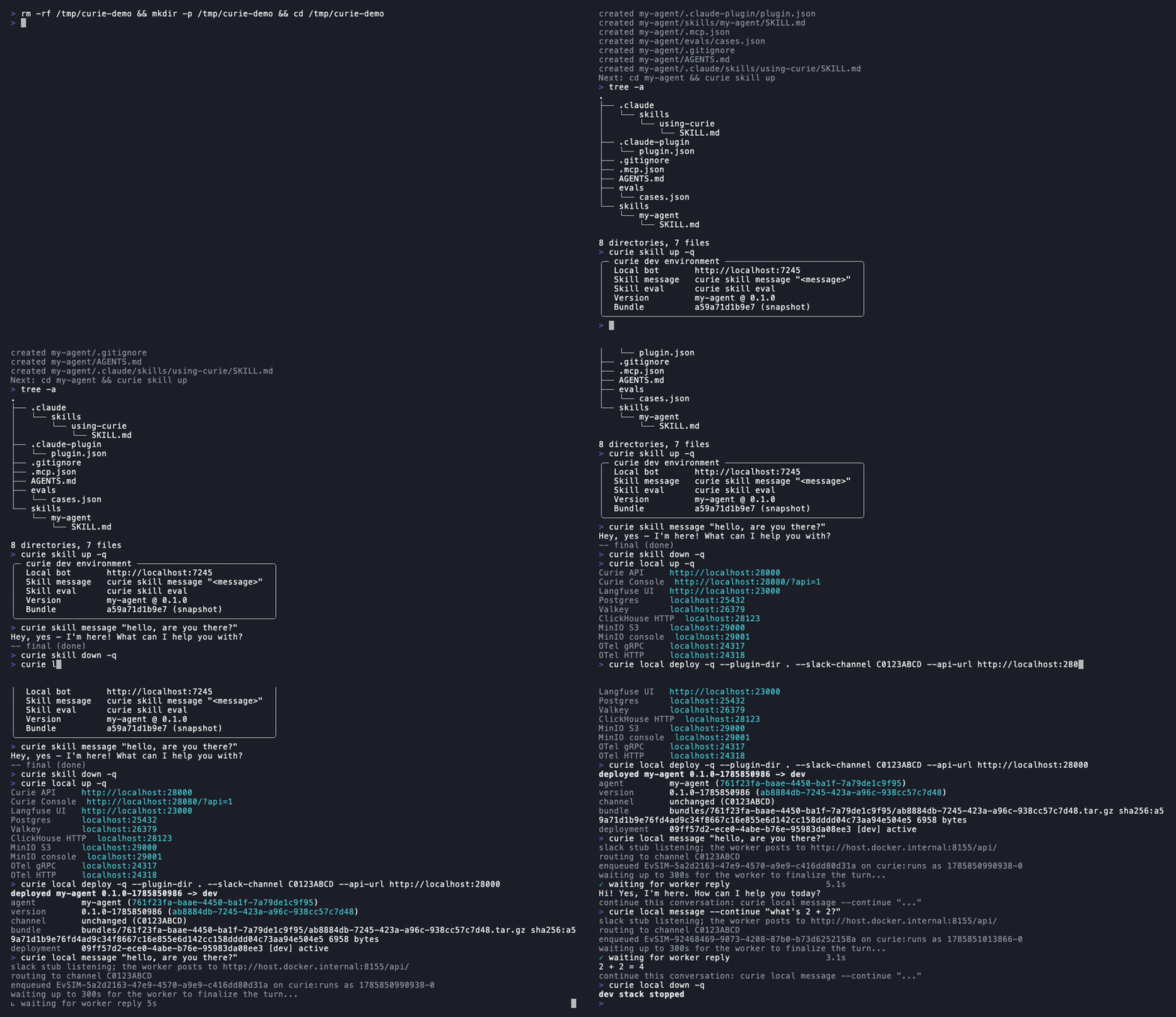
curie init my-agent && cd my-agent
Take a look at what got scaffolded:
tree -a
.
├── .claude/
│   └── skills/
│       └── using-curie/
│           └── SKILL.md
├── .claude-plugin/
│   └── plugin.json
├── .gitignore
├── .mcp.json
├── AGENTS.md
├── evals/
│   └── cases.json
└── skills/
    └── my-agent/
        └── SKILL.md
skills/my-agent/SKILL.md- the agent's instructions: what it does, and when to use which tool..mcp.json- the MCP servers (tools) this agent can call.evals/cases.json- the eval cases that grade this agent's behavior, at every tier.AGENTS.md- the rules for a coding agent working in this bundle..claude/skills/using-curie/SKILL.md- a primer skill that teaches the agent to drive the Curie harness (same content ascurie guide).
This is the Claude Code plugin format, verbatim - see packages/plugin-format/README.md
for the shape Curie validates against.
curie skill up
curie skill message "hello, are you there?"
A real reply streams back: no Slack, no platform yet. skill up runs an immutable snapshot of the
bundle, so after you edit skills/my-agent/SKILL.md run curie skill up again to load the new
snapshot. When done run the following command
curie skill down
This is the fastest inner loop of development and enables you to iterate and build your skills.
2. Full platform, still your laptop
Next hook up the agent into the full backend so that the message runs the real queue -> worker -> sandbox -> reply path.
curie local up
curie local deploy --plugin-dir . --slack-channel C0123ABCD --api-url http://localhost:28000
curie local message "hello, are you there?"
Then continue this conversation thread
curie local message --continue "what's 2 + 2?"
This is the same path a real Slack @mention
takes - see docs/slack-local-runbook.md when you're ready to try it live.
Visit the console at
http://localhost:28080/?api=1&api_key=<key>
where <key> is this install's API key: the api_key field of
~/.config/curie/local/curie.json (or $CURIE_CONFIG_DIR/local/curie.json), which
curie local up generates on first run. There you can see the whole conversation, its traces, metrics, and cost. The same console also surfaces logs,
approvals, and memory, which get more relevant once this plugin is deployed on Kubernetes in production.
When done run the following command
curie local down
3. Real Kubernetes
Finally, deploy the bundle on Kubernetes.
Point kubectl/helm at a cluster - k3s is the lasting recommendation; if you don't have a cluster
handy, install minikube and run the following command
(See docs/operations.md for the tradeoffs between k3s and minikube):
minikube start
Then:
curie cluster up
curie cluster deploy --plugin-dir . --repo <owner>/<name>
curie cluster message "hello, are you there?"
--repo binds this agent to the GitHub repository whose pushes will deploy
it in step 4. A later deploy can bind an unbound agent; it refuses to replace
an existing different binding. The API's PATCH /agents/{id} can explicitly
change repo_full_name. The bundle's deploy.yaml selects the agent for the
pushed branch's environment when several agents share that repository. See
git-flow routing for the
single-agent fallback and target refusal codes.
Plain cluster up infers Anthropic or OpenRouter egress from an unambiguous
credential prefix. On minikube, the first admission attempt reports that its
gvisor RuntimeClass is absent, so Curie shows that attempt as retrying,
applies security.gvisor.mode=off, and retries once. Each inference is printed
with the equivalent override. Ambiguous credential shapes still need an explicit
--allow-egress-host, and explicit values that contradict detected facts are
errors.
See docs/operations.md for cluster prerequisites and the full egress model.
This first cluster is disposable. For production, keep durable data outside the cluster: set
postgres.deploy: false for managed Postgres and minio.deploy: false for an S3 compatible object
store, then supply their credentials through existing Kubernetes Secrets. The chart redirects its
consumers to those stores, including bundle fetches. See the
charts/curie production storage configuration
for the complete backing store settings.
Then continue this conversation thread
curie cluster message --continue "what's 2 + 2?"
When done run the following command
curie cluster down --yes
4. Ship it: your CI/CD
Git-flow needs the agent created with --repo, as step 3 showed. If you tore the cluster down at the
end of step 3, bring it back up and re-run that same cluster deploy line before pushing, because the
binding lives in the release's database. What is left is exposing the Curie API to GitHub and wiring
the webhook and its secret (see docs/operations.md), then:
git push origin dev
A matching dev push stores an immutable, versioned bundle and deploys it under your dev bot. Merging that SHA to prod reuses the stored bundle. Each target agent owns its own Version row pointing to that object, so you can identify what is live and roll back to an earlier version.
No Slack event loop, no queue, no sandbox plumbing to write. You asked the same bundle to run somewhere bigger, then told it to ship itself.
Ready to make it real? See docs/slack-local-runbook.md to wire
this bundle into an actual Slack workspace.
Once this is live in dev or prod, @mention the bot in Slack like any teammate - see
apps/dispatcher/README.md's runbook for connecting a real workspace to a deployed release.
See QUICKSTART.md for the offline --fake-model path,
the examples/ bundles, and building Curie from source.
Which target do I want?
Every CLI command that touches an environment takes a target noun in the
middle: skill, local, or cluster. Pick the lightest one that answers your
question.curie init is the exception: it scaffolds a plugin bundle on disk and
targets no environment. The point of the three targets is that the same
plugin bundle format and the same evals/cases.json run across all of them, so
promoting skill → local → cluster is a parity ladder, not three separate
setups. An eval that passes on your laptop and fails on the cluster is
signal, not noise; each target's eval command is documented alongside it
in cli/README.md.
| Target | What runs | Slack | Kubernetes | Verbs | Reach for it to |
|---|---|---|---|---|---|
skill |
Just the runner container on the host Docker daemon. No platform, no queue, no API, no Slack. Fully offline. | none | none | up down status message eval |
Iterate a plugin/skill against a local runner, the fastest development loop. |
local |
The full platform via docker compose (Postgres + Valkey + Langfuse + API + worker). | none | none | up down status message eval deploy |
Exercise the real queue -> worker -> sandbox -> reply product loop with zero Slack and zero Kubernetes. Its API is published on host port 28000. |
cluster |
The platform on Kubernetes (a Helm release). | optional | yes | up down status message eval deploy |
Operate and drive a deployed cluster release. |
The table lists the verbs it covers, not every verb a target has: the universal
quartet up/down/status/message is on all three targets, and so is
eval, while local/cluster add deploy. See
cli/README.md for each target's verbs. Parity does not mean
every capability is implemented at every tier: every verb is answered at every
tier, with unsupported concepts returning a deterministic reason and an
alternative, as defined in
ADR 0041.
The distinction that matters: skill is the runner-only loop — it boots
just the runner container and talks straight to its ACI HTTP surface with no
platform in front. local and cluster put the full platform (queue,
worker, sandbox) in front of the identical runner and ACI. A message on
either therefore walks the same path a real Slack mention would take.
See cli/README.md for the full command reference per target
(skill,
local,
cluster),
docs/slack-local-runbook.md for connecting local Slack, and
docs/operations.md for cluster operations - the Quickstart above already
walks through skill, local, and cluster end to end.
Status
The core spine is built, covered by CI, and was live-verified end to end
against a real Slack workspace on a real model. For the precise, maintained
built-vs-deferred split, see "What is built vs deferred" in
ARCHITECTURE.md — this file
does not duplicate that list, which only drifts out of sync.
Forward-looking work is planned and tracked in
GitHub issues, with larger
journeys filed as epic-labeled issues.
Contributing to Curie
See CONTRIBUTING.md for the full contributor setup (uv, Python
3.13, Node.js + pnpm, Rust toolchain) and verify commands.
License and trademarks
Curie is released under the Apache License 2.0; see NOTICE
for attribution. "Curie" is a trademark of CurieTech AI. The code license
does not grant trademark rights, and TRADEMARKS.md explains
what use of the name is fine without asking and what needs permission.
See Releases for version history.
If Curie is useful to you, especially if you build on it commercially, we'd love a link back to github.com/curie-eng/curie. It is a friendly request, not a license condition: nothing in the Apache License requires it, and you are free to use Curie whether or not you do.
Where do I go next?
- docs/your-first-slack-agent.md -- the one-page path from nothing to a bot answering in Slack that redeploys itself on push, plus the mistakes worth skipping.
ARCHITECTURE.md-- the component diagram, the message-flow and deploy-flow sequence diagrams, and the built/in-progress split.- docs/adr/ -- the load-bearing architecture decisions (Agent Sandbox as substrate, stateless-first sessions, Langfuse as the observability backbone, the frozen ACI, security rails as chart defaults, adopt-not-build boundaries), each with the live-cluster evidence behind it.
- docs/agents.md: the verification contract for an agent driving Curie. The exact commands that prove an outcome, and the rule that a file existing or a string appearing in output is never evidence. This is for an agent using Curie, not one working in this repo.
AGENTS.md-- the operative rules for anyone (human or agent) working in this repo: the verify commands, the dev stack, the frozen-contract escalation rule, and the build gotchas. Each top-level directory also has its own scopedCLAUDE.mdwith rules specific to that area.