Prumo
English · Português (Brasil)
Prumo is an independent project inspired by graph-foreman, by JrSantiaggo, and guided by PO First: approved plans, phase-wide research and planning, dependency-aware execution, independent review, validation evidence and a local dashboard. The same workflow supports software, data, automation, migrations and other domains.
The plan defines the expected outcome; the engine enforces transitions and records evidence. Your AI harness performs the work and dispatches its agents.
New contracts declare their write scope before execution: investigated file paths, no file writes, or a scope still requiring research. Shared resources identify conflicts beyond files, such as changes to the same database table. Discussion settles uncertainties, planning refines the approach, execution stays inside the approved scope, and independent review checks the delivered changes against the pre-execution baseline. The dashboard explains readiness and blockers. Existing contracts remain compatible; adopting the explicit scope policy requires an approved plan update.
Supported AI harnesses
Prumo brings the same evidence-driven workflow to the ten harnesses shown in the built-in guide. Each harness keeps its own models, planning controls and agent capabilities.
| Claude Code | Codex | Kiro | DeepSeek Harness | Antigravity |
|---|---|---|---|---|
/prumo |
$prumo |
/prumo |
/prumo |
/prumo |
| OpenCode | Grok Build | GitHub Copilot | Hermes Agent | OpenClaw |
|---|---|---|---|---|
@prumo / /prumo |
/prumo |
/prumo |
/prumo |
/prumo |
See the dashboard
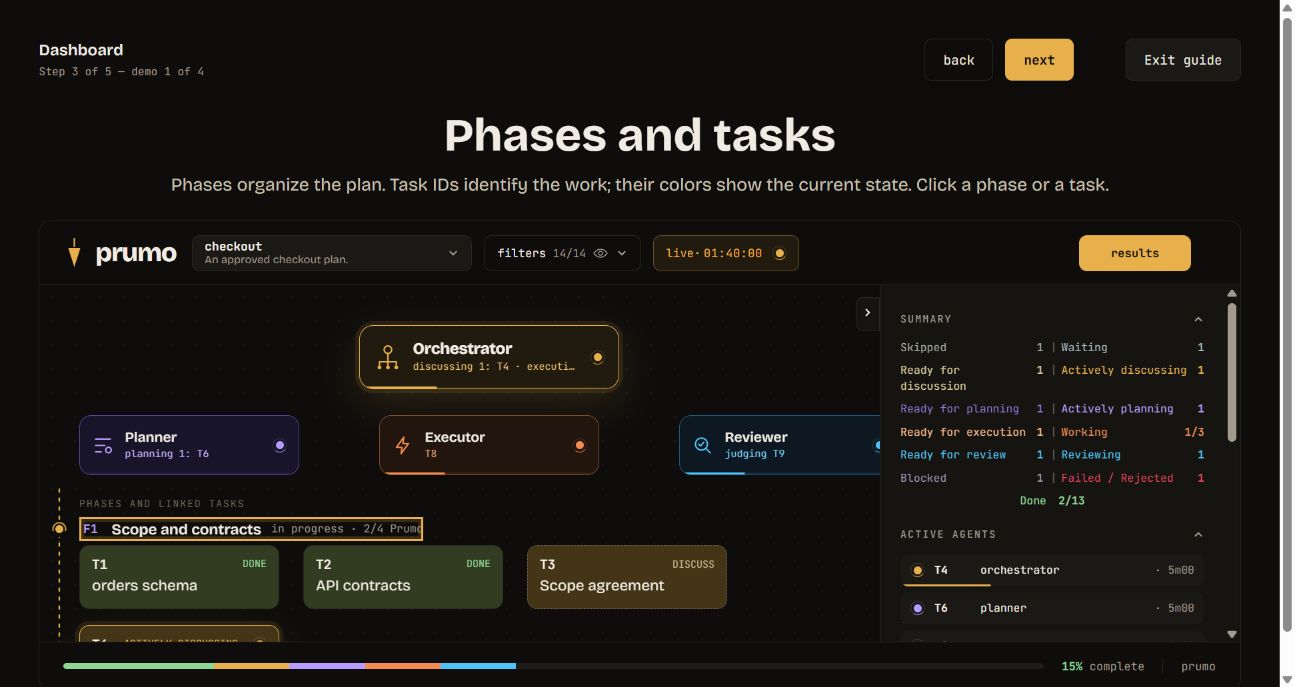
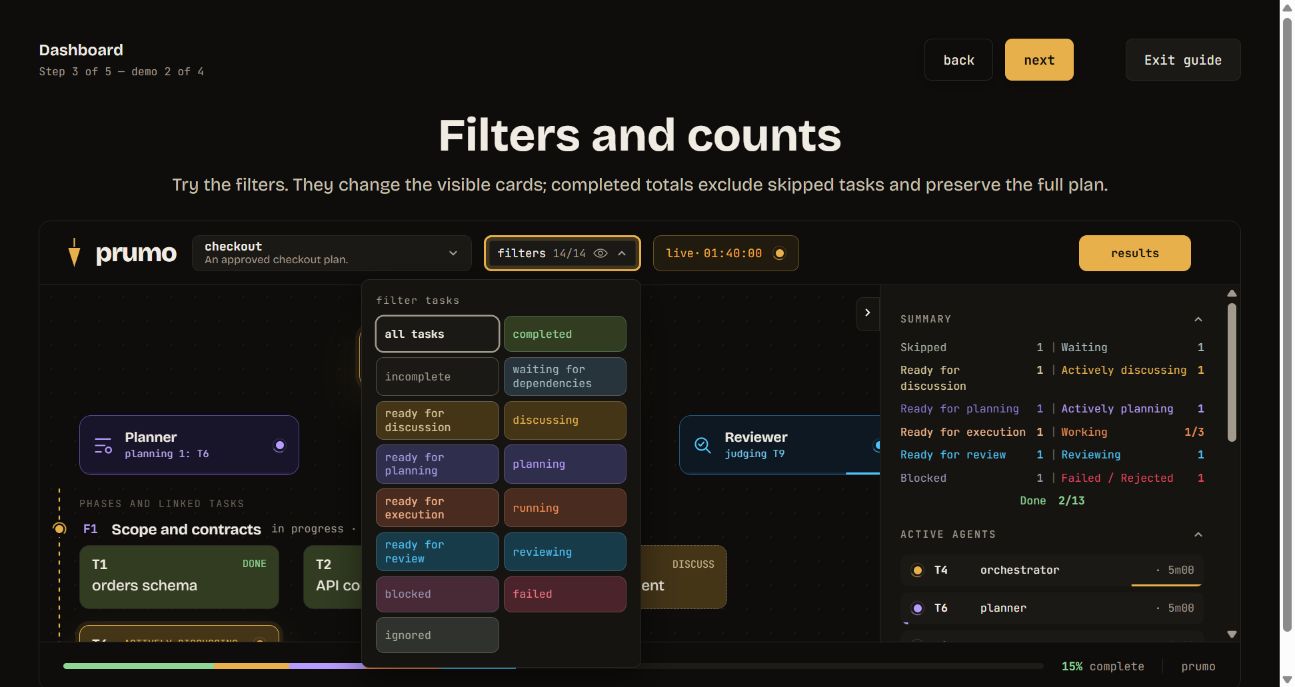
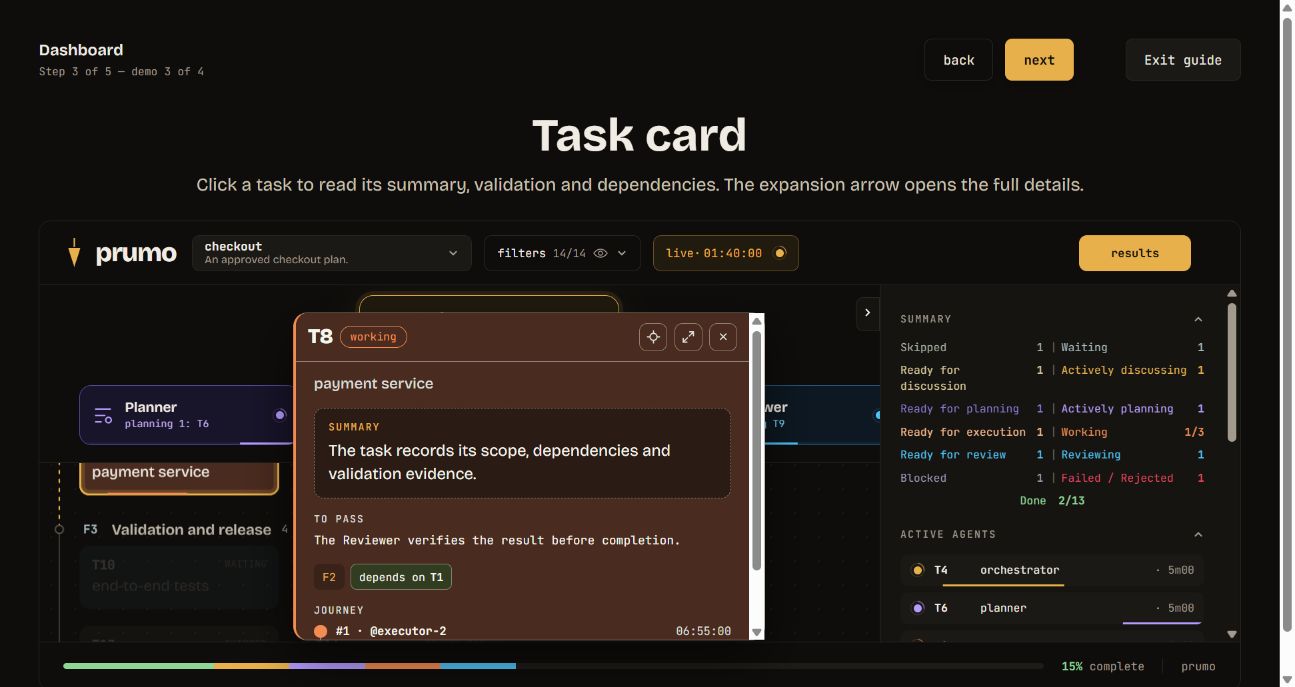
These screenshots come from the built-in guide and use a fictional checkout plan. Open Guide in the dashboard to try the same controls without changing your plans.
Phases and tasks. Follow the approved plan, dependencies and current task states.
Filters and counts. Focus on a task state while preserving the full plan totals.
Task details. Read the summary, validation, linked dependencies and journey; expand the card for the complete evidence.
The built-in guide also shows the native planning and model-selection entry points for Antigravity, OpenCode and Grok Build.
Install
Requires Node.js 22 or newer and the chosen harness. The installer does not install Claude Code, Kiro, Codex, DeepSeek Harness, Antigravity, OpenCode or Grok Build, or expand their execution permissions.
Install the CLI, Prumo skill, PO First and the per-user dashboard service in one step:
npm install -g @henri-ralmeida/prumo
The global npm postinstall configures every detected supported harness and enables the dashboard at http://localhost:4949. A project-local npm install is inert: it does not change global harness configuration or register startup. If npm scripts were disabled, or a new harness was installed later, repair the setup with prumo install --all.
At least one successfully configured harness is kept and the dashboard is enabled even if another harness fails, but the command exits nonzero and reports the incomplete configuration. If none can be configured, installation exits nonzero and does not enable the dashboard. Repeating the command resumes safely without duplicating files, managed instruction blocks or startup records.
You can also start the interactive installer, select a harness directly or preview the changes:
| Target | Command |
|---|---|
| Detect and choose available harnesses | bunx @henri-ralmeida/prumo@latest install |
| Every detected harness, unattended | bunx @henri-ralmeida/prumo@latest install --all |
| Claude Code | bunx @henri-ralmeida/prumo@latest install --claude |
| Kiro | bunx @henri-ralmeida/prumo@latest install --kiro |
| Codex | bunx @henri-ralmeida/prumo@latest install --codex |
| DeepSeek Harness (DSH) | bunx @henri-ralmeida/prumo@latest install --dsh |
| Antigravity | bunx @henri-ralmeida/prumo@latest install --antigravity |
| OpenCode | bunx @henri-ralmeida/prumo@latest install --opencode |
| Grok Build | bunx @henri-ralmeida/prumo@latest install --grok |
| GitHub Copilot | /prumo |
| Repair after disabled npm scripts | prumo install --all |
| Preview harness and dashboard changes | prumo install --all --dry-run |
It detects available environments from real configuration or commands on PATH (claude, kiro-cli / kiro, codex, dsh, agy / antigravity, opencode, grok). DSH can also be detected from its official global structure under a nonempty DSH_HOME, which falls back to ~/.dsh; Antigravity, OpenCode and Grok Build can be detected from their existing configuration roots. An empty .dsh directory or a project-local .dsh/AGENTS.md alone is not enough, and empty configuration directories are likewise insufficient. A checkbox menu shows only detected environments, initially all selected. Use the arrow keys to move, Space to toggle, A for all/none, Enter to install, or Esc to cancel. Installation is per user and available across projects; no changes are applied before selection.
To install in every detected environment without prompting, including from scripts:
bunx @henri-ralmeida/prumo@latest install --all
Without an interactive terminal, use --all or an explicit harness flag. If nothing is detected, the installer reports it without writing files. An explicit flag for a missing harness exits nonzero, identifies that harness and writes nothing. To choose one environment directly:
bunx @henri-ralmeida/prumo@latest install --claude --lang en
bunx @henri-ralmeida/prumo@latest install --kiro --lang en
bunx @henri-ralmeida/prumo@latest install --codex --lang en
bunx @henri-ralmeida/prumo@latest install --dsh --lang en
bunx @henri-ralmeida/prumo@latest install --antigravity --lang en
bunx @henri-ralmeida/prumo@latest install --opencode --lang en
bunx @henri-ralmeida/prumo@latest install --grok --lang en
Language is detected from the country/region configured in the operating system: Brazil selects Brazilian Portuguese; other regions or an unavailable setting select English. This uses Windows home region, macOS regional preferences, or Linux address locale, independently of display/browser language. It does not use IP geolocation. To override it explicitly, choose --lang en or --lang pt-BR. For example:
This preference controls dashboard and CLI messages and the installed PO First language. Prumo workflow instructions use one English source for every locale and direct agents to respond in the user's language unless another language is requested. PO First retains English and Brazilian Portuguese installation templates.
bunx @henri-ralmeida/prumo@latest install --claude --lang pt-BR
Without --lang, existing installations retain their saved preference. The dashboard follows the installation and has no separate language selector. Agent responses follow the user's language.
A real installation also installs the persistent global CLI through npm, so prumo -v and prumo update are available in a new terminal. Installed harness files remain independent of the Bun cache. --dry-run changes neither the CLI nor harnesses.
bunx @henri-ralmeida/prumo@latest install --claude --lang en --dry-run
bunx @henri-ralmeida/prumo@latest doctor --claude --lang en
bunx @henri-ralmeida/prumo@latest doctor --dsh --lang en
--dry-run only previews harness changes and dashboard service creation or restart. A real installation shows compact progress; the preview reports affected files, backups and conflicts. Repeat the command to repair or update; identical files, instruction blocks and startup records are not duplicated. Repeatable --project <path> registers additional projects and includes them when looking for existing installations and runs. Prumo does not scan your entire disk.
| Harness | Invocation | PO First activation |
|---|---|---|
| Claude Code | /prumo |
Installs and selects an output style |
| Kiro | /prumo |
Always-included steering and explicit resources in discovered JSON agents |
| Codex | $prumo / skill picker |
Managed block in the effective global instructions file |
| DeepSeek Harness (DSH) | /prumo |
Skill in <DSH_HOME>/skills/prumo and managed PO First block in <DSH_HOME>/AGENTS.md |
| Antigravity | /prumo |
Skill in both Antigravity global roots and managed PO First in ~/.gemini/AGENTS.md |
| OpenCode | @prumo (V2) / /prumo (V1) |
Skill in ~/.config/opencode/skills/prumo and managed PO First in ~/.config/opencode/AGENTS.md |
| Grok Build | /prumo |
Skill in $GROK_HOME/skills/prumo (or ~/.grok/skills/prumo) and managed PO First in the same root's AGENTS.md |
See the harness integration guide for the different Antigravity IDE/CLI skill roots, OpenCode discovery paths, Grok Build project rules, native planning controls and model selectors. Prumo preserves the harness's model catalog and defaults; choose the current model in that harness after installation.
For DSH, DSH_HOME takes precedence when it is nonempty; otherwise the root is ~/.dsh. Prumo writes only its skill under <DSH_HOME>/skills/prumo and its managed PO First block in the global <DSH_HOME>/AGENTS.md; with the fallback root, those paths are ~/.dsh/skills/prumo and ~/.dsh/AGENTS.md. install --all and global postinstall include DSH only when it is detected. Update and repair reuse detected or registered Prumo installations, including custom DSH_HOME paths, without creating a DSH installation from scratch.
DSH status: Prumo supports DSH as its fourth harness, but never installs
@deepseek-ai/dsh. The upstream version validated during this integration was0.1.6-alpha.2, which is still alpha/developer preview and may change incompatibly.install --dsh,doctor --dshanddsh --profile headless --dump-configcan verify structural setup without a provider credential or model call. A real model conversation depends on the user's provider configuration and was not established by those checks.
DSH already provides native skill discovery, global AGENTS.md instructions, subagents and workflows in applicable profiles. Prumo uses those capabilities when /prumo is invoked; it does not create or edit cordis.patch.yml, a DSH profile, plugin, subagent, workflow or credential, and it does not replace DSH's own orchestration.
PO First also applies outside Prumo. It prioritizes outcomes, rules, scope, decisions and evidence without requiring other personal skills. It maps every material criterion to current evidence, asks for one independently derived counterexample against the highest applicable risk, and stops when the material criteria are covered. Final reports lead with the observable result. Suggestions appear only when a useful next action exists: one to three in priority order, with a fourth only to prevent a critical failure, loss or blockage. Claude's coding instructions stay enabled in the output style.
Open a new session after installation. doctor distinguishes installed files, completed configuration and pending activation conditions. Local overrides, explicitly disabled skills and Markdown agents needing an inheritance check are reported; installation does not override harness policies. Filesystem inspection is not proof of model behavior.
prumo status lists the harness, version, language and content identifier for every registered installation. It also warns when an older marker has no identity, when the engine.mjs hash diverges, or when installed content differs from this package. prumo status --verify-install checks every distributed file. doctor compares registered installations in the same language, including DSH. Before publishing a change to a distributed file, bump its SemVer version; use a pre-release only after updating SemVer validation, which currently accepts only X.Y.Z. npm run check and npm pack also compare the distributed file manifest to scripts/release-baseline.json; it records the published 1.3.16 npm tarball and its SHA-512 integrity. Refresh that baseline only from the exact package contents after a release is published.
Dashboard operations
prumo dashboard status
prumo dashboard logs
prumo dashboard enable
prumo dashboard disable
prumo dashboard
status reports registration, process, version, content, origin, path, port, URL and the selected startup mechanism. logs shows the latest bounded lifecycle events, including startup, readiness, warnings, fatal errors, signals and a registered process later found missing. enable registers startup for the current user and starts the server immediately: Task Scheduler is tried first on Windows; if its per-user task cannot be created, Prumo automatically uses one hidden entry in the current user's Startup folder without requesting administrator access. macOS uses a LaunchAgent, and Linux uses a user systemd service with XDG autostart fallback. Reinstalls and updates keep the selected mechanism. A restart waits for the previous managed process to release the port and confirms the served content identifier even when the text version matches. disable stops an exactly identified Prumo process and removes only its managed registration; this choice survives reinstall and update. The bare prumo dashboard command runs the server in the foreground. The footer discreetly shows the served package's origin, version, content identifier and path; /api/about returns those same details.
The service saves Node stderr in ~/.local/share/prumo/dashboard-stderr.log, including a stack when available; prumo dashboard logs shows lifecycle events and the end of that file. The launcher also records the process result. On the next launch, files over 256 KiB are preserved as .previous; the command reads bounded tails. If the launcher is also forcibly terminated or the computer shuts down, an error or exit code may be unavailable: status detects the missing process when queried without assigning an unknown cause.
For startup or port trouble, begin with prumo dashboard status. If another Prumo owns port 4949, setup reuses or restarts the managed service. If an unrelated process owns it, Prumo reports the conflict and never terminates that process; resolve the owner yourself, then run prumo dashboard enable.
Update installed environments
The installer and updater make the short command available:
prumo update --dry-run
prumo update
bunx @henri-ralmeida/prumo@latest update provides the same update from any directory. A real update installs or updates the global CLI, refreshes Prumo/PO First in every detected installed harness and restarts an enabled dashboard. An explicit dashboard disable remains respected. --dry-run only previews those changes. npm must be available; a download failure leaves installations unchanged.
Normal updates show a compact colored progress bar in interactive terminals and finish with Prumo updated successfully, followed by the installed Prumo v<version>. Use prumo update --dry-run for the detailed file and conflict preview. The installer records installed environments and custom paths in ~/.local/share/prumo/installations.json. Update also recognizes existing Prumo markers in standard locations and projects supplied with --project. It preserves each installation's language unless --lang is supplied, uses the same backups and conflict handling as installation, and skips environments containing only graph-foreman. It never resumes plans or creates attempts. After a successful prumo update, prumo -v reports the published version used for the update.
An update verifies the installed payload, not only its saved version. It reapplies files when a managed copy differs, a previous activation is pending or the global CLI is missing. A damaged installation marker is recovered only when that exact harness/path is registered and a Prumo backup contains a byte-verified original; otherwise the installation remains pending for explicit repair. An interrupted update retains its checkpoint and missed release notes until every group completes. A global CLI newer than npm latest is never downgraded.
Running install again is safe. Complete same-version environments are reported as already installed and are not rewritten or backed up. Older, incomplete or changed installations follow the normal preview, backup and conflict checks.
Installing alongside graph-foreman
Use the same install command to install Prumo alongside an existing graph-foreman installation. For all detected environments, preview and then apply:
bunx @henri-ralmeida/prumo@latest install --all --dry-run
bunx @henri-ralmeida/prumo@latest install --all
Omit --all to choose with checkboxes, or use an explicit harness option such as --claude, --kiro, --codex, --dsh, --antigravity, --opencode, --grok or --copilot. For a project-local installation, run from that project or add --project "<project-path>". This first switch uses install; update only refreshes environments already containing Prumo. After migration, use the native skill invocation for the selected harness; the original /graph-foreman skill stays intact in its separate directory.
A graph-foreman-only installation keeps its skill and plans intact. Prumo uses its own storage and does not automatically import those plans. Compatibility copying applies only when a previous Prumo installation is identified by its Prumo product and version marker.
- Installs Prumo under the same skills root, copies non-product legacy files when they do not conflict, verifies the installed files and preserves the original graph-foreman skill directory.
- For older Prumo installations, copies durable central data from the historical
~/.local/share/graph-foremannamespace to~/.local/share/prumo, preserving the complete source directory. Generated execution files remain in the original directory. Project-local Prumo runs remain in place. - Verifies the copy and detects concurrent changes without deleting source files. Restoring the installation does not revert copied run data; old backups that recorded a relocation retain their original restore checks.
- Applies independent groups separately. Conflicting custom files, invalid configuration, linked paths or busy files block only their affected group. The installer does not kill processes to release files.
- Verifies written bytes and rolls back a failed group before reporting success. Concurrent changes are detected.
The backup includes a restore command:
prumo restore "<backup-directory>"
Restore refuses to overwrite files edited since installation. Plans keep their current state: reverting an installation must not erase ongoing work. Maintain your own business-data backups; the installer does not take a consistent snapshot of every live plan.
An enabled dashboard is restarted after installation or update so it serves the installed version. A disabled dashboard remains disabled.
Migrate an existing run
Run migration from the installed CLI after updating Prumo:
prumo migrate --check --run <run-name>
prumo migrate --run <run-name>
--check is read-only and reports the structural fields and contracts that need migration. migrate upgrades a safe legacy run in place, creates a versioned state.pre-migrate-v<schema>.json backup, preserves task ids, dependencies, evidence, attempts and every done/skipped task, and leaves adopted phases pending without opening discussion or planning. It is idempotent. Active work or an open round that makes conversion unsafe defers migration and names the blocker. Engine commands also attempt the same migration automatically when it is safe; change the approved source and use sync-plan for contract changes rather than editing state.json.
Run an approved plan
Present and approve the global plan in the native planning mode of your AI harness. If that mode blocks writes or agent dispatch, leave it after approval. Then invoke the installed Prumo skill (/prumo, $prumo or the harness's skill picker/tool) for the approved plan. The engine records dispatches; the harness creates agents. If dedicated planners, executors or independent reviewers are unavailable, the workflow must report that limitation.
The current workflow has two planning levels. Global Plan/Spec mode defines and approves the graph. Each phase then follows discuss → plan → execute → review: the orchestrator first records the phase as discussing, researches it and asks at least one contextual question in the principal conversation. When consequential gray areas are closed, inspect the actual tools and permissions before planning; never infer subagent or file-write capability from the harness name. A dedicated read-only planner researches each task and writes only its separate immutable task-plan-<id>.json artifact. If no planner subagent is available, report that limitation and let the orchestrator plan locally with read-only research. If a planner cannot write, it returns each complete JSON object in a fenced JSON block preceded by its exact filename; the orchestrator decodes HTML entities in string values, validates and writes the artifact, then finishes planning. Planning never implements product files or edits graph state.
A phase becomes eligible for discussion and planning only when every external dependency of every unfinished member is done or skipped. One blocked member holds the entire phase; internal dependencies gate execution only. Independent phases can be planned in parallel when the user chooses them, regardless of numbering. Preserve the approved graph instead of moving tasks or removing dependencies to bypass a blocker. When the user explicitly names one existing task, that task is the planning boundary: one discussion, one planner and no helper tasks or sibling planning without explicit approval.
Resolve $ENGINE to scripts/engine.mjs inside the installed Prumo skill. The complete phase handoff is:
node "$ENGINE" begin-phase-discussion F1
# Ask and answer the phase questions in the principal conversation.
node "$ENGINE" finish-phase-discussion F1 --context "$PRUMO_ROOT/.specs/graph/plans/discovery-F1.json"
node "$ENGINE" plan-phase F1 --agent plan-F1
# The read-only planner writes one task-plan-<id>.json per target.
node "$ENGINE" finish-phase-planning F1 --plan-dir "$PRUMO_ROOT/.specs/graph/plans"
node "$ENGINE" start T1 --agent executor-T1
node "$ENGINE" review T1 --agent reviewer-T1
| Dashboard state | Color | What it means |
|---|---|---|
Ready for discussion (ready_for_discussion) |
Violet | The phase needs a current principal-conversation discussion; this can happen before task dependencies finish |
Discussing (discussing) |
Violet | Persisted phase state while the principal conversation resolves consequential gray areas |
Ready to plan (ready_to_plan) |
Blue | Persisted phase state after discussion closes; its planner may start before task dependencies finish |
In planning (planning) |
Pink | One read-only planner is preparing the phase's separate task plans |
Ready to execute (ready) |
Teal | The task plan is current and DAG inputs are ready |
Discovery uses the host's native question UI when available and a structured principal-chat fallback otherwise. It records light research, real answers, PO First coverage, decisions, deferred ideas and why no consequential gray area remains. The planner consumes it without repeating the discussion. Material changes to scope, contract or shared phase decisions require fresh discussion/planning for the affected work; a reviewer-marked plan defect replans only that task. Ordinary executor findings and corrective retries reuse a sound, current immutable plan.
Executors own recoverable obstacles: they inspect the failure, perform targeted additional research when needed, rotate to safe alternatives within the approved contract and rerun relevant checks until the whole plan is delivered. They hand off only when they reasonably believe every criterion passes. The reviewer is a validation gate, not failure triage. Early blocking is reserved for missing authority, an unresolved consequential decision, unauthorized destructive risk, an external dependency still unavailable after proportional attempts or evidenced impossibility. Strategy changes reuse the same plan; the planner still runs exactly once per approved contract.
Existing task-scoped runs retain their lifecycle and history. Before continuing them, Prumo's skill inspects and normalizes every nonterminal legacy contract in the approved source and synchronizes the original run. Contract migration does not expand planning scope: an explicitly selected task keeps one task-scoped planner; otherwise eligible phases are adopted in order with begin-phase-discussion <phase> --adopt-legacy. It never creates a second run to avoid migration; unsafe adoption is refused atomically. See the phase planning artifact and recovery rules.
For new work, select a central workspace. On macOS/Linux:
export PRUMO_HOME="${PRUMO_HOME:-$HOME/.local/share/prumo}"
export PRUMO_ROOT="$PRUMO_HOME/my-workspace"
mkdir -p "$PRUMO_ROOT"
On PowerShell:
$prumoDefault = Join-Path $HOME '.local/share/prumo'
if (-not $env:PRUMO_HOME) { $env:PRUMO_HOME = $prumoDefault }
$env:PRUMO_ROOT = Join-Path $env:PRUMO_HOME 'my-workspace'
New-Item -ItemType Directory -Force -Path $env:PRUMO_ROOT | Out-Null
Project-local plans preserve their original workspace. GRAPH_FOREMAN_HOME locates legacy data for discovery and migration; it does not select the destination for new plans. The default store is ~/.local/share/prumo, overridable with PRUMO_HOME. Old GRAPH_ROOT/PRUMO_ROOT references follow a migrated central workspace when its old graph is gone and the new graph exists.
Local Claude Code, Kiro, Codex, DSH, Antigravity, OpenCode and Grok Build sessions running as the same user share the Prumo central store. These commands create missing directories. Access still depends on each harness's permissions; cloud sessions do not automatically share local files.
Scripts are under scripts/ beside the installed skill. Resolve paths from that skill, not from the project directory. See the engine reference for commands, contracts and states.
What approval means
A functional change needs an executable step marked kind: "functional". Lint, build, type checks and prose alone are insufficient. The engine executes approved commands and records output, exit code, working directory and timeout; the reviewer judges whether that evidence establishes the requested behavior.
Documentation and other tasks without runtime impact can use validationMode: "inspection", with inspectionReason and evidence. This exception must not disguise functional work. A label in a plan does not prove test quality.
An approved contract update does not require inventing a failure or another attempt. refresh-contract preserves work and state, including blocks, while invalidating old receipts. Unblocking and resuming are separate decisions; installation does neither.
Keep background and superseded requirements in approved context/history, current criteria in expect, and real checks in run. Every functional criterion needs relevant evidence; one functional label does not prove the entire task. After a real rejection and an approved contract change, record the failure, edit the plan, sync-plan while failed, inspect the persisted definition, then retry, required task planning and start with actual agent dispatches. See rejection and contract changes. Resume from the recorded phase after interruptions; do not manufacture attempts for a dispatch that never happened.
Corrective reviews resume at the first invalid step when earlier deterministic static checks declare cacheable: true and safe relative cachePaths. Prumo reuses those receipts only while the declared files remain unchanged. Functional checks always run again.
Languages and compatibility
The initial language follows the system's configured region, with English as fallback. Use --lang en|pt-BR or PRUMO_LANG for an explicit override. The dashboard follows the saved installation preference and has no language selector. Interface, messages and documentation support English and Brazilian Portuguese. Internal instructions remain English and direct agents to answer in the user's language. Identifiers, contracts, commands and process output are not translated.
Installer and engine checks for Windows, macOS and Linux with Node.js 22 and 24 are defined in CI. Each harness remains subject to its vendor's platform support. The verification matrix separates automated checks from real client sessions.
Publishing updates
Pushing to main runs CI; it does not publish an npm package or update a GitHub release. Each published update needs a new version in package.json, matching release checks and changelog, passing CI, and a corresponding Git tag and GitHub release. Publish the tested archive to npm as @henri-ralmeida/prumo; the latest npm tag selects the version installed by the commands above.
Develop and license
npm test
npm run check
npm pack
After changing translations, run node scripts/build-dashboard.mjs --write. The dashboard embeds its catalog so already-running legacy servers need no new asset routes.
Prumo started as a fork of graph-foreman by JrSantiaggo and is now an independent project under the MIT license. Prumo and PO First additions are described in the changelog.
Hermes Agent and OpenClaw also support Prumo installation. Use prumo install --hermes --project <project>
or prumo install --openclaw --project <workspace> and check paths, permissions and planning in the
harness guide.
The server listens only on 127.0.0.1:4949 and is read-only. http://prumo.localhost:4949 works too in Chrome, Edge and Firefox, which resolve *.localhost to loopback without a hosts file; no other host name is accepted. It discovers known central workspaces and projects recorded in installations.json, selects the most recently modified current run, notices new runs without restart and shows an empty state when none exist. It does not execute tasks, edit graph state, synchronize plans or scan the disk.
The dashboard keeps every card in place while filters dim unrelated work. Filters cover all, completed, incomplete, waiting dependencies, ready for discussion, discussing, ready to plan, planning, ready to execute, executing, reviewing, blocked, failed and skipped; done and skipped are terminal. Turn dependency context on to reveal direct predecessors, successors and their connecting curves. Density is detailed through 24 tasks, compact through 100 and dense above that; phases also wrap to the viewport width, and the side panel can collapse without losing selection or navigation.