Graph-It-Live
See your codebase as a graph — in VS Code, your CLI, and your AI assistant.






Graph-It-Live analyzes imports, symbols, calls, cycles, unused exports, and change impact. Use it as a VS Code extension, a standalone CLI, or an MCP/native tool provider for GitHub Copilot and other AI clients. Analysis runs locally and returns evidence from your codebase.
Table of Contents
- What it does
- Quick start
- Features
- Standalone CLI
- AI integrations
- Configuration
- CI review gate
- Supported languages
- Documentation
- Development
- License
What it does
Graph-It-Live provides three views of a codebase:
| View | Answers | Analysis layer |
|---|---|---|
| File graph | Which files import this file? What depends on this module? | Regex and AST parsing |
| Symbol view | Which functions and classes call each other in this file? | AST analysis |
| Live call graph | Which symbols call each other across files? | Tree-sitter and SQLite |
Use the same graph data to navigate code, review refactors, generate codemaps, and give AI assistants focused context instead of entire source files.
Quick start
VS Code extension
Requirements: VS Code 1.96 or later. Install from the VS Code Marketplace or Open VSX.
- Open a project.
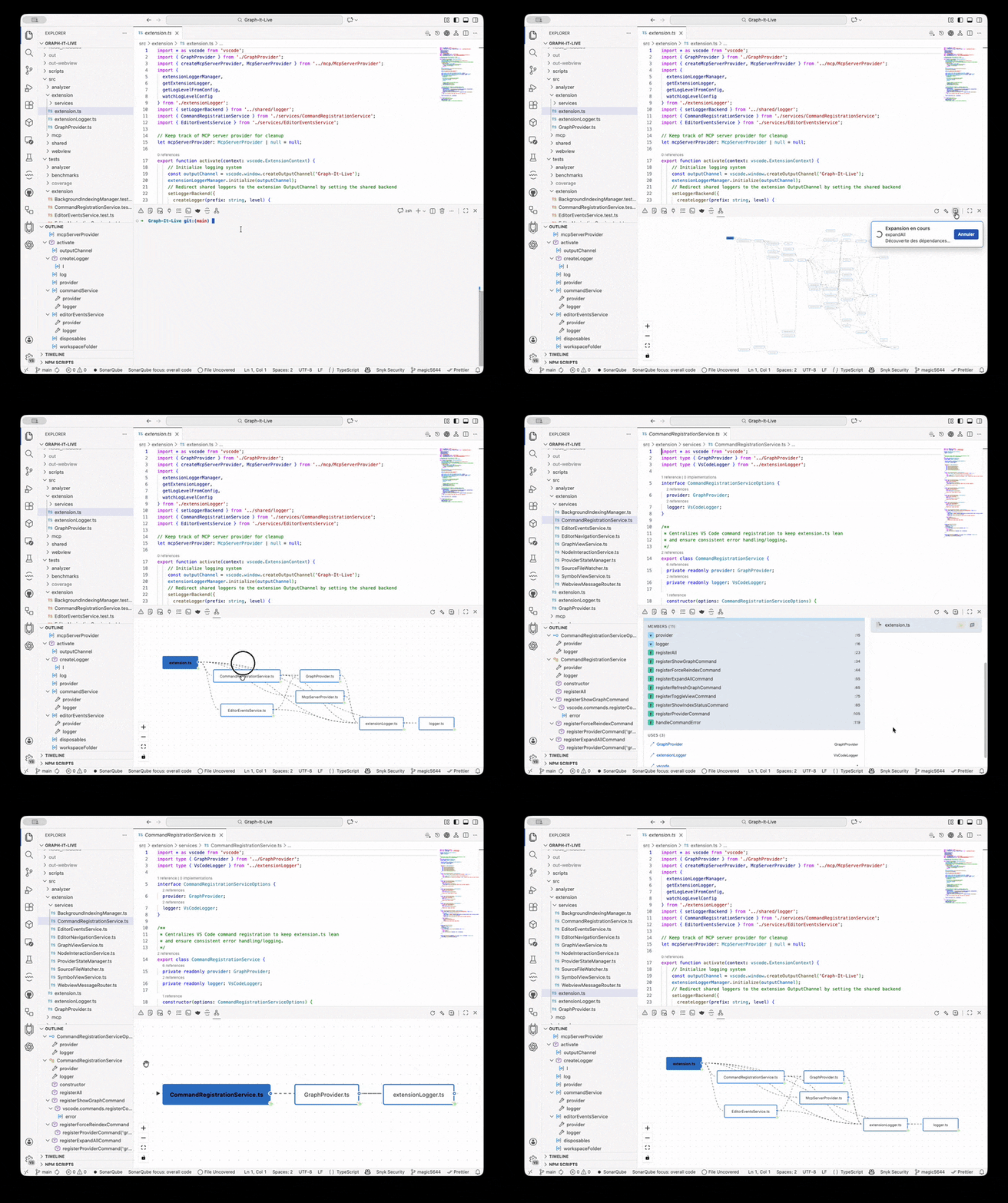
- Open the Graph-It-Live view from the Activity Bar.
- Run Graph-It-Live: Show Dependency Graph from the Command Palette.
- Click a file to open it, double-click it for the Symbol View, or use Show Call Graph for cross-file calls.
Supported projects include TypeScript, JavaScript, Python, Rust, C#, Go, Java, Vue, Svelte, and GraphQL.
First useful actions
| Goal | Action |
|---|---|
| Explore imports | Open the dependency graph and expand a file node |
| Inspect functions | Switch to Symbol View or double-click a file |
| Find callers | Open Show Call Graph with a symbol selected |
| Find reverse dependencies | Use Show Reverse Dependencies |
| Hide unused imports | Enable Filter Unused Dependencies |
| Refresh analysis | Run Refresh Graph or Force Graph-It-Live re-index |
Features
File dependency graph
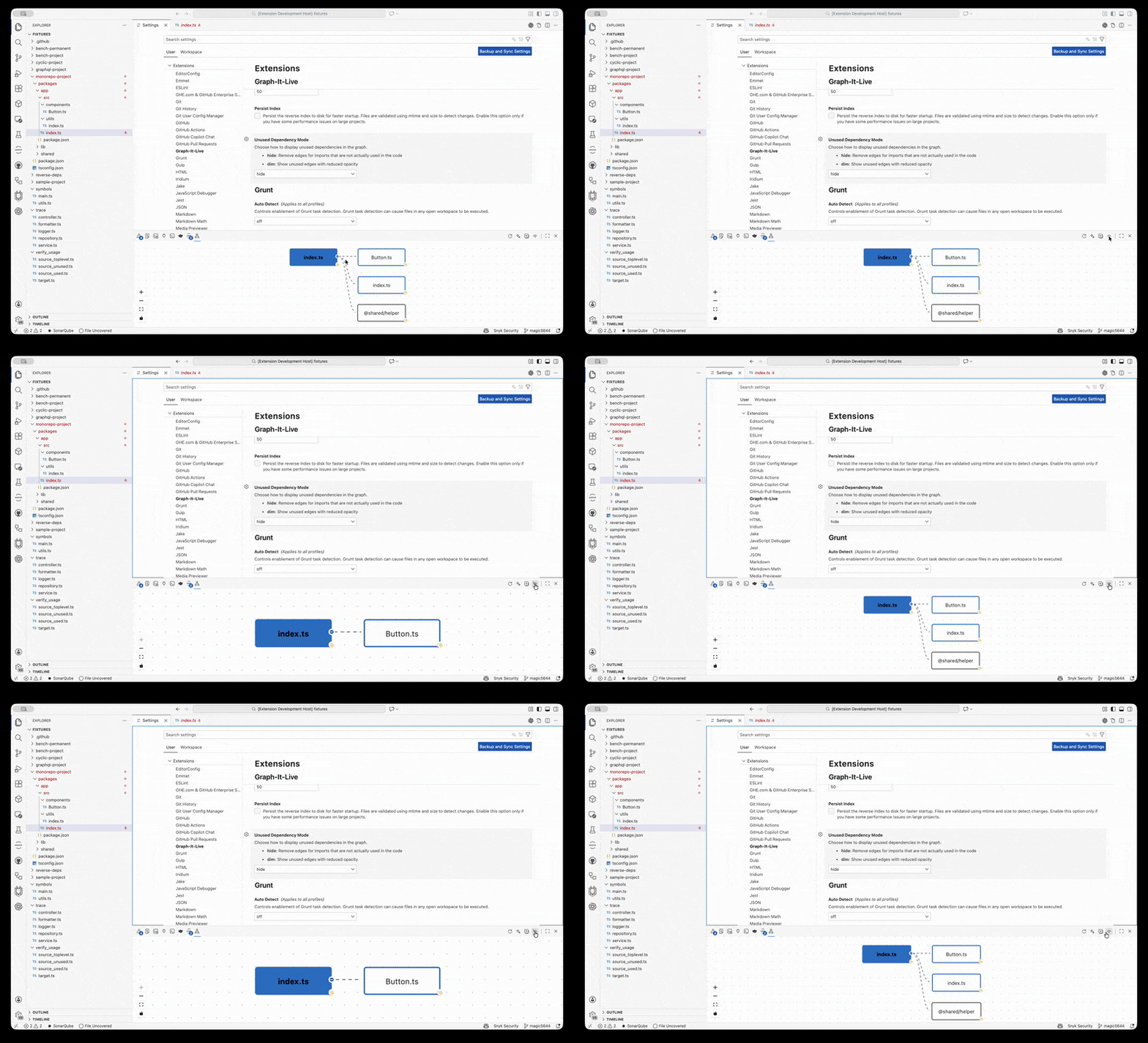
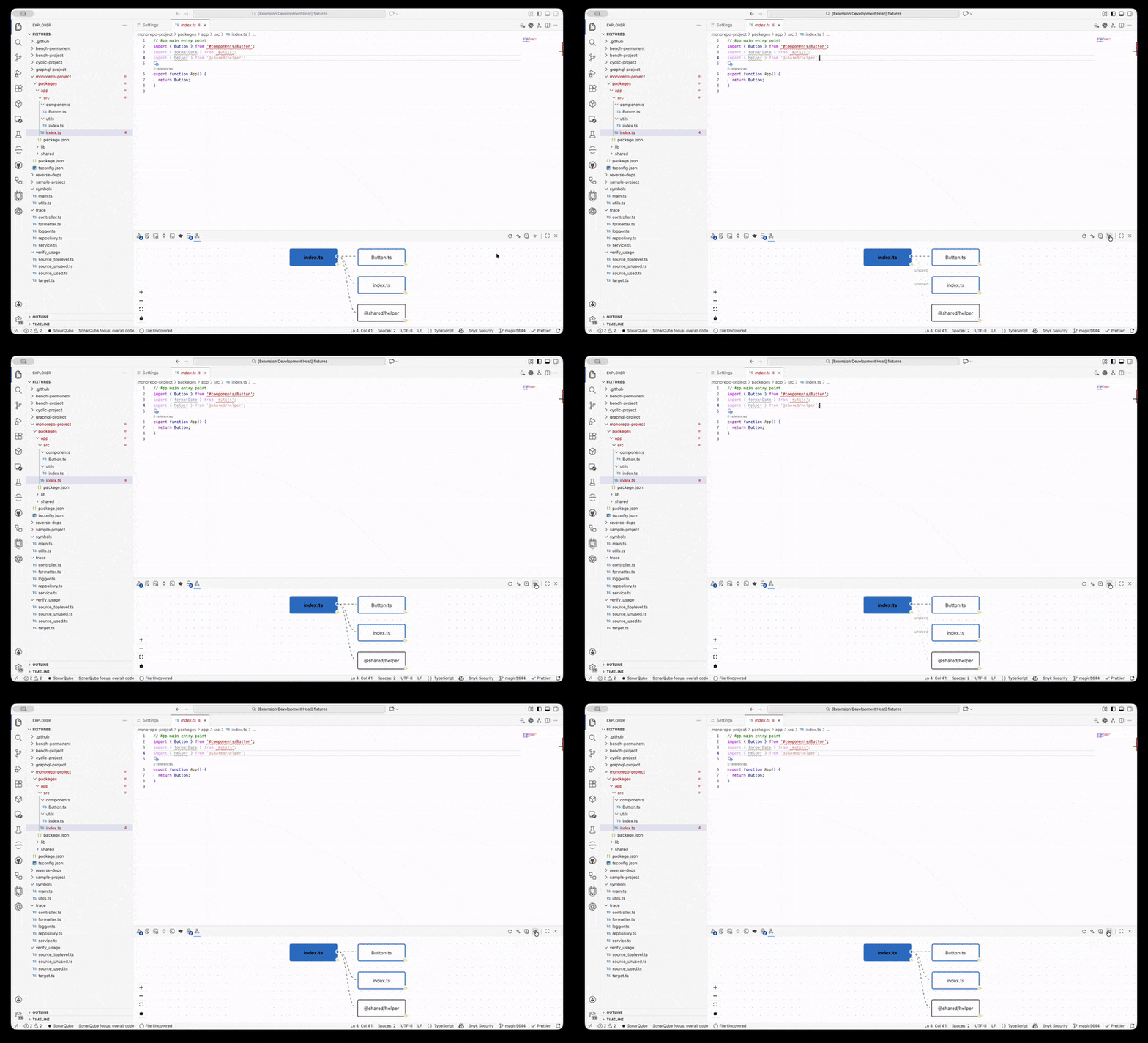
- Visualize file-to-file imports across a workspace.
- Detect circular dependencies and highlight cycles.
- Expand and collapse nodes as you explore.
- Open files directly from graph nodes.
- Find reverse dependencies with an indexed lookup.
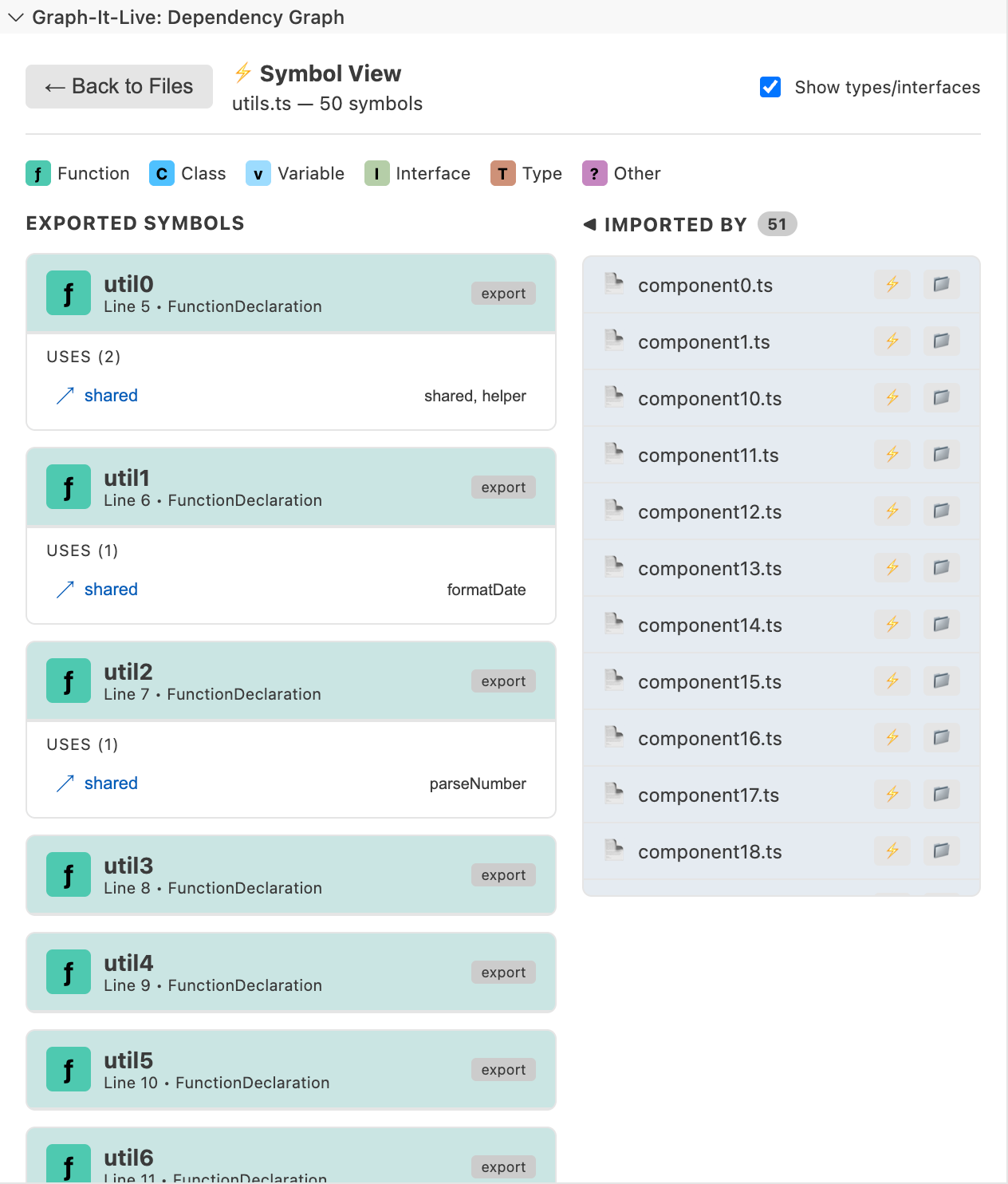
Symbol View
Drill into TypeScript, JavaScript, Python, or Rust files to see functions, classes, variables, outgoing calls, incoming callers, and recursive calls. Click a symbol to navigate to its definition.
Live Call Graph
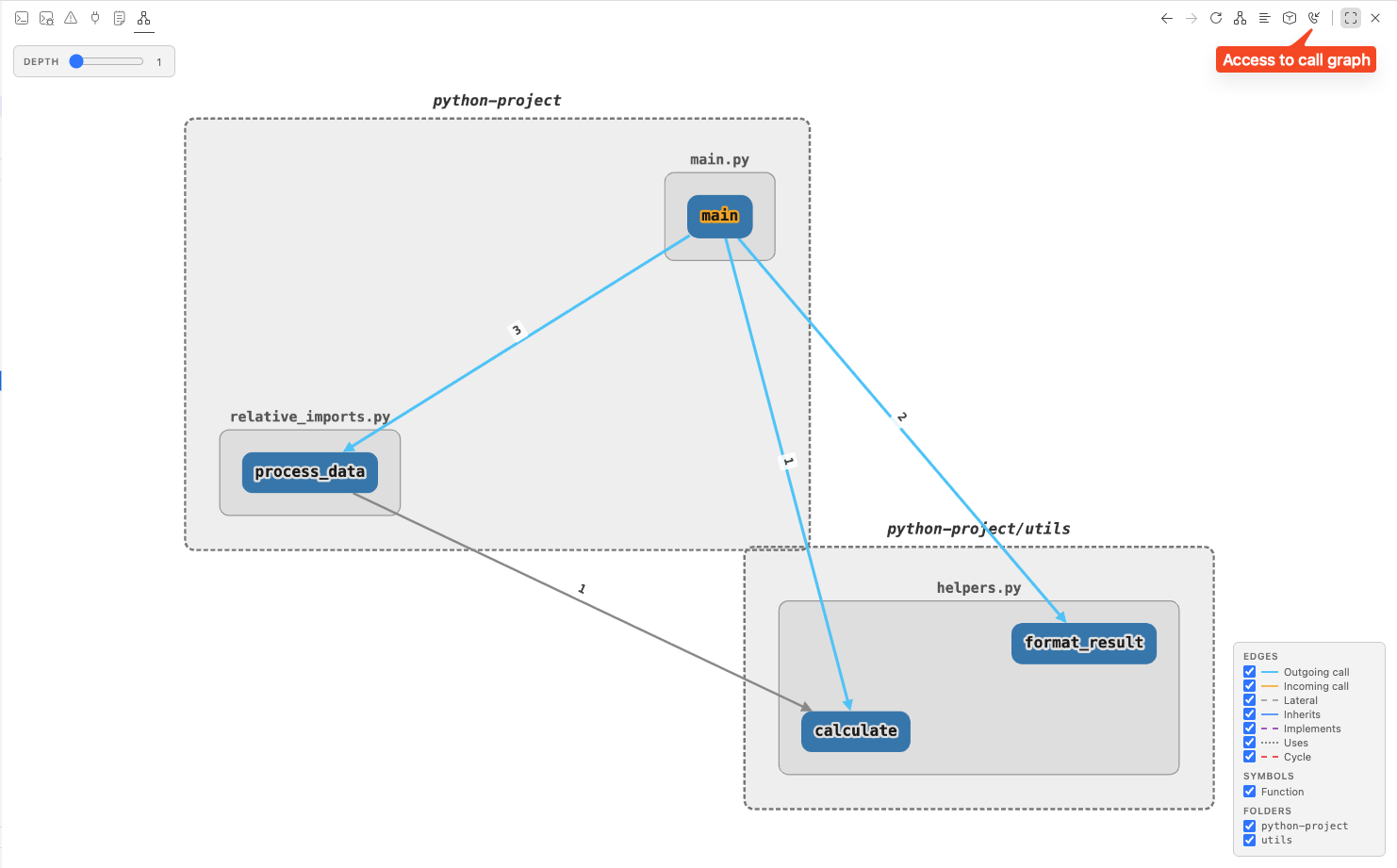
The Live Call Graph shows cross-file symbol relationships in a Cytoscape.js panel.
- Expand callers and callees with a depth from 1 to 5.
- Group symbols by folder.
- Number calls in invocation order.
- Highlight self-recursion and mutual recursion.
- Filter by symbol type or folder.
- Refresh automatically after file saves.
The Live Call Graph supports TypeScript, JavaScript, Vue, Svelte, Python, Rust, C#, Go, and Java. C#, Go, and Java are supported in the file graph and Live Call Graph; Symbol View support is currently limited to TypeScript, JavaScript, Python, and Rust.
Unused dependencies and impact analysis
- Hide or dim unused dependencies.
- Detect unused exported symbols.
- Trace execution from a function or symbol.
- Identify callers affected by a signature change.
- Generate a codemap with exports, internals, dependencies, dependents, and call flow.
Standalone CLI
Use the same analysis engine without VS Code. Install it globally:
npm install -g @magic5644/graph-it-live
Or run it with npx:
npx @magic5644/graph-it-live scan
Common commands:
graph-it scan                         Index the workspace
graph-it summary                      Show a workspace overview
graph-it summary <file>               Generate a file codemap
graph-it trace <file#Symbol>          Trace execution from a symbol
graph-it explain <file>               Explain intra-file call flow
graph-it path <file>                  Show a dependency path
graph-it check [path]                 Find unused exported symbols
graph-it query "<question>"           Ask a natural-language graph question
graph-it context "<question>"         Retrieve bounded graph context
graph-it wiki                         Generate a navigable Markdown wiki
graph-it serve                        Start the MCP stdio server
graph-it export [path]                Export the graph as HTML
graph-it --help                       Show all commands and options
Analysis commands support --format json|toon|markdown. trace and path also support --format mermaid. Use --workspace <path> or -w to analyze a project other than the current directory.
See the complete CLI reference, including installation troubleshooting, REPL commands, output formats, and tool details.
Unified graph context
graph-it context combines imports, symbols, calls, tests, impact, paths, hubs, and communities in one bounded response. It supports search, neighbors, path, impact, refactor, and overview modes.
graph-it context "what calls the request handler" --scope 'src/**' --format toon
graph-it context --mode path --from src/api.ts#handle --to src/db.ts#query
graph-it context --mode impact --seeds src/api.ts#handle --depth 3 --format json
Use --detail compact and --token-budget for agent-oriented responses. See the TOON format specification for the output format and measurement protocol.
AI integrations
Graph-It-Live exposes local graph analysis to GitHub Copilot, Claude, Cursor, Windsurf, Antigravity, and other MCP-compatible clients.
Native Copilot tools
When the extension is installed, use these tools in Copilot Agent mode without configuring MCP:
| Tool group | Capabilities |
|---|---|
| Navigation | Dependencies, reverse dependencies, imports, module resolution, workspace index status |
| Symbols | Symbol graphs, callers, dependents, execution traces |
| Refactoring | Breaking changes, impact analysis, unused symbols, dead-code scans, Git diff review |
| Context | File logic, codemaps, unified graph context, natural-language graph queries |
| Call graph | Cross-file caller/callee queries and neighbourhood expansion |
The graph-context tool is available as #graphContext. Other native references include #graphDeps, #graphFindRefs, #graphCallers, #graphImpact, #graphCodemap, #graphTrace, #graphDeadCode, #graphReviewPr, and #graphQuery.
MCP server
The MCP server exposes 22 graph-analysis tools. Enable it in VS Code with graph-it-live.enableMcpServer, or start it from the CLI:
graph-it serve
For VS Code, add .vscode/mcp.json:
{
  "servers": {
    "graph-it-live": {
      "type": "stdio",
      "command": "graph-it",
      "args": ["serve"],
      "env": {
        "WORKSPACE_ROOT": "${workspaceFolder}"
      }
    }
  }
}
For Cursor, use .cursor/mcp.json with the same server definition under mcpServers instead of servers. The same graph-it serve command works with Claude Desktop, Claude Code, Windsurf, and Antigravity. See the CLI/MCP documentation for client-specific configuration and environment variables.
For Codex CLI:
codex mcp add graph-it-live --env WORKSPACE_ROOT=/path/to/project -- graph-it serve
Portable agent plugin
The plugins/graph-it-live/ directory is the portable Agent Plugin package.
It bundles the MCP server and four skills: graph-it-live, onboarding-express, dead-code-hunter,
and pr-review. Install it with the client you use:
Claude Code
From Claude Code, add the repository marketplace and install the plugin:
claude plugin marketplace add magic5644/Graph-It-Live
/plugin install graph-it-live@graph-it-live
For a local checkout, start a session with claude --plugin-dir ./plugins/graph-it-live.
GitHub Copilot CLI
copilot plugin marketplace add magic5644/Graph-It-Live
copilot plugin install graph-it-live@graph-it-live
VS Code
- Open the Command Palette.
- Run Chat: Install Plugin From Source.
- Select
plugins/graph-it-live/.
The VS Code extension itself remains available from the VS Code Marketplace and Open VSX.
Cursor
Open the Plugins panel, choose Install from local source, and select
plugins/graph-it-live/.
Codex
Add the repository's Codex marketplace catalog to a configured
plugin marketplace, then open /plugins in Codex and install Graph-It-Live.
Windsurf, Antigravity, and other MCP clients
These clients can use the MCP server directly. Add this server entry to the client's MCP configuration:
{
  "graph-it-live": {
    "type": "stdio",
    "command": "npx",
    "args": ["-y", "@magic5644/graph-it-live@latest", "serve"]
  }
}
Use the client's MCP configuration file and its expected top-level key (servers or mcpServers).
See the MCP server instructions for ready-to-copy VS Code, Cursor, and Codex examples.
The repository also includes marketplace catalogs for Claude Code
and Codex. The MCP entry pins the
latest published @magic5644/graph-it-live version and starts it with npx --prefer-offline, so a
cached package starts without a registry lookup; a workflow updates the pin, the plugin manifests and
the marketplace versions after each npm publish.
Agent skill
Install the Graph-It-Live skill for an AI agent:
npx skills add magic5644/skills/graph-it-live
The skill documents graph queries, codemaps, impact analysis, dead-code detection, and safe refactoring workflows.
Configuration
Branch Watch
Branch Watch is disabled by default. Enable graph-it-live.branchWatch.enabled for a workspace folder, select a local Git base branch and optionally a local or remote head branch, and use the native Branch status view to inspect changes automatically. Branch selections are stored per workspace in the ignored .graph-it/branch-watch.json; the baseRef and headRef settings are retained only as a legacy fallback. An empty head uses the current branch plus the final on-disk state; an explicit head compares committed branch refs and does not include untracked workspace files. It never fetches, runs tests, or reports test success. The view shows file impact for supported languages, TS/JS signature evidence, cycle history when the graphs are complete, and explicit limitations. Impact traversal is intentionally bounded (depth 3 and at most 200 affected files), so a partial result is reported with its risk and confidence instead of being presented as complete. Right-click any message row and choose Copy Message to pass the exact text to an LLM or issue. The reminder Tests must pass before delivery. is informational.
Branch Watch requires the Graph-It-Live workspace root to be a supported Git repository. A folder without Git, an unborn or detached repository, conflicts, an inaccessible index, or an unsupported VCS is shown as Branch watch unavailable; the normal graph and CLI/MCP tools remain available.
Set these options in VS Code settings:
| Setting | Default | Purpose |
|---|---|---|
graph-it-live.branchWatch.enabled |
false |
Enable Branch Watch for the workspace folder |
graph-it-live.performanceProfile |
default |
Select default, low-memory, high-performance, or custom |
graph-it-live.enableMcpServer |
false |
Enable the built-in MCP server |
graph-it-live.maxDepth |
50 |
Limit dependency traversal depth |
graph-it-live.excludeNodeModules |
true |
Exclude dependencies from node_modules |
graph-it-live.enableBackgroundIndexing |
true |
Build reverse-dependency indexes in the background |
graph-it-live.unusedDependencyMode |
hide |
Hide or dim unused dependencies |
graph-it-live.preIndexCallGraph |
true |
Pre-index the Live Call Graph |
graph-it-live.symbolViewLayout |
hierarchical |
Select hierarchical, force-directed, or radial |
Workspace indexing (extension, CLI, and MCP) skips paths listed in the root .gitignore, plus tests/fixtures/ and out-*/ by default. Add a root .graphitignore with gitignore syntax to exclude more paths, or negate a rule to include it again, for example !tests/fixtures/.
performanceProfile sets indexing concurrency, cache sizes, and unused-analysis limits. To tune them by hand, select custom and edit the Advanced: Performance overrides section (search @tag:advanced graph-it-live in the Settings editor). The other profiles ignore these overrides.
CI review gate
The graph-it review-pr command performs a deterministic local Git diff review before CI. It compares exported TypeScript and JavaScript signatures, follows bounded dependent-symbol impact, and reports cycle evidence, unused exports, test candidates, and consumer standing. Consumers are classified as updated in the diff, covered by a test path, or unverified. The score reflects the highest-risk changed symbol; a high risk is report data, not a failing exit status.
By default, --base <ref> is compared with the current working tree, including staged and unstaged file contents. Pass --head <ref> to compare two Git refs. Use --depth and --max-files to bound impact traversal and changed-file analysis. See the review-pr CLI reference for scoring thresholds, output formats, limitations, and examples.
The reusable GitHub Action is informational by default. Set fail-on-risk: high or critical to gate a pull request. Add it to a consumer workflow with docs/examples/graph-it-review-gate.yml.
Use pull_request, not pull_request_target, for untrusted pull requests. The action analyzes the consumer checkout in an isolated temporary directory and sends only a sanitized report to GitHub.
Supported languages
| Language | File graph | Symbol View | Live Call Graph |
|---|---|---|---|
| TypeScript / JavaScript | Yes | Yes | Yes |
| Vue / Svelte | Yes | Yes | Yes |
| Python | Yes | Yes | Yes |
| Rust | Yes | Yes | Yes |
| C# / Go / Java | Yes | No | Yes |
| GraphQL | Yes | No | No |
Documentation
- CLI reference — commands, REPL, output formats, and MCP tools
- Development guide — setup, builds, tests, and WASM architecture
- Contributing guide — contribution workflow and conventions
- System architecture
- Class hierarchy
- TOON format
- Coding standards
- Cross-platform testing
- Performance optimizations
- Documentation index
Development
Requirements: Node.js 22 or later and npm.
git clone https://github.com/magic5644/Graph-It-Live.git
cd Graph-It-Live
npm install
npm run build
Press F5 in VS Code to launch the Extension Development Host.
| Command | Purpose |
|---|---|
npm run build |
Build the extension and copy WASM assets |
npm test |
Run unit tests |
npm run test:cli |
Run CLI tests |
npm run test:vscode |
Run VS Code E2E tests |
npm run lint |
Run ESLint |
npm run check:types |
Run strict TypeScript checks |
npm run package |
Build the VSIX package |
npm run package:verify |
Verify package contents |
See DEVELOPMENT.md for the full project structure, test strategy, WASM details, and troubleshooting.
License
MIT. See LICENSE.
Language icons are provided by SuperTinyIcons under the CC0-1.0 license.