keryx
One project-local brain for your AI agents and your team.
Version-controlled repository context for Codex, Claude, Cursor,
and any other AI coding agent.


keryx turns what agents keep rediscovering about your repository into durable
Markdown and JSON under .metaproject/: code relationships, architecture,
project memory, relevant tests, quality signals, agent skills, and task state.
Every agent and every teammate reads the same context, and it is reviewed in a
diff like the rest of the code.
The core is deterministic, local, offline, and has no required runtime dependencies. keryx does not take your coding agent away and does not make engineering decisions for you — it gives every agent the same project context instead of letting each one reconstruct the repository from scratch.
It also ships an agent runtime of its own, built directly on that context:
durable sessions, an allow/ask/deny policy engine, kernel-enforced sandboxing,
child agents and evidence-gated completion. Keep using Codex, Claude or Cursor,
run keryx shell, or do both — they all read the same project brain.
You can delegate the work, not the responsibility: a managed flow freezes its
acceptance criteria before the work starts, lets them change only through a
recorded update with a reason, and completes only when every one is confirmed
against recorded evidence — under a named owner, with every confirmation and
the completion itself signed.
Quick start
Requirements: git and bun (>= 1.3.14 — older Bun can close the terminal input of keryx shell; see onboarding).
npm install -g @mrciphersmith/keryx
No bun, git, or node? Install the standalone binary instead — same CLI, no runtime dependency:
curl -fsSL https://raw.githubusercontent.com/MrCipherSmith/keryx/main/scripts/install-binary.sh | bash
The package is scoped, and the scope matters. The unscoped name
keryxon npm belongs to an unrelated project. Install@mrciphersmith/keryx; the executable it installs is calledkeryx.
All four install paths — the npm package above, the standalone binary, the
managed installer (~/.keryx with a wrapper in ~/.local/bin) and a
project-local install — are compared side by side, with what each one needs on
the machine first, in the onboarding guide.
Local-first · deterministic core · offline by default · MIT
cd path/to/your-project
keryx init --yes
keryx gdgraph build          # code dependency graph
keryx test analyze           # testing context report
keryx health run --changed   # normalized health report
keryx dash                   # human admin dashboard
keryx init creates the .metaproject/ workspace and connects your agents to
it, so they are routed to the right module automatically. It imports your
AGENTS.md / CLAUDE.md as project rules and writes its routing block and
Claude hooks to per-developer, gitignored files (CLAUDE.local.md,
AGENTS.override.md, .claude/settings.local.json, ignore rules in
.git/info/exclude), so the files your team tracks stay untouched and
git pull never meets an edit made by keryx. A team that wants the block committed opts
into scope: "shared"; see
where the block goes.
Connect a model provider
keryx shell needs one configured provider. The first run with none
configured opens a picker: choose a built-in provider (Anthropic, Ollama,
OpenRouter, DeepSeek, Z.AI, Cerebras, Groq, Moonshot, Grok, …) or add a custom
OpenAI-compatible endpoint, paste an API key if the provider needs one, then
pick a model.
To set one up before the first run, or add another later:
keryx providers list         # providers you already have configured
keryx auth login <provider>  # subscription login (device code / OAuth) or API key
Inside a running session, /provider reopens the same add/reconfigure wizard
and /connect switches between providers you already configured.
ChatGPT / Codex model discovery reads the current stable Codex version from npm
metadata and caches it for one day. Test in /connect (or
keryx providers test openai-codex) always checks for a newer version before
listing models. This does not install Codex or poll npm in the background.
If npm is unavailable, a previously discovered version is reused; without a
cached version, discovery reports the problem instead of guessing a version.
Once you have more than one provider connected, keryx routing (and, inside a
session, /routing) maps a task category — review, subagents, and a
catalogue of others — to a specific model, so reviews and subagent spawns can
run on a different (cheaper, or stronger) model than your main session without
switching /model before every turn. Leave a category unset and a sensible
default is built automatically from your connected provider's own models and
their recorded price/strength profiles (keryx routing profile list) — cheap
models for high-volume work, strong ones for planning/review. See the CLI
reference.
Your first session
keryx shell
Bare keryx prints the main commands; keryx shell starts the agent harness
described below. A few commands worth knowing from the
first session:
/theme [name]opens the theme picker; a choice applies immediately./settingsopens one modal with the permission mode, plan, guards, routing, reasoning, theme and external switches, each with its On/Off or value buttons;/modeand/planare markedsession, the restsaved./mode [ask|trust|auto]shows or switches the permission mode for the rest of the session — see permission modes./helplists every slash command available in the current mode./resume,/sessions,/newmove between sessions from inside the shell;keryx sessions listdoes the same from outside it.
Where to go next
Full documentation site: https://mrciphersmith.github.io/keryx/, starting
with Onboarding for the complete first-run
walkthrough. keryx help groups every command by task; the same table is a
generated reference page, Commands by task.
Run keryx <command> --help for the live flag surface of any command.
Delivery orchestrators can also ask Jev to flag rule-breaking edits and triage
failed CI jobs — see Jev in the delivery loop.
The review orchestrator can ask Jev to triage CI and pick which reviewers to
dispatch — see Jev in review for what was
measured and what was not.
Why keryx
An agent starts every task by re-deriving what your repository already knows:
- which files and symbols are connected;
- what a change is going to affect;
- which architectural decision constrains it, and why;
- which tests verify the behaviour;
- what broke the last time someone tried this;
- which project rules apply.
That work is repeated per task, per agent, per person — and the answers land in scratchpads, CI logs and IDE rule files that never agree with each other.
keryx materializes those answers into the repository. The context is versioned with the code, readable in a diff, and shared by humans and agents alike, whichever agent runtime happens to be open.
What you get
| Need | keryx provides |
|---|---|
| Understand a change | Dependency and call graph, symbol/concept lookup, affected-set blast radius |
| Recover project intent | Architecture wiki with grounded retrieval and code↔wiki backlinks |
| Avoid repeating an investigation | Long-term project memory: lessons, decisions, constraints, known mistakes |
| Choose what to verify | Related tests for a file, changed-scope runs, coverage-map test impact analysis |
| Judge readiness | Normalized health reports and a quality gate over lint, types, tests, coverage, complexity |
| Coordinate work | Versioned task flows, managed review packages, generated agent skills |
| Keep agents inside boundaries | Deterministic secret / PII / prompt-injection scanning, redaction, policy gate, OS sandbox |
| Run an agent at all | A first-party harness on top of all of the above: durable sessions, allow/ask/deny policy, child agents, evidence-gated completion |
A typical agent workflow
One task, one repository, no re-exploration:
keryx gdgraph affected src/payments/retry.ts   # what a change here touches
keryx wiki ask "How are payment retries designed?"
keryx memory search "payment retry"            # decisions and past failures
keryx test related src/payments/retry.ts       # the verification scope
keryx health run --changed                     # normalized quality result
The agent gets structural context, architectural intent, previous decisions, the tests that matter, and a normalized health result — without reconstructing any of it by reading files at random.
What it looks like on a real repository
Real output from a fresh clone of
express — three commands after init,
nothing edited:
$ keryx gdgraph build
gdgraph build complete: 139 nodes, 153 edges
summary: .metaproject/data/gdgraph/artifacts/summary.md

$ keryx gdgraph query cycles
No cycles found.

$ keryx gdgraph affected lib/express.js
# Affected context for lib/express.js

## Dependencies
- lib/application.js
- lib/request.js
- lib/response.js

## Dependents
- examples/route-map/index.js
- examples/route-middleware/index.js
- index.js
That last answer — what breaks if I change this — is exactly the context the affected graph supplies deterministically, in one command.
What lands in your repository
.metaproject/
├── metaproject.json      # the module manifest
├── index.md              # the routing index every agent reads first
├── wiki/                 # architecture, domain models, decisions, flows
├── memory/               # lessons, decisions, constraints, known mistakes
├── skills/               # bundled agent skills and routing
├── project-skills/       # skills generated from your own modules
├── rules/                # your AGENTS.md / CLAUDE.md as project rules
├── data/gdgraph/         # graph artifacts, module map, query results
├── data/testing/         # test context, related tests, normalized reports
├── data/health/          # normalized health artifacts and trends
├── flows/                # task flows with frozen acceptance criteria
└── …                     # per-module config, hooks, templates, dashboard
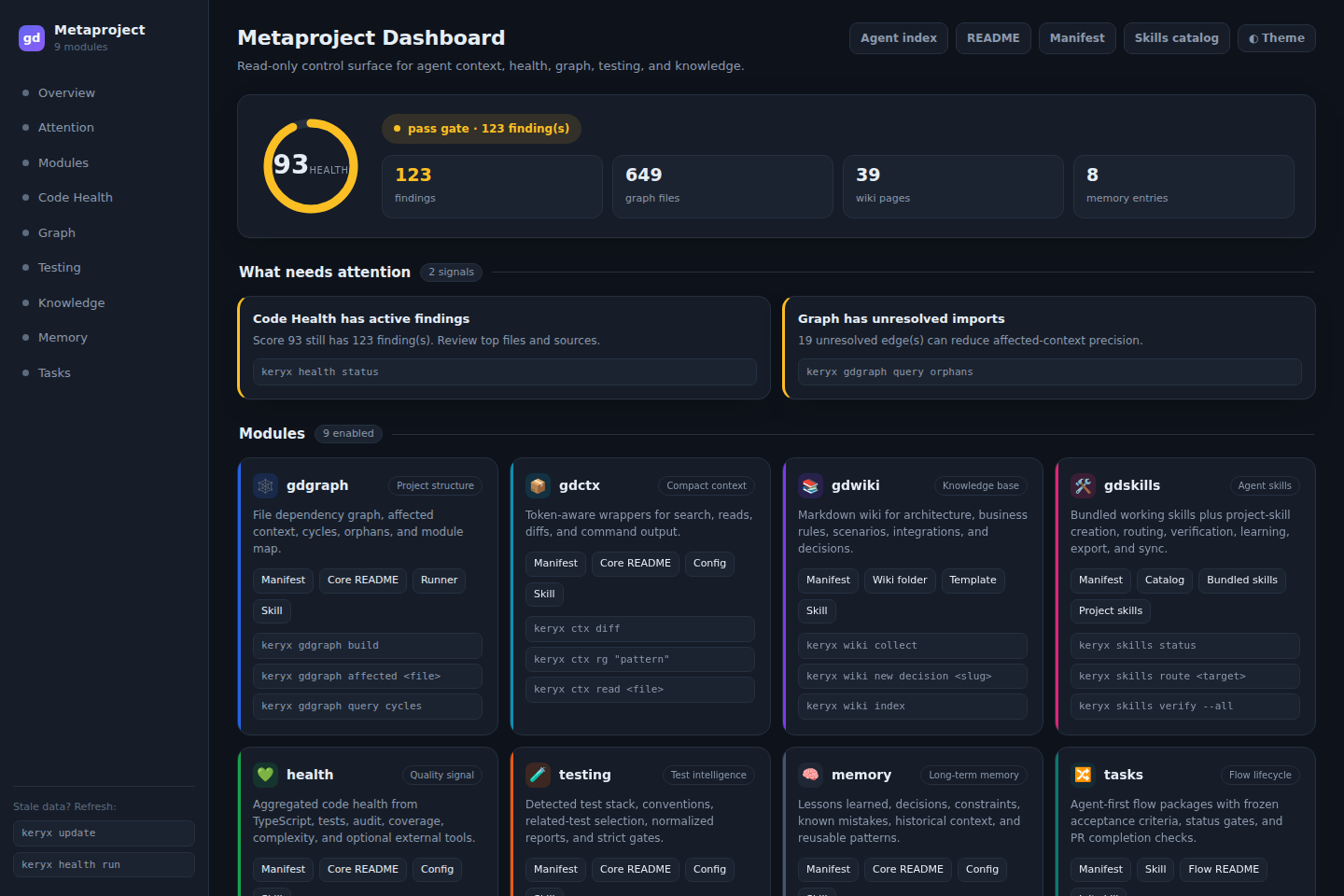
All Markdown and JSON. All diffable. All yours. And readable as a dashboard when
a human wants to look at it (keryx dash):
The agent harness
This is the half that makes the other half worth having.
The agent is ephemeral; the project brain is durable.
keryx ships its own agent runtime — not a wrapper around someone else's. It owns
the execution loop, the tool registry, permissions, sessions, subagents and
completion gates, and it assembles its context from the same .metaproject/
graph, wiki, memory, rules, skills, testing, health and security that every other
agent reads. That combination is the point: an agent that starts a turn already
knowing the repository, and that cannot end one by asserting it is done.
keryx shell                                   # TUI + agent (default UI)
keryx shell --no-tui                          # classic readline shell
keryx shell --chat                            # chat without tools
keryx shell --provider ollama --model gemma4:e4b     # fully local
Finding a command
keryx help prints every command grouped by task — Start here; Connect a
model provider; Look and feel; Working in keryx shell; Project knowledge;
Managed work; Automation; External agents, ACP and MCP; Maintenance and
diagnostics — instead of one long alphabetical list. keryx help <group>
narrows to one group, and keryx help <command> (a CLI verb or a keryx shell command like /theme) prints that command's own usage. --help,
-h and bare keryx are unchanged: they still print the flat usage block.
The same table is also a generated reference page: Commands by
task.
keryx help                    # every group
keryx help project-knowledge  # one group
keryx help flow                # one command's full usage
keryx help /theme               # one shell command's detail
Inside keryx shell's TUI, /help opens the same grouping as a tabbed
modal — arrow keys to move, Enter for a command's detail, Esc to close. On
your very first keryx shell with no model provider configured yet, it
opens once on its "Connect a model provider" tab. The readline shell,
--no-tui, and the ACP host print the same grouping as text.
Turn budgets
Agent mode protects each user turn with nested unique-signature budgets: 48
total, including at most 40 risk-read signatures and 8 non-read (or
unknown-risk) signatures. An identical tool + normalized input may retry up
to three times while occupying one unique slot. Reaching a limit exactly still
gives the model a normal round to answer; only a new signature beyond a pool or
a no-progress repeat loop forces the final tool-free wrap-up.
Version update advisory
keryx shell starts one bounded, non-blocking version check in the background.
It shows a notice only when the registry returns a strictly newer validated
version; it never installs anything and never blocks the shell or project work.
The same check is available to humans and agents with:
keryx version check [--json]
Successful metadata is cached for 24 hours, failed checks are suppressed for 15 minutes, and each registry request times out after 2 seconds. When an update is available, the exact command is:
npm install -g @mrciphersmith/keryx@latest
Offline, timed-out, unknown, or otherwise unavailable results remain advisory
and do not stop work. The generated .metaproject/index.md instruction is
prompt guidance rather than enforcement, and existing installations from
before the first feature-bearing release cannot discover that release through
code they do not yet contain; existing projects gain the guidance only after
their index is regenerated or updated.
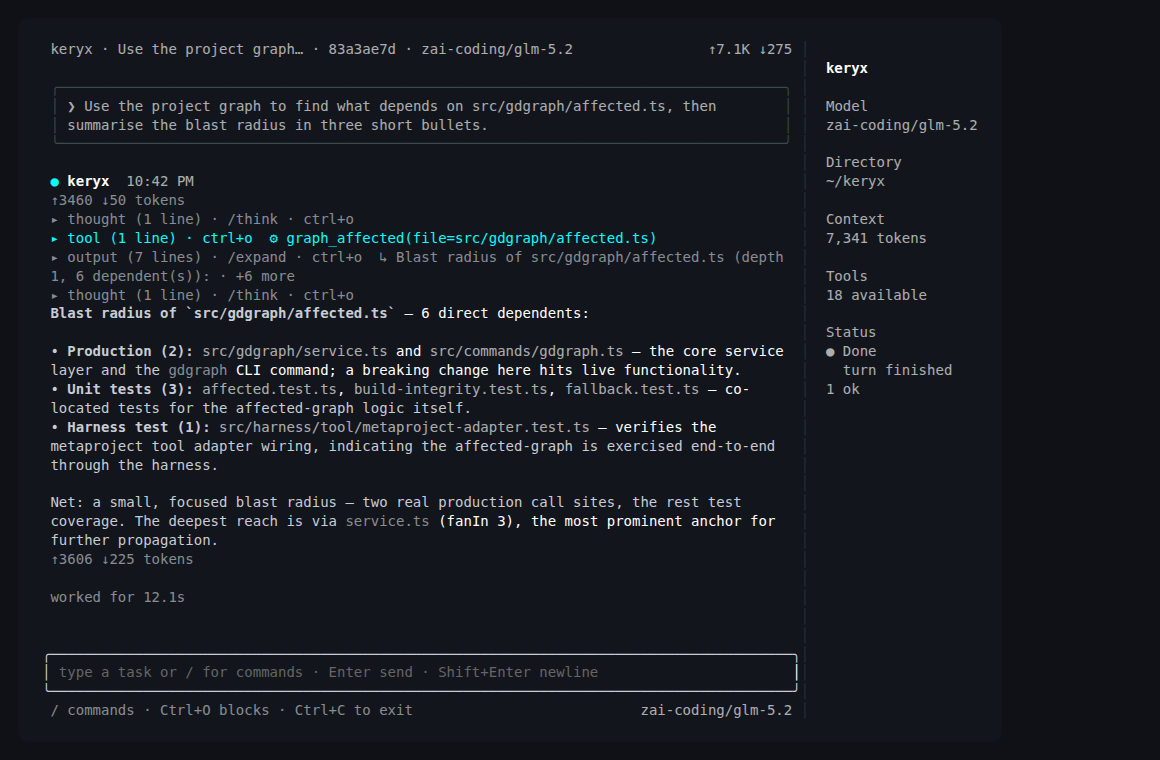
Here it is answering a blast-radius question through the project graph rather than by reading files and guessing — one tool call, twelve seconds:
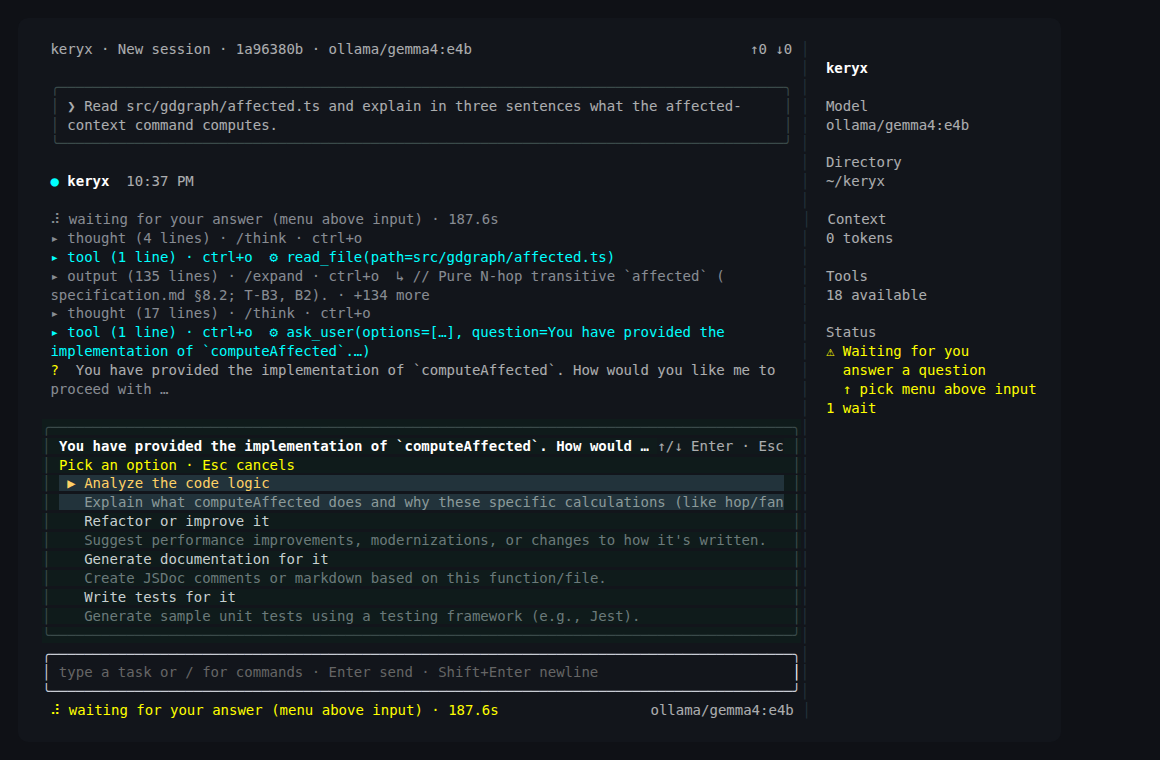
And when it needs a decision from you, it asks with structured options instead
of guessing — the same ask the policy engine raises for a guarded action:
What is in it today:
- Provider-neutral loop. Anthropic, Ollama, and any OpenAI-compatible gateway — OpenRouter, DeepSeek, Z.AI, Cerebras, Groq, Moonshot, Grok — plus an offline fake provider for deterministic runs. Swapping the model does not change the loop, the tools or the policy.
- Custom file-backed providers. Register any OpenAI-compatible endpoint —
including one on your own LAN — in
~/.local/share/keryx/llm-providers.json; it merges into the built-in provider list. The/providerwizard in the TUI has an "add custom provider" entry that walks name → URL → key → models and writes the file for you; a name that collides with a built-in provider is rejected. Custom providers get a narrow, opt-in SSRF allowance for private LAN hosts (RFC1918/CGNAT) as an explicit operator-trust boundary — built-in providers never get it, and loopback/link-local metadata addresses stay denied regardless. - Reasoning effort, provider-neutral.
/reasoning [off|minimal|low|medium|high|xhigh|max]sets the session's thinking effort for the main turn (no argument shows the resolved level and its source);KERYX_REASONING_EFFORTand a persisted shell-config setting sit below it in precedence, defaulting tooff. Anthropic, OpenAI and Gemini each map the level onto their own reasoning knob, clamping a level a model does not support rather than sending it unrecognized. A custom OpenAI-compatible provider ignores this control — its reasoning shape (inline<think>tags, an out-of-band field, a gateway-specific request flag) is configured per-provider inllm-providers.jsoninstead. Reasoning streams live into the shell and collapses to a◆ thought for 12s · 1.8k tokensblock;/think auto|expand|hidechooses how it is shown. See the CLI reference. - Durable sessions, per project. JSONL transcripts on disk, resume across a
process restart, and context compaction that keeps the full archive.
/resume,/sessions,/status,/flows,/compact,/new, andkeryx sessions list|fork|export—forkbranches a conversation into a new session that keeps its ancestry, without editing a transcript by hand./statusis the session inspector (identity, context window and limits when the provider reported them);/session-infoand/infoare not aliases. /rewind: undo a turn. Before the first mutating tool call of a turn, keryx snapshots the work tree into a per-session shadow git repository (your own.gitis never touched)./rewindrestores files, the conversation, or both to before any of the last 50 turns, with a confirmation and an undo point. It covers the project work tree only;shell_execside effects elsewhere are not undone.KERYX_REWIND=offdisables it. See the guide.- Agent Client Protocol server.
keryx acpspeaks ACP v1 — newline-delimited JSON-RPC 2.0 over stdio — so an ACP client (an editor, typically) can launch keryx as a subprocess, open a session bound to a project, and drive a real harness turn with streamedsession/updatenotifications instead of one dump at the end. The session gets keryx's own read-only project tools — graph, wiki, memory, flow status, skills, repo map, related tests, health status andsearch_code— whereverkeryx shellwould offer them (same gate, same definitions), alongside file reads,shell_execandapply_patch; web tools, keryx's own MCP servers, subagents and bus tools are left out on purpose. keryx advertises the commands it handles over ACP —/help,/model,/reasoning,/status— and answers them itself. The model is the editor's model picker (aconfigOptionsentry of categorymodel, listing what keryx can run here): switch it there or with/model, and it applies from the next turn without touchingkeryx shell's saved choice. A gated tool call is asked throughsession/request_permissionrather than approved locally — only an explicit allow runs it, and anallow_alwaysanswer is remembered by the client, never persisted by keryx — andsession/cancel,session/list, andsession/load(replaying a session created anywhere, including one fromkeryx shell) are all implemented. With no--provider/--modela session starts on the provider and modelkeryx shellsaved (runkeryx shellonce and pick one); with nothing configured it still answersinitializeand refusessession/newwith a message saying what to configure — it never answers with a test stand-in. The client's own stdio MCP servers frommcpServersare started for that session, their tools offered throughsearch_tool/use_toolwith every call asked, one running set shared by the threads that send the same list, and stopped when the connection ends orkeryx acpis sent SIGTERM/SIGINT;http/sseentries and a server that fails to start are reported to the client by name, and the session still opens. Writes and shell execution stay local unconditionally (nofs/write_text_fileorterminal/*calls, whatever the client advertises), and there is no HTTP/WebSocket transport, no authentication over this wire, and nosession/resume/close/delete/set_mode. Verified against the published v1 schema and this repo's own scripted test client; Zed has been driven against it by hand, and no shipping IDE is part of the automated tests. See the CLI reference for the full method table, the tool roster and why each exclusion, the commands, and what keryx does when a capability is absent. - ACP client — foreign agents under keryx's policy. The other direction:
keryx agents external run gemini-acp --task "…"launches an external ACP agent (Gemini CLI's--experimental-acp) as a subprocess and drives it as its client, inside a disposable git worktree. keryx advertises only what it serves (fs.readTextFile;fs.writeTextFilewith--write; neverterminal), serves everyfs/*request itself — confined by real path to the worktree — and answers everysession/request_permissionthrough its own approval gate with the mode lowered toask: only an explicit allow selectsallow_once,allow_alwaysis never chosen, and an unattended run refuses anything that needs a human. The agent gets keryx's context as a read-onlyserve-mcplaunched from the running build, and every run is a keryx session with its decisions, fs requests, usage and cost (ormissing). Honest limit: an agent's own internal tools never reach ACP, so keryx cannot see or gate them — the disposable worktree is what contains them. See the ACP client guide. - Plans that survive the turn. For multi-step work, the agent can keep a
structured execution plan in the session's own
plan.json— beside the transcript, not inside the Slate — so closing a Slate (or a Flow reporting done) no longer takes the plan with it. The TUI shows pending, active, completed, blocked, and skipped steps in the sidebar, and restored sessions continue from the same plan instead of rebuilding it from transcript text. Clicking the sidebar's Plan section (its header or any row) opens the whole plan in a modal: a Plan tab that spells each item's status out and colours it by state, a Meta tab with the revision, per-status counts, the active item, the blocked ids, and the plan file it lives in. A plan can also be published FOR APPROVAL — items markedproposedawait a human, never force the agent to continue, and are shown as◇ awaiting approvalin both the sidebar and the modal. Orchestrators publish into this same view —job-orchestrator,flow-orchestrator,review-orchestrator,issue-analyzer,feature-analyzer,autodoc-orchestrator,docpack-orchestrator,feature-devandreview-pr-feedbackproject their own steps here under thesession-plan-bridgerule, so a run driven by one of them is watchable while it runs instead of only after it reports. - Theme-aware rich transcripts. Assistant prose, headings, emphasis,
inline code, fenced code, diffs, and GFM pipe tables use semantic colors
derived from the selected
/theme. Use a language fence such as```typescriptfor syntax color,```difffor addition and deletion rows, or```text/```txtwhen content must remain literal, including terminal output and ASCII diagrams. The theme is applied from the first frame — the canvas background included — so a fresh session never inherits the terminal's own background, and the startup provider/model picker and the composer's own text follow the palette too. - Responsive busy-turn UX. A running main turn can be interrupted with
/interrupt; additional prompts are queued and answered as read-only side workers (side-1) in the TUI so the shell stays usable under long-running turns. - A policy engine with three answers, not two.
allow,ask,denyover seven risk classes — read, write, shell, network, credential, delegate, destructive — with path and command rules underneath. Shell and destructive actions are default-deny and need an explicit approval before they run. - Session permission modes.
keryx shell --trust/--auto, or/modeinside a running session, decide whether that approval is asked for at all —ask(default),trust(safe calls run, a destructive one still asks),auto(nothing asks except a credentials-touching command, which no mode ever auto-approves). A session-level layer only:harness run/exec,keryx serve, and MCP keep the unconditional policy engine above, untouched. See the permission modes guide. - Kernel-enforced containment underneath. The OS sandbox sits below the policy engine — Seatbelt on macOS, bubblewrap on Linux — with network off/on, and on macOS a loopback domain allowlist, credential masking behind a per-run sentinel, and TLS termination where masking requires it. It fails closed when a launcher or a posture is missing rather than quietly doing less.
- Child agents with budgets. Dispatch over the canonical
subagent-dispatch/subagent-resultcontracts, token budgets per child, bounded parallel scheduling, and an offline fleet report over a recorded event log (keryx agents monitor <events-file>). - Vendor CLIs as child agents — off by default. keryx can hand a bounded,
read-only task (or, for
claude-cliandcodex-cli, a reviewed write — see below) to a coding CLI you already have installed (codex exec,claude -p, or Google's Antigravity CLI,agy -p --output-format stream-json) and host it as a child of the same harness: a disposable git worktree, a stripped environment, a restricted tool roster, the same budget ledger and depth caps, and the same completion.keryx agents external listshows the registry;keryx agents external run <id> --task "…"or/delegate <agent> <task>starts a run;claude,codexandagyare accepted as short names.keryx agents external enable(in the shell:/external-agents on) is the one-step opt-in: your user config and this project's manifest, nothing else. It is hard disabled on a remote transport and under CI. keryx never reads a vendor credential store — not even to check whether you are logged in — so it reports "installed … login not verified — keryx cannot know" rather than a tick. No vendor sanction is claimed.antigravity-cliadditionally sits on the/externalblock-list by default (Google collects prompts and agent actions by default) and needs one-time TTY consent before its first dispatch, recorded and never asked again; a real recorded run lives underfixtures/external/live/antigravity-cli/2026-09-28/, produced through keryx's ownagents external run.codex-cli/claude-cliremain verified offline against recorded transcripts. - A write from an external agent you review before it lands.
keryx agents external run claude-cli --task "…" --writerunsclaudein a throwaway worktree with onlyRead Grep Glob Edit Write(no shell, no network, no MCP);codex-cli --writerunscodexin the same kind of worktree under an OS sandbox (as measured: writes outside the worktree fail, a DNS lookup fails,.gitread-only) that still leaves it a shell able to read files your account can read, so review its output too. Its diff is captured, secret-redacted, hashed and stored as a pending review — nothing reaches your checkout.keryx agents external review <run-id>shows it;apply <run-id>needs a real terminal, shows the diff and asks you to type the first 12 hex digits of the patch hash, then creates a NEW local branchexternal/<run-id>with one commit. Your current branch and working tree are never touched, nothing is pushed and no pull request is opened;discard <run-id>drops it. There is no flag that skips the confirmation. Onlyclaude-cliandcodex-clican write (antigravity-clirefuses--write), the review is a human reading the diff (a model review is not built), and neither has a long live history (codexwas verified in a scratch repository oncodex0.159.2; versions outside 0.159.2 up to 0.160.0 are refused). In the TUI:/external-diffand a sidebar row while a diff waits. See the external agent write guide. - Completion you can audit. The completion gate blocks on missing evidence: a run that cannot produce the evidence its flow requires does not get to claim it finished.
- Four doors. The CLI (
keryx harness run|exec|extension|wave|replay), JSONL/RPC and the loopback HTTP entry (keryx serve, whoseaskdecisions become approvals answered once over/v1/approvalsorkeryx approvals) share one execution loop; the interactive TUI runs its own on the same tool registry and the same policy. - A record you can check.
keryx harness run --recordwrites a run's recomputable hash surface andkeryx harness replayvalidates a fixture against it, naming the diverging field when one moves.
The full tour — including what the harness does not do yet — is in the harness page.
Provider-neutral means what it says — the same loop, the same tool registry and the same policy, with the model swapped out from under it:
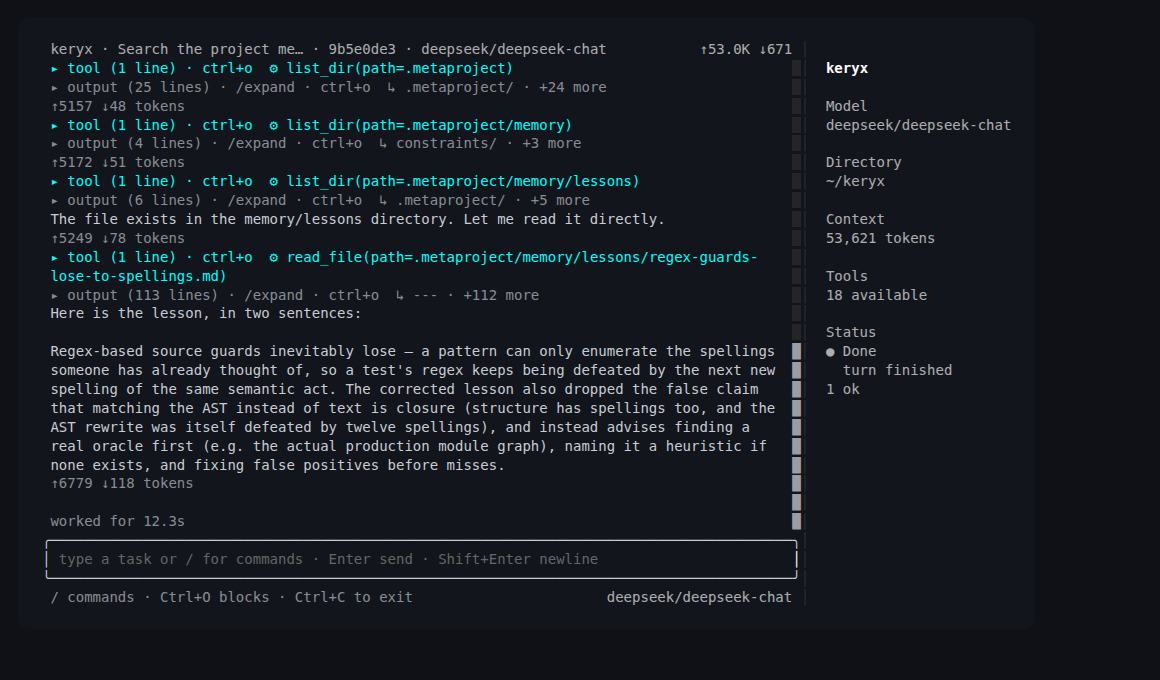
You do not have to use it. Every module above works with Codex, Claude Code or Cursor driving them instead. But if you want an agent that is native to the project rather than a guest in it, it is here and it is the same install.
Core capabilities
Grouped by what you are trying to do, not by internal module layout.
Understand the codebase
- gdgraph — language-aware dependency graph for TypeScript/JavaScript, Java (Maven/Gradle) and Python: cycle and orphan queries, file and symbol search, shortest paths, affected-set blast radius, PageRank repo map, and an optional tree-sitter symbol/call graph.
- gdwiki — a Markdown architecture wiki with hierarchical indexes, link
checks, code↔wiki backlinks, and grounded
wiki askretrieval. - gdctx — compact command, search and file-read output, so agents keep raw logs out of their context window while the full output stays on disk.
Preserve knowledge
- memory — long-term project memory with indexing, lexical search, dedup and as-of validity queries, so a lesson learned once stays learned.
- gdskills — bundled and project-generated agent skills with routing, verification, learning from reviews, and export to different agent runtimes.
Change with confidence
- testing — testing context, related-test selection, changed-scope runs, and an opt-in coverage-map Test Impact Analysis.
- health — normalized reports from TypeScript, tests, audit, complexity, coverage and lint (optional SonarQube issue import), plus a quality gate and trends.
- review — managed review packages, standalone under
.metaproject/reviews/or inside the flow package when attached to a flow, so review findings become durable project artifacts. A finding points at the code it quotes: the line is derived by locating that quote at the commit the round records, not taken on the reviewer's word, and a quote that cannot be found is marked unlocatable rather than carrying a number nobody checked. Each round also states its price — estimated before dispatch, recorded after, and divided by the findings that survived it.
Operate agents
tasks — an agent-first Task Manager driven by
keryx flow, with frozen acceptance criteria and status gates. Each flow can name an accountable human owner (flow init --owner/flow owner set, never inferred), andac confirm/completeappend an honest, append-only signature — who acted, when, and what was signed, with its basis (stated/derived/unknown) stated rather than assumed. A flow can also require a terminal-minted confirmation token (flow init --require-confirmation,flow confirm) that no agent tool can mint. It adds friction for an agent but does not prove a person was present.flow recoverreturns a flow left incompletingby an interrupted run. See TM-02 and TM-03.triggers — declared automation over
.metaproject/triggers.json(a repository event or a cron/systemd schedule):reconcile/rebuildkeep the graph and wiki current,open-flowopens Task Manager work, andflow-nexteither reports a flow's next task or — with adispatchblock — dispatches a keryx agent to work it unattended: in a throwaway worktree on atrigger/<flow>-<task>branch that is never pushed, its commands and its health gate inside a mandatory hardened sandbox (network off, home and credentials hidden, allow-listed environment), every would-be-approval denied and recorded, spend reserved before the first model call, tokens and USD recorded, and a per-trigger spend ceiling on top of the project-wide one.keryx trigger installextends the same hook filessync install-hooksandupdatealready write into;keryx trigger scheduleprints a cron line or systemd unit pair (with a realOnCalendar=) and runs no daemon of its own. Triggered runs and a manualsync --apply/gdgraph buildshare one maintenance lock (manual waits, triggered refuses). In the TUI, the sidebar's Triggers section lists the event-fired triggers. Each row shows the last outcome and its age, and aNETmarker when the agent gets the host network. The section also shows project trigger spend and any open spend reservations./triggers(or a click) opens a list+detail modal with the full unattended posture. There,rthenyruns one now askeryx trigger run <name>in a child process of the same build, bound by the same locks, budgets and refusals as the CLI. See the CLI reference.schedule: scheduled agent tasks in the background. Say it in the shell ("schedule a task every 4 hours to check my open PRs"), use
/schedule, or runkeryx schedule add. keryx shows a confirmation card listing the cadence and next runs, the prompt, the runner and its budget, the network mode, and every granted tool with the account it acts as. It also shows exactly what will be installed. Nothing is written until you say yes. After that, keryx stores the schedule in a per-machine, gitignored store and installs asystemd --usertimer (launchd on macOS, cron elsewhere) that runskeryx trigger run <name>unattended. The run leaves a report in.metaproject/data/trigger/reports/.- Granted tools (
gh pr list/view/checks,gh issue list/view,gh run list) run outside the sandbox with your credentials. The model sees only redacted output, and the token never enters the sandbox, the model context or the report. - Network: the agent's shell network is
off,full, orallowlist(Linux only) — reaches only the domains you name, through a loopback proxy keryx runs outside the sandbox; it governs only the agent's own shell commands, never the model call or a granted tool. See the CLI reference. - Refusals: the unattended floor is unchanged, and an entry edited after you confirmed it is
refused (
grants-changed). - Tracking: every run is spend-bounded and appears in
keryx trigger statusandkeryx governance report. - Management:
keryx schedule list|show|pause|resume|run|remove. Inkeryx shell:- the sidebar's Schedules section shows each schedule's next run and last outcome;
/schedules(or a click) opens the detail: Overview, Grants, Runs, Report;ppauses or resumes,rthenyruns it now,dthenydeletes it;- a run finished in the background shows up without a restart.
- Limits: the machine must be on. systemd and launchd catch up one missed run after a boot or wake; cron does not. Without linger, a user timer does not run while you are logged out, and keryx never enables linger for you. The hardened sandbox is Linux-only.
See the CLI reference.
- Granted tools (
governance —
keryx governance report, one read-only report unifying what is already recorded: review-round spend per flow (USD and tokens, with a rounds-with-cost/rounds-total count for partial coverage), project-wide trigger spend (never attributed to a flow — the run record carries no flow reference), who confirmed each acceptance criterion and who signed completion (with identity basis), everyflow completeattempt's gate outcomes, and each flow's acceptance coverage — how many criteria carry a runnable[verify: exec ...]or[verify: invariant ...]marker (a flow with no recorded kinds counts as fully unclassified; seekeryx flow ac kindsin the CLI reference). A figure nobody recorded is reported as "not recorded", never as zero. Writes.metaproject/data/governance/artifacts/latest.{md,json}, the same conventionkeryx health runuses;--all-projectsalso covers every project in the user-global registry. In the TUI, the sidebar's Governance row showsno report — click to run,unreadable — click for reason,running…,last report <date>orfailed — click to retry. With no report, a click (or/governance) runs the report in the background, and the row updates when it finishes. With a report, a click opens it in a scrollable modal, whererre-runs it. Sessions written bykeryx agents external runappear in/sessionsmarkedacp:<agent>. See the CLI reference.product — two commands, no gate.
keryx product indexreads every flow and everydocs/requirements/*/package into a disposable intent index under.metaproject/data/product/and reports how many entries state no intent.keryx product openlists the intents closed in code that nobody looked back at, each with its outcome criterion ornot measured — no instrument stated, and splits the count three ways: no outcome criterion stated, criterion stated but never observed, observed (split by verdict). A criterion goes in the## Outcome criteriaslotflow initleaves indescription.md; who wrote it is recorded asoutcomeAuthor(flow init --outcome-author agent|human,flow outcome author <id> agent|human --reason "<why>"), shown byproduct open, and gates nothing. An observation is a line startingoutcome-observed: <verdict> — <note>in the flow'sjournal.md, with the verdict one ofhelped,no-effect,harmed,inconclusive; a requirements package uses an## Outcome observationssection in its README.md. Nothing calls it automatically and no flow transition waits on it. In the TUI,/productshows the same header and rows. See the CLI reference.security — deterministic secrets / PII / prompt-injection / egress scanning, redaction, and a policy gate at agent write seams, with a committed evaluation corpus.
mcp — an opt-in Model Context Protocol server exposing read-only module services to agents, plus one report-writing security scan.
shared agent context (experimental) — a local-first, off-by-default layer for a reproducible entry into a piece of work: a bounded FWK (Facts / Work / Know-how) overview, evidence-linked wrap-up proposals with owner review, and a fail-closed runtime policy guard. Driven by
keryx workspace(keryx modules enable sacto turn it on); accepting a proposal into real project knowledge always passes through an approval-gatedconfirm-review(friction for an agent, not proof of a person — see TM-03), which refuses a security-flagged proposal until--acknowledge-securityrecords that someone read the findings. The TUI's/reviewmodal offers the same acknowledgement as an explicit[s]action, never as an automatic fallback for its plain[a]accept. See the Shared Agent Context guide.slate — the task-local scratchpad (Anchors, Course, model-written Seeds) a working session keeps, plus an external hand onto it: the
slate.open/slate.writeSeed/slate.closeMCP tools let any MCP-connected harness open one scoped to its own session id and close it into the same review pipeline. Local stdio only; there is no CLI verb. See the Slate guide.
Run agents inside boundaries
- harness — the first-party agent runtime described above: provider-neutral loop, durable sessions, policy engine, child agents, evidence-gated completion.
- sandbox — kernel-enforced containment under the policy engine
(
keryx harness exec), with filesystem boundaries, network posture and, on macOS, a domain allowlist with credential masking. - remote entry —
keryx serve, a loopback-bound authenticated HTTP door into the same harness, so a bot or a browser workspace can drive a run.
keryx modules toggles modules by manifest key; keryx status shows what is
enabled. Nine modules are on after init; mcp is opt-in.
Agent integrations
| Runtime | Integration |
|---|---|
| Claude Code | CLAUDE.local.md routing, orientation hook, security hooks, MCP server |
| Codex | AGENTS.override.md routing and orientation hook |
| Cursor | Rules/orientation, security hooks, MCP server |
| Any other agent | Repository-local Markdown/JSON artifacts under .metaproject/ |
After init, agents follow the routing block — in CLAUDE.local.md and
AGENTS.override.md by default, in the shared CLAUDE.md/AGENTS.md under
scope: "shared" — to .metaproject/index.md, which routes them to the right
capability. Those local files exist per checkout: run keryx update in a new
worktree to give it the block and hooks. Two commands
sharpen that routing:
keryx orient emits a bounded excerpt of the launch project's own
.metaproject/index.md, followed by the graph map and wiki index. The excerpt
directs the agent to read the full project-root entrypoint; it does not discover
or substitute an ancestor Metaproject.
keryx orient install-hook --runtime codex   # graph + wiki map at turn start
keryx agents bootstrap install --runtime claude
keryx integrate cursor                      # opt-in read-only MCP server
Each of those commands has its own --runtime vocabulary — run
keryx <command> --help for the values it accepts.
Using other people's MCP servers
The commands above install keryx into an editor as an MCP server. The
reverse also works: keryx shell connects out to MCP servers you configure,
and the model can use their tools.
keryx mcp add fs -- npx -y @modelcontextprotocol/server-filesystem ~/notes
keryx mcp doctor fs      # does it connect, how many tools, what got skipped
keryx mcp list           # every server, its source, and whether it is disabled
The model gets two tools — search_tool and use_tool — however many
servers you connect, rather than one registered tool per MCP tool: the
advertised surface stays a fixed cost instead of growing with your server
list. Every call goes through the same approval prompt as shell_exec, a
server is spawned without keryx's own credentials in its environment, and
--scope project writes a .keryx/mcp-servers.json you can commit while
keryx mcp disable stays personal to you. In --trust mode you can trust one
exact tool for the session (never one its server marks destructiveHint);
/mcp trust list and /mcp trust revoke <server__tool>|all show and remove
those grants.
Remote servers work the same way — keryx mcp add linear --transport http <url> --header 'Authorization: Bearer ${LINEAR_TOKEN}' — and if that
variable is unset keryx refuses to dial rather than sending an empty bearer
and letting the server answer 401. It also refuses to follow a redirect
(your credential header would follow it) and refuses a credential written
into the URL itself. keryx mcp doctor names which of those it is, rather
than reporting one "failed".
OAuth and importing what you already configured in Cursor or Claude are next.
Requirements and compatibility
| Requirement | Status |
|---|---|
| Bun | >= 1.3.14 |
| Git | Required for hooks, --changed scopes and the managed installer; the core runs without it |
| ripgrep | Required only for keryx ctx rg and the agent's search_code tool |
| Model provider credential | Required only for the optional AI commands below |
| macOS | Full support, including the complete policy sandbox |
| Linux | Full core support; filesystem containment and network on/off (needs bubblewrap) |
| Windows | Core CLI is not verified in CI; the OS sandbox is macOS/Linux only |
| CI | Ubuntu and macOS runners on every pull request and every push to main |
Optional AI features
The graph, wiki, memory, testing, health, task, review and security workflows are deterministic and run with no model provider at all. A small set of commands adds model-generated suggestions or narration on top, and those require a configured credential:
keryx test suggest <file>— a test plan matching your project's frameworkskeryx flow plan <id>— task breakdown for a flowkeryx memory reflect --narrate— a narrative summary of project memorykeryx health explain <target> --narrate— a readable explanation of a health resultkeryx wiki enrich— model-written wiki pages (skips pages without a credential)- the model-tier fallback — when discovered model names alone cannot say which model is bigger, one short call on the light tier of your own provider orders the candidate models (see below)
Model tiers follow the session model and its generation. light, standard
and deep are anchored on the model your session runs: standard is that model,
deep is the next size step above it, light the next size step below it (an Opus
session with Sonnet and Haiku discovered gets Sonnet for light, Haiku only when
nothing sits between). Within one family a newer version outranks an older one, and
an older-generation model that costs more than the session model is never picked as
deep. When the size words and versions cannot settle a tier (the ranking is refused,
or the only larger candidate is an older generation), keryx asks a small fallback
agent to order the candidates. It sees only the discovered model ids and the prices
in your model profiles, never a task, a diff or your text. Its answer is validated
(ids it was not given are dropped), cached by a hash of the catalogue, and recorded as
tier_resolution: agent-ranked; a failure, timeout or malformed answer keeps the
session model. keryx review tier prints the resolution, and the shell's tier row
shows tier, source and reason for every dispatch.
Semantic embeddings and ML security classifiers are not bundled in the current release. Memory search uses lexical retrieval, and security scanning uses deterministic rules plus entropy analysis — both fully functional on that floor. The seams exist for the model-backed variants when they ship.
Tree-sitter grammars for the symbol/call graph are downloadable and optional; the graph falls back to its deterministic resolver when a grammar is absent.
Keeping private work in-house: /external
/external on|off (and keryx external on|off) is one general switch that
stops keryx from sending private work — code, diffs, CI-log excerpts,
prompts, rule text — to Jev/TypeSafe and to model vendors/tiers the
operator has not decided to trust with it. It is on by default (today's
behavior, unchanged) and is checked at the two places that actually send
anything out: the Jev client (callJevSystemOne, so every review-jev-*
command, conform, ci-triage, jev-select, the routing classifier and
the turn guard are covered by one change) and the routing/model-selection
choke point (a listed provider/model is excluded from a category
resolution, falling through to the next layer with a notice rather than
silently).
keryx external status         # effective on/off, source, Jev credential availability, what's blocked now
keryx external off            # keep this project's/your work in-house
keryx external off --project  # override for this project only (wins over your per-user setting)
keryx external list           # the effective block list — every provider id and model pattern, with its reason
The block list lives in an editable JSON file
(<keryx config dir>/external-providers.json), created with built-in
defaults on first use and never overwritten again. The defaults: Jev/
TypeSafe System One (the OpenRouter /api/v1/systemone endpoint — it
receives code and CI logs on every call); keryx's own direct provider ids
for vendors hosted under jurisdictions/terms where a prompt may be
retained or trained on (deepseek, zai/zai-coding, moonshot); the
same vendors reached instead through an OpenRouter model id, plus vendors
with no first-class keryx provider at all (deepseek/*, minimax/*,
z-ai/*/zhipu/*/glm/*, moonshotai/*, qwen/*/alibaba/*,
baidu/*, tencent/*, bytedance/*, 01-ai/*); OpenRouter's free tier
(*:free), whose underlying provider's logging/training policy is
unaudited per-model; and any model id containing muse, named explicitly
by the operator. The mainstream paid US providers you connect directly —
Anthropic, OpenAI, Google/Gemini, GitHub Copilot, xAI, Groq — stay off the
list; adjust any of it by editing the file.
Because Jev is only worth blocking when it would otherwise run, the
recommended, fail-open review steps (ci_triage, select, edit_guard —
see below) are now on by default wherever Jev is reachable: as soon as
a Jev/OpenRouter credential resolves and /external is on, no per-project
opt-in is needed. keryx review jev-profile show names each key's
effective source (explicit/default-because-jev-available/
off-by-external), and the first time a project actually sends data
because of the default — not an explicit opt-in — one line is shown once,
then never repeats for that project: Jev is on here: redacted code/CI snippets go to OpenRouter/TypeSafe. Turn off: /external off.
In the TUI, /external (bare) shows the same status block; /external on|off toggles the per-user setting; a sidebar row appears when it is
off (the default "on" state costs no permanent sidebar space, same idiom
/guard//route use for their own default state). See the CLI
reference for the full command and
Jev in review
for what changed there.
Jev EDIT GUARD
A Claude Code PostToolUse hook that checks every Edit/Write/MultiEdit a
coding agent makes against your project's own written rules, using Jev, and
feeds violations straight back to the agent through the hook's
additionalContext channel — before the code ever reaches a human reviewer.
It never blocks the tool call: on any error, timeout, or missing credential
it fails open silently and always exits 0. As of the /external switch
above, it (along with CI triage and reviewer selection) is on by default
wherever Jev is reachable — the opt-in below still works, but only records
the choice explicitly rather than leaving it to the default.
Measured on a real project (10 tasks × 2 runs, a large production React/MobX frontend):
| violations reaching first review | review rounds | Jev cost | |
|---|---|---|---|
| without the guard | 27 | 31 | — |
| with the guard (threshold 0.5) | 10 (−63%) | 24 | $0.04 for 40 runs |
The agent acted on 79% of the flags at threshold 0.5. At threshold 0.2 the
guard flagged almost every edit, the agent learned to ignore it, and it had
no measurable effect — so precision matters more than recall here, and
0.5 is the default for exactly that reason. Raise it if the guard still
flags too much for your rule set; lower it only if you have evidence the
agent is actually acting on the extra flags.
keryx review jev-edit-guard install # merge-safe: writes .claude/settings.local.json
Then opt in per project — the hook is installed but stays silent until this is set:
// .metaproject/tasks.config.json
{ "review": { "jev": { "edit_guard": true, "edit_guard_threshold": 0.5 } } }
keryx review jev-edit-guard status shows whether it is on, the threshold,
and today's calls/flags/cost. The TUI's /editguard shows the same, plus the
most recent flags, with a one-key toggle. keryx review jev-edit-guard uninstall removes only this hook's entry, leaving every other hook
untouched.
Current limitations
| Limitation | Impact | Alternative |
|---|---|---|
| Remote approvals need a tool registry | The stock keryx serve registers no tools, so it raises no approvals; with a registry an ask becomes a pending approval answered over /v1/approvals or keryx approvals |
Run tool-using turns locally |
| Domain allowlist is macOS-only | Domain-level egress policy, credential masking and TLS termination refuse to run on Linux rather than silently doing less | Filesystem containment and network on/off work on both |
| No bundled embedding runtime | No semantic ranking in memory search | Lexical memory search remains fully available |
| ripgrep is external | keryx ctx rg needs rg on PATH |
Install ripgrep, or let the agent read files directly |
| Model commands need a credential | Four of the five commands above exit non-zero without one; wiki enrich exits 0 and marks the affected pages skipped |
Everything else runs deterministically offline |
External agents are read-only, except claude-cli and codex-cli write mode, which have no long live history |
A delegated CLI can read and search; only claude-cli and codex-cli can write, and only as a stored diff a human reviews (keryx agents external review|apply|discard) that lands as a new local branch — never on your checkout, never pushed. claude is confined by a tool allow-list (no shell, no network); codex by an OS sandbox that still leaves it a shell that can read files your user can read (it cannot send them, but they can show up in the run output), and is refused when older than 0.159.0 — live-verified in a scratch repository on codex 0.159.0. antigravity-cli refuses --write. A model review is not built. The parent gets the child's result and nothing before it — supervision of a running external child is not implemented. claude and agy read-only runs are live-verified |
Use keryx's own child agents for work that must mutate the tree, or the external agent write guide for a reviewed claude-cli or codex-cli diff |
A dispatched flow-next task is "done" by checks, not review |
task done means normal end + a commit on the trigger branch + keryx health gate passing in the worktree; nobody has read the diff |
Review and merge the trigger/<flow>-<task> branch yourself |
trust dispatch needs Linux + a working bubblewrap |
The hardened unattended sandbox (network off, home hidden, allow-listed env) is bwrap-only; without it — or on macOS — a trust dispatch refuses before starting |
Use permissionMode: "ask" (read-only), or run triggers on a Linux host with bwrap |
dispatch.network: true is the host's full network |
The agent's commands then reach the internet and every host loopback service; the model call never needs it (it is made outside the sandbox) | Leave network off; review the trigger/* branch before installing or building it |
| The unattended text floor is defence in depth | It can be spelled around (quoting, $(…), interpreters); the boundary is the sandbox, not the floor |
Keep dispatch.network off unless the task truly needs it |
| A killed dispatch keeps its spend reserved | Its reservation counts against both ceilings until closed | keryx trigger status, then keryx trigger resolve <runId> --spent <usd> |
| Dispatch cost is priced from your declared rates | keryx has no price table; wrong rates make both ceilings wrong by the same factor |
Set rates from your provider's price list |
Full detail, including known defects and platform caveats: limitations.
Remote entry (opt-in, off by default)
keryx serve is a second door into the same agent harness keryx shell uses — a
loopback-bound HTTP listener, so a Telegram bot or a browser workspace can drive
a run without a second agent runtime or a second owner of session state.
keryx serve config init          # write the listener config
keryx serve token issue          # print a bearer token (only a salted hash is stored)
keryx serve                      # bind 127.0.0.1 and listen
keryx serve status --json        # configuration state
It is off unless you configure it, and moving it off loopback takes a --bind
address plus an explicit acknowledgement in both the stored config and the
command line — either one alone refuses to start. It authenticates before
routing, so an unauthenticated caller cannot tell a known path from an unknown
one. The remote policy profile may never be weaker than the local one — it is
compared at startup, and a weaker profile refuses to bind at all. See
drive keryx remotely for routes and
setup.
Remote control from Telegram (opt-in, off by default)
/remote-control in a running shell mirrors that session into its own topic of a
Telegram supergroup: you send a line from your phone and it runs as if typed
there, the reply and any approval question come back to the topic. Nothing
happens until Telegram is connected to the machine: make a separate bot with
BotFather and a supergroup with topics, then type /channels in any shell and
choose Connect. The only thing you type is the bot token (hidden); your Telegram
user id and the group id are found from a one-time pairing code and from adding
the bot to the group as an admin with the manage topics right. Test sends a
message to the group's General topic, Disconnect deletes the topics and erases the
token. The connection is per machine, so use one bot per machine (Telegram allows
one poller per token); /remote-control then turns individual sessions on. The
files it writes, remote/bot-token (mode 600) and remote/config.json, can still
be made by hand. The Telegram transport is the single poller inside keryx serve — shells
talk to serve over loopback with a local shell token (new on every serve
start, and never sent to an endpoint whose serve is gone), they never poll
Telegram themselves, and a second keryx serve does not poll while the first one
runs. At most 500 lines wait per topic, and turning it off tells the topic which
queued lines will not run.
Without a connection serve starts as before, with remote control off, and only
offers the local /channels routes. This
has been verified against a fake Bot API only; no run against real Telegram has
been done yet. Setup and limits:
drive keryx remotely.
CI integration
CI can publish normalized, committable artifacts that humans and agents read later:
keryx gdgraph build
keryx test analyze
keryx health run --changed
keryx dashboard build
keryx health gate --strict-warn fails a job on the normalized health gate
instead of parsing raw linter/test logs, and keryx security eval --corpus all
fails on any detector breaching its committed false-negative threshold — from a
repository checkout, since the evaluation corpus is not shipped in the npm
package. See
run keryx in CI.
Review bot on pull requests
A GitHub Action reviews each same-repository pull request, has a second model turn try to refute every finding, and posts one review with inline comments:
- uses: MrCipherSmith/keryx@main
  with:
    model-api-key: ${{ secrets.ANTHROPIC_API_KEY }}
Set up the secret and copy docs/examples/review-bot.yml
(permissions: contents: read, pull-requests: write, trigger pull_request, never
pull_request_target). Fork pull requests are refused before any model call.
keryx review bot post is a dry run until you pass --post; the action's
post: "false" does the same. A run reviews at most max-diff-bytes of the diff
(default 200,000 bytes) with one reviewer turn plus one verifier turn per finding.
keryx review metrics (and /reviews in the shell) reports findings acted on,
dismissed, precision and resolved-before-merge; a ratio with no data prints
n/a. Metrics need the managed review packages on the machine where you run
keryx review complete; the Action's runner keeps them only for the job and
nothing uploads them. See review as a pull request bot.
Documentation
Full documentation site: https://mrciphersmith.github.io/keryx/
- Onboarding — install paths, first-run walkthrough, the build loop.
- Architecture — the four-layer pattern, invariants, cross-module data flows.
- Module reference — one section per module: purpose, CLI surface, mechanics, data paths.
- CLI reference — the command surface: subcommands, flags and exit codes.
- Jev in review — what we measured putting Jev in the review domain: CI triage (proven), three CLI-engine reviewers (measured weaker than a strong model), and reviewer selection (unmeasured, most promising).
- Jev in the delivery loop — edit guard and CI triage inside
job-orchestrator/flow-orchestrator/task-implementer/code-verifier, on by default wherever Jev is reachable. - Workspace & lifecycle — the
.metaproject/contract andinit/updatelifecycle. - Limitations — known gaps, platform caveats, and what to do instead.
- Shared Agent Context (experimental) — local-first work-context layer: FWK overview, proposals, runtime policy guard.
- Review as a pull request bot — the GitHub Action, secrets, the same-repository rule, dry run, cost, and the precision and resolved-before-merge metrics.
- Permission modes —
ask/trust/autofor the interactive shell: how to set them and exactly where the per-project default is stored. - Changelog — what has landed since
v0.1.0.
Run keryx <command> --help for the live flag surface of any command.
Local development
bun ./src/cli.ts init
bun ./src/cli.ts status
bun run check      # lint + typecheck (src and scripts) + tests
Contributions are welcome — see CONTRIBUTING.md.
License
MIT. See LICENSE.