prompt-rail
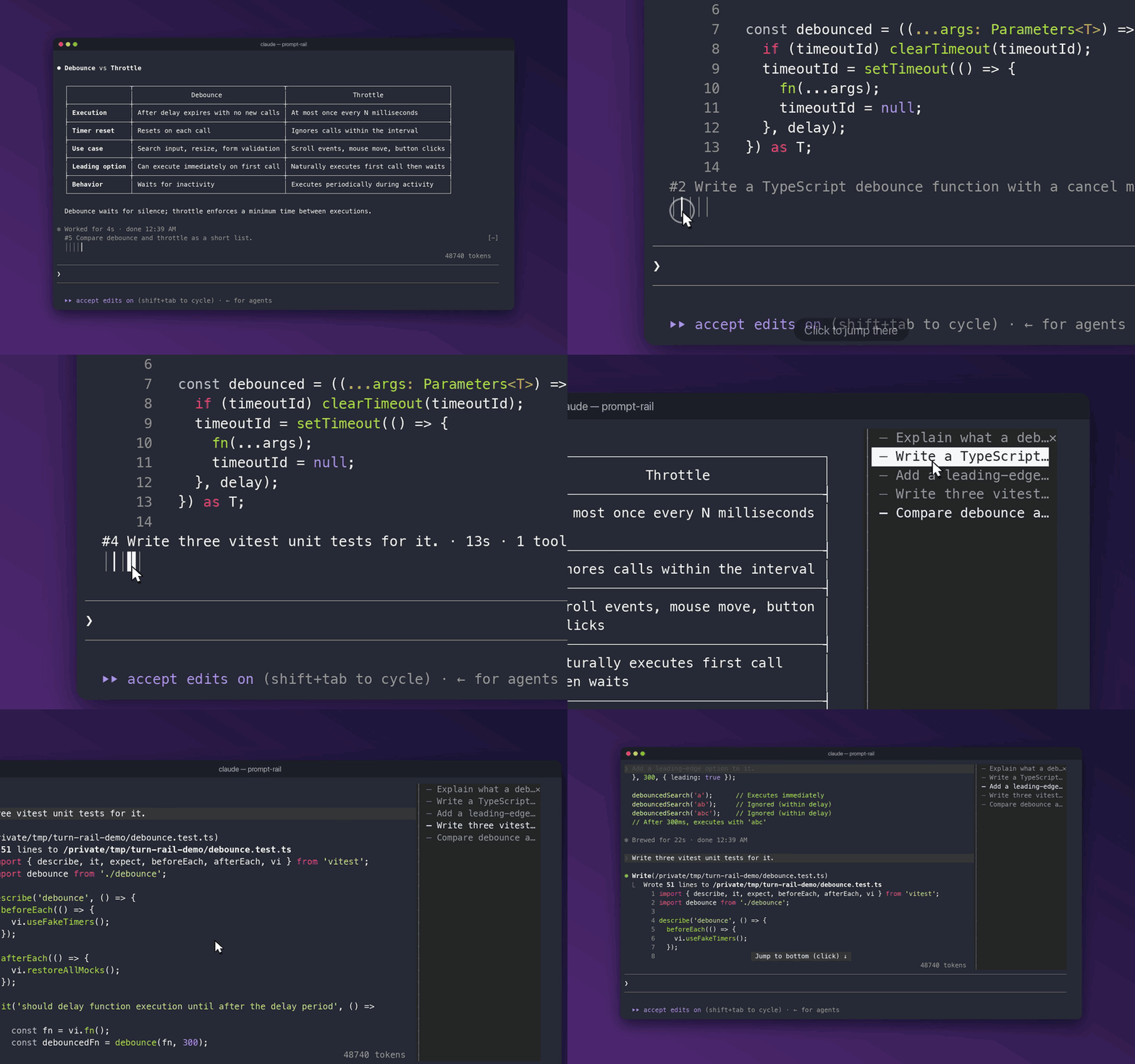
A rail of your prompts for Claude Code. Hover to read one, click to jump back to it.




Quick start
prompt-rail is a mod, so it needs Claude Code 2.1.287 or later, where mods are on by default. If you set CLAUDE_CODE_ENABLE_FUNCTION_HOOKS during early access, you can remove it, since Claude Code now ignores it.
Install, from your shell or inside a session:
claude plugin marketplace add oikon48/prompt-rail
claude plugin install prompt-rail@oikon48
/plugin marketplace add oikon48/prompt-rail /plugin install prompt-rail@oikon48Start a new session. The rail opens on its own.
Mouse works best with "tui": "fullscreen".
Two layouts
Horizontal, above the prompt (default)

Vertical, beside the transcript
Commands
| Command | |
|---|---|
/prompt-rail horizontal |
Bars above the prompt input |
/prompt-rail vertical |
A pane beside the transcript |
/prompt-rail off |
Hide the rail |
/prompt-rail next |
Jump to the next prompt |
/prompt-rail prev |
Jump to the previous prompt |
/prompt-rail first, last |
Jump to the first or the newest prompt |
/prompt-rail 12, #12 |
Jump to prompt #12 |
/prompt-rail find <words> |
Jump to the newest prompt that holds the words |
/prompt-rail-next, /prompt-rail-prev |
Jump to the next or previous prompt, with no argument, for a keybinding |
/prompt-rail-toggle |
Hide the rail, or bring it back in the layout last on, with no argument, for a keybinding |
/prompt-rail |
Reopen the rail in the current layout |
The layout is also the "Rail mode" row in /config, and it is kept across sessions.
Keyboard
Bind the step commands in ~/.claude/keybindings.json; they run mid-turn too:
{
  "bindings": [
    { "context": "Chat", "bindings": { "ctrl+k": "command:prompt-rail-prev", "meta+j": "command:prompt-rail-next" } }
  ]
}
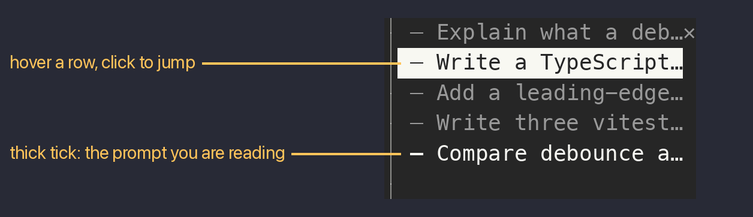
In the horizontal layout, ctrl+x tab moves the focus to the bars: the ring starts on the prompt you are reading, ← → move it across the bars on screen and show its prompt, Enter jumps there, Esc returns to the prompt input.
Tick legend
| Tick | Meaning |
|---|---|
━ ┃ |
The prompt you are reading |
─ │ |
Any other prompt |
┄ ┆ |
A prompt Claude Code refused to scroll to; next and prev skip it |
How it works
From the transcript file to the rail
flowchart LR
  T[transcript .jsonl] -->|every prompt on the live branch| R[rail]
  S[rows on screen] -->|topmost row's prompt| R
  R -->|click, next/prev| J[scroll that prompt's row into view]
The rail lists the prompts of the live branch, so prompts abandoned with /rewind drop out, and prompts from before a resume are listed too. The prompt you are reading owns the topmost row on screen. The transcript is read again only when its size or time changed.
Limitations
Known limits
- The mods API may still change between Claude Code releases.
- The hover card with the turn summary is part of the horizontal rail.
- The Claude desktop app draws the horizontal rail and its hover cards, but a click cannot jump there. The app gives a plugin no way to scroll its transcript, so the rail says so once a session. The prompt being read is named beside the bars rather than on the line above them, since the app paints a card over that line without hiding what is under it. Checked with Claude Code 2.1.280, the app did not draw the vertical pane.
- The dock width is shared by all plugin panes; drag its edge to narrow it, down to 24 columns.
- A
/compactcommand's own row cannot be jumped to; its tick turns dotted after the first try. - Near the end of the transcript,
nextcannot scroll further.
Development
claude --plugin-dir plugins/prompt-rail        # load this checkout; saving reloads it
claude plugin validate plugins/prompt-rail
claude plugin test plugins/prompt-rail
Run /plugin-types .claude/types in a session here for type declarations. Bump the version in plugins/prompt-rail/.claude-plugin/plugin.json with each release, since installed copies update only when it changes.
The Claude directory listing tracks the release branch rather than main, so merged changes reach it only when a release is pushed there. After a Release PR merges, publish it with:
git push origin main:release
The directory picks the new commit up within about six hours and scans it before it goes live.