optim-jev
Spend fewer tokens in long agent sessions without changing how you work.
Jev-powered optimization for Claude Code, plus model routing for OpenAI Codex.




Get started · Codex support · Documentation · Architecture · Contributing
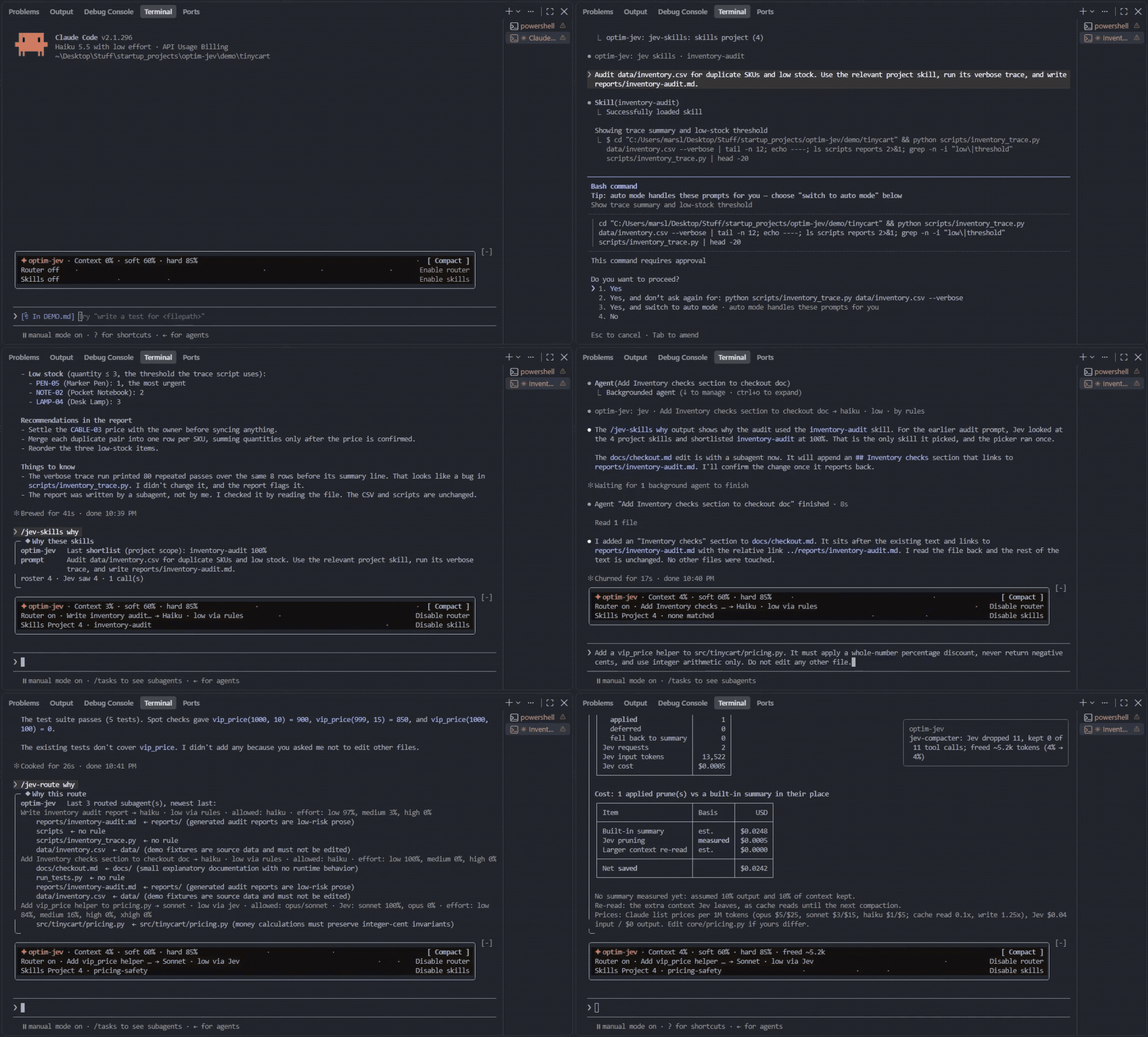
Why optim-jev?
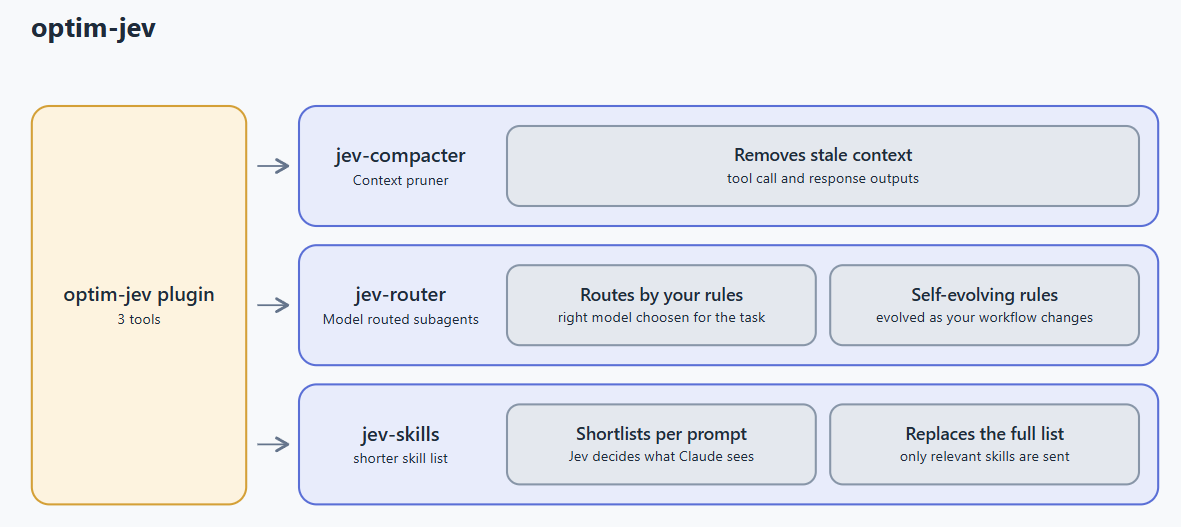
Long agent sessions accumulate stale tool output, send oversized skill catalogs, and use the main model for work a smaller model could handle. Claude Code supports all three optimizers below. Codex supports the model router and an off-by-default advisory skill experiment.
Each tool works independently and fails open if unavailable. Measured cost reports remain Claude-only.
Three tools, one project
| Tool | What it does | Available in | Claude default | Learn more |
|---|---|---|---|---|
| jev-compacter | Removes stale tool calls and outputs instead of summarizing away the whole conversation | Claude Code | On | Guide |
| jev-router | Routes file changes to the right model using project-specific rules that evolve with your workflow | Claude Code and Codex | Off | Guide |
| jev-skills | Sends a short, relevant skill list for each prompt instead of the entire catalog | Claude Code; experimental advisory mode in Codex | Off | Guide |
jev-compacter — preserve useful context
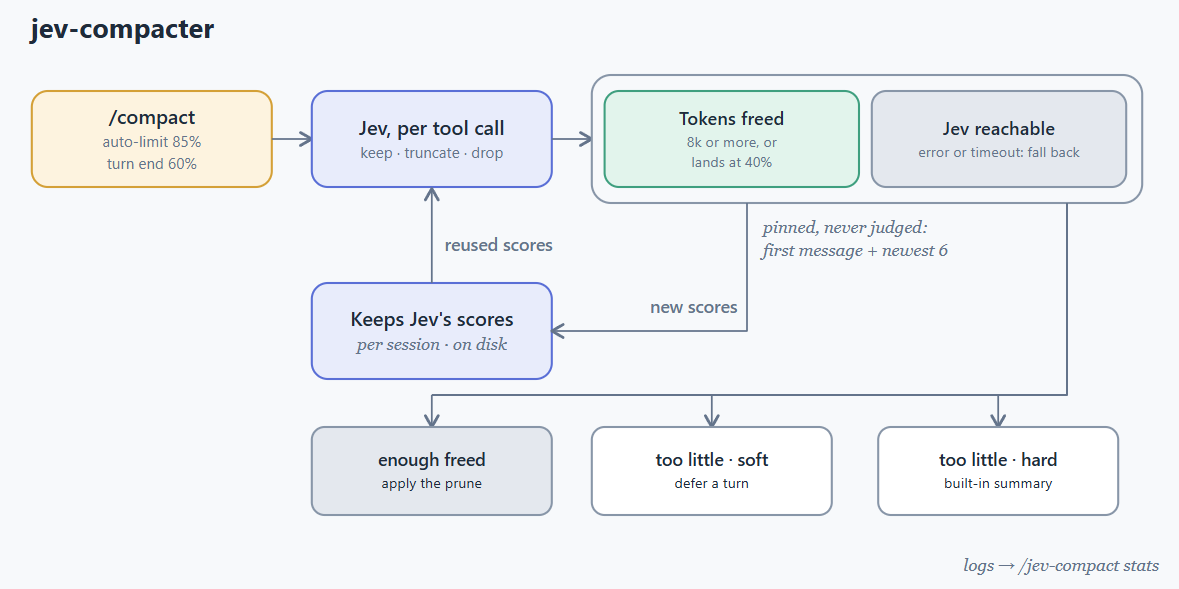
It works automatically with /compact and auto-compaction. Inspect the current session with:
/jev-compact stats
jev-router — use the right model for each edit
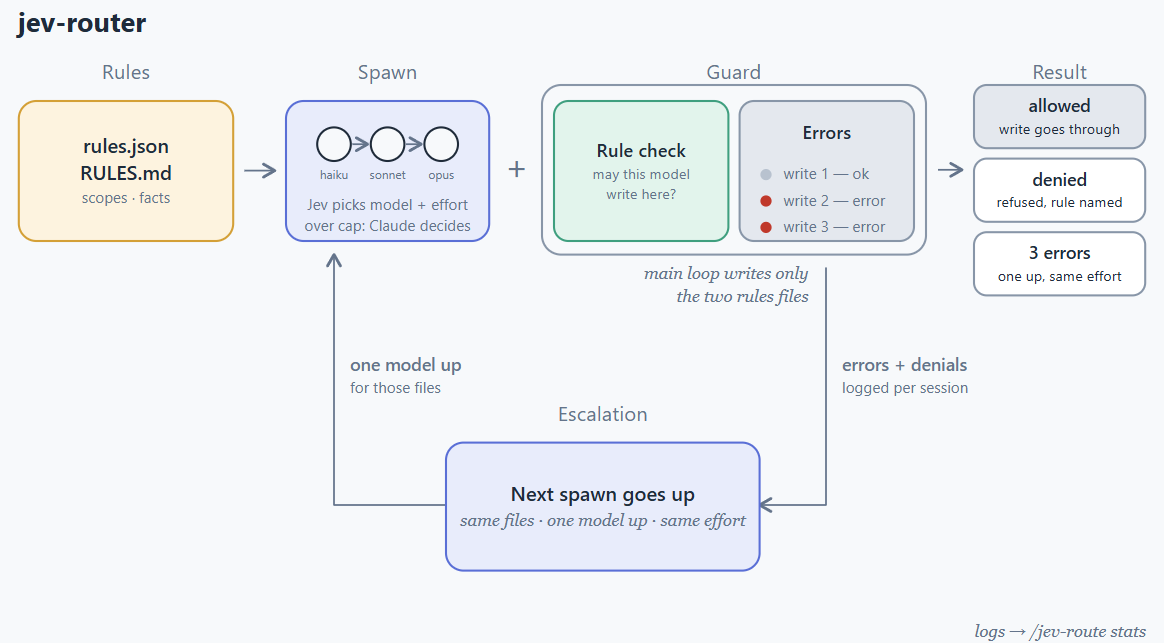
/jev-route init "what matters in this project"
/jev-route on | off
/jev-route why | stats
Tell Claude to change a preference later—for example, “let haiku edit the tests”—and the project rules update with your workflow.
jev-skills — load only relevant skills
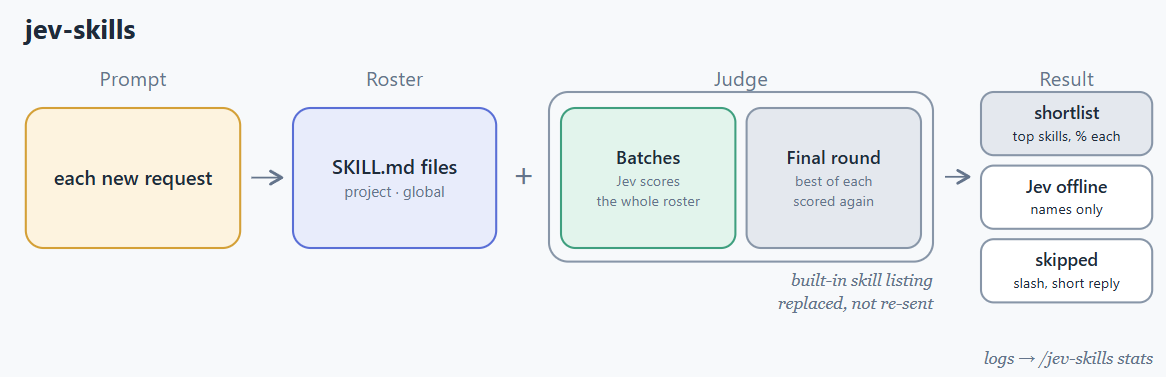
/jev-skills on | off
/jev-skills scope project | global
/jev-skills why | stats | reindex
Claude Code quick start
Requirements
- Claude Code with plugin support
- Python 3.10 or newer
- A TypeSafe API key for Jev
Install
git clone https://github.com/Oqura-ai/optim-jev.git
claude plugin marketplace add ./optim-jev
claude plugin install optim-jev@optim-jev
Set the key in Claude Code under /config → TypeSafe API key, or export it before starting Claude Code:
export TYPESAFE_API_KEY="your-key"
Restart Claude Code. jev-compacter is ready immediately; enable the router and skill picker when you want them. See Getting started for every command, option, and troubleshooting step.
[!NOTE] The plugin uses only Python's standard library. Your API key is passed to child processes through the environment and is never written to project files or logs.
OpenAI Codex support — new
Start with the complete Codex guide for installation, usage, model-tier setup, verification, limitations, troubleshooting, and uninstall steps.
optim-jev can automatically route each Codex subagent to an account-specific fast, balanced, or
strong model. It also selects reasoning effort, applies project path rules, escalates after
failures, and can provide an optional advisory skill shortlist. Claude and Codex keep separate
model catalogues, policies, caches, and logs.
[!IMPORTANT] Compaction is not supported in Codex. Codex hooks cannot replace live conversation history. The AbovePrompt dashboard, slash commands, and measured token and cost reports are also Claude-only.
Install and use
Codex CLI 0.162.1 or newer can install optim-jev directly from GitHub. No PyPI release or manual clone is required.
py -3 -m pip install "https://github.com/Oqura-ai/optim-jev/archive/refs/heads/main.zip"
optim-jev codex install

$env:TYPESAFE_API_KEY = "your-key"
cd C:\path\to\your-project
optim-jev codex setup
optim-jev codex status
codex
On the first Codex launch after install or update, run /hooks, review and trust every optim-jev
hook, then restart Codex.
Inside Codex, subagent routing is automatic. Check the most recent decision or control project features with:
!optim-jev codex why
!optim-jev codex status
!optim-jev codex on
!optim-jev codex off
!optim-jev codex skills-on
!optim-jev codex skills-off
Documentation
| Resource | What you will find |
|---|---|
| Getting started | Installation, configuration, commands, and troubleshooting |
| Codex support | Codex installation, router setup, configuration, and limitations |
| TinyCart demo | A short, repeatable showcase of all three tools on a toy project |
| Performance metrics | How token usage, cost, and estimated savings are calculated |
| Architecture | The TypeScript-to-Python bridge, data flow, and session logs |
| Contributing | Local setup, tests, conventions, and pull requests |
Community and support
- Found a bug or have a feature idea? Open an issue.
- Want to help? Read the contributing guide and submit a focused pull request.
- For the wider Claude Code community, join the official Claude Developers Discord.
License
optim-jev is released under the MIT License.
Built by Oqura.ai for more efficient coding-agent workflows.