Full Stack HQ
One engineering core. Every AI coding agent on your team.
Permission-first engineering rules, agents, skills, and workflows for
Claude Code, OpenAI Codex, and Google Antigravity IDE, plus Cursor,
GitHub Copilot, and Gemini CLI through a repository's AGENTS.md.
Quick start · Architecture · What's inside · Setup guide · FAQ · Comparison · Türkçe · Launch playbook


The short version: keep the engineering policy in one readable source, then render only the host-specific details each AI tool needs.
Full Stack HQ is an open-source, permission-first engineering configuration
kit for AI coding agents. One shared set of rules, 10 specialist agents,
28 Agent Skills, and 10 workflows is rendered into the native formats of
Claude Code (CLAUDE.md and a plugin), OpenAI Codex (AGENTS.md and TOML
agents), and Google Antigravity IDE (GEMINI.md and workflows).
Use it when you want an AI coding agent to plan before it edits, wait for an
explicit approval phrase such as PLAN APPROVED, and report what it actually
verified, and when you want the same rules in every coding host you use without
maintaining hand-written copies. Common questions are answered in the
FAQ.
It is not a SaaS product, agent runtime, application framework, or hard security boundary. The host still controls tools, approvals, sandboxing, network access, and filesystem behavior.
Start here
Claude Code: two commands, no clone
Run these inside Claude Code:
/plugin marketplace add sabahattink/antigravity-fullstack-hq
/plugin install full-stack-hq@full-stack-hq
Start a new session. The shared rules load at session start, the 10 specialist
agents and 28 skills become available, and the 10 workflows appear as
namespaced commands such as /full-stack-hq:plan. Upgrade with
claude plugin update full-stack-hq@full-stack-hq and remove it with
claude plugin uninstall full-stack-hq@full-stack-hq.
Use either the plugin or the Claude installer (--only-claude), not both;
together they load the same rules, agents, and skills twice.
Any host: one line, no clone
Preview first. --dry-run shows every file that would be written and changes
nothing:
# macOS / Linux
curl -fsSL https://raw.githubusercontent.com/sabahattink/antigravity-fullstack-hq/main/bootstrap.sh | bash -s -- --dry-run
# Windows PowerShell
& ([scriptblock]::Create((irm https://raw.githubusercontent.com/sabahattink/antigravity-fullstack-hq/main/bootstrap.ps1))) -DryRun
Drop --dry-run / -DryRun to install, or add any installer option such as
--only-codex / -OnlyCodex and --backup / -Backup. The bootstrap makes a
temporary shallow checkout, runs the regular installer with your options, and
deletes the checkout. Pin a release with FULL_STACK_HQ_REF=v1.3.0 (Bash) or
-Ref v1.3.0 (PowerShell). Read bootstrap.sh or
bootstrap.ps1 before piping either into a shell.
Your repository: shared rules for the whole team
Add the rules to a project instead of your home directory. Everyone who opens the repository gets them, whatever coding agent they use:
# macOS / Linux, from a checkout of this repository
bash install.sh --project ../your-repo
# Windows PowerShell
.\install.ps1 -Project ..\your-repo
| File | Read by |
|---|---|
AGENTS.md |
OpenAI Codex, Cursor, GitHub Copilot, and other AGENTS.md-aware agents |
CLAUDE.md |
Claude Code, through a one-line @AGENTS.md import |
GEMINI.md |
Gemini CLI, through a one-line @./AGENTS.md import |
The installer only manages the block between <!-- full-stack-hq:start -->
and <!-- full-stack-hq:end -->, so instructions your repository already has
are kept. Re-run the command to update the rules; add --uninstall /
-Uninstall to remove the block and get the original files back. The one-line
bootstrap accepts the same options.
Try it from a checkout
Preview the Codex adapter without changing your real host configuration:
git clone https://github.com/sabahattink/antigravity-fullstack-hq.git
Set-Location antigravity-fullstack-hq
.\install.ps1 -OnlyCodex -DryRun -TargetRoot .\.demo-home
macOS/Linux:
git clone https://github.com/sabahattink/antigravity-fullstack-hq.git
cd antigravity-fullstack-hq
bash install.sh --only-codex --dry-run --target-root ./.demo-home
This preview validates the source and shows the host files that would be
generated while keeping the real home directory untouched. When the result
looks right, continue with the full setup guide, or test a
different host with --only-claude / --only-antigravity.
For the three reproducible first-run recipes, see First-run recipes.
Report an installation result · Join the discussion · Record the 45-second demo
The experience
The repository is designed to feel like a small engineering control plane:
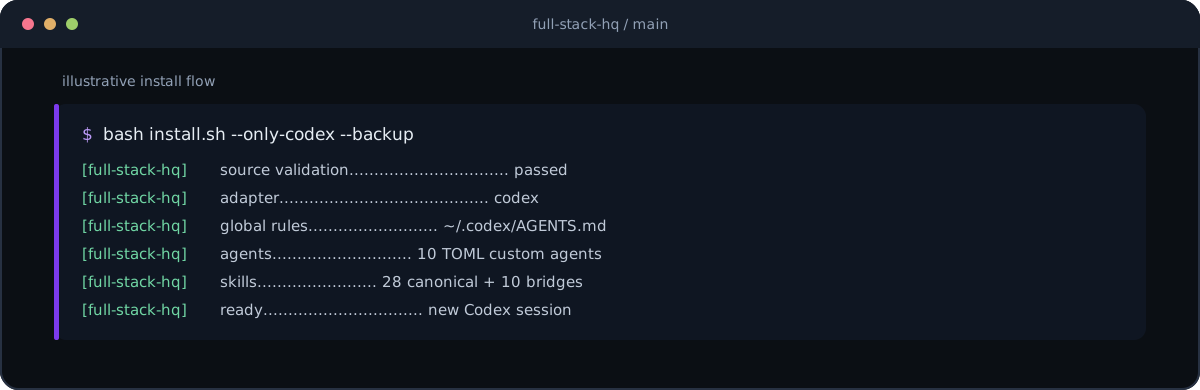
$ bash install.sh --only-codex --backup

FULL STACK HQ / CODEX ADAPTER
────────────────────────────────────────────────────────
 source      ✓  validated
 rules       →  ~/.codex/AGENTS.md
 agents      →  ~/.codex/agents/*.toml       10 specialists
 skills      →  ~/.agents/skills/            28 + 10 workflow bridges
 result      ✓  ready for a new Codex session

$ .\install.ps1 -OnlyClaude -Backup
The terminal above is a representative flow. Run the validator and installer from a local checkout to see the exact output for your machine.
Why this exists
| Principle | What it gives you |
|---|---|
| One source of truth | Shared engineering behavior lives in core/, not in three drifting copies. |
| Native adapters | Claude Code, Antigravity, and Codex receive the format and paths they understand. |
| Permission-first | The workflow asks for scope and approval before an approved implementation slice. |
| Safe migration | Existing files are preserved by default; backups, dry-runs, and legacy bridges are available. |
| Evidence over confidence | Validation and verification states distinguish changed, failed, and unverified results. |
Architecture
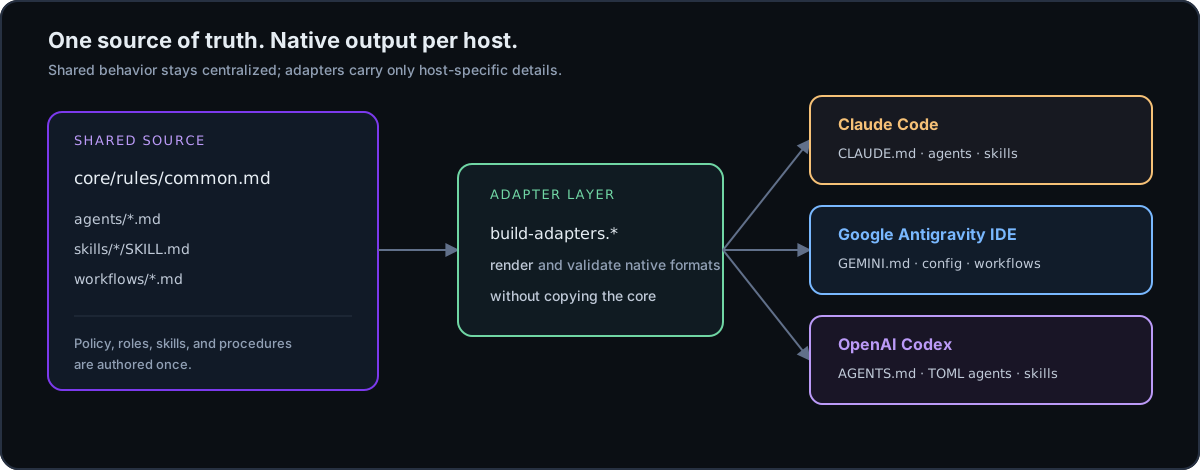
The core is the deep module: callers learn one stable engineering policy, and
each adapter carries only the details that genuinely vary. The existing
top-level agents/, skills/, and workflows/ paths remain public so current
customizations and links continue to work.
The source-to-host contract
| Source | Claude Code | Google Antigravity IDE | OpenAI Codex |
|---|---|---|---|
| Shared rules | ~/.claude/CLAUDE.md |
~/.gemini/GEMINI.md |
~/.codex/AGENTS.md |
| Agents | ~/.claude/agents/ |
~/.gemini/config/agents/ |
~/.codex/agents/*.toml |
| Skills | ~/.claude/skills/ |
~/.gemini/config/skills/ |
~/.agents/skills/ |
| Workflows | Generated skills | ~/.gemini/config/workflows/ plus bridge |
Generated skills |
| Project guidance | .claude/ / CLAUDE.md |
.agents/ |
AGENTS.md, .codex/, .agents/ |
The Codex adapter uses its current native formats: layered AGENTS.md
instructions, Agent Skills for reusable procedures, and TOML custom agents with
name, description, and developer_instructions.
Native format references
Portable package
The repository root is also a Claude Code plugin marketplace.
.claude-plugin/ describes the plugin, hooks/hooks.json loads the shared
rules at session start, and the plugin reads the canonical agents/,
skills/, and workflows/ directly, so there is no second copy to drift.
The repository root also contains a portable plugin.json manifest beside the
canonical skills/ directory. Plugin-aware OpenAI hosts can consume that
package boundary without a second copy of the shared guidance. The regular
installers remain the complete path when you also want global rules, native
agents, Antigravity workflows, Codex TOML agents, backups, or dry-runs.
Read the portable package guide for the boundary, release rules, and local validation checklist.
Quick start
Choose one or more hosts. The default installs all three integrations.
macOS / Linux
$ git clone https://github.com/sabahattink/antigravity-fullstack-hq.git
$ cd antigravity-fullstack-hq
$ bash install.sh
Windows PowerShell
PS> git clone https://github.com/sabahattink/antigravity-fullstack-hq.git
PS> Set-Location antigravity-fullstack-hq
PS> .\install.ps1
Install one host only
# macOS / Linux
$ bash install.sh --only-codex
$ bash install.sh --only-claude
$ bash install.sh --only-antigravity
# Windows PowerShell
PS> .\install.ps1 -OnlyCodex
PS> .\install.ps1 -OnlyClaude
PS> .\install.ps1 -OnlyAntigravity
Safe upgrade controls
| PowerShell | Bash | Use it when you want to... |
|---|---|---|
-DryRun |
--dry-run |
Preview changes without writing target files. |
-Backup |
--backup |
Keep timestamped copies of replaced files. |
-Force |
--force |
Replace managed files after reviewing the change. |
-TargetRoot DIR |
--target-root DIR |
Test inside an isolated home-like directory. |
-NoLegacyPaths |
--no-legacy-paths |
Skip refreshing an existing Antigravity legacy tree. |
-Check |
--check |
Validate source and adapter generation before installing. |
-Project DIR |
--project DIR |
Add the rules to a repository's AGENTS.md, CLAUDE.md, and GEMINI.md. |
-Uninstall |
--uninstall |
With --project, remove the Full Stack HQ blocks again. |
For a conservative upgrade:
# macOS / Linux
$ bash install.sh --dry-run
$ bash install.sh --force --backup
# Windows PowerShell
PS> .\install.ps1 -DryRun
PS> .\install.ps1 -Force -Backup
Existing global instruction files are confirmed interactively. Existing agent
and skill files are kept unless Force is selected. Restart the host
application and start a new conversation after installation.
Diagnose before installing
The read-only doctor checks the repository, adapter validator, host commands, target paths, and Codex override precedence. Missing host files are reported as warnings so it is useful both before a first install and after an upgrade.
# Windows PowerShell
PS> .\scripts\doctor.ps1
PS> .\scripts\doctor.ps1 -OnlyCodex -TargetRoot .\tmp\host-home
# macOS / Linux
$ bash scripts/doctor.sh
$ bash scripts/doctor.sh --only-codex --target-root ./tmp/host-home
Use -Strict / --strict when warnings should make the diagnostic fail.
First run
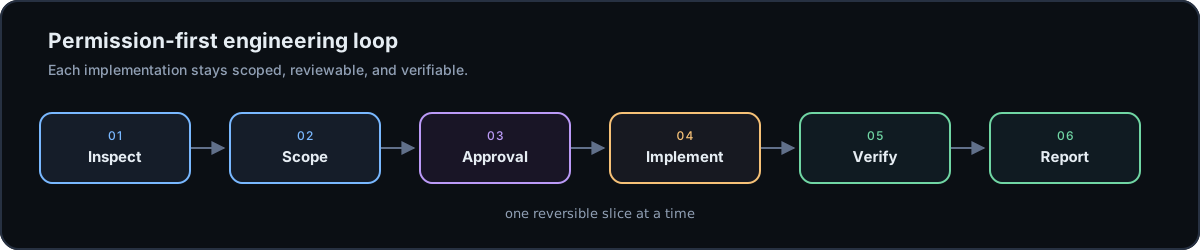
Use a small, reversible prompt to check that the configuration is loaded:
Create a React component called UserCard
The intended engineering loop is:
inspect → scope → approval → implement → verify → report
This is instruction-level guidance. It does not intercept shell commands or guarantee runtime permissions.
Help us test the host adapters
The most useful contribution is a real installation result, including a successful dry-run or a small host-specific difference. Open the installation feedback form with:
- the host and operating system;
- the command and Full Stack HQ version or commit;
- the expected and actual generated paths;
- a redacted log excerpt or screenshot, with tokens and private paths removed.
If you are comparing more than one AI coding host, continue the conversation in GitHub Discussions so repeated questions can become documentation improvements.
What's inside
| Directory / file | Role |
|---|---|
core/rules/common.md |
Host-neutral engineering policy and shared behavior. |
adapters/ |
Thin Claude, Antigravity, Codex, and project integration layers. |
.claude-plugin/ |
Claude Code plugin and marketplace manifests. |
hooks/hooks.json |
Claude Code plugin hook that loads the shared rules. |
plugin.json |
Portable plugin manifest for the existing canonical skills. |
bootstrap.sh / bootstrap.ps1 |
One-line installers that run without a manual clone. |
llms.txt |
Plain-text project summary and doc index for AI assistants. |
docs/assets/ |
Repository-local terminal, architecture, and workflow visuals. |
agents/ |
10 canonical specialist role definitions. |
skills/ |
28 canonical Agent Skills for recurring engineering tasks. |
workflows/ |
10 canonical workflows and the Antigravity compatibility source. |
scripts/build-adapters.* |
Render host files and workflow skill bridges. |
scripts/validate.* |
PowerShell and Bash source/adapter validators. |
scripts/doctor.* |
Read-only environment and installation diagnostics. |
scripts/smoke-test.* |
Isolated all-host installer smoke tests. |
install.ps1 / install.sh |
Safe, selective, cross-platform installers. |
Specialist agents
| Agent | Focus |
|---|---|
frontend-specialist |
React, Next.js, Tailwind, and UI/UX |
backend-specialist |
NestJS, APIs, queues, and Redis |
database-specialist |
Prisma, PostgreSQL, and migrations |
architect |
System design, ADRs, and trade-offs |
code-reviewer |
Quality, patterns, and security |
test-engineer |
Vitest, Jest, and Playwright |
security-auditor |
Auth, OWASP, and input validation |
devops-engineer |
Docker, CI/CD, and deployment |
performance-optimizer |
Bundles, queries, and rendering |
documentation-writer |
Technical writing, READMEs, and ADRs |
Canonical skills
The 28 skills are grouped around the work they support:
| Area | Skills |
|---|---|
| Frontend | react-best-practices, typescript-patterns, tailwind-patterns, frontend-design, web-design-guidelines, nextjs-app-router |
| Backend | nestjs-patterns, backend-dev-guidelines, software-architecture, api-design-patterns, prisma-workflow |
| Testing | test-driven-development, systematic-debugging, webapp-testing |
| DevOps | docker-patterns, github-actions, deployment-guide |
| Auth and security | auth-patterns, security-checklist |
| Documents | docx-official, pdf-official, pptx-official, xlsx-official |
| Meta | brainstorming, skill-creator, code-review-patterns, git-workflow, prompt-engineering |
Workflow catalog
The canonical workflows remain in workflows/. They are also rendered as
skills so the same procedures can be used across all three hosts:
| Workflow | Purpose | Native invocation |
|---|---|---|
plan |
Break work into phases and approval checkpoints. | /plan · $plan |
brainstorm |
Explore options before implementation. | /brainstorm · $brainstorm |
create |
Implement an approved plan. | /create · $create |
debug |
Perform systematic root-cause analysis. | /debug · $debug |
enhance |
Improve existing code quality. | /enhance · $enhance |
test |
Design or improve meaningful tests. | /test · $test |
status |
Record progress, blockers, and next steps. | /status · $status |
preview |
Review quality, security, and readiness. | /preview · $preview |
orchestrate |
Coordinate specialist workstreams. | /orchestrate · $orchestrate |
ui-ux-pro-max |
Run a structured UI/UX review. | /ui-ux-pro-max · $ui-ux-pro-max |
The exact invocation is host-native: Antigravity and Claude commonly expose
slash commands, while Codex exposes skill selection and $skill-name
invocation.
Compatibility and migration
- Existing top-level
agents/,skills/, andworkflows/paths remain intact. - New Antigravity installations use documented
~/.gemini/config/locations. - An existing
~/.gemini/antigravity/tree is refreshed as a compatibility bridge unless--no-legacy-paths/-NoLegacyPathsis selected. - New installations do not create the legacy Antigravity tree.
- Codex user skills are installed under
~/.agents/skills/. - Codex global rules and custom agents use
CODEX_HOMEwhen it is set, otherwise the active~/.codex/directory. - If
~/.codex/AGENTS.override.mdexists, Codex prioritizes it. The installer warns about the override and never overwrites it. - The root
plugin.jsonpackages the existingskills/tree for plugin-aware hosts; it does not create a parallel source tree.
There is intentionally no separate Codex workflow directory. The canonical workflow bodies are converted to Agent Skills because skills are the current shareable workflow format.
Verification
Validate the repository before installing or proposing a release:
# Windows PowerShell
PS> .\scripts\validate.ps1
PS> .\install.ps1 -Check
# macOS / Linux
$ bash scripts/validate.sh
$ bash install.sh --check
$ bash scripts/smoke-test.sh
# Windows PowerShell
PS> .\scripts\smoke-test.ps1
The validators check:
- YAML frontmatter and name/path consistency.
- Skill and workflow metadata.
- Canonical content for accidental host-specific leakage.
- Codex TOML agent generation.
- Workflow-to-skill conversion counts.
- Antigravity rule-size limits and workflow/skill name collisions.
- Cross-platform renderer parity.
The smoke tests then install all three adapters into a disposable temporary home and verify the generated rules, agents, skills, and workflows without touching the real user configuration.
The repository also runs least-privilege validation on Windows and Ubuntu for
every push to main and every pull request.
Documentation
- Setup guide — installation, upgrades, migration, and troubleshooting.
- FAQ — short answers to the most common questions.
- Comparison — how Full Stack HQ differs from rule-sync tools and skill frameworks.
- Türkçe özet — Turkish summary.
- First-run recipes — safe previews, isolated tests, and feedback.
- Customization guide — extend the core without creating drift.
- Contributing guide — change discipline and verification.
- Core and adapter design — the source-of-truth model.
- Portable plugin package — package boundary and release rules.
- Launch announcement pack — reviewable copy for GitHub and social channels.
- Launch playbook — channel sequence, demo brief, and measurement plan.
- Installation feedback — structured host-specific reports.
- Security policy — reporting and security boundaries.
- Changelog — release history.
Contributing
Please read docs/CONTRIBUTING.md before opening a pull request. Changes should remain focused on the core, adapters, installers, validators, skills, agents, workflows, and documentation.
License
MIT License. Maintained by Sabahattin Kalkan.