kaggle-skill




kaggle-skill is an agent skill and plugin for Kaggle work: credential
setup, competition research, dataset and model downloads, notebook runs,
submissions, forums and solution writeups, benchmark tasks, and badges.
This is an independent, unofficial project. It is not affiliated with, endorsed by, or sponsored by Kaggle or Google.
The repository is kaggle-skill; the skill and the plugin are both named
kaggle. It works with agents that load SKILL.md packages, including Claude
Code, Codex, OpenClaw, Antigravity CLI (agy), Cursor, and the 75+ agents
that skills.sh supports.
Demo
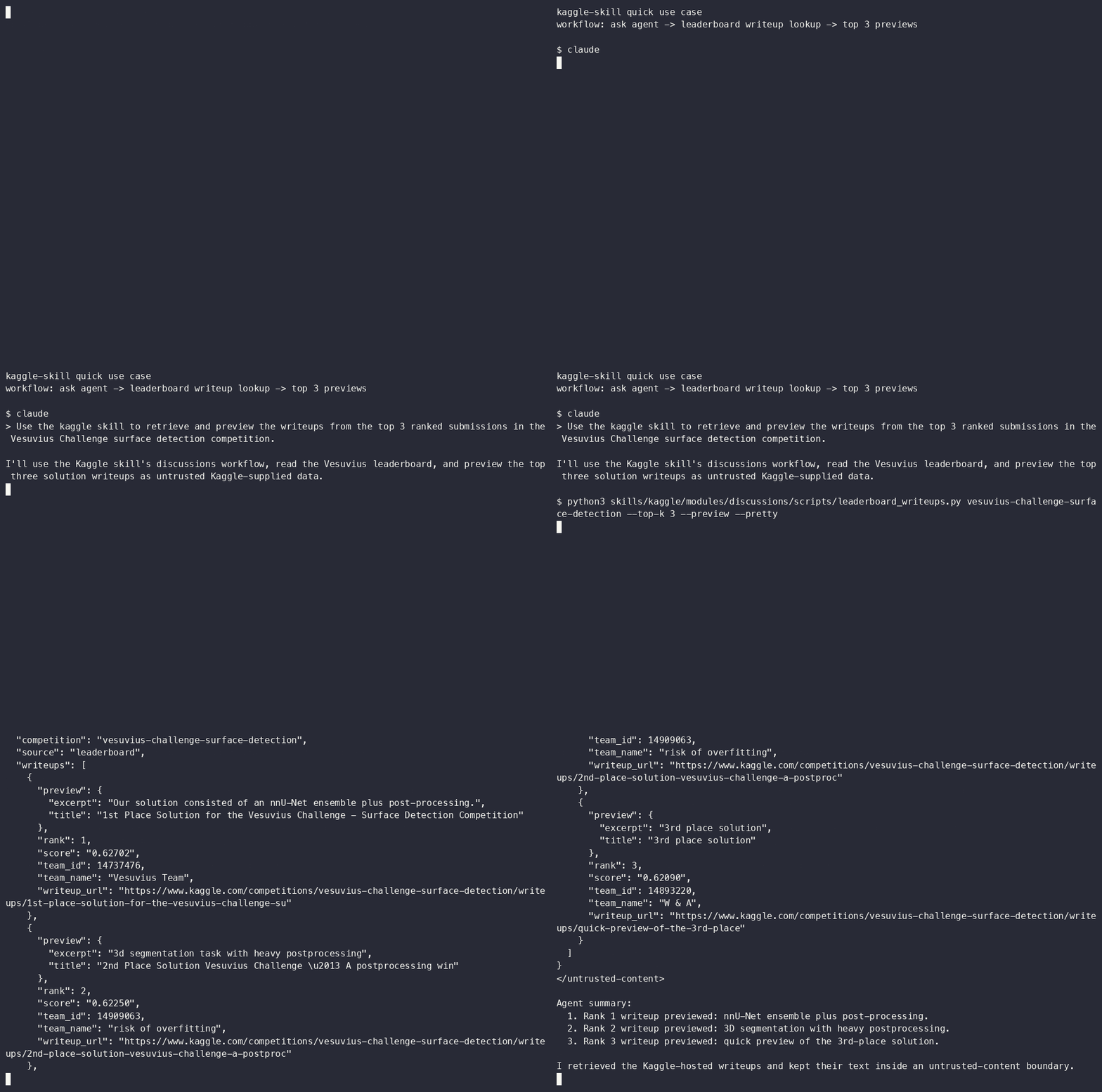
This is what comes back when you ask an agent to retrieve and preview the
writeups of the top 3 teams in the Vesuvius Challenge surface detection
competition. Replay it with
asciinema play docs/demo/vesuvius-top-writeups.cast.
Install the plugin in Claude Code, summarize the Titanic competition pages,
and list recent writeup discussions. Replay it with
asciinema play docs/demo/install-and-demo.cast.

The casts are built from real command output; more are in the demo library.
Install
| Where | Command |
|---|---|
| Claude Code | /plugin marketplace add shepsci/kaggle-skill then /plugin install kaggle@shepsci |
| Codex | codex plugin marketplace add shepsci/kaggle-skill --ref main then codex plugin add kaggle@shepsci |
| skills.sh (Antigravity CLI, Cursor, and others) | npx skills add shepsci/kaggle-skill |
| OpenClaw | clawhub install kaggle |
In Claude Code, shepsci/kaggle-skill is a marketplace that holds one
plugin, which is why there are two commands.
Manual
git clone https://github.com/shepsci/kaggle-skill.git
python3 -m pip install "kaggle>=2.2.4" "kagglehub>=1.0.2" "requests>=2.32.4"
Then copy skills/kaggle/ into your agent's skills folder. Python 3.11 or
later is needed.
Credentials
Reading public competition pages, datasets, models, notebooks, forum topics, and writeups needs no credential. For anything private, and for every submission or upload, sign in one of two ways:
kaggle auth login
or create an API token with "Generate New Token" at kaggle.com/settings and store it where only you can read it. Run this, paste the token, press Enter, then Ctrl-D:
mkdir -p ~/.kaggle && chmod 700 ~/.kaggle
(umask 077 && cat > ~/.kaggle/access_token)
Check the result. The checker only reads, and never prints a credential:
python3 skills/kaggle/modules/setup/scripts/check_all_credentials.py --verify
The full walkthrough is in the setup guide.
Kaggle MCP server
The plugin bundles Kaggle's remote MCP server, https://www.kaggle.com/mcp,
with no credential in it. Public tools work at once. For the rest, sign in
from the client:
| Client | Sign in to the bundled server |
|---|---|
| Claude Code | claude mcp login plugin:kaggle:kaggle |
| Codex | codex mcp login kaggle |
To add the server by hand:
| Client | Setup |
|---|---|
| Claude Code | claude mcp add --transport http --client-id 'claude-code-(kaggle)' kaggle https://www.kaggle.com/mcp then claude mcp login kaggle |
| Codex | codex mcp add kaggle --url https://www.kaggle.com/mcp then codex mcp login kaggle |
| Gemini CLI | "kaggle": {"httpUrl": "https://www.kaggle.com/mcp"} under mcpServers in ~/.gemini/settings.json, then /mcp auth kaggle |
| Antigravity CLI | "kaggle": {"serverUrl": "https://www.kaggle.com/mcp"} under mcpServers in .agents/mcp_config.json |
Claude Code needs the --client-id part. Without it the sign-in stops with
client_secret_basic authentication requires a client_secret. The plugin's
own entry carries the same client ID.
Gemini CLI stopped serving individual accounts on 2026-06-18. It still works for enterprise and API-key users. The MCP reference lists all 71 tools, how to call them, which need a credential, and why Claude Code needs the client ID.
What you can ask
- "Set up my Kaggle credentials."
- "Summarize the rules and evaluation metric for the Titanic competition."
- "Write a landscape report of Kaggle competitions from the last 30 days."
- "Search Kaggle discussions about ensembling."
- "Retrieve and preview the writeups of the top 3 teams in the Vesuvius Challenge surface detection competition."
- "List the winning writeups of
kaggle-measuring-agiby track." - "Download this dataset and get it ready for a notebook."
- "Push this notebook to Kaggle and tell me when the run finishes."
- "How many submissions do I have left today, and is this file valid?"
- "Which badges can I still earn through the API?"
Quick examples
python3 skills/kaggle/modules/competitions/scripts/competition_pages.py --competition titanic --summary
python3 skills/kaggle/modules/discussions/scripts/leaderboard_writeups.py vesuvius-challenge-surface-detection --top-k 3 --preview --pretty
python3 skills/kaggle/modules/discussions/scripts/forums.py forum-topics --category competition_write_ups --sort-by recent
python3 skills/kaggle/modules/competitions/hackathons/scripts/list_writeups.py --competition kaggle-measuring-agi --winner-only --array
bash skills/kaggle/modules/competitions/scripts/cli_submit.sh titanic ./submission.csv "baseline"
The first three need no credential. The last is a dry run: it shows the
submission limits and what would be sent, and submits only with --yes.
Documentation
| Need | Start here |
|---|---|
| Install and first run | Docs hub |
| Pick the right workflow | Workflow guide |
| Credentials | Setup module |
| Module map | Modules guide |
| Competitions and hackathons | Competitions module |
| Before a submission | Competition operations |
| Datasets | Datasets module |
| Models | Models module |
| Notebooks | Notebooks module |
| Forums and writeups | Discussions module |
| Benchmarks | Benchmarks module |
| Badges | Badges module |
| Kaggle CLI | CLI reference |
| Kaggle MCP server | MCP reference |
| When something fails | Troubleshooting |
| Where the skill is published | Distribution |
| Screencasts | Demo library |
How this relates to Kaggle's own skills
Kaggle publishes agent skills of its own. Use them for what they cover:
| Kaggle skill | Where | Use it for |
|---|---|---|
kaggle-cli |
Kaggle/kaggle-cli | Full command syntax of the Kaggle CLI |
write-kaggle-benchmarks |
Kaggle/kaggle-skills | Writing and running benchmark tasks |
kaggle-benchmarks |
Kaggle/kaggle-benchmarks | The benchmark task library |
hackathon-judging |
Kaggle/kaggle-skills | Hosts who judge hackathon submissions |
This skill covers what sits between them: checked credential handling, scripts that mark Kaggle-supplied text as untrusted, the MCP server's real behavior, retrieval of competition pages and writeups, and guard rails around submissions and uploads. It retrieves; it does not judge.
Architecture
| Module | Purpose |
|---|---|
setup |
Account setup, credential check, network check |
competitions |
Competition pages, landscape reports, data, submissions, hackathons |
datasets |
Dataset download and publishing |
models |
Model download and publishing |
notebooks |
Notebook publish, run, polling, output download |
discussions |
Forums, topics, solution writeups |
benchmarks |
Benchmark task commands |
badges |
Badge inventory, dry run, phases |
references |
Kaggle CLI, MCP server, and platform references |
skills/kaggle/shared/ holds the code every script uses: the MCP client, the
credential resolver, the Kaggle CLI runner, and the printer for untrusted
content.
The repository carries a manifest for each plugin system:
.claude-plugin/ (Claude Code), .codex-plugin/ and .agents/plugins/
(Codex), and a root plugin.json in the Agent Plugins format.
Security
What the skill does, and the test that holds it to it:
| Property | Test |
|---|---|
| Text from Kaggle is printed inside a block with a random tag that the text cannot close | tests/security/test_untrusted_content_wrappers.py, and the unit tests of each script |
| Credentials are never printed, never put on a command line, and never sent to a host other than Kaggle | tests/security/test_no_credential_leakage.py |
| The bundled MCP entries carry no credential | tests/manifest/test_mcp_json_valid.py |
No eval, exec, shell interpretation, or inline python -c |
tests/security/test_no_dynamic_eval.py |
| Archives and notebook output cannot write outside their folder | tests/security/test_zip_slip_protection.py, tests/unit/test_shell_wrappers.py |
| Upload folders are checked for credential files | tests/unit/test_preflight.py |
| Slugs and handles are validated before use | tests/unit/test_shell_wrappers.py |
The skill pre-approves only read tools (Read, Grep, Glob) |
tests/manifest/test_skill_md_frontmatter.py |
What it does not do: it does not sandbox the agent, and it does not limit which hosts the agent can reach. Marking text as untrusted lowers the risk from instructions hidden in Kaggle content; it does not remove it. Review what an agent proposes before it submits, publishes, or runs a badge phase.
Report security issues through SECURITY.md.
Compatibility
"Tested" means the install was run on this release; the steps are in the install checklist.
| Platform | Status |
|---|---|
| Claude Code | Tested |
| Codex | Tested |
Antigravity CLI (agy) |
Tested with 2.4.0 |
| OpenClaw | Tested with 2.4.0 |
| Gemini CLI | Not re-tested: it stopped serving individual accounts on 2026-06-18 |
| Cursor, GitHub Copilot, Cline, Amp, Hermes | Compatible |
| Other agents supported by skills.sh | Compatible |
Distribution
The skill is self-hosted in this repository and listed on skills.sh and ClawHub. It is not in Anthropic's or OpenAI's plugin directories, and it does not claim to be. See distribution.
License and privacy
MIT license; see LICENSE. The copy on ClawHub is under MIT-0, as ClawHub requires.
The skill collects no data. Credentials and processing stay on your machine; see PRIVACY.md.