Agent Reachout
Let your Claude Code message you on Telegram when it needs decisions or finishes work, even when you’re away from your desk.
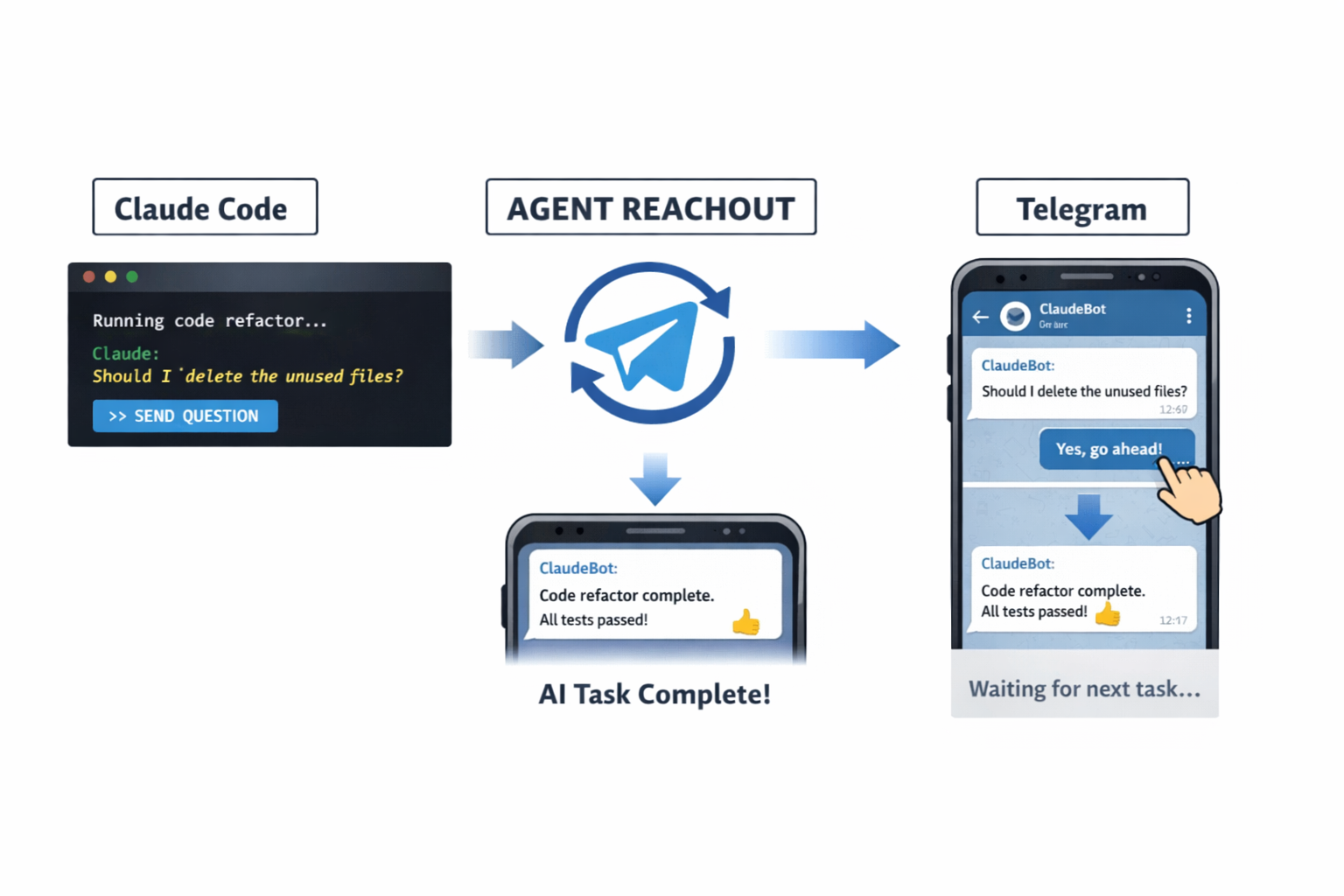
Claude Code → Agent Reachout → Telegram → Human reply → Agent continues
Why?
AI agents are great at doing work, but real workflows still need human judgment.
In practice, agents:
- hit ambiguous decisions
- need approval before destructive actions
- finish long tasks while you’re not watching the terminal
Dashboards assume you go check them.
Messaging flips the model — the agent comes to you only when needed.
Agent Reachout turns agent workflows into something asynchronous and interrupt-driven, without babysitting the CLI.
What it does
- Sends notifications to Telegram when an agent:
- finishes a task
- hits a blocker
- needs a decision
- Supports one-way notifications or two-way conversations
- Lets the agent pause → ask → resume
- Designed for human-in-the-loop agent workflows
Currently implemented as a Claude Code plugin.
Why Telegram first?
This started as a personal workflow tool, not a team platform.
Telegram was chosen because:
- it’s already on my phone
- fast setup and low friction
- feels like a push notification, not another dashboard
- works well for solo devs and small setups
The concept is channel-agnostic — Telegram is just the first integration.
What it’s not
- Not a workflow engine
- Not a chatbot framework
- Not a full agent orchestration system
It’s a small bridge between agents and humans.
Use cases
- Approving file changes or deletions
- Answering clarification questions mid-task
- Getting notified when long-running tasks complete
- Running agents asynchronously without monitoring logs
Installation
Prerequisites
- Claude Code CLI installed
- Bun installed (https://bun.com/docs/installation)
- A Telegram account
1. Create a Telegram Bot
- Open Telegram and search for @BotFather
- Send
/newbotand follow the prompts to create your bot - Copy the bot token (looks like
123456789:ABCdefGHIjklMNOpqrsTUVwxyz)
2. Get Your Telegram Chat ID
- Search for @userinfobot on Telegram
- Start a chat with it
- Copy your chat ID (a number like
123456789)
Tip: Start a conversation with your newly created bot first by searching for it and clicking "Start".
3. Configure Environment Variables
Set the following environment variables. You can add them to your shell profile (.zshrc, .bashrc) or set them before running Claude Code:
Shell format:
export AGENT_REACHOUT_TELEGRAM_BOT_TOKEN=your_bot_token_here
export AGENT_REACHOUT_TELEGRAM_CHAT_ID=your_chat_id_here
Or in your Claude Code settings (~/.claude/settings.json):
{
"env": {
"AGENT_REACHOUT_TELEGRAM_BOT_TOKEN": "your_bot_token_here",
"AGENT_REACHOUT_TELEGRAM_CHAT_ID": "your_chat_id_here"
}
}
Environment Variables Reference
| Variable | Required | Description |
|---|---|---|
AGENT_REACHOUT_TELEGRAM_BOT_TOKEN |
Yes | Bot token from @BotFather |
AGENT_REACHOUT_TELEGRAM_CHAT_ID |
Yes | Your personal chat ID from @userinfobot |
AGENT_REACHOUT_NOTIFY_DEFAULT_TIMEOUT_MS |
No | Timeout for waiting for responses (default: 300000ms / 5 min) |
AGENT_REACHOUT_CLAUDE_COMMAND |
No | Claude Code CLI command for Telegram task runner (default: claude) |
AGENT_REACHOUT_TELEGRAM_TASK_PREFIX |
No | Telegram command prefix for tasks (default: /task) |
AGENT_REACHOUT_ALLOWED_TOOLS |
No | Allowed tools for Agent SDK CLI (passed to --allowedTools) |
AGENT_REACHOUT_HISTORY_LIMIT |
No | Max number of task history entries to keep (default: 25) |
4. Install the Plugin
Run these commands in Claude Code:
/plugin marketplace add vibe-with-me-tools/agent-reachout
/plugin install agent-reachout@agent-reachout
Restart Claude Code. Done!
Start tasks from Telegram (Agent SDK)
You can trigger Claude Code tasks by sending a Telegram message.
Tasks are queued and executed one at a time. The runner keeps a short in-memory
history and remembers the latest Claude session ID for /continue.
- Ensure the Claude Code CLI is installed and authenticated.
- From the
server/directory, run:
bun run telegram-agent
- In Telegram, send a message like:
/task Summarize the repo and propose next steps
The runner uses the Agent SDK CLI (claude -p) to execute the task and replies with the result.
Telegram commands
/task <description>: start a new task (queued)/continue <description>: continue the latest session/resume <session_id> <description>: resume a specific session/history [count]: show recent jobs/status: show current job + queue depth + last session + allowed tools/allowed_tools <list>: set CLI--allowedToolsfor future tasks (send empty to clear)/cancel: cancel the current job and clear the queue/help: list commands
Roadmap
- Slack integration
- WhatsApp / Discord support
- Model-agnostic agent support
- Better conversation state handling
Feedback will shape this.
Feedback & Contributions
This is early and intentionally small.
If you:
- hit similar problems
- have strong opinions on human-in-the-loop agents
- want a specific notification channel
Issues, discussions, and PRs are very welcome.
Repo
https://github.com/vibe-with-me-tools/agent-reachout
License
MIT