human-review
- Live demo 1: Link Visit with Vet — PR #49: a visit now records the vet who attended it
- Live demo 2: Visits grid, paged and sorted — PR #53: the visits list, paged in 5/10/20 and sortable by every column, implemented unguided by Opus
Both are real pull requests, reviewed with this skill. Nothing to install — every tab is clickable.
What it is
A /human-review skill for Claude Code. It builds
one page that lets a human review a change set fast.
- One question per tab: what to look at first, what the diagrams say changed, what the REST contract did, where it landed in the code, a video of the feature working, what it cost in complexity, which tests pin it.
- Every code reference is a click into your editor.
- It cannot drift: every snippet is cut from the working tree at build time.
- Born in production: extracted from a real project's review loop, used on real branches before it was made portable.
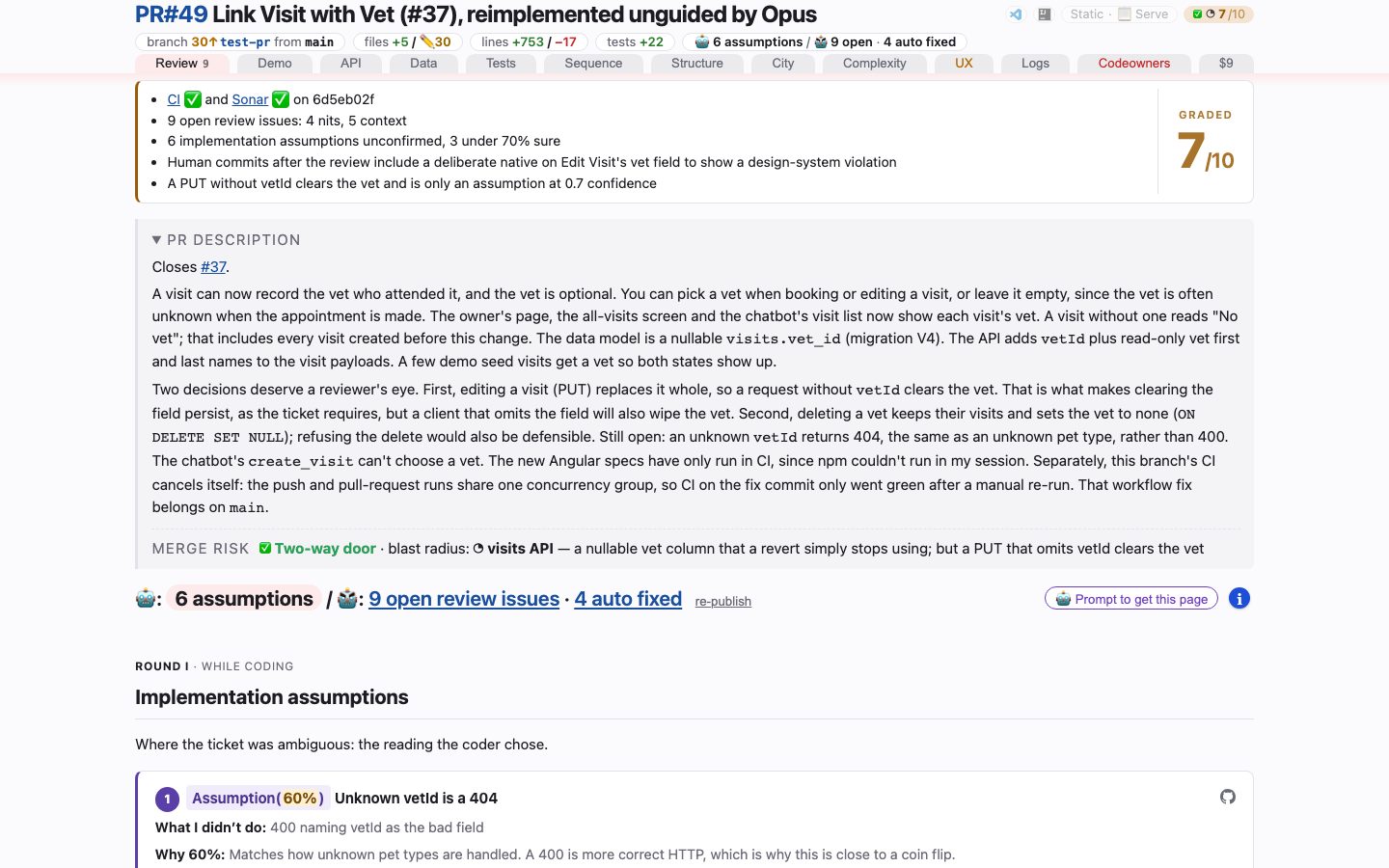
Link Visit with Vet (#37), reimplemented unguided by Opus, Review tab — click to open it live. Every published snapshot: https://victorrentea.github.io/human-review/
Found something? Open an issue — anyone can.
- No need to install it first, or to be sure it is a bug.
- Welcome: something odd on a demo page, a tab that won't build on your stack, a question.
- Every page the skill builds links here from its footer.
A tour, one tab at a time
One screenshot per tab of the demo, retaken on every publish. Click a picture for that tab's own page: what it shows, what it needs, how it works.
Review
open it live — One list, read off the branch's own review-points.md: what the agent declined and why, what it fixed (with the diff), and what it assumed where the ticket was ambiguous — each stamped with the reviewer that raised it, under a band saying what changed since.
Demo
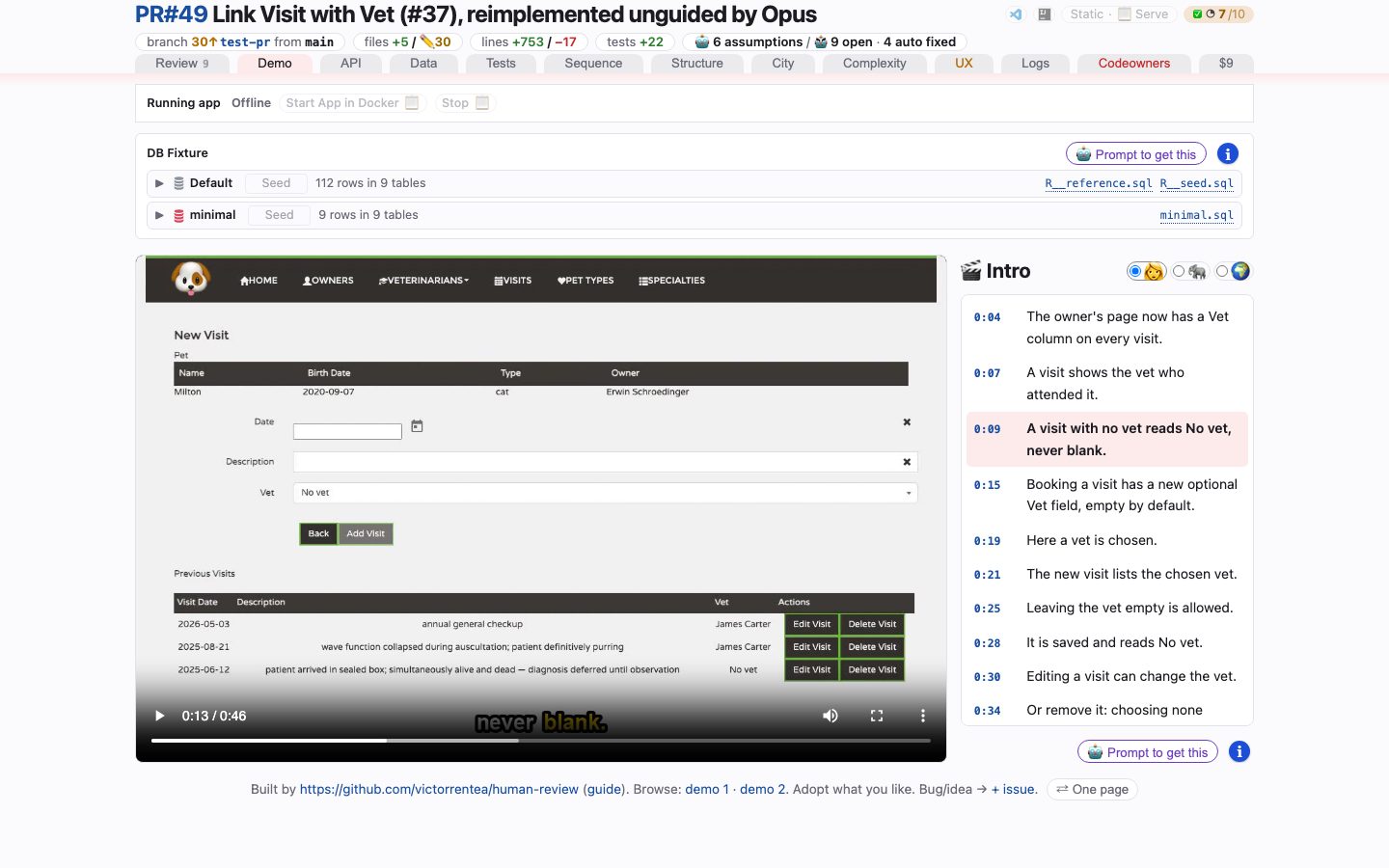
open it live — A Playwright recording of the feature working, narrated, with every caption a timestamp you can jump to.
API
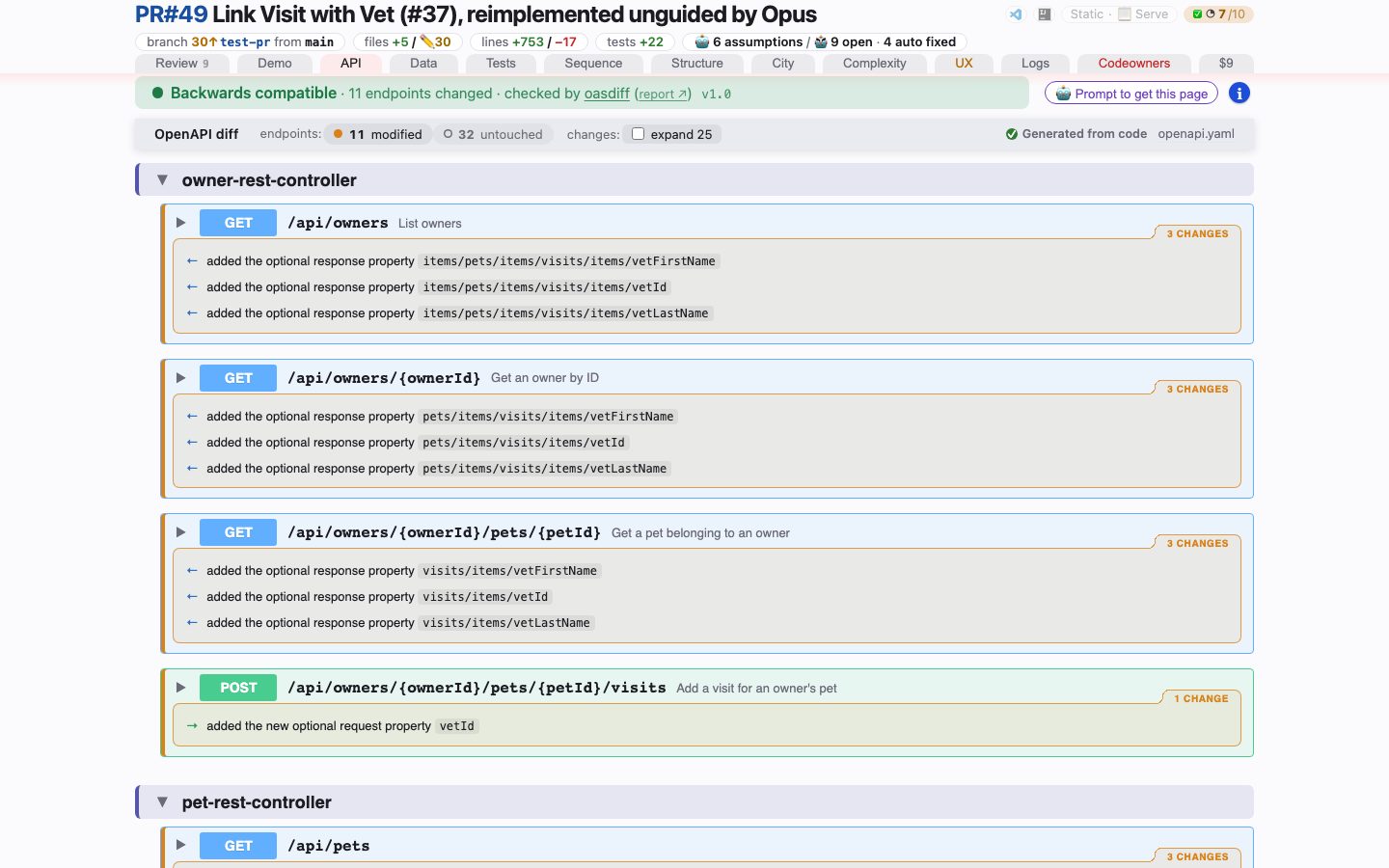
open it live — Every REST operation and schema the branch moved, each classified breaking / additive / changed / cosmetic — and a verdict from an independent differ on top.
Data
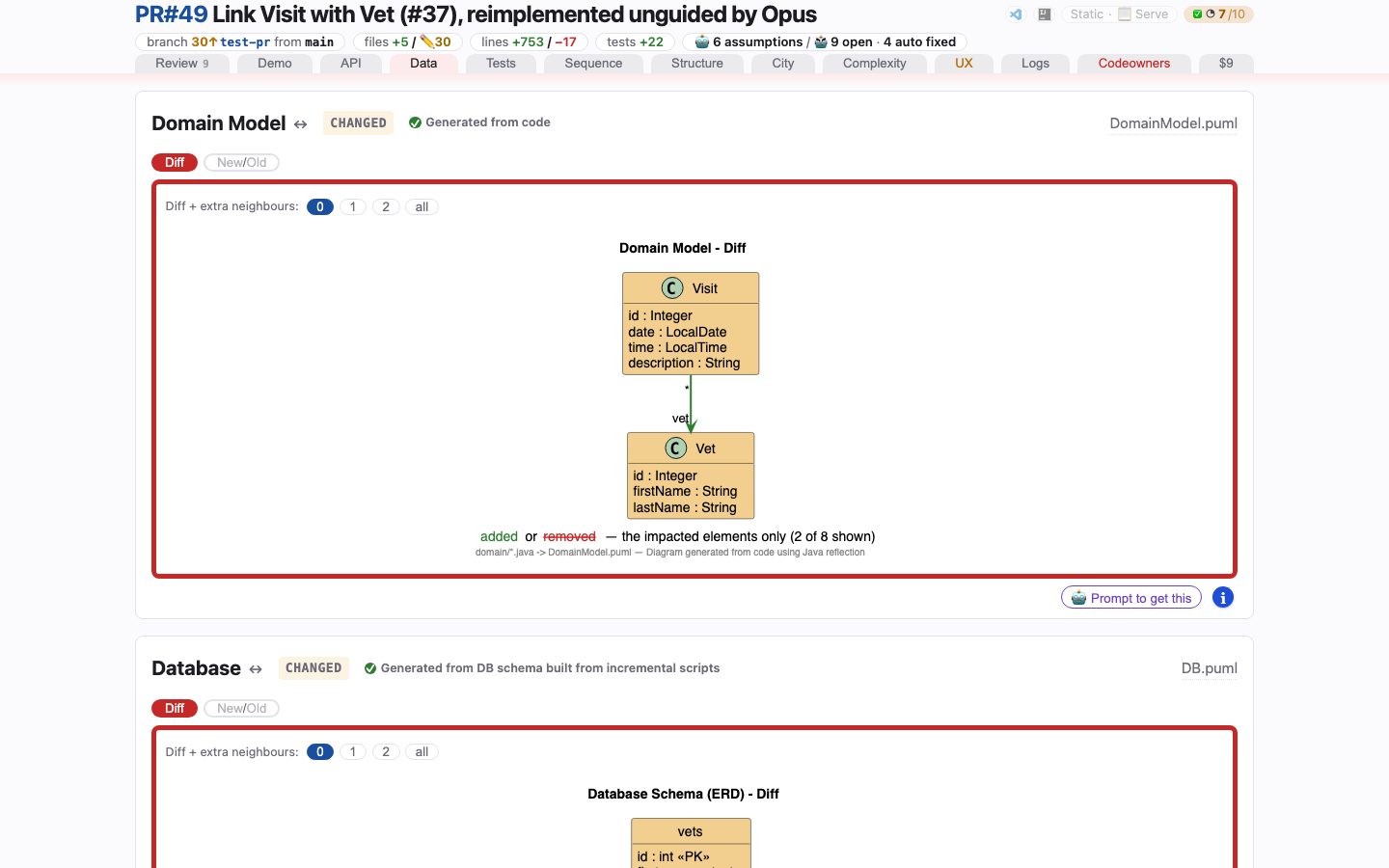
open it live — The database and domain-model deltas — added in green, removed in red and struck — trimmed to what changed.
Tests
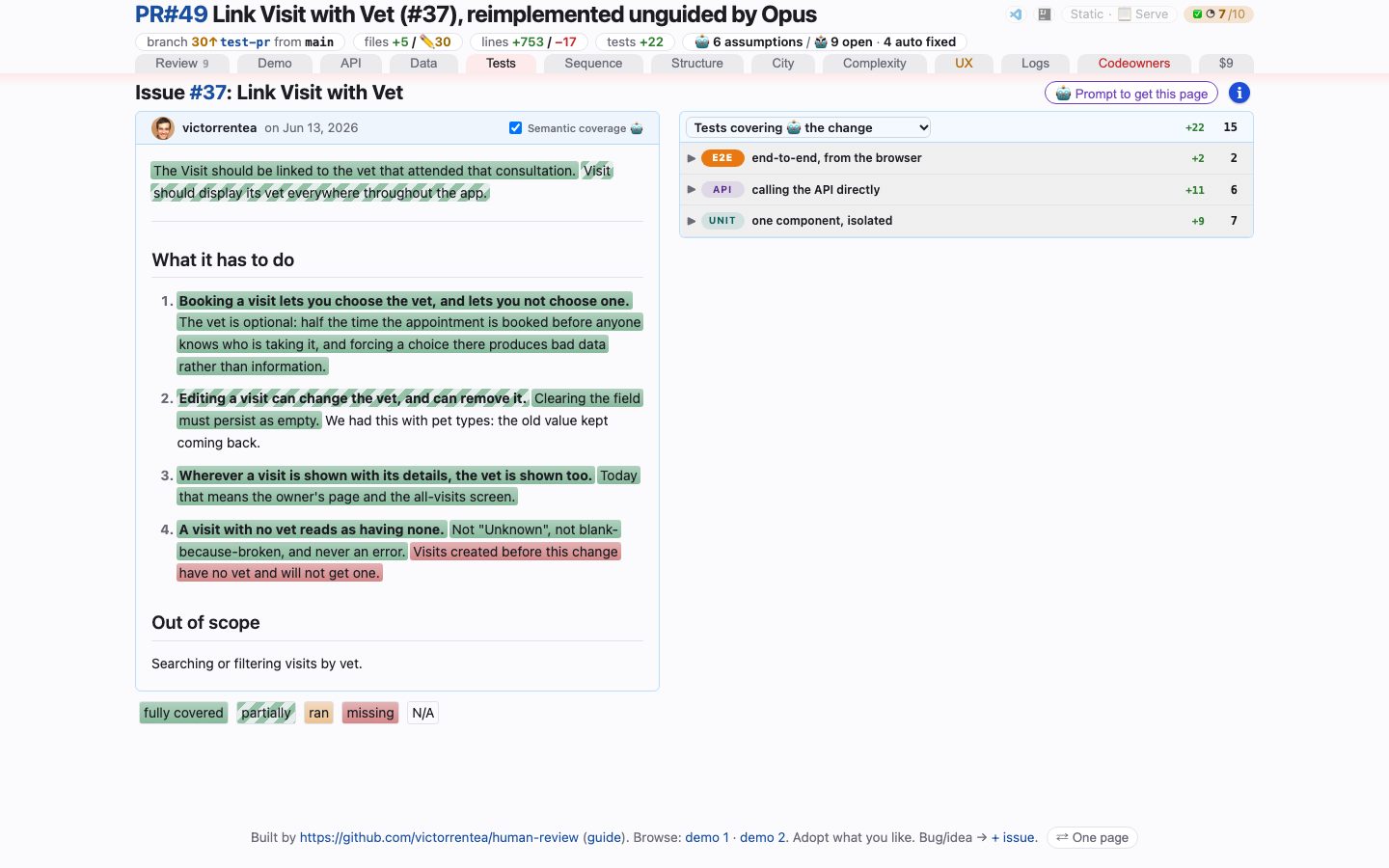
open it live — What the change set was supposed to do, the tests that pin each sentence of it, and what the branch did to the test run — including the tests it stopped running without deleting.
Sequence
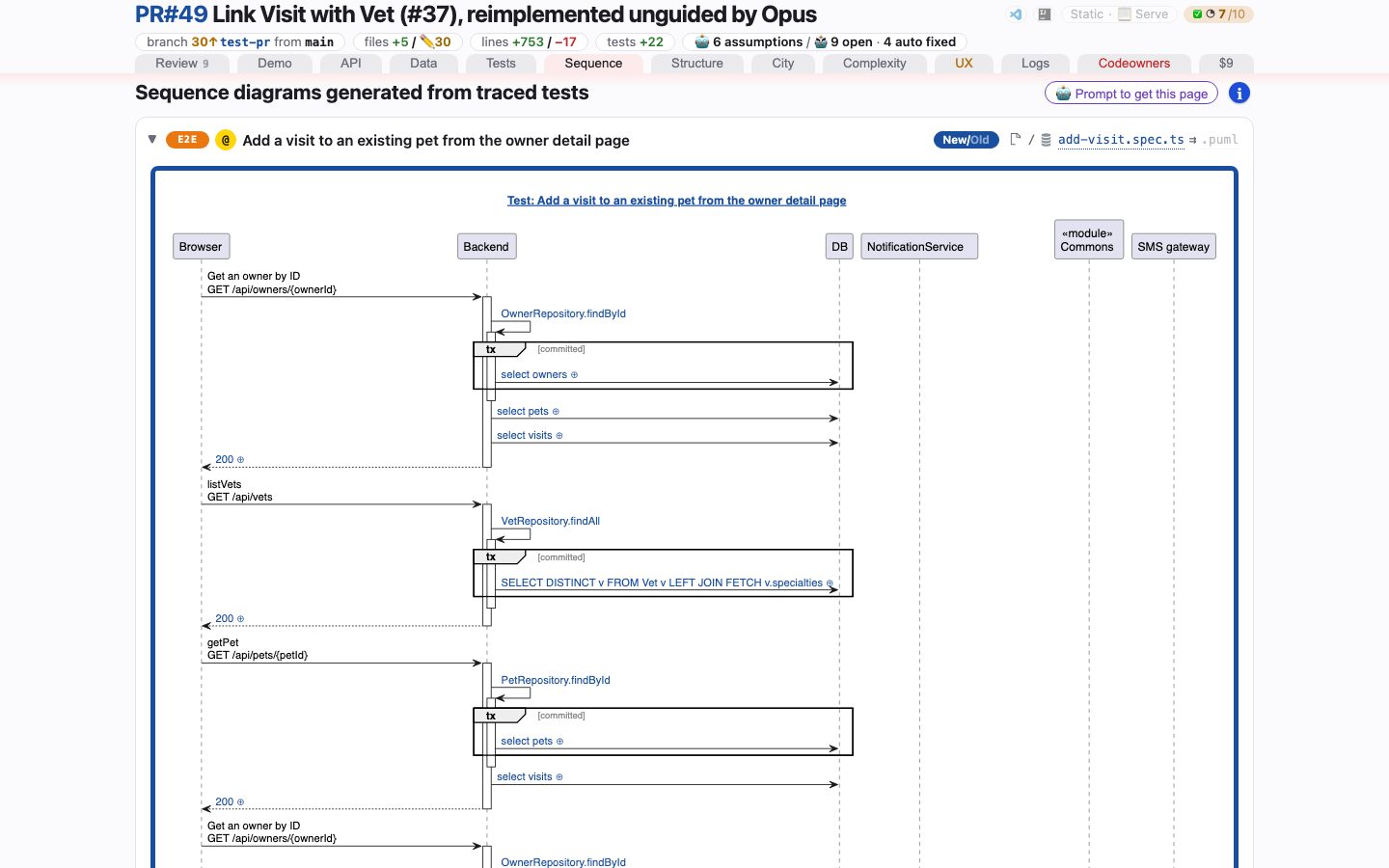
open it live — Sequence diagrams recorded from real traces of real test runs, each beside the test that produced it — and the tests tagged for tracing that came back without one.
Structure
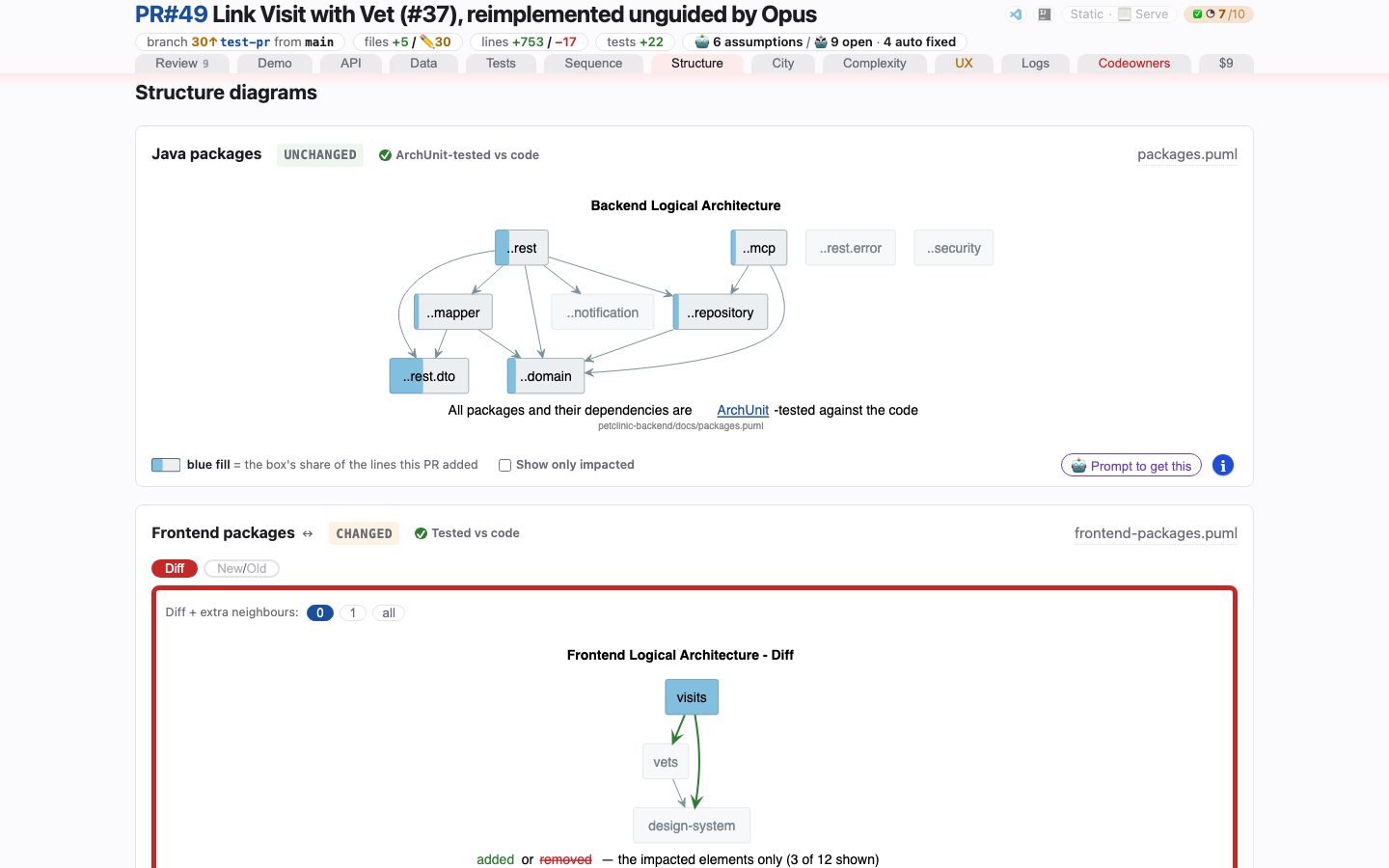
open it live — The package and container delta — or, when nothing moved, the current diagrams as context, marked unchanged.
Code City
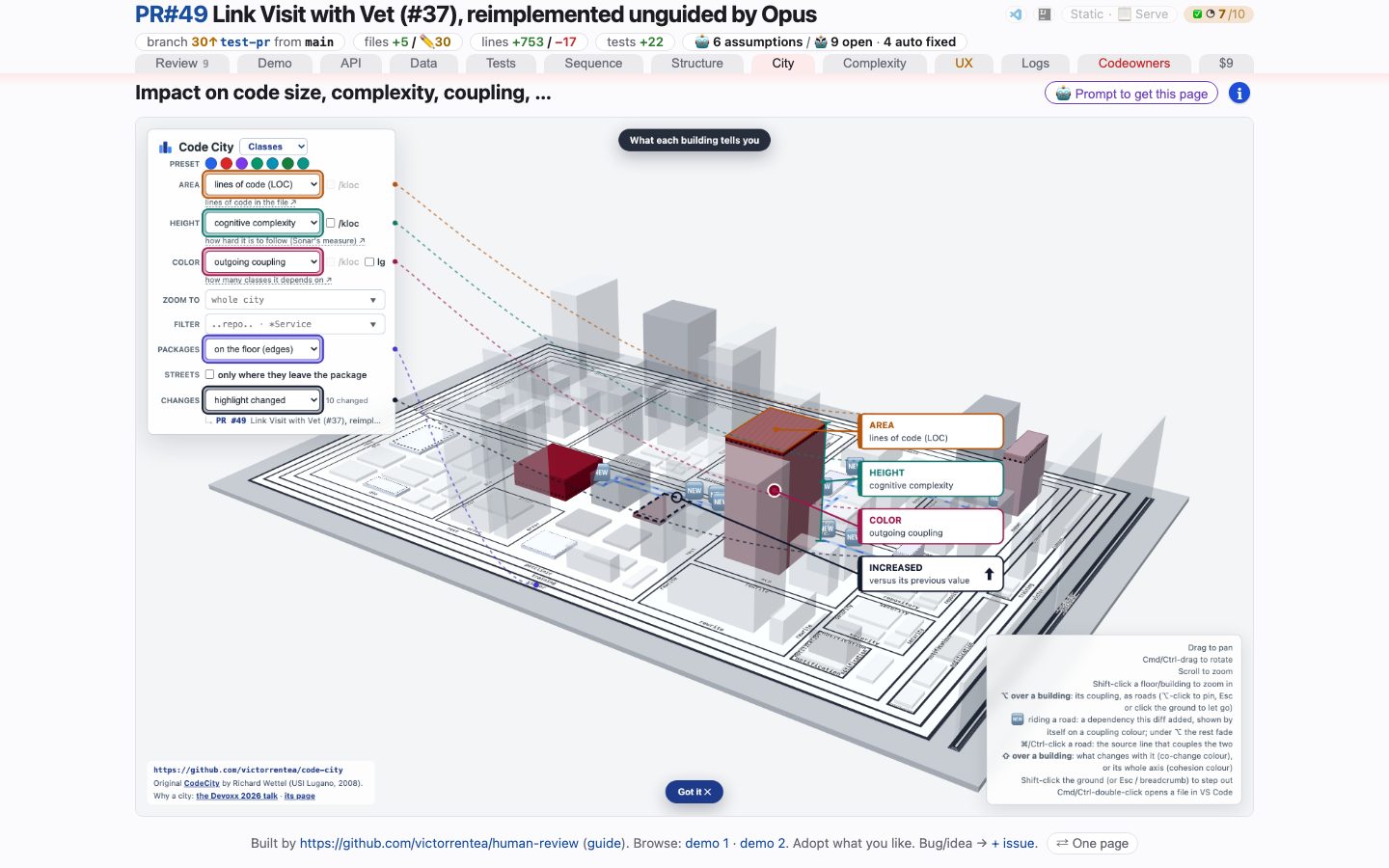
open it live — The change lit up in a 3D Code City: every class a building, sized by lines of code, raised by complexity, coloured by churn.
Complexity
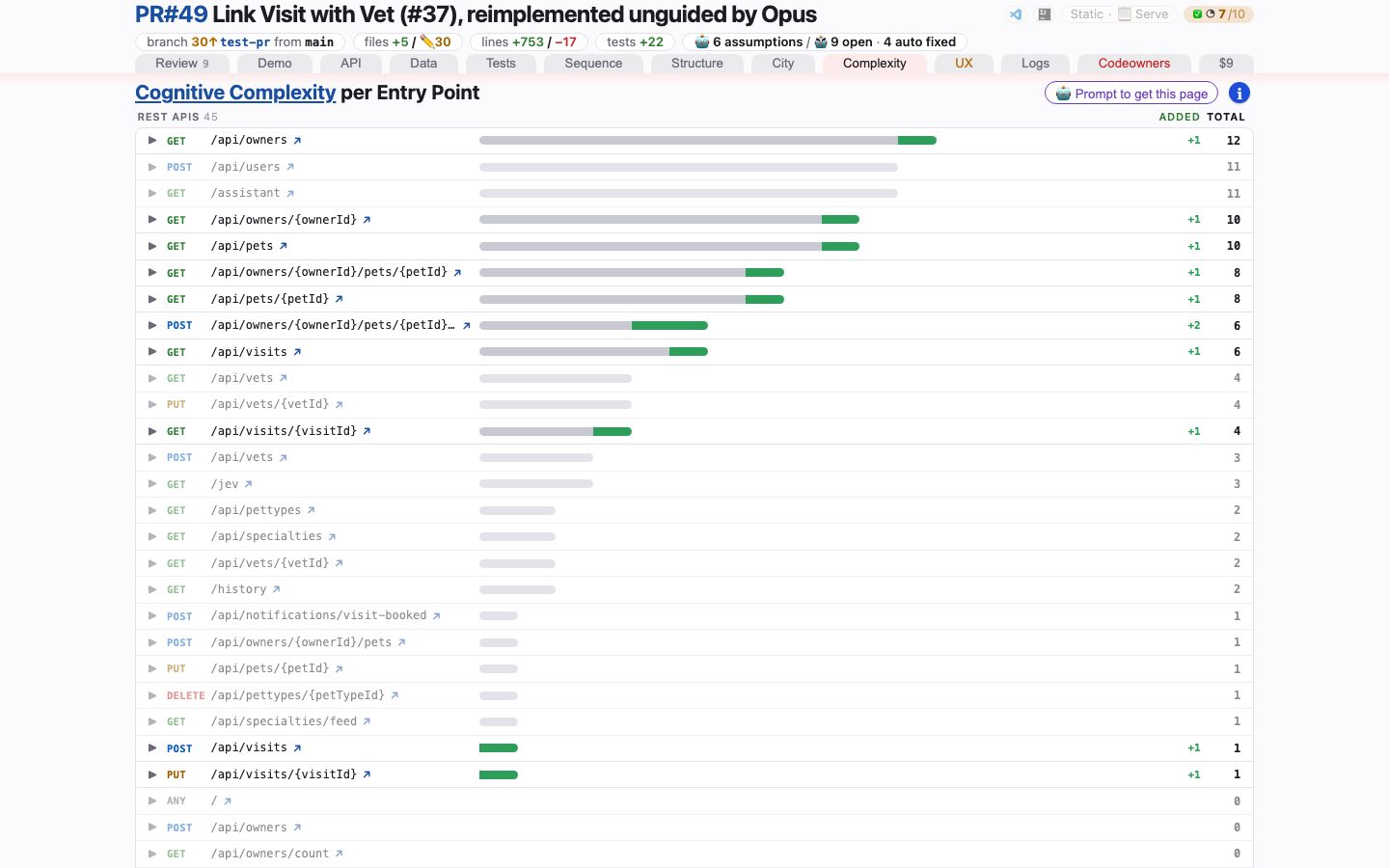
open it live — The before → after of every entry point: cognitive complexity of the whole flow behind each REST endpoint, and what this branch added to it.
UX
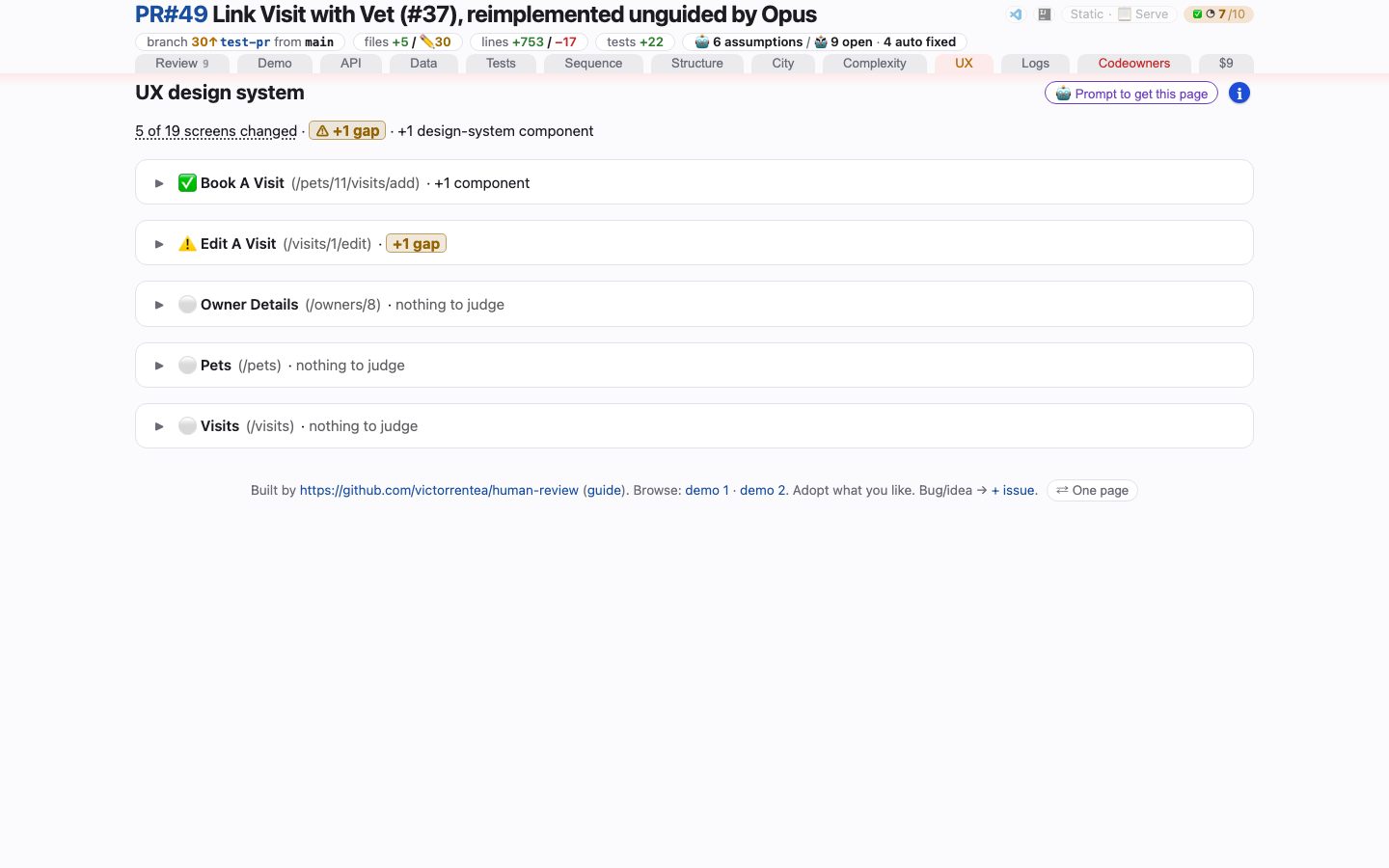
open it live — Native controls sitting where a design-system component belongs — a finding made of an absence, which a passing Playwright suite cannot produce.
Logging
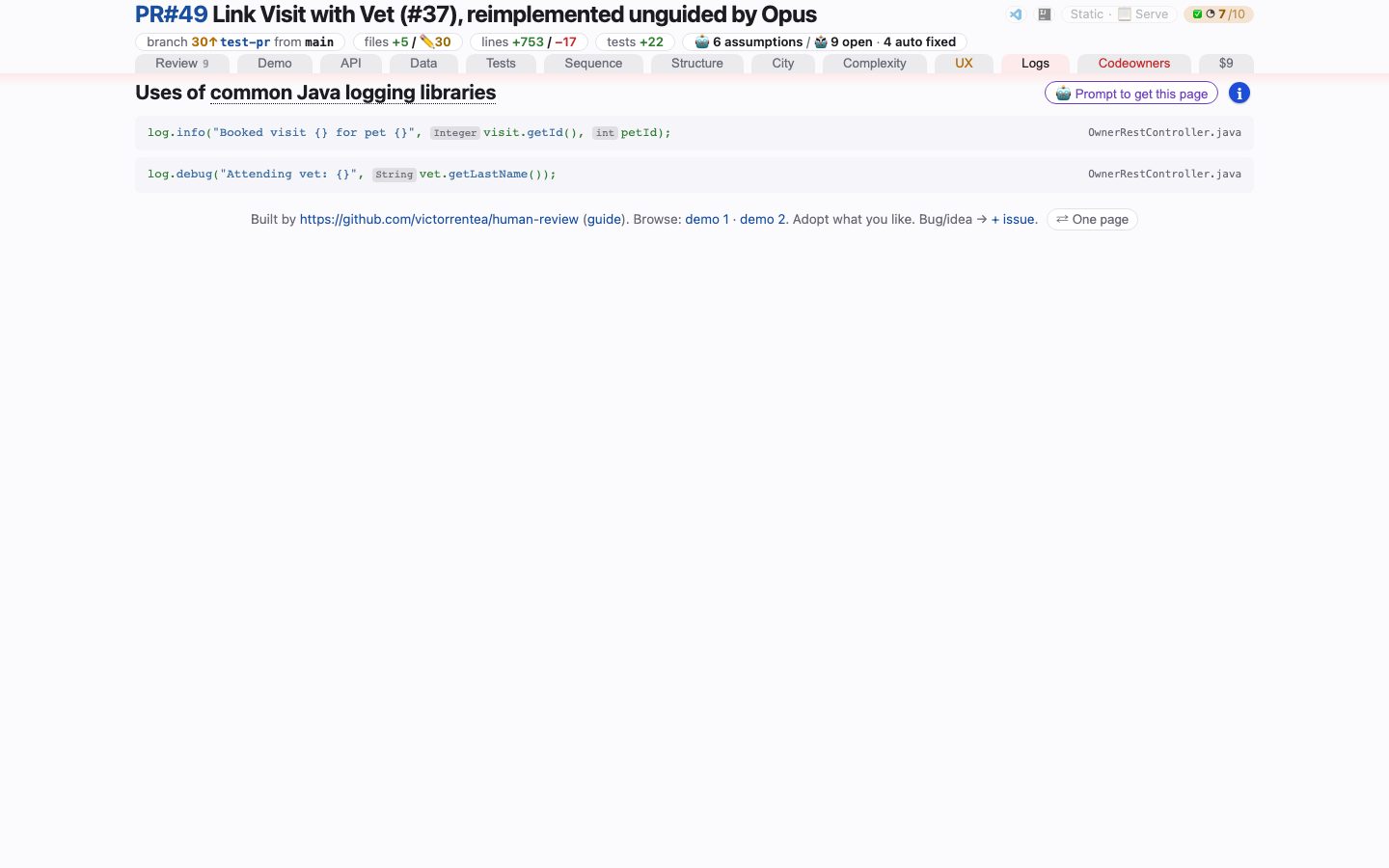
open it live — What the change set will say for itself in production — every logging statement it adds or changes, found by syntax, not by grep, and whether a value it logs is personal data.
CODEOWNERS
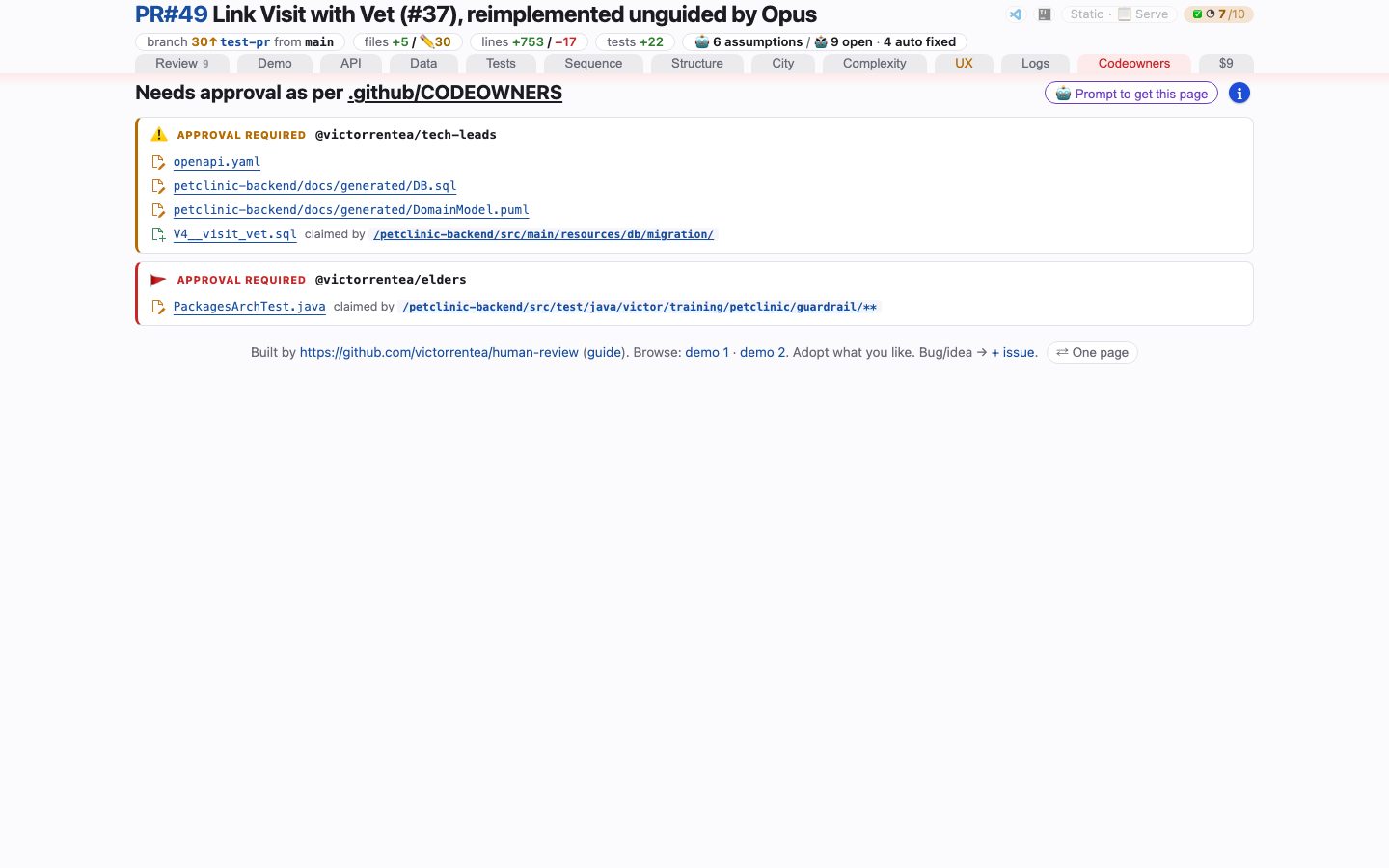
open it live — Who has to approve this, and whether the merge is blocked — asked of your CODEOWNERS file at review time, not at merge time.
Cost
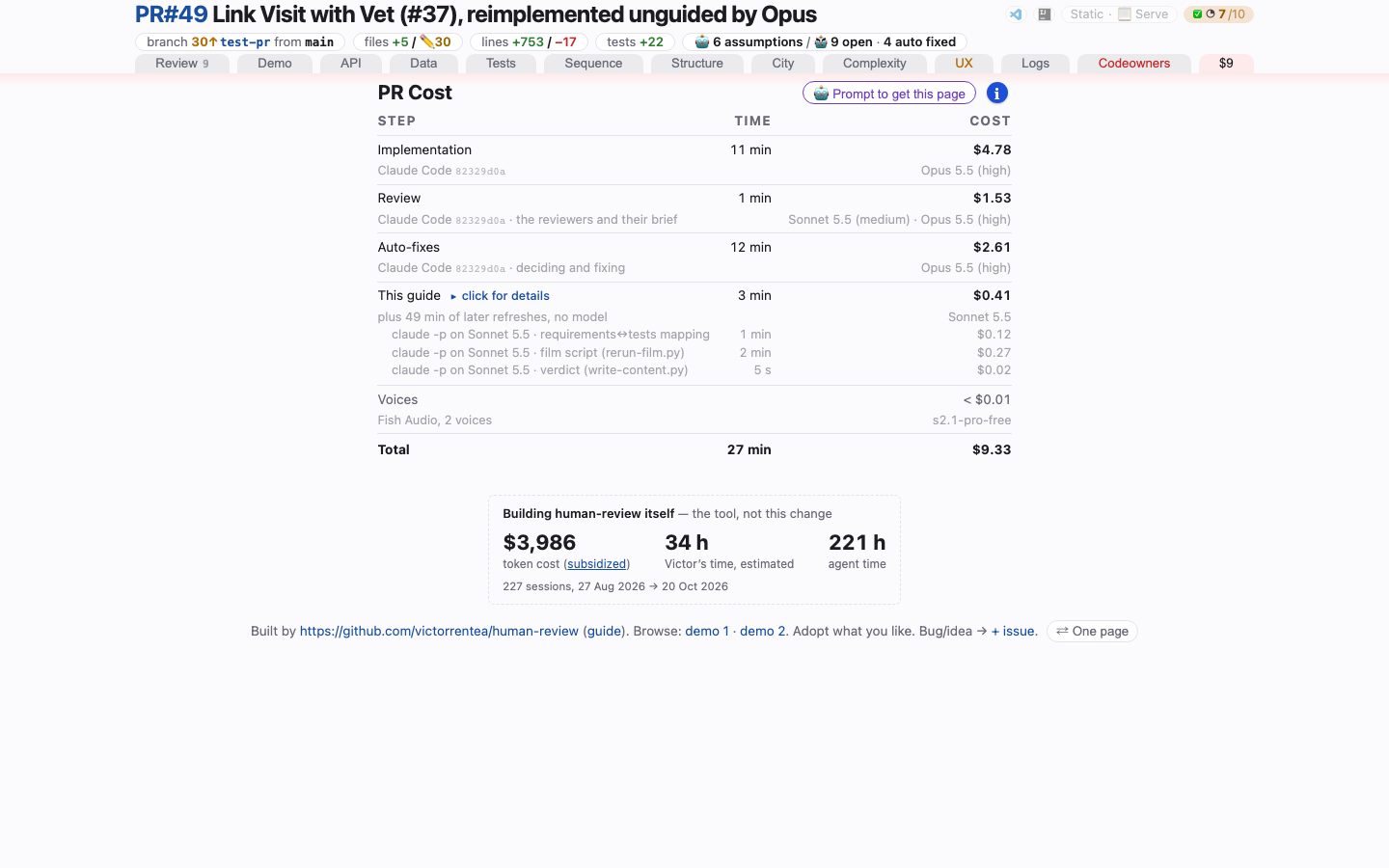
open it live — What this change cost to write and to review, at list price — every turn priced from the transcripts that recorded it, per phase and per tab. The tab is named after the total.
Install
Fork it first, and install from your own fork:
gh repo fork victorrentea/human-review --clone=false # or the Fork button on GitHub
/plugin marketplace add <your-github-user>/human-review
/plugin install human-review@human-review
human-review@human-review is the plugin name and the marketplace name, both declared
inside the repository — they stay human-review in your fork, whoever owns it.
The detour is worth one paragraph. Adding a marketplace tells Claude Code to run whatever that repository holds, and to keep doing so as the repository changes; this plugin drives a browser, a database and a Maven build, and reads your working tree, so that is a wide standing grant to hand to a branch someone else can push to. Nothing here is specific to this repo — it is simply how plugin marketplaces work, and it is the reason to point Claude Code at a copy whose contents change only when you change them.
The trade is that fixes made upstream no longer arrive on their own. Pull them when you want them:
gh repo sync <your-github-user>/human-review --source victorrentea/human-review
/plugin marketplace update human-review
The VS Code extension
Every code reference on the page is a click into your editor. Without help, that click goes
to whichever VS Code window was active last — with two checkouts of one project open, often
the wrong one, showing the right path with the wrong content. The Human Review extension
in vscode-extension/ is the editor's end of the page: the click lands
in the window that has the reviewed checkout, only when its file is the reviewed version, as
a highlighted range, a before/after diff, or the PR comment thread on it. It also puts a
human-review item in the status bar that serves and opens the checkout's review.
The packaged extension is committed next to its source, so the repository is all you need:
code --install-extension vscode-extension/dist/human-review.vsix
Installed as a Claude Code plugin, the same file is in the plugin's own copy of this
repository (~/.claude/plugins/cache/human-review/…/vscode-extension/dist/), or download
it from
https://github.com/victorrentea/human-review/raw/main/vscode-extension/dist/human-review.vsix.
Once published, it is also on the Marketplace as victorrentea.human-review.
There are two commands, and they are the two ends of one flow. Implement the change however you like — then, in the same conversation that wrote it (Claude Code, or Copilot Chat in VS Code):
/record-review # review it adversarially, write down what you decided
and then, in the same repository, when you want the page:
/human-review              # uncommitted work
/human-review origin/main  # this branch vs a base
/human-review 123          # a pull request
Two commands: one decides, the other writes it up
This is the one thing worth knowing before installing it. The judgement is produced by
the agent that wrote the code, and committed to the branch. /human-review reads it and
never forms one of its own.
/record-review runs after the implementation, in the conversation that did it. It commits
the implementation if it is not committed yet, runs an adversarial review over it —
/code-review high in Claude Code, four read-only reviewer subagents elsewhere —
deliberately without --fix, because applying findings automatically destroys
the only information this flow exists to keep — and then writes review-points.md at
the repository root:
| pile | what goes in it |
|---|---|
| Fixed | what it repaired because the review was right, with the reviewer that raised it and a diff of the fix |
| Declined | what it read and said no to, with the reason. An empty Declined section after a five-agent review is not credible |
| Assumptions | which reading of an ambiguous ticket it chose, and — under alternative: — the reading it did not take. This is the only pile nobody else can write, because it is not in the diff |
It commits that file with the fixes, so the record arrives in the pull request's own
file list: a reviewer sees the artifact land in the diff rather than taking a generated
page's word for it. Both commits carry trailers (Review-Points:, Implements:,
Claude-Session:) rather than a message convention, because trailers survive a rebase, a
cherry-pick and a squash, which is what happens to a branch between the run and the page.
/human-review then parses it and fills the Review tab's three piles from it, with no
model call at all. Two consequences worth stating:
- an accept/decline decision only exists where it was made. A review pass run later, by an agent that did not write the code, produces findings with no decision attached — which is exactly the column a reviewer reads first. So the page never runs one.
- a branch with no
review-points.mdsays so. The tab opens with a band reading nothing records what was reviewed or declined, the piles read not recorded, and the assumptions pile says the coder could not be asked. It must never read as "nothing outstanding — the automated passes came back clean", which is true of a clean review and confidently false about a missing record. Those are the two states a reviewer most needs told apart.
# what the branch records about its own review, without building anything
"$SKILL"/scripts/review-points.py --check

# which commit is the implementation, which is the review, and what came after
"$SKILL"/scripts/review-commits.py --base origin/main
Review passes are still found, and still priced: review-passes.py locates the
/code-review forks in the coding session and the cost tab bills them as their own phase.
Detection is exact rather than inferred — a slash command is a recorded <command-name>
row in the transcript, and a forked pass is a subagent whose metadata names its type and
model. What changed is that it is a cost source and no longer a gate.
What changed after the agent stopped
Every number on the page is measured from a diff, and a diff cannot say when it was written. So the page can be accurate about a change set and misleading about the review it claims to be: the findings, the declined items, the assumptions, the film and the costs all describe the branch as the agent left it.
The Review tab therefore opens with what landed after the review commit, folded to one
line — how many commits, how many lines — that opens onto each commit's sha, subject and
files, read from git log. Nothing on it is a button to undo them: what to do about a
commit is the developer's call, made on the command line. It is red
when a file no generator owns has moved and grey when every path in the range is
generated, which is what "generated": [globs] in human-review.json is for: on a
repository whose hooks regenerate diagrams and a spec on every commit, a band that does not
split is red on every branch, and a red band that is always on is one nobody reads.
No green build, no review
Before anything else runs, the skill pushes the branch and waits for CI. A review of a tree nobody has proved compiles is the exact failure the whole page exists to prevent: a confident-looking guide, every number on it measured from a working copy of unknown status. The wait binds to the commit SHA that was just pushed, never to "the latest run on the branch" — a branch almost always has some green run on it, and that is the easy way to end up reviewing one commit while quoting another's build.
Three outcomes:
- green for that SHA → the review proceeds, and the guide records what it was measured against.
- red, cancelled, timed out — or no run for that commit at all → it stops, and names the workflow and job. An empty run list is a stop, not a pass: absence of a build is not evidence of a passing one, and it is the state that looks quietest while proving least.
- a repository with no CI configured at all → it continues rather than blocking forever, and the guide says "no build proved this" on its face, so the page never reads as a pass it did not earn.
Nothing the page produces is part of the gate, because the page changes no code. It used to apply the non-disputable half of its own findings and leave them uncommitted for you to inspect; the triage now happens in the coding session and is recorded there, so what gets pushed and gated is the branch and only the branch. An edit made while writing the page would land after the review commit — and would show up on the page itself, in red, in the band above.
What it builds
.human-review/review.html — a throwaway artifact, regenerated, never committed. A review
is not one argument read top to bottom but a dozen separate questions, answered in
whatever order the reviewer's doubt takes them, so the page is a strip of tabs.
Each tab has a screenshot, one line and a page of its own in the
tour above; the pictures are retaken every time the demo is
published, so they show the page as it is today.
Tabs are declared in the content file, so the layout is the guide's to choose: a tab with
nothing to show is dropped and named, a changed diagram no tab claimed warns at build time,
and show all (or printing) reveals every panel at once so ⌘F searches the lot.
Rerun, in the header
The page has two halves and only one of them is reproducible. The requirements↔tests
matrix, the per-test catalogue and the page's layout and ledes are written once, by a model,
when a human asks — a second pass over the same diff does not confirm the first, it replaces
it at full price. Everything else is the output of a program, the three Review piles
included: those are parsed from the branch's own review-points.md.
So on the served copy the masthead carries two buttons beside the served badge, one
per half.
Rerun is the free one, and the one to reach for. It runs refresh-report.py --steps static — the diagram deltas, the container view, the complexity increment, the REST
contract and its second opinion, the logging scan, code owners and the test manifest —
rebuilds the page, and reloads the tab you are on, in place, keeping its scroll. Not the
model's half. Not the feature film, which needs the application up and is a decision, not a
refresh. Not the traced suites either, whose commands are the project's own e2e run.
It is also incremental, which is what makes it a button rather than a coffee break. Each
producer declares what it reads — git pathspecs in the repository, the producer script
itself, and any artifact an earlier step wrote (STEP_INPUTS in run-steps.py) — and a step
whose fingerprint matches the one recorded beside its last successful run is skipped with
unchanged, N s saved in the status band under the header. The band says how many steps
re-ran and how many did not, so a fast rerun reads as a fast rerun instead of as a button
that did nothing. A press that changes nothing takes about five seconds where it used to
take a minute and a half; a press after editing one test re-runs the four steps that read
test sources and leaves the six that do not.
Most of that is not the producers. A step that runs stamps .steps.json, and the cost ledger
— by far the slowest thing in the build, because it reads every turn of the conversation that
wrote the branch — is cached on that file among others. One needless step therefore used to
cost the build another forty-five seconds, two programs away. A refresh no longer stamps
the ledger at all: its step windows would name a stretch of a later session in which none of
the reviewed conversation happened, so they could only dilute what the real ones say. The
review's own run still stamps, which is where the attribution comes from.
The fingerprint is taken from the inputs and never from a timestamp, so a hit means nothing
this answer depends on has moved. It is also refused when the step's own outputs are not
where it left them — a fresh review wipes .human-review/assets/, and a cache that only knew
about inputs would skip every step and leave the page naming evidence that had just been
deleted. From a terminal, refresh-report.py --steps static --force re-runs everything and
--timing prints what each step and each phase cost.
Rerun + AI is the same thing with the model's half in front of it: rerun-model.py
(claude -p --model sonnet over skills/human-review/reference/matrix-prompt.md) rewrites
assets/requirements-map.html and test-index/, and then the same static refresh runs with
--allow-model, so the build may also make the Logging tab's uncached privacy calls. It is
the only control on the page that spends money, and it is guarded
three times over, in this order: the price is in the hover before you click, the click opens
the page's own confirmation panel (not window.confirm — it cannot say the price in the
page's voice, cannot make the safe answer the default one, and is the dialog everyone has
been trained to dismiss unread), and the server refuses the verb outright unless
rerun-model.py is really beside it. The matrix being replaced is copied to
.human-review/.model-prev/ first, because this replaces a judgement rather than refreshing
one: the copy you were reading has to survive the click. content.json is not in it — the
layout and the ledes are a human's answer to what the page is for, and no button regenerates
those.
What it costs is measured, not asserted. The label read ~$5 on Sonnet for a long
time, and it was a number somebody typed once: three real runs on the demo page came in at
$4.00, $8.09 and $10.63, so a reader who budgeted for the label was out by a factor of
two in the direction that matters. rerun-model.py records every run in
.human-review/.model-runs.json — dot-prefixed like the manifest, because it is this
machine's spending and not a fact about the branch — taking the figure out of
claude -p --output-format json's own total_cost_usd. The server averages the last five
and hands it to the page on the probe: the hover says the average, the confirmation panel
says the average and what the last one really cost, because an average is what you budget
with and the last invoice is what makes you believe it. With no ledger yet the label is a
range, ~$5–$10, because a number with nothing behind it is a promise.
Two buttons rather than one with a modifier, because the difference between them is not a degree of thoroughness: one is free and reproducible, the other buys a judgement. A single Rerun that sometimes called a model would make every press a question about what it was about to do; two buttons make the answer the label.
They appear only where there is a server behind the page: read off disk, out of the zip or
off GitHub Pages there is nothing to run them, so there is no button — and each one is
raised by the probe's own answer for its verb (rerun, rerunAi), so a skill directory
without the model step offers the free one and not the paid one. One rerun goes at a time,
across both — they share a single lock, because the paid one ends in a refresh-report.py
of its own and two refreshes over one directory collide whichever button started them. A
second click on Rerun joins the run in flight rather than starting another, and the
answer says joined: true, so the page can tell a press that started something from a
press that was handed somebody else's run. Rerun + AI is never joined. With anything
running it answers 409 and names the run — a paid run started at 14:05 is still going;
wait for it, then decide — and the page shows that in the confirmation panel instead of
starting. A silent join was the old behaviour and it cost eight dollars: a press was joined
to a paid run somebody else had started an hour earlier, over a working tree that had moved
since, and the only way out was to press again and pay again. GET /__run_status__ with no
run answers the question that made it possible — is anything running here at all — with
{active, kind, started, joined}. The button
carries a spinner while it works, and a rebuild that failed puts the program's last lines in
a red band under the header instead of leaving you to go and look.
A running command says what it is doing
Every control the page can run ends in a rebuild, and a rebuild is seconds during which a
page that said nothing was indistinguishable from a page that had ignored the click. The
blocks that offer a command carry a status line under them: hidden until something
starts, then the command's own last line, polled from /__run_status__ — what is actually
happening rather than a script's guess at which stage it has reached — and a ✓ before the
reload. Every offer in the same block goes down together while one of them runs, because
they run one command over one working tree. The reload keeps the tab (it is in
location.hash) and the scroll (HR.keepPlace, the same place-keeper the masthead's Rerun
uses), so pressing a button three screens into the fifth tab does not land you at the top
of the first.
It also got quicker. Re-rendering a diagram takes three seconds; the rebuild behind it took
forty-five, of which forty were the cost ledger — review-cost.py reading every turn of
a conversation that wrote a feature over two days, again, on a page whose bill had not
moved. It is cached now on its inputs (the session id, the byte length and mtime of its
transcript and every subagent's, .steps.json, the base, the tab list, and
review-cost.py itself), never on a timestamp: anything moves and the number is recomputed;
nothing moves and it cannot have changed. A rebuild is about five seconds. The diagram
commands also pass --no-model now, because a click under a picture is a request to pick
the picture up and not to buy a privacy verdict.
Commands: text + one glyph
Every control on this page that is a shell command underneath is one button: the words of the action, and one mark after them. Which mark it is depends on what this copy of the report can honour, and it is the answer rather than an option beside it.
753f724c  Let the review run start the stack its film is recorded against   2026-09-17

served    [ Regenerate the report ▶ ]     off disk   [ Regenerate the report 📋 ]
It was a grey pill and, next to it, a separate glyph — two elements for one action, so a
reader who pressed one had no way to know the other did the same thing, and a served page
drew the clipboard and the run mark side by side and asked a question it already knew the
answer to. The mark went through ↻ on the way here and lost it: the circular arrow is the
masthead's badge, where it means this page can rebuild itself, and on a row of actions it
said "rerun" over three verbs (Start, Stop, Where) that are not reruns of anything. The
play triangle is drawn in the page's action accent, which is the colour everything
pressable here already wears.
The command itself is not printed. The first version put it in a parenthesis beside the offer, which was the right instinct and the wrong artifact: a review page is prose and pictures, and a two-hundred-character absolute path in the middle of a sentence is a wall the eye has to climb on every read — charged to all ten readers for the benefit of the one who wanted to paste it. The line lives in the clipboard's hover, which is where that reader looks and nowhere else.
What a click does differs by what the copy of the report can honour, and the words and the mark are the same target, so it does not matter which one is pressed:
- Served, the button wears a play (▶) and a click runs the command through the review server — the spinner in the mark, the status line under the row, the reload. Its hover is one short sentence naming the action and where it runs, because everything else about it is legible from the label.
- Off disk (
file://, the zip, GitHub Pages), it wears a clipboard (📋), hovers Copy command to paste in terminal with the line under it, and a click copies, with a copied toast. That is the one thing that copy of the report can do with the command, so it is what the click does — a control whose whole answer is a sentence explaining why it did nothing is a control readers learn to stop pressing.
One renderer does all of it (command_html in hrbuild/shared/commands.py), and the places
it reaches are the aftermath band's Regenerate the report, the Demo tab's Deployed
app row (Start, Stop, Where — each with its own mark, since none of them is a rerun), and
the two offers under every hand-drawn diagram, Update the report and Revert the
diagram. Both faces are in the markup of every copy and the probe raises exactly one, so
the page never has to be built twice. The clipboard itself is one function too, on
window.HR, with the document.execCommand fallback a file:// page needs.
One string, two surfaces
The line you copy off disk is byte for byte the line the server runs when the same button is pressed on a served page. That is a property of where the command lives, not of anybody remembering to keep two copies in step:
- the register (
.human-review/.actions.json, written by the build out ofhrbuild/shared/actions.py) holds each command once, as a line a reader could paste: absolute interpreter, absolute program,cd <repo> &&in front; command_htmllooks the command up by its action id and embeds those exact bytes indata-cmd, indata-copyand in the hover — it never prints the string its caller handed it when the register has one;serve-review.pyruns the command out of the register, throughsh -c, and reconstructs nothing.
It was not always so. The masthead's Rerun was assembled inside the server as an argv
(python refresh-report.py --dir … --steps static --no-serve) while the aftermath band
printed its own line for the clipboard (cd <repo> && refresh-report.py --dir … --steps static) — same intent, two authors, and they had already drifted by an interpreter and a
flag, so pasting the line did something other than pressing the button. Both reruns are
declared by the build now, --no-serve included, because that is what the press does and a
copy that left it out would start a second review server on the reader's machine.
Being in the register is about where the command lives, not about how it is reached:
__rerun__ and __rerun_ai__ keep their own endpoints, with the shared lock, the watcher
hold and the confirmation in front of the paid one, and /__run__ refuses them outright.
Two guardrails hold the property: test_command_html.py walks every command on a built page
and asserts each data-cmd is exactly the register's entry for that id, and
test_action_server.py asserts the handler runs that string literally.
Nothing about any of this widens what the server will run. The page still sends an id; the command behind it is in the register, written by the build. Showing a command to a reader and accepting one from the page are different things, and it is the second that was never on offer.
What it needs
The skill drives tools that belong to your project, and degrades rather than fails when one is absent: a tab with nothing to show is dropped, and named under the strip.
Hard requirements — nothing runs without these:
python3, with Pygments and Pillow — the page builder cannot render at all without themgit,plantuml, and theghCLI against a GitHub remote: the run opens by pushing the branch and waiting for CI to go green, and stops if it is not (a repository with no CI is let through, and the guide says no build proved it)
Everything else buys a tab, and its absence costs only that tab:
- A
review-points.mdat the repository root, written by/record-review— the Review tab's three piles. Without it the tab is still there and says so, which is the point; with it, nothing on that tab was written by the agent building the page - PyYAML plus a JVM or Docker — the API contract diff;
oasdiff(Homebrew) resolves$refs the fallback cannot, andopenapi-changes(pb33f) embeds a second opinion ast-grep— the Logging tab, the only way to telllog.info(x)fromMath.log(x)- Playwright, numpy and both branches served — the design-system audit
- Playwright with tracing on (
--trace on) and its HTML report — the recordings the Tests tab steps through; the viewer travels with them, so the page needs no network - ffmpeg and a TTF the captions can use — the feature video
- Diagrams to diff: any
.pumlyour project generates and commits, and a hand-drawn.drawio.pngif you keep one - Your project's own commands, named in a
human-review.jsonat its root: the traced test run, the Code City render, the filmable browser suite, the endpoint-complexity extractor, the OpenAPI spec, the screens the design-system audit visits, and"generated"— the globs for paths nobody types, which is what keeps the aftermath band red only for a human's edits. Copyskills/human-review/human-review.example.jsonto start. Nothing in the skill knows anything about your project, and a step this file does not describe is skipped and named on the page rather than failing the run
The PlantUML differs
skills/human-review/puml-diff/ diffs two versions of a diagram and renders the delta —
useful on its own, and not tied to this skill:
python3 puml_diff.py OLD.puml NEW.puml --out merged.puml           # class / ER / package
python3 puml_diff.py OLD.puml NEW.puml --focus 1                   # …trimmed to what changed
python3 seq_puml_diff.py OLD.puml NEW.puml --out merged.puml       # sequence
Two diagram families need two algorithms. A class diagram's meaning is a set of elements and relationships, where order carries nothing. A sequence diagram is the opposite: an ordered script of messages, where the same arrow twice is two different events.
Additions are drawn green, removals red and struck through — the page's own added/removed pair,
so a diagram and a code hunk beside it never mean two things by one colour. Both differs
print the legend in words under the picture — added
or removed — and title the delta as one:
title Domain Model renders as Domain Model - Diff, so a picture that escapes its
page still says it is a change rather than a snapshot, and still says which colour means
which.
--focus 0|1|2|3|all answers the problem every large diagram has — a two-line change
arrives as a wall you have to search the delta out of. It keeps what changed plus N relationships
outwards, so the same delta can be read at whatever radius makes it legible.
python3 -m pytest skills/human-review/puml-diff
The draw.io differ
skills/human-review/scripts/drawio-diff.py answers the same question for the one
diagram a human draws by hand — a .drawio.png, whose mxGraph XML rides along inside
the PNG:
./drawio-diff.py old.drawio.png new.drawio.png --out-dir assets --name conceptual
./drawio-diff.py --base origin/main --diagram docs/ConceptualModel.drawio.png \
                 --out-dir .human-review/assets --name conceptual
It compares by the identity each element declares in that XML — concept="Owner" on
a box, assoc="Owner-Pet" on a line, the mxCell id otherwise — and never by rendered
pixels. Nudging a box does not make it a different box, and neither does rewording the
label drawn on it, so a re-layout does not arrive as a page of phantom additions.
The same reading is what stops it miscounting. A caption, a title, a sticky note and the "Please manually fix the layout." marker are all drawn as vertices, but they are parsed as annotations, not as concepts — the distinction is data off the file, not a guess from the wording. Counting a sticky note as a box is how a review page ends up announcing a new domain class nobody added.
Two colours, and they must not be conflated: red is the diagram's own — the patch script paints an element red when it drew that element itself, and it stays red until a human lays it out by hand — while green is this tool's mark for what the branch adds, the same green every other delta in the report spends on added. An element that is both renders red, because the to-do is the louder fact; turn it black in draw.io and it goes green, because it is still new.
The to-do is also a link. Every annotation is anchored at drawio://<absolute path>, so
the reader told to re-lay the diagram out can open the real file in the draw.io desktop
app from the picture itself — draw.io registers no URL scheme of its own, so
install-drawio-url-handler.sh installs a shim that answers one. The red ones say so in
words, too: an underlined "Click here to open draw.io ↗" is appended to the note on the
way to the SVG, because a picture has no other way to show that something in it is
clickable. The title and the captions are anchored just as silently — they are not
asking the reader for anything.
Re-laying the map out by hand is what the red asks for, and it is also the one step on
the page with no way back — the layout is in the file, the file is in the repository, and
"let me see what the machine drew" otherwise means going and finding a revision by hand.
--redraw '<command>' closes that: half the line falls out of the flags this run already
has (git stash push -- <diagram>, then git checkout <base> -- <diagram>), the other half
is the repository's own patch script, and the report turns the chain into one button under
the picture — Revert the diagram. It is passed in and never guessed: a script that
rewrites a checked-in file is not something to derive from a naming convention and then give
a reader a button for.
There used to be two buttons there. Undo your edits walked back to the newest committed drawing and start over ran the script; two commands, two tooltips, and one question behind every press of either — give me back the diagram the machine makes. Only the second answers it: the first hands back a human's layout from an earlier commit, which is a different drawing and is not generated in any sense the reader meant. So the one that runs the generator stayed, named after what it gives back rather than after the gesture that gets you there, and it took the other's one good property with it — the stash, so the layout it replaces is banked rather than binned. It read Regenerate the diagram for a while, and the word was the problem: beside Update the report on the same row and Regenerate the report in the aftermath band, a third Regenerate made three controls sound like three doses of one thing. Revert is the question a reader is actually asking here, and the only word on that row that admits the layout goes away.
./drawio-diff.py --base origin/main --diagram docs/ConceptualModel.drawio.png \
                 --redraw 'python3 docs/scripts/conceptual-model-patch.py' \
                 --out-dir .human-review/assets --name conceptual
It writes three SVGs plus a machine-readable <name>-diff.json. Rendering goes through
the draw.io desktop app when it is installed, which is the only faithful picture;
without it, a built-in renderer walks the mxGeometry, which is enough for this class of
diagram. It needs nothing installed either way.
The OpenAPI contract differ
The API tab does not classify the contract itself. skills/human-review/scripts/openapi-compat.py
runs oasdiff over the spec at the review base and the
working tree, and the band reads its verdict as is — oasdiff breaking is every entry at
WARN or above — with the full changelog one click away:
python3 openapi-compat.py --base origin/main --panel --out verdict.html   # the one-line band
python3 openapi-compat.py before.yaml after.yaml --json                    # two files, no repo
oasdiff resolves $refs, so an operation is listed because of any schema it reaches, and it
knows the direction of each change: a looser maxLength breaks nobody on a request and every
strict reader on a response. Without oasdiff the script falls back to OpenAPITools/openapi-diff
and says on the band that its list is a lower bound.
Until October 2026 the skill also ran its own classifier, openapi-diff.py, as a second
opinion, and painted the band "Verdict disputed" whenever the two disagreed.
An eval on 121 spec pairs found it
missed 31 breaking changes oasdiff caught (every parameter change, every response-side
widening), raised 15 false alarms to oasdiff's 2, and caught 5 that oasdiff missed — the clear ones went upstream as oasdiff issues, the arguable
ones to a human, instead of staying a private patch. One differ, maintained by people
whose whole job it is, is the better second opinion.
It reads the contract, not the handler, so it cannot see a semantic break that leaves the
spec additive — a PUT that starts clearing a field it was not sent looks like "an
optional field appeared" to any structural differ.
The design-system audit
skills/human-review/scripts/ds-audit.py asks whether the frontend change actually used
the design system — and it is built around the fact that the defect is an absence.
Labelling the components that are right proves nothing. The bug is that somebody copied
an older template and shipped a bare <select> where the standardised combo belongs, and
it looks close enough that review slides straight past it. So the audit inverts the
question: know which roles the design system covers, then flag native controls filling
one of those roles that sit outside any DS component. Green is context; red is the
product.
./ds-audit.py --base-new http://localhost:4300 --base-old http://localhost:4301 \
              --screen "Book a visit=pets/11/visits/add" \
              --screen "Edit a visit=visits/1/edit" \
              --screen "Edit a pet=pets/11/edit" \
              --label-new my-branch --label-old main \
              --source ../frontend/src \
              --assets assets -o assets/ds-audit.html --json assets/ds-audit.json
Which screens? All of them. steps.dsaudit.screens in human-review.json is the
app's whole catalogue — every route, deep-linked to a seeded row — not the two screens
somebody guessed the branch touched. The audit shoots every one, draws a viewer only for
the screens whose DOM differs between the two builds, and names the rest in one line
under the verdict ("also audited, identical on both sides"). Which screens matter is
decided by the diff, never by hand. The one thing the diff cannot see is a changed screen
that is not in the catalogue, so run-steps.py follows every changed Angular component
in the diff to its route (one hop through the templates that embed an unrouted child) and
prints, in red at the top of the UX tab and in the run's notes, any route the catalogue
does not reach — "VisitEditComponent renders visits/:id/edit and no screen reaches it".
That is the exact failure this arrangement exists to rule out: a two-screen list that
covered "Book a visit" while the branch's own "Edit a visit" was never looked at.
The role registry is derived, not listed. A hand-written table of "roles the design
system covers" is wrong the day the second component lands and nobody remembers the file
exists, so it is read from four sources in descending authority — data-ds-covers where
the component author said it out loud, then the control a rendered DS host actually
wraps, then the same reading taken off a template for a component this screen does not
happen to render, and last a guess from the name, marked in the output as a guess.
Adding data-ds="datepicker" to a component needs no code here. The one thing the design
system has to do is mark its host with data-ds="<name>"; nothing depends on its class
names or its DOM shape.
The registry is built from both revisions at once and applied to both, which is what makes a migration read as an improvement and a straggler read as a gap. Several screens per run, because a migration touches one control per form: "it flagged the bare one" is a weak claim, "it flagged only the bare one, and called the other three right" is the one worth making.
The JSON is the artefact and the picture is its rendering — a reviewing agent reads
--json rather than OCR-ing a PNG. Needs Playwright (pip install playwright && playwright install chromium), Pillow and numpy, and both revisions served — the
branch at --base-new, the base at --base-old, two instances side by side.
The run starts both. steps.dsaudit.app is the same block steps.video.app is, and
"video" borrows it rather than repeating it; the step expands it twice, once with HEAD's
{sha}/{shortsha} and once with the merge-base's, reads each host port back out of
what its up printed, and brings both down in a finally — including when only one of
the two ever came up. The ports are ephemeral by design: that is exactly what lets two
builds of one repository be up at the same time.
This is the only step that needs both sides of a branch running at once, and for a year it
was the only step that never ran. base-new and base-old named :4300 and :4301 —
which is not a configuration, it is a promise about somebody else's machine. Nothing
started those builds, the prerequisite found nothing answering, the step was skipped on
every single run, and the UX tab arrived empty carrying a note that explained it was empty.
A project that genuinely does keep two builds served by hand still names the two origins
and gets the old behaviour: run-steps.py probes both before the browser is launched and
skips the step naming the URL that did not answer. Either way the script itself refuses in
one line, rather than a Playwright traceback, when run by hand against a port nobody is
listening on; --base-new/--base-old also default from $DS_AUDIT_BASE_NEW and
$DS_AUDIT_BASE_OLD, so whoever started the builds can export the addresses instead of
writing them down.
Publishing a snapshot to GitHub Pages
A review page is a throwaway artifact — but one frozen copy is worth keeping, so that
somebody can see what /human-review produces before installing anything. Anything under
demo/ in this repo is published to GitHub Pages:
https://victorrentea.github.io/human-review/
demo/index.html is a hand-written landing page listing the snapshots; each snapshot lives
in demo/<slug>/ and is a copy of a .human-review/ output directory — review.html,
content.json and assets/, bytes untouched. Two things are left behind: everything the
run keeps for itself, which it names with a leading dot (the step stamps, the ledger, the
privacy verdicts, the session id, the vendored .tools/), and *.raw.webm, the
un-narrated capture nothing on the page plays. .github/workflows/pages.yml
uploads the whole demo/ directory and deploys it on every push to main that touches
demo/** (or the workflow itself), and on workflow_dispatch.
demo/DEMO-PR-RECIPE.md records the retouches Victor made by hand on the
demo exhibit after the agent finished it, one per tab, so they
can be redone if the demo PR is ever reimplemented or re-reviewed.
To add one, /publish-demo from the reviewed project, once the run has finished. It is
one command and no judgement:
skills/human-review/scripts/publish-demo.sh [slug] [source-dir] [--card] [--push]
The slug defaults to the name of the project the snapshot belongs to — the source
directory's parent, the same rule publish-demo-shots.sh uses, so both publishers file a
change under one name — and the source defaults to .human-review. The target checkout
comes from HUMAN_REVIEW_REPO, defaulting to ~/workspace/human-review. It copies the
snapshot into demo/<slug>/, refuses any file over 50 MB, and without --push prints the
commit-and-push commands rather than running them.
--card writes that snapshot's card on the landing page, and writes it from the
snapshot: the headline numbers are the scope chips review.html itself draws, and the
title, subtitle and verdict are the ones content.json carries. That is not tidiness. The
card that stood there before this was written claimed ±33 files against a page that said
±38, because the page had been rebuilt and the card had not — a landing page whose numbers
are typed by hand is a landing page that lies within a week. Cards live between
<!-- live-snapshots:begin --> and <!-- live-snapshots:end -->, one <!-- snapshot:<slug> -->
block each, and only the block for the slug being published is rewritten. Anything outside
the markers is prose and is never touched.
Publishing the featured snapshot retakes the README's pictures. The snapshot the
README's <!-- featured-demo:begin slug=… --> marker names (demo) is the one every
screenshot in this repository shows, so publish-demo.sh with --card or --push hands it
to readme-tour.py: it serves demo/ over HTTP the way Pages does, clicks through every tab
in headless Chromium, saves one viewport per tab as demo/<slug>/tour/<panel>.jpg, and
rewrites every place that shows them — the hero and the tour
here, the picture at the top of each page under docs/tabs/, and the featured block at the
top of the Pages landing page, which is what makes https://victorrentea.github.io/human-review/
open on the demo. All of it is committed with the snapshot, so the README can never show an
older page than the one Pages serves. Only the text between the generated markers moves:
each tab's one-line summary lives in its own docs/tabs/*.md (the > line) and the README
table is assembled from those. Any other slug leaves the pictures alone; --feature makes
the slug being published the featured one, and --no-tour publishes without the pictures.
To refresh the text around the pictures after editing a tab page, without reshooting:
skills/human-review/scripts/readme-tour.py --no-shoot
One thing the card generator has to do, and anything hand-writing a card has to do too:
strip links out of the subtitle. A card is itself an <a>, an <a> inside an <a> does
not nest, and the parser closes the card at the inner link and re-parents the rest — which
is how the screenshot gallery's four stats spent a while rendering outside their own card.
One caveat. Every code reference in a review page is a vscode://file/... deep link
holding an absolute path on the machine that generated it. Those links open nothing on a
stranger's machine. Diagrams, video, complexity and snippets are self-contained and work
anywhere, so a published snapshot is a faithful tour of everything except the click-into-
your-editor part.
Downloading a snapshot as a zip
Clicking through a snapshot on Pages needs a browser and a connection. Keeping one needs a file, so every snapshot is also published as a zip attached to a rolling release:
https://github.com/victorrentea/human-review/releases/tag/demo
The download URL is fixed and quotable — .../releases/download/demo/human-review-<slug>.zip
— and its contents track the last push to main. Unzip it and open review.html: the
diagrams, the feature video, the complexity report, the snippets and the live 3D Code City
behind the skyline picture are all inside the folder, so it reads off disk with no server.
The caveat above is the only thing that does not travel — plus the city itself, which pulls
three.js and d3 from a CDN and so is the one click that wants a connection.
.github/workflows/demo-zip.yml does it, on every push to main — no path filter, so the
release notes always name the commit the download is standing on rather than the last one
that happened to touch demo/.
Nothing is uploaded from the authoring machine and nothing is regenerated in the cloud — the
snapshots are committed verbatim, so the checkout already holds everything the zip needs.
Before zipping, the job resolves every relative src/href in review.html against the
snapshot directory and annotates the run with any link that escapes it or names a file the
snapshot does not carry; that is a warning and not a failure, because a stale link is a
reason to fix the snapshot and never a reason to withhold the download. *.raw.webm — the
un-narrated capture, which nothing on the page plays — is dropped, and an OPEN-ME.txt
naming the source commit is added.
Running a snapshot from a container image
A zip opened off disk is not quite the page /human-review produces. Under file:// a
review cannot reliably fetch its own content.json, every request it makes is a
cross-origin one, and its capability probe fails in a way the page is written to survive
rather than in the way a served page answers it. So every snapshot is also published as a
container image, and running one is the only way to stand in front of exactly the page
being demoed without cloning anything:
docker run --rm -p 8642:80 ghcr.io/victorrentea/human-review:demo
# then open http://localhost:8642
The host port is 8642 rather than 8080 for one reason: a demo machine usually already has something on 8080, and a port already taken is a terrible first second of a demo. Nginx listens on 80 inside the container, so the left-hand number is yours to change.
Untagged — ghcr.io/victorrentea/human-review — you get demo/ itself, the landing page
listing every snapshot, which is the same thing Pages serves at its root. Beside each
readable tag sits an immutable <slug>-<sha7>, so a snapshot shown at a course can be
pulled back byte-for-byte after the demo has been regenerated. The package is public, so
none of this needs a login.
Both are in every page's footer, and that is the whole of the footer beside the address
the page came from: Report built by <repo> on <date>. Browse it online or run it locally. Then adapt it to your liking. Two links and almost no prose between them — a reader at the foot of a page is scanning
for a thing to take, so the links are the nouns (what arrives) rather than the verb
(Download here, which said nothing about what arrives and made them read on to find out).
The docker run line above is in the second one's hover, because a footer is a place to
send somebody, not a place to print a command they cannot run from a browser.
.github/workflows/demo-image.yml does it, on pushes to main that touch demo/** or
the two files that package it — .github/snapshot.Dockerfile, which copies one committed
directory into nginx:alpine, and .github/snapshot.nginx.conf, which names both
review.html and index.html as directory indexes so a full review and a screenshot
gallery are served by the same image definition. Unlike the zip job it is path-filtered:
the zip refuses a filter because its release notes name the commit the download stands on,
while an image is the snapshot bytes and nothing else, and rebuilding it on unrelated
pushes would only mint a fresh immutable tag per push.
Nothing is regenerated in the cloud: the workflow only packages what publish-demo.sh
already committed, so publishing a new snapshot and pushing it is the trigger. The gap
that leaves is the run you finished two minutes ago, which is in no image until it has
been staged and pushed — and which is usually the one you want to show. For that:
skills/human-review/scripts/serve-image.sh [source-dir] [--port N] [--tag NAME] [--build-only]
It points the same .github/snapshot.Dockerfile at a local .human-review/ (the default
source), stages it with the same two exclusions publish-demo.sh makes — the run's own
dot-prefixed bookkeeping, and *.raw.webm — builds, and starts the container, printing
the URL and the command to stop it. It reuses the packaging files rather than carrying its
own copy, because a local image that differs from the published one defeats the point of
serving the page at all; installed as a plugin, where .github/ is not shipped, it wants
HUMAN_REVIEW_REPO pointed at the checkout.
Two things still 404 and are meant to. The root-relative deep links into the reviewed
application — /owners/4 — have no application behind them here; the page's
app-environment bar is what rewrites those, and it cannot until the page loads. And
/__human_review__, the probe by which a page asks whether the live tool is serving it,
correctly answers "no". Both behave identically on Pages. The vscode://file/... caveat
above is unchanged: those hold absolute paths on the authoring machine.
Where the page is built: one module per tab
build-review-html.py was one file of ten and a half thousand lines: the Logging tab's
privacy prompts forty lines from the cost table, and the whole stylesheet in the middle of
both. It is now an orchestrator over a package next to it.
skills/human-review/scripts/
  build-review-html.py     the orchestrator: read the content file, validate it, render
                           each tab's blocks in order, assemble the document, write it
  hrbuild/
    tabs/                  one module per tab of the page
      review.py            findings, assumptions, applied fixes, the aftermath band
      sequence.py          a sequence diagram paired with the test that draws it
      tests.py             the test ledger, the requirement lists, the recordings
      demo.py              the feature film, its captions, its verdict
      city.py              the Code City shot
      logging.py           what the branch logs, and whether it is a privacy problem
      owners.py            the CODEOWNERS verdict
      cost.py              what the run spent — per pass, per phase, per tab
    shared/                what two or more tabs need: snippets and diffs, the diagram
                           gallery, the commands the page offers, the masthead, the
                           footer, the scope bar, the post-render rewrites
    assets/                late.css, xref.css and every script, as real files, inlined
                           verbatim by shared/assets.py
      css/                 the base stylesheet, one file per module: core.css (the page's
                           vocabulary), one <tab>.css per tab, one <module>.css per shared
                           module, frame.css (tab strip, panels, footer) emitted last
A change to one tab is made in that tab's module, and its style in that tab's
stylesheet, assets/css/<tab>.css. That is the whole point of the split: two agents
working on two tabs are editing two Python files and two CSS files and never rebase over
each other. page.css used to be the one place they still collided — fifteen hundred
lines with every tab's rules interleaved — so it is gone: shared/assets.py concatenates
css/*.css in the order CSS_FILES declares, core first, frame last, shared modules
before the tabs that reuse their classes. A rule goes in the file of the module that
emits the class; a class two tabs emit goes in core.css. A new file is on the page only
once it is named in CSS_FILES — test_build_split_identity.py fails a file that is not.
shared/ and css/core.css are touched by one agent at a time — they are the part
where agents can still collide, and a change there is a change to every tab at once.
Five tabs have no module, and that is not an omission. API contract, Data model,
Structure, UX and Complexity are includeHtml fragments rendered whole by
their own producer (openapi-compat.py, schema_tree.py, c2-from-sequence.py,
ds-audit.py, endpoint-complexity.py) and pasted into the panel. A change to what one
of those tabs shows is a change to its producer.
build-review-html.py re-exports every name the package defines, because it is the import
surface the rest of the skill has always used — ds-audit.py, serve-review.py and two
dozen test modules load it by path and reach for a function on it. Three names are the
exception and must be read and patched on the module that owns them, never through the
re-export: OFFLINE (tabs/logging.py) and _LIST_OFFSET / _LEDE_SHOWN
(tabs/review.py). A re-export copies a value; those three move while a build runs.
test_build_split_identity.py holds the split to all of this: the assets round-trip byte
for byte, the CSS and the scripts are emitted in the order they always were, every tab
module is reachable, no name has two homes, and nothing the package defines fell off the
orchestrator.
Editing it in place
The skill is developed by symlinking it into a project rather than reinstalling it:
ln -s ~/workspace/human-review/skills/human-review \
      <project>/.claude/skills/human-review
Every script resolves the project under review from the directory it was invoked in, never from where the script itself lives — which is what makes the symlink work.
Licence
MIT