
Wenlan turns your scattered documents, AI chats, and coding sessions into one local wiki with citations:
a source of truth for you and your AI tools that keeps up as they change.
English | 简体中文 | 繁體中文 | Español



Get started · Capabilities · Docs · Discord
https://github.com/user-attachments/assets/5e661389-d7ea-4a36-a645-2b1ec2a92d32
Cover: localized composite of App views with demo data; the graph is illustrative, not a native three-column layout.
Why Wenlan
I started Wenlan out of anxiety about my own knowledge: notes, documents, and AI chats scattered everywhere, always changing. Keeping an Obsidian vault from rotting within three months took plugins, a workflow, and constant upkeep, and LLM-wiki setups weren't much easier day to day. I wanted an AI-native knowledge base app that stays useful without the hassle.
- Everything in one place: Documents, Markdown files, Obsidian vaults, Logseq graphs, web links, and exported AI chats come into one wiki.
- One wiki for all your AI tools: Claude Code, Codex, Cursor, and other MCP clients work from the same pages.
- Built in, not bolted on: Saving, organizing, citing, and updating pages live in one app, with no maze of plugins to wire up.
Get started
Save your material in Wenlan so your everyday AI tools can use it to answer questions and get work done.
1. Download and open Wenlan
Download the desktop app (macOS Apple Silicon or Windows x64), install it, and open it.
Prefer the terminal? Use Wenlan through the CLI or AI tools.
2. Create a page or import existing material
Create a page in Wenlan, connect an Obsidian vault or a Logseq graph, add a folder, or import earlier AI conversations and memories. Import guide.
3. Connect an AI tool when you want
| AI tool | Connection | Setup |
|---|---|---|
| Claude Code / Claude Desktop | Plugin / MCP | Claude guide |
| ChatGPT Desktop (Codex), Codex CLI | Plugin | Codex guide |
| Cursor, VS Code, Gemini CLI, Muse Code | MCP | MCP guide |
After installing a plugin, start a new AI session and run /wenlan ($wenlan in Codex). It checks that Wenlan works and sets it up when needed.
Imported material is ready to use right away, and you can turn it into pages whenever you want. Ask your AI:
/recall my earlier notes and decisions on this, then help me: …
In Codex, use $recall. With an MCP-only tool, just ask: “Check Wenlan for my earlier notes and decisions on this, then help me: …”
To turn imported material into cited pages, run /wenlan steep ($wenlan steep in Codex). New installs steep On demand, with your AI tool; switch to Automatic with a model to organize memories and update pages in the background.
Not sure what to ask? Open What your AI can do in the App for the exact text to type in your AI tool.
Organize scattered material into knowledge
Sources preserve documents and conversations; memories keep the decisions, lessons, and reasons worth reusing. Combine them in editable Markdown pages with citations, connect pages with [[wikilinks]], and follow citations back to the originals. Pages can include Mermaid diagrams, which the App draws; when an AI tool writes a page, Wenlan checks its diagrams for common mistakes and names the line to fix.
- Atomic memories: Following Zettelkasten’s principle of atomicity, keep findings independently retrievable and reusable without loading an entire conversation or page.
- Shared topics: With an enrichment model configured, LLM entity extraction and entity resolution link mentions of the same person, project, or concept across documents and conversations, retaining their memories and sources.
- Knowledge communities: Group connected topics to reveal related knowledge across your material. Label Propagation runs by default; Leiden is available as an opt-in algorithm. Graph details.
Sources and imports
| Bring in | How you can use it |
|---|---|
| Markdown, text, text-based PDFs, or a folder | Search and cite the imported text. Import a folder once, or keep it in sync as its files change. |
| An Obsidian vault or a Logseq graph | Search and cite existing pages through a read-only connection. Keep it in sync to follow changes in the background, or import it once; nothing is written back. |
| Web excerpts with a URL | Paste the text and its URL to save searchable material with a link to the original. |
| ChatGPT or Claude export ZIPs | Retrieve earlier conversation text, including a last message that got no reply, and cite it as context; imports are snapshots, not live account connections. |
| Existing memories as text | Save preferences, decisions, or lessons as individual memories. |
Scanned PDFs need text extraction first; chat attachments are not imported. Import guide.
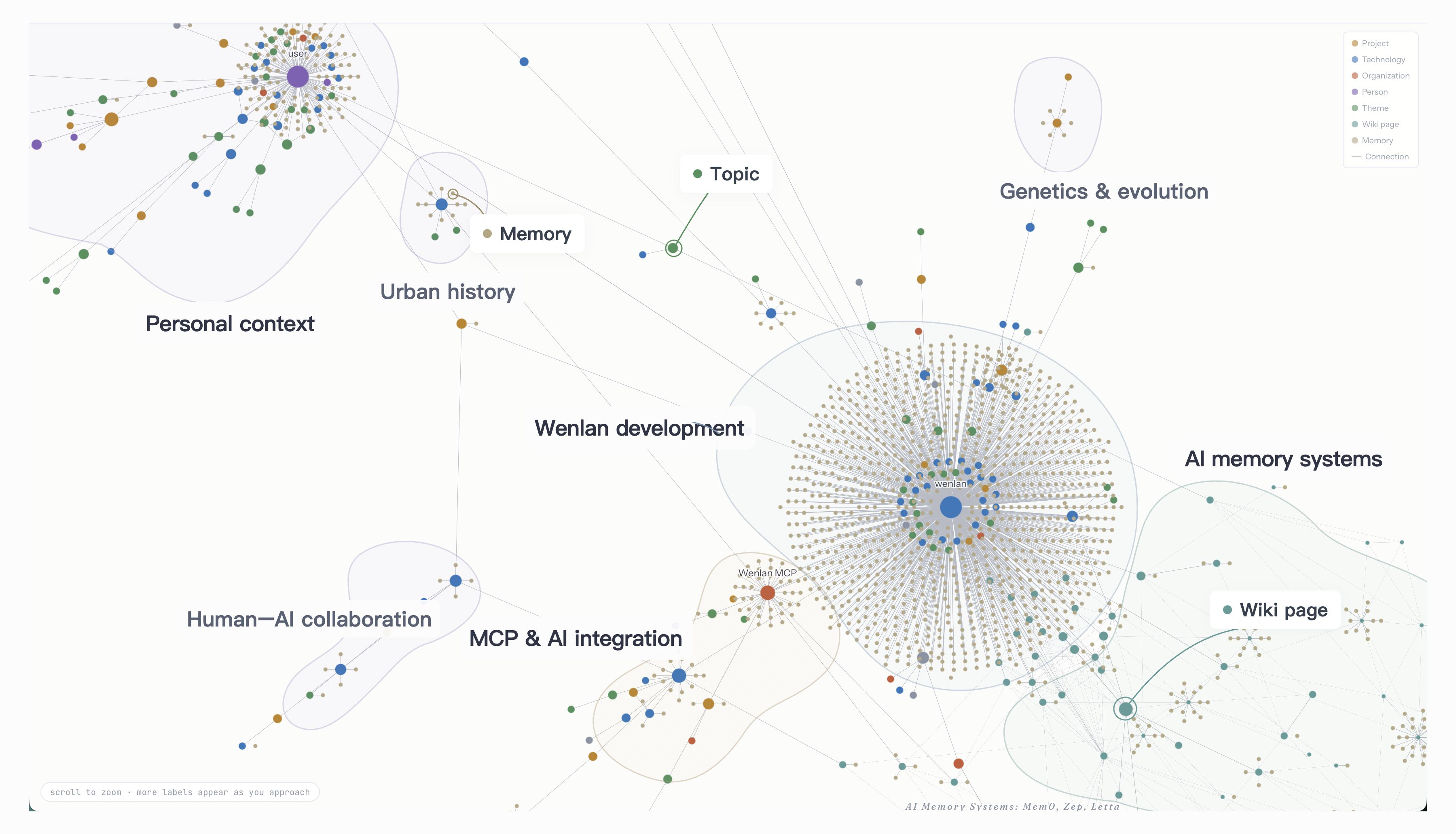
App nodes and connections; translated labels and illustrative regions.
In everyday use
Save new findings and progress as you work, then pick up where you left off next time.
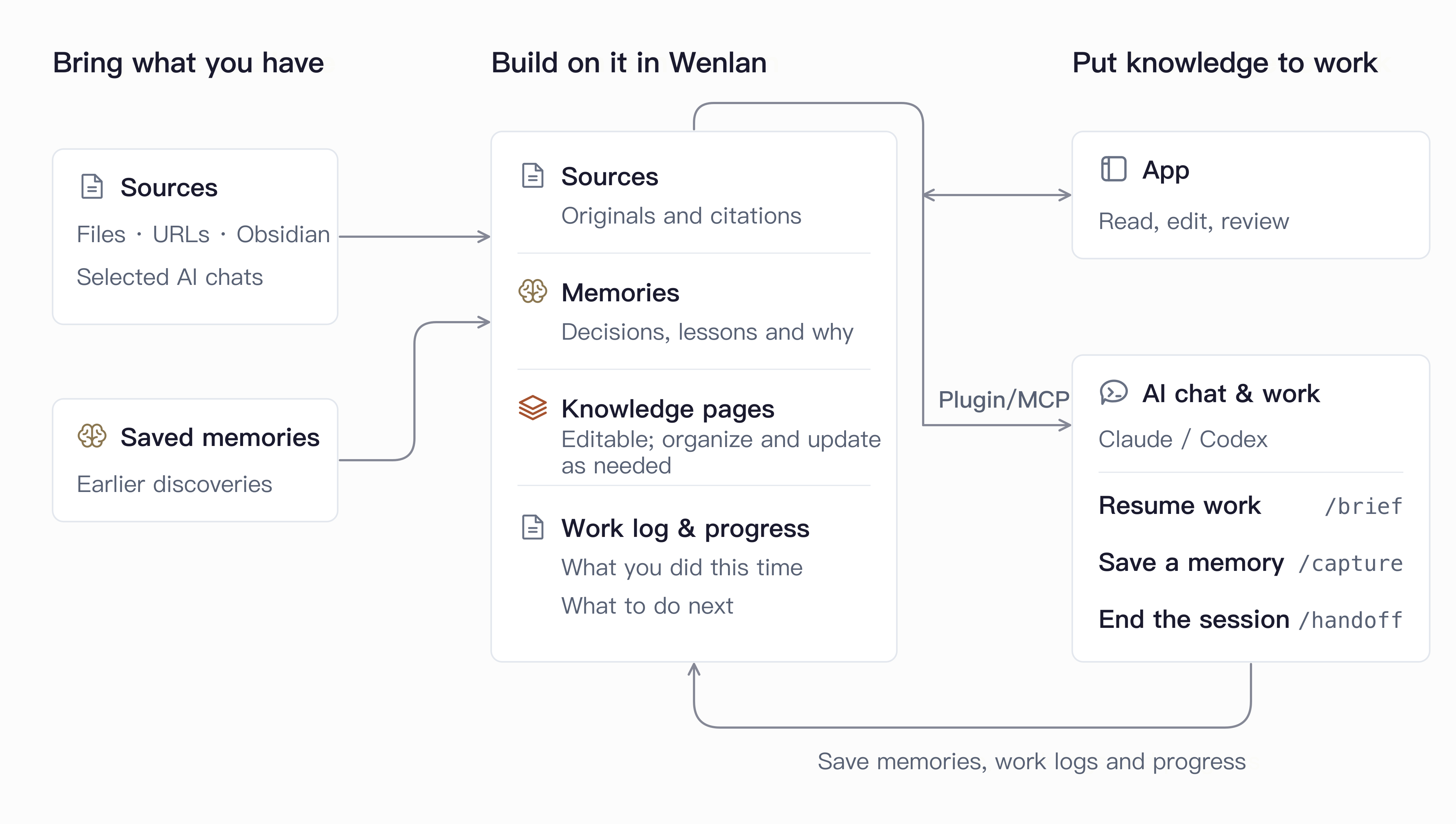
Simplified workflow. Plugin commands and page organization are optional, with no fixed sequence.
- Work in the App. Add material, write or edit pages, follow citations, and review proposed changes without connecting AI.
- Use your knowledge and write new pages. Ask your AI to find relevant sources and memories for the task (
/recall). It can also write cited pages or update existing ones from their current version, then save them to Wenlan. When a page cites its sources as[n], Wenlan checks the cited source supports each sentence, and does not save the page when too many citations fail. - Keep what you learn. Save a decision or lesson, with its reasons and sources, in the App or through your AI (
/capture). - Pause and resume. Save findings and a session log, update affected pages, and record progress and next steps in the project Brief (
/handoff). Pick up that context next time (/brief).
Organize accumulated memories when needed: Synthesize or refresh cited pages from related memories (/wenlan distill); writing a new page does not require this step. Plugin commands.
Put your knowledge to work with AI
Once your material is in Wenlan, your AI tools can build on it: retrieve earlier decisions with their supporting material, save new work, and keep using it as the evidence changes.
Use it for:
- Development: Bring earlier technical decisions, lessons, and acceptance criteria into implementation and debugging.
- Products and websites: Use customer research, positioning, and design principles to draft specifications or build pages.
- Research and learning: Turn reading material and saved findings into cited reports or study notes you can reuse.
Retrieval and connections: Plugins guide retrieval and saving; MCP connections expose the tools for your AI to call.
- Local hybrid retrieval: Find exact terms and similar meaning with SQLite FTS5 and BGE embeddings, fused by weighted Reciprocal Rank Fusion (RRF); base search needs no API key.
- Graph-assisted ranking: Shared-entity links boost related memories even when their wording differs. Optional cross-encoder reranking compares each candidate with the question to refine the order.
- Space-scoped retrieval: Select a Space to limit returned knowledge to the relevant project or personal collection.
Turn on Web access in Settings to let supported web AI clients such as Claude, ChatGPT, or Muse search your library or a chosen Space while your computer is online. When you allow an app, choose search only or search and write; a write app can also add, edit and delete, and AI apps can ask you before each change. This feature is experimental; queries and results pass through a relay. See the privacy limits.
A wiki for your code repository
Run /wenlan wiki ($wenlan wiki in Codex) in a repository. Your AI tool plans the wiki from the repository itself: an overview that lists every page, then one page for each part or flow a newcomer needs. A small tool gets a few pages, a large monorepo many more. A rerun writes only the pages that are missing. /wenlan wiki replaces /wenlan map, with no alias for the old name.
- Tied to the code: Each key sentence records the code lines it was read from. When that code changes, the page shows what changed with one Review button, and steep brings the page up to date.
- In the repository as a pull request: The GitHub button on a Space connects it to its repository and puts the pages that rely on that code in the repository's
wiki/folder as a pull request. Run it from the button, or turn on the daily update. The same pull request fixes sentences in the repository's own docs that the code no longer agrees with, for you to review. - Your edits stay: A wiki page someone edited in the repository keeps that edit. Pages that cite your memories or chats stay out of the repository.
Steep: keep knowledge useful as it changes
Saving material is only the start. Steep prepares it for reuse and keeps supported pages current, so you and your AI can build on earlier findings instead of repeatedly working through the originals.
Choose one of two modes in Settings:
- On demand (new installs start here): when your AI tool saves or writes into Wenlan, it steeps as it goes, with no command needed. To finish the rest at once, run
/wenlan steep: it writes new pages from imported material and brings out-of-date pages up to date. - Automatic: Wenlan steeps in the background with the model you assign.
What steep does:
- Enrich memories: Add types, structured details, search cues, and graph links so individual findings are easier to retrieve in context.
- Follow the evidence: Changed sources, memories, or cited code flag dependent pages for refresh; new memories can enrich eligible pages. Refresh keeps the saved page if a draft fails citation checks. Passing these checks does not establish factual correctness.
- Keep control and history: Background refresh updates eligible AI-maintained pages; your authored or edited pages receive proposed revisions. Explicit memory replacements hide or archive earlier memories while preserving their links. Page revisions remain inspectable.
- Review lock: With Lock pages I've written on, as it is for new installs, AI changes to pages you wrote or edited wait for your review. Pages AI wrote keep updating.
Steep guide: triggers, review rules, and model setup. Choose an on-device model, a local server, or a cloud provider; model-backed background work is optional.
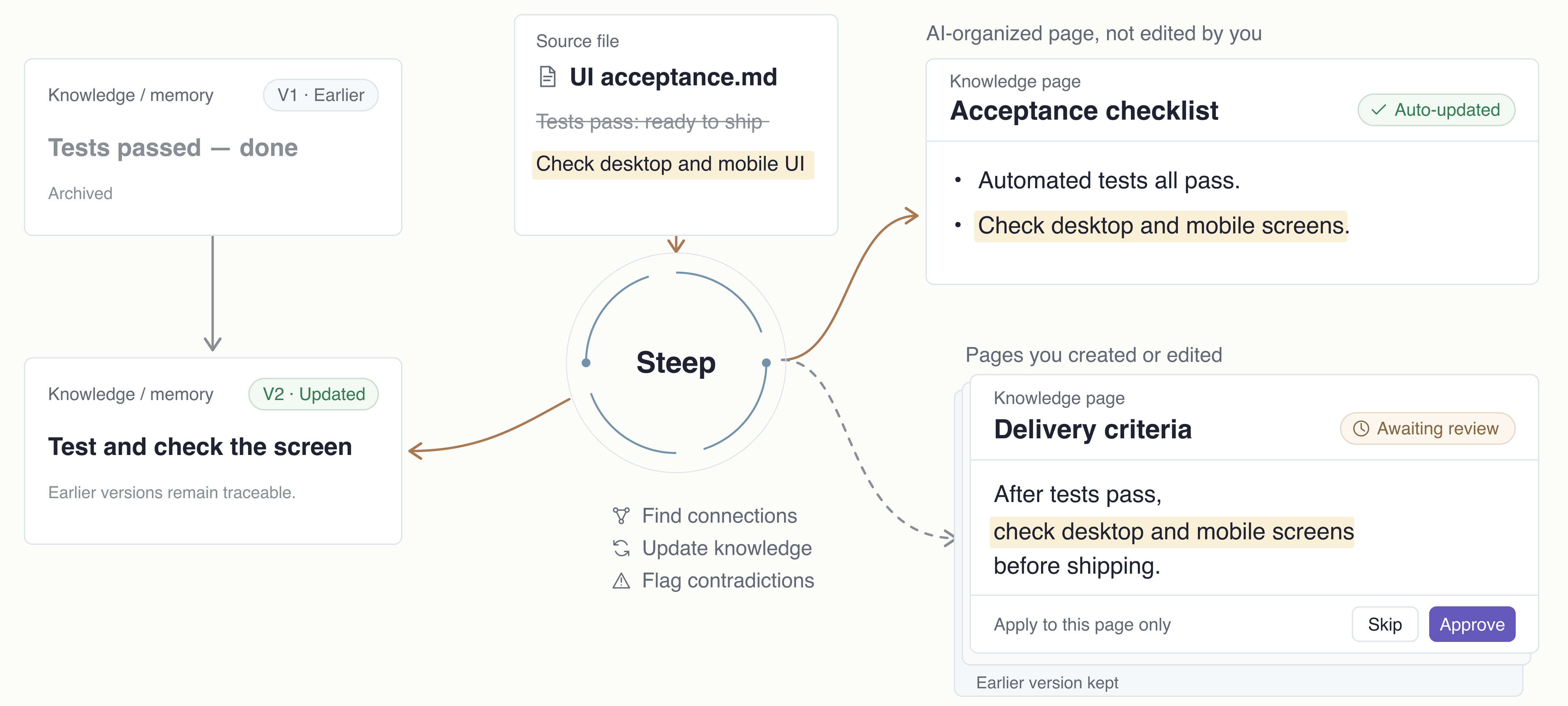
Illustration based on current update behavior; not an App screenshot.
Architecture
One local knowledge base. App, CLI, and connected AI tools read and write through Wenlan’s local service. Pages are Markdown files; memories, relationships, and search indexes live in local libSQL.
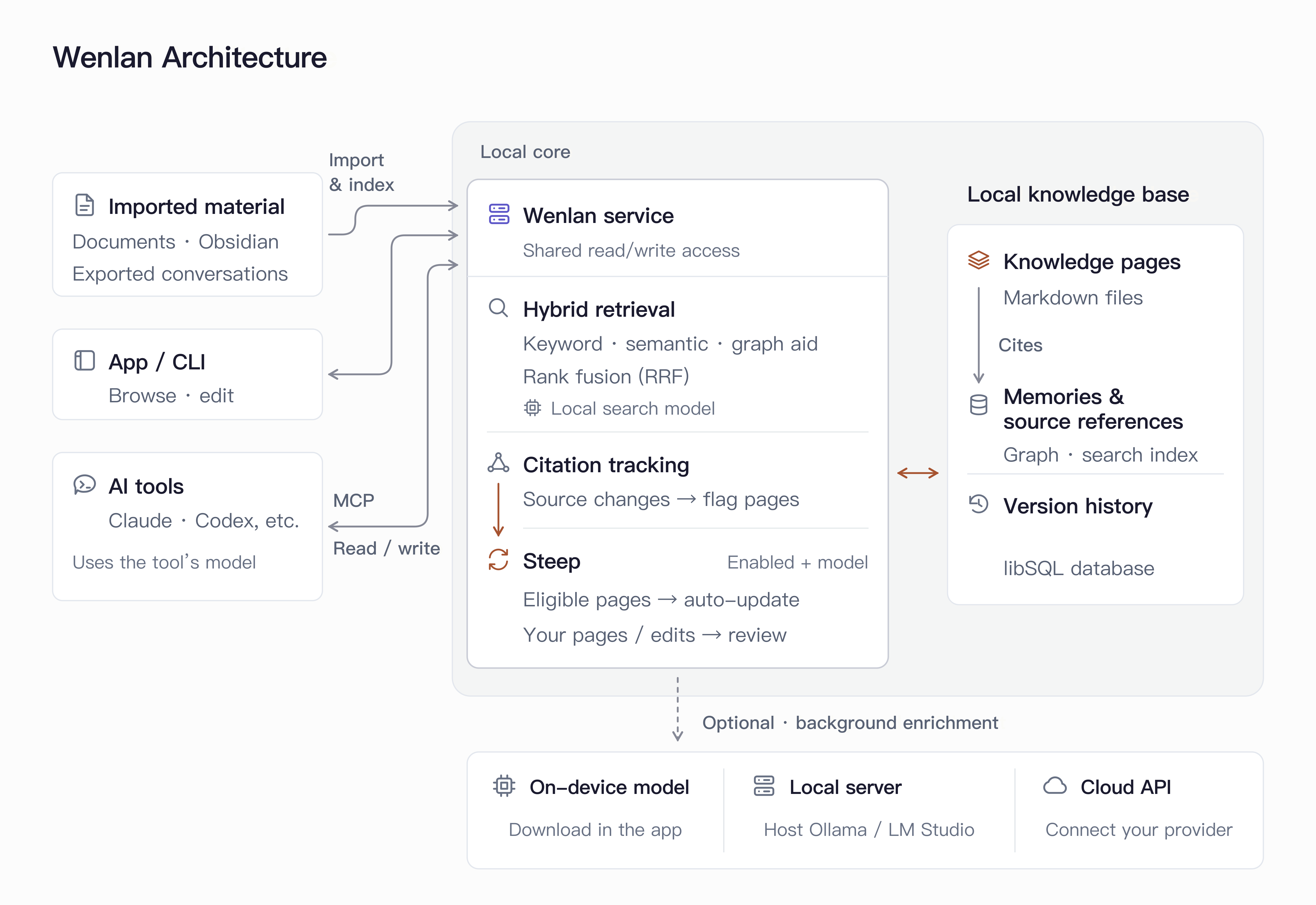
Architecture overview. Retrieval, evidence, and models.
Data and privacy
Export your wiki: Export eligible pages as an Open Knowledge Format (OKF) wiki.
A cloud AI client may send retrieved knowledge to its provider, and a cloud model receives the material it processes. Local storage does not keep those interactions local. Usage statistics are off by default.
File locations, backup, and removal · Network and privacy details.
Evaluation
These LongMemEval (LME) snapshots measure retrieval of saved knowledge, not AI answer quality. Recall@5 measures how much relevant material appears in the top five results.
| Benchmark | Recall@5 | MRR | NDCG@10 |
|---|---|---|---|
| LME_Oracle (500 Q) | 93.6% | 0.857 | 0.883 |
| LME_S (deep, 90 Q) | 87.7% | 0.815 | 0.822 |
Evaluation method and benchmark details.
Learn more
- Get started and install
- Connect an AI tool
- Sources and imports
- Local files, backups, and offline use
- Privacy
- Doctor and issue reports
- Full documentation index
Contributing
Join the Discord community. Report bugs or request features in GitHub issues; issues are public, so redact secrets and personal information.
For code and docs, see Contributing, Security, and the Code of Conduct.
Code signing policy
See the platform signing and notarization details.
License
The local runtime, CLI, MCP server, shared types, and plugins use Apache-2.0. The desktop app and its frontend use AGPL-3.0-only; modified versions run as a network service must offer their source to users.
Lineage and peers
Wenlan takes its name from Wenlan Pavilion. Its direction builds on the LLM-wiki and agent-memory lineages: Karpathy’s LLM-wiki note, Rohitg00’s proposal, and nashsu/llm_wiki.