sage-mem · file-based memory for DeepSeek Harness (sage-mem)
中文版见 README.zh.md







Cross-session memory for DeepSeek Harness — plain markdown files, no database, no worker.
Current release: 1.8.2 — the npm badge above is the dynamic source of truth. Contract baseline: 1.0.0 — the first stable release, whose public commitments, the capability boundaries and the list of things it explicitly cannot do are frozen in the
frozen contract.
If it is useful to you, a Star is the most direct feedback.
Table of Contents
- What This Is
- Why Files, Not a Database
- Core Features
- Quick Start
- UI Preview
- Memory File Format
- Retrieval and Injection
- Write Safety
- Autodream
- Migrating from Claude Code
- Configuration Reference
- Stability and Versioning Policy
- Permissions and Privacy
- Compatibility
- Architecture
- Contributing
- FAQ
- Uninstall
- Maintainer
- Credits
- Related Projects
- Legacy
- License
What This Is
DSH has no native memory system. Every new session is a blank sheet: it does not remember who you are, where you got to yesterday, or what stage the project is at, so you have to brief it again every time.
sage-mem adds that layer, like this: write down the things worth remembering as cards, and store them on your own computer. Before DSH hands the question to the model, the plugin picks out the few most relevant cards and puts them in front of the model.
So the accurate statement is not "the model remembers you", but "before it opens its mouth, somebody has handed it the relevant slips of paper". Take the slips away and it is that amnesiac colleague again.
A memory takes the form of one .md file per memory (YAML frontmatter + body): openable, editable and deletable in an editor, and manageable with git directly. This memory stays in your own hands the whole time, not in some database.
Why Files, Not a Database
Most memory schemes take the "SQLite + a long-running worker" route: once memories are written into a database they are opaque (to see what is stored you have to go query tables), capturing every event inflates the store (even "the user said hello" counts as a row), and you have to keep an extra process and an extra port alive.
| File-based (sage-mem) | Database + worker | |
|---|---|---|
| Seeing what is stored | Open the directory | Query tables / write a script |
| Editing one by hand | Edit it in an editor | Go through an API or SQL |
| Migration / backup | Copy the directory (travels with git) | Export tooling |
| Extra process and port | None | Usually yes |
| Who decides what gets stored | The agent judges by rules | Commonly indiscriminate capture of everything |
Core Features
| Feature | Description |
|---|---|
| File-based storage | One .md per memory: frontmatter holds metadata, the body holds content. No database, no hidden format |
| Automatic injection | Every turn automatically scans the memory directory and picks the most relevant few by relevance to inject into context. The model "recalls" on the first turn, without having to go and read files itself |
| The model can look things up too | Two retrieval tools are also given to the model (search_memory / read_memory), so it can go through memories on its own and read the original text by line |
| Writes are not overwritten | While you are editing and the model is changing things at the same time, the later write does not silently clobber the earlier one; the conflict is left as a pending record for you to decide which side to keep |
| Zero extra services | No worker, no SQLite, no port, no long-running process, and no extra API key or cloud service (the only runtime dependency is the ordinary npm library zod) |
| Anti-bloat | Rules guide the model in judging "is this worth storing": nothing without substance is stored, nothing derivable by reading the code / git is stored |
| Tidyable | The optional "autodream" reads your memories through once: merges duplicates, fixes the index and broken links, and creates a rollback point before changing anything |
| Migration from Claude Code | The persona (CLAUDE.md → AGENTS.md) is copied as-is; memories just need organizing into .md files under four types (see the next section) |
The UI also carries four more capabilities (all of them optional): the memory management page, type and tag filtering, the memory star map, and audit & archiving.
Since 1.8.0, memory management is also reachable from the sidebar: a 「记忆管理」(memory management) icon appears in the sidebar and switches the central panel to this page (with a "back to conversation" control at the top). It can be turned off in the settings page under 「记忆管理 → 自动做梦 → 设置」(on by default; applies immediately, no restart); since 1.8.2 the same toggle also lives on the plugin's detail page (「插件 → sage-mem」card) and applies immediately too; turning it off only removes the sidebar icon — the 「设置 → 记忆管理」 entry always stays. Since 1.8.2 the plugin also ships its own icon (a golden stack of memory cards) instead of the generic square.
The memory management page's file list also has an Open memory folder button: it opens the memory directory in the system file manager (Explorer / Finder / the Linux file manager) through a detached host-side process and returns without waiting for the window.
While the memory directory is empty, the empty state carries a Create index skeleton button: one
click writes a starter MEMORY.md (index format plus the four memory categories). When MEMORY.md
already exists it only says so and changes nothing; it uses the existing reserved-file read/write
calls rather than a new remote.
Quick Start
Requires DSH 0.1.2-rc.1 or higher (see Compatibility) and Node.js >= 18.
# replace web with your own profile name
dsh plugin --profile web add sage-mem
dsh plugin add puts the package into this profile and registers its bundle — no hand-editing package.json (manual install below).
After installing, restart DSH and confirm it is in:
dsh plugin --profile web list
Then open a new session and try three steps:
- Tell the model "remember: my cat is called Zhima, and it likes sunbathing" — it writes this into the memory directory by its rules
- Open another new session and ask "what is my cat called"
- It should answer "Zhima" on the first turn — the memory was retrieved and injected automatically by the plugin; the model did not go and read files itself
Manual install (if you do not want the CLI, or want to install a local development build)
Add the dependency to the profile's package.json and write the package name into dsh.profile.bundles:
{
  "dependencies": {
    "sage-mem": "^1.0.0"
  },
  "dsh": {
    "profile": {
      "bundles": ["sage-mem"]
    }
  }
}
For local development, use the cloned source:
{
  "dependencies": {
    "sage-mem": "link:../sage-mem"
  }
}
Then run pnpm install and restart DSH.
Where Memory Lives
By default ~/.sage-mem/memory. To put it somewhere else (inside a project repository, so it travels with git, for example), set the environment variable:
SAGE_MEM_DIR=/path/to/your/memory
The state directory (configuration, ledger, rollback points, conflict queue) defaults to the parent of the memory directory: <memory directory>/.sage-mem. All environment variables are in Configuration Reference.
UI Preview
Every image below is rendered from the UI code in this repository (the same CSS, the same component tree; the data is demo data for illustration, not a real memory directory).
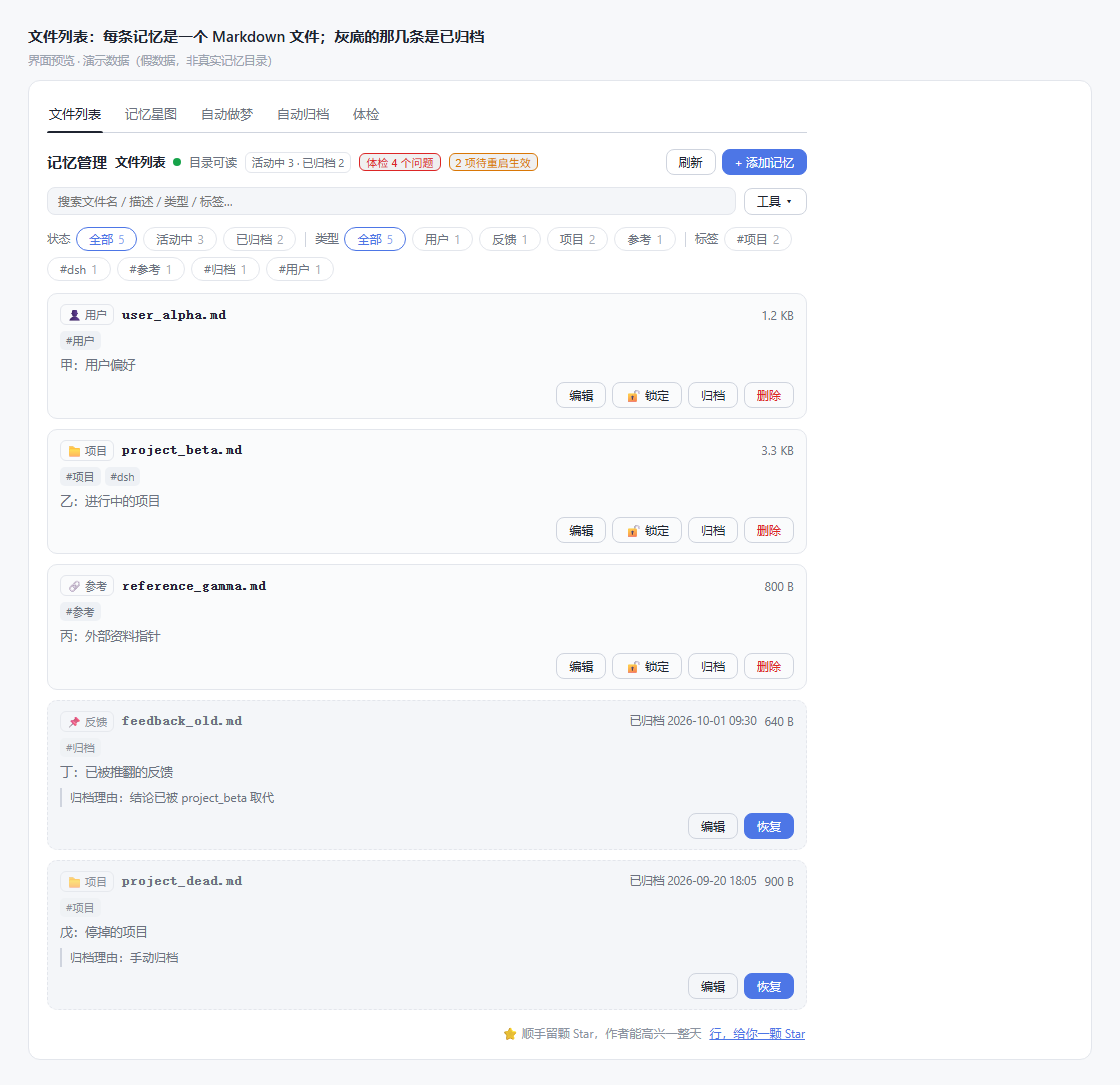
File list — the header always shows 「体检 N 个问题」(audit: N issues) and 「待重启生效」(restart to apply), so you know whether you should deal with it without opening anything; greyed rows are archived and can be restored at any time, or deleted for good with 「彻底删除」(irreversible, asks once more).
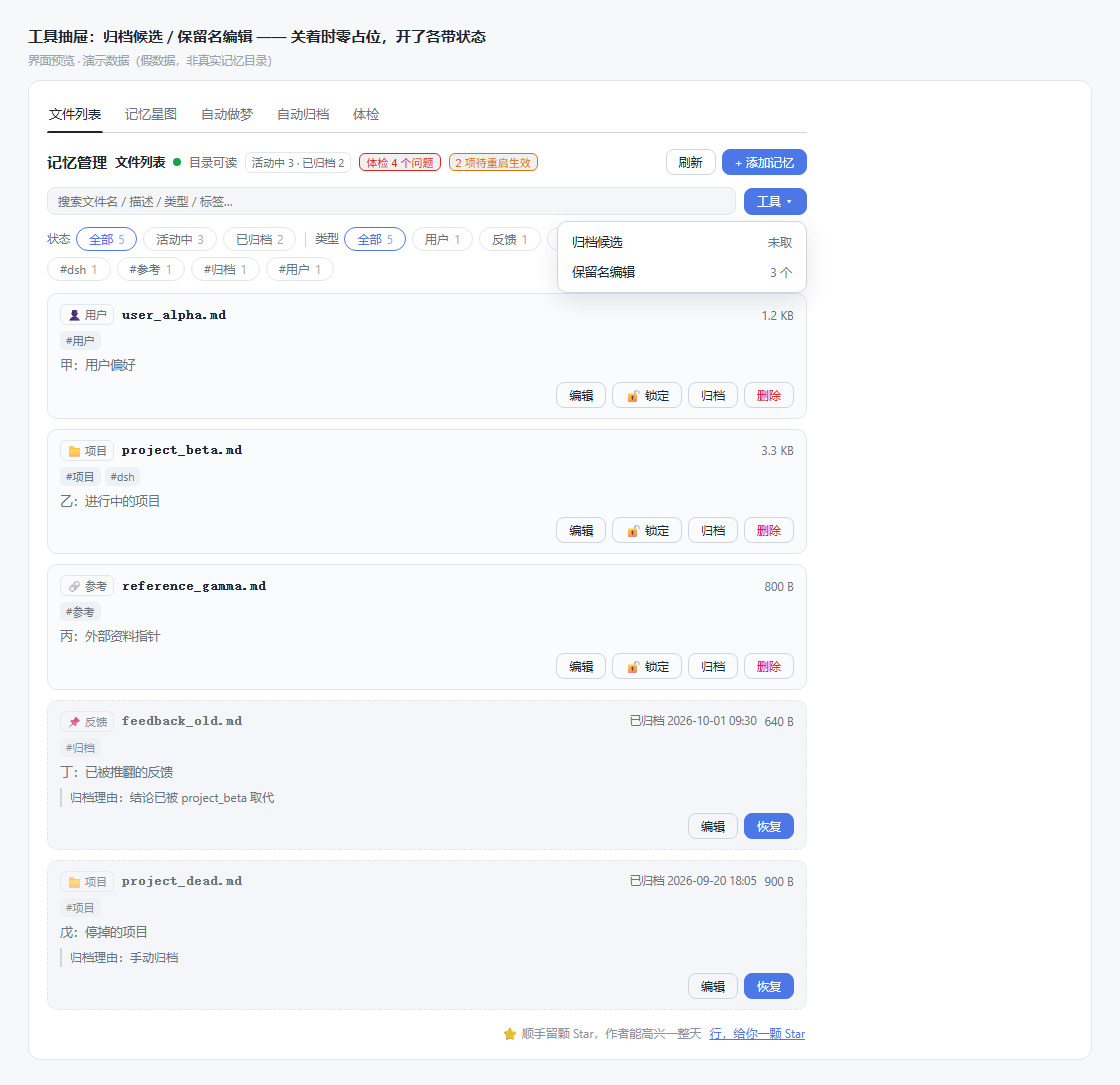
Tools drawer — closed it takes up a single button; expanded, each of the two items carries its own status.
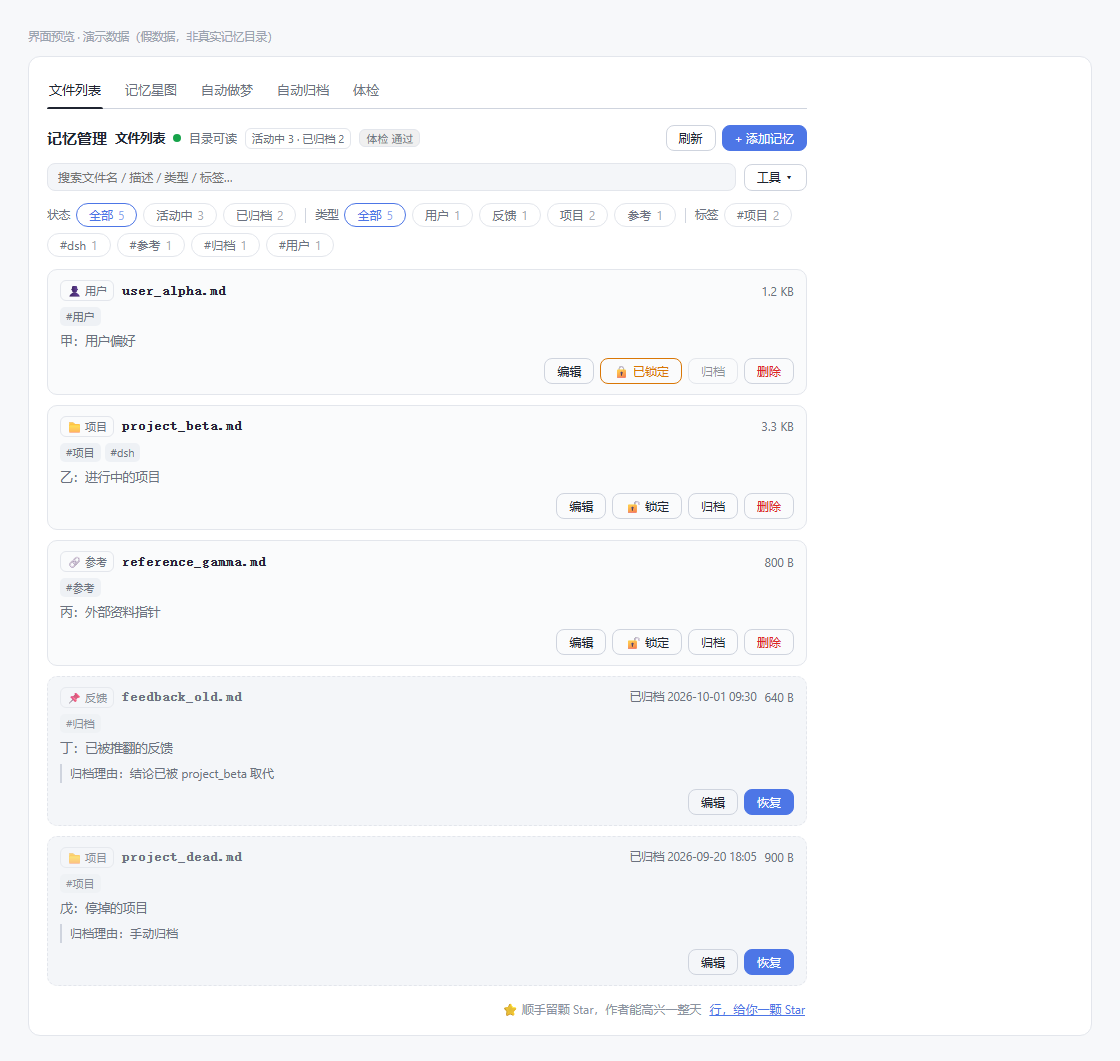
*Lock — one click locks an important memory: it no longer appears among the automatic archive candidates; the archive button in the UI is disabled, and even if you bypass the UI, the archive implementation refuses explicitly with locked. The lock lives in the state directory and is not written into the memory's own frontmatter — that would be rewritten by automatic consolidation, and once the lock is lost it would be back among the candidates.*
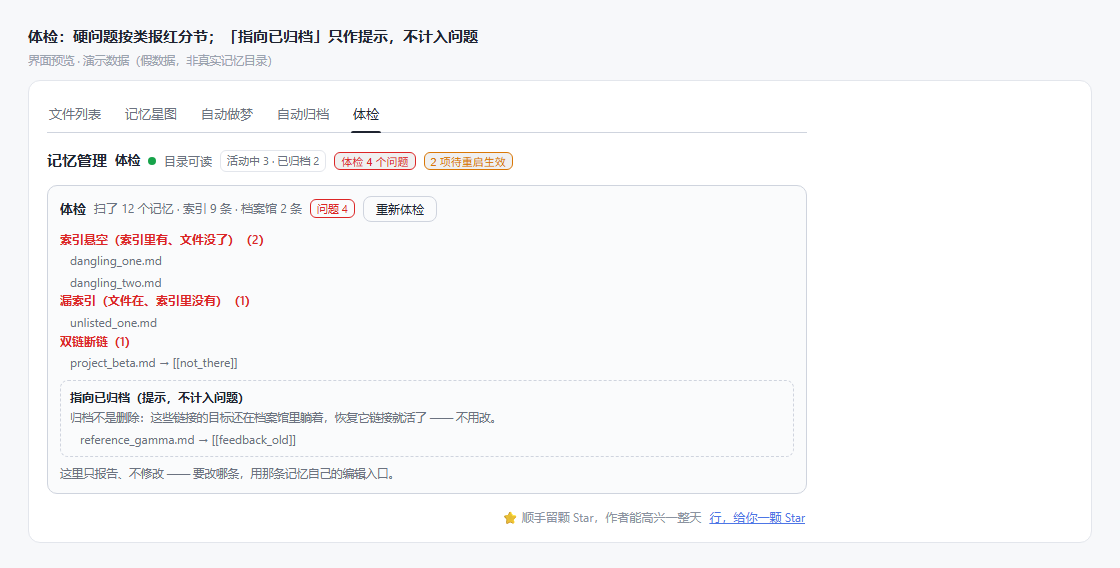
Audit — hard problems such as dangling index entries, missing index entries and broken links are reported in red by category; "points to an archived memory" is only a hint, does not count as a problem, and has no one-click fix (which one to change is your call).
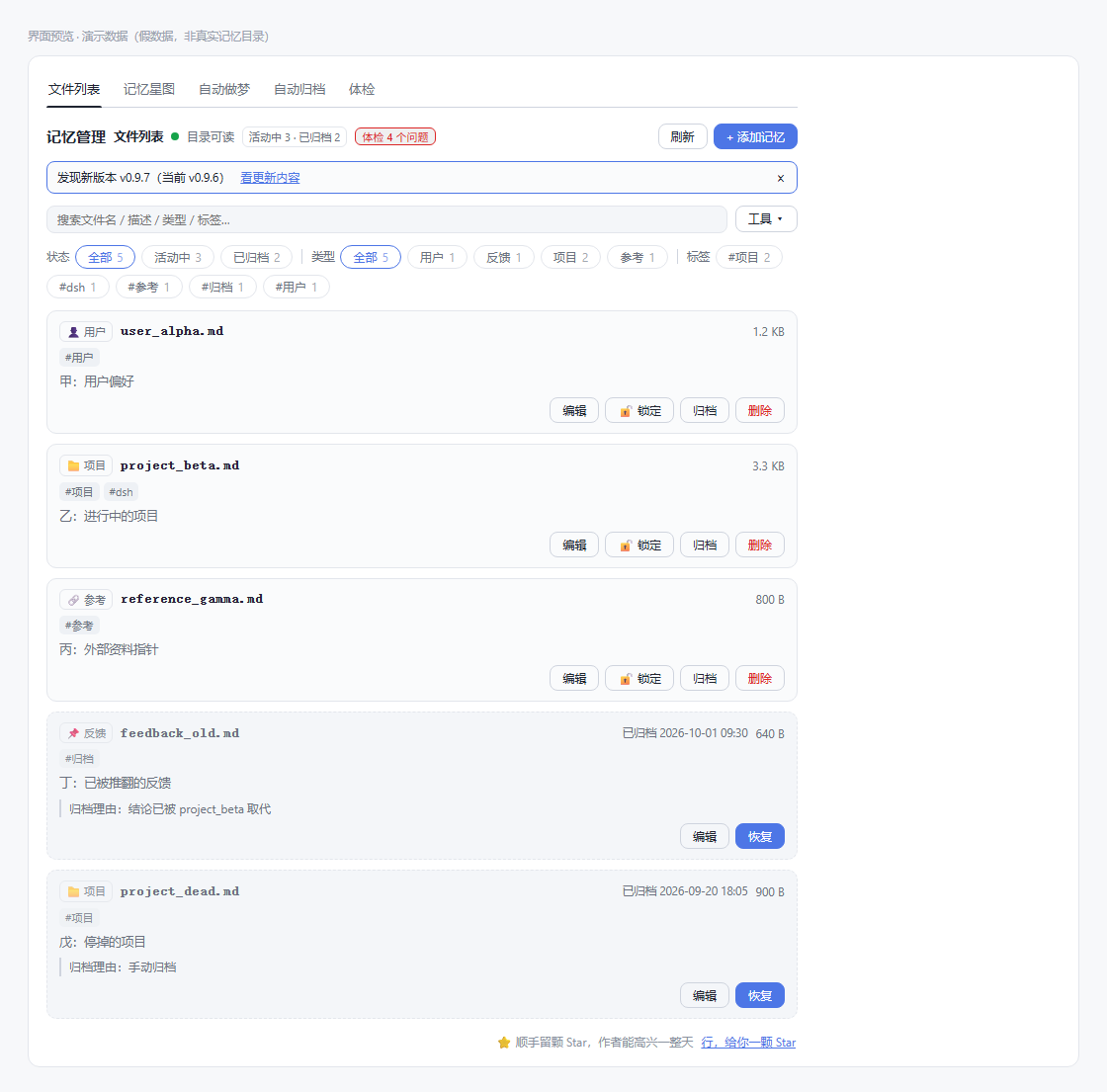
Update notice — a single banner appears only when there really is a new version, naming the new version and the current one; 「看更新内容」(see what's new) opens a new tab, and "×" just means not this time.
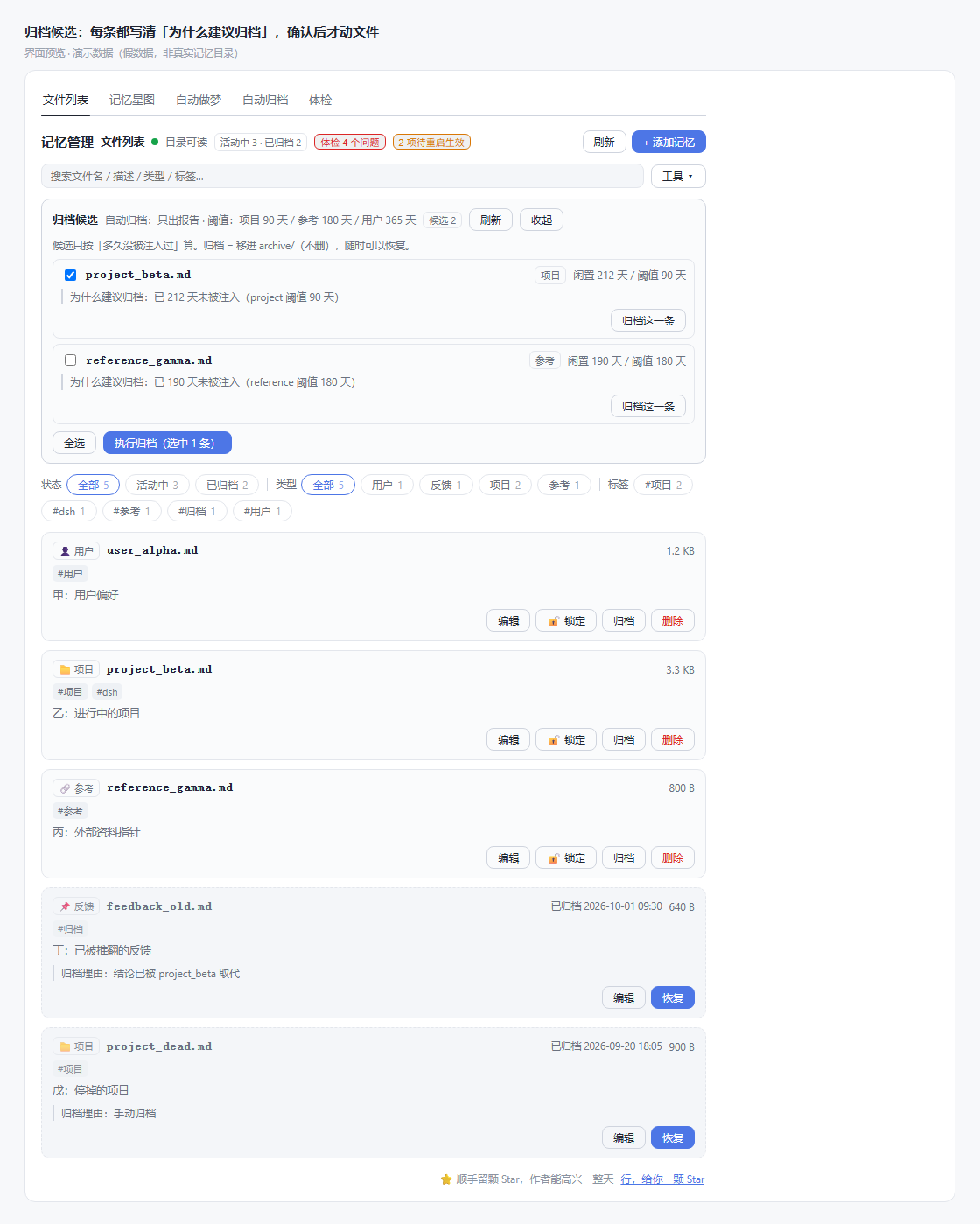
Archive candidates — each states "why archiving is suggested" (idle days vs the threshold for that type); files are touched only after you confirm one by one or select all. Archiving moves a file into archive/, it does not delete; to actually delete an archived entry, click 「彻底删除」(delete permanently) in the archive view and confirm once more.
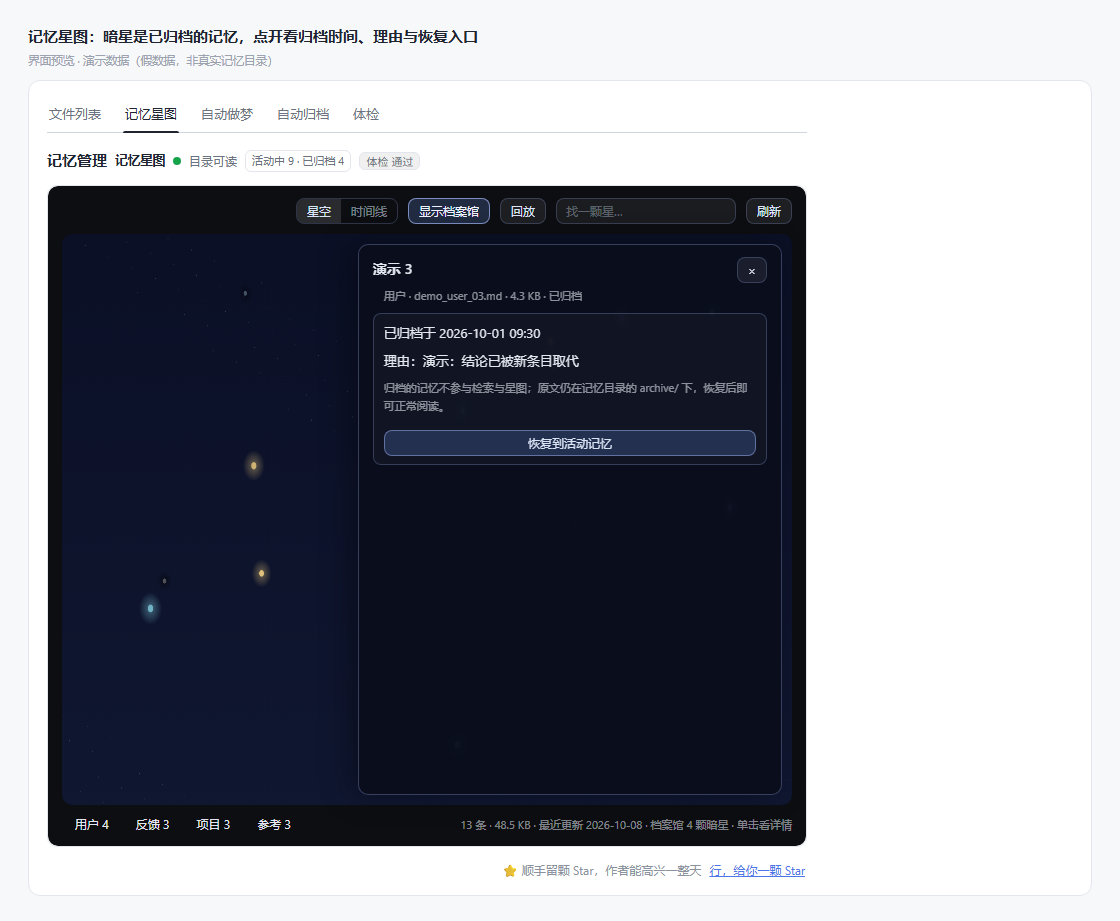
Memory star map — colour maps to type, size to volume, brightness to freshness; dark stars are archived memories, and opening one shows the archive time and reason.
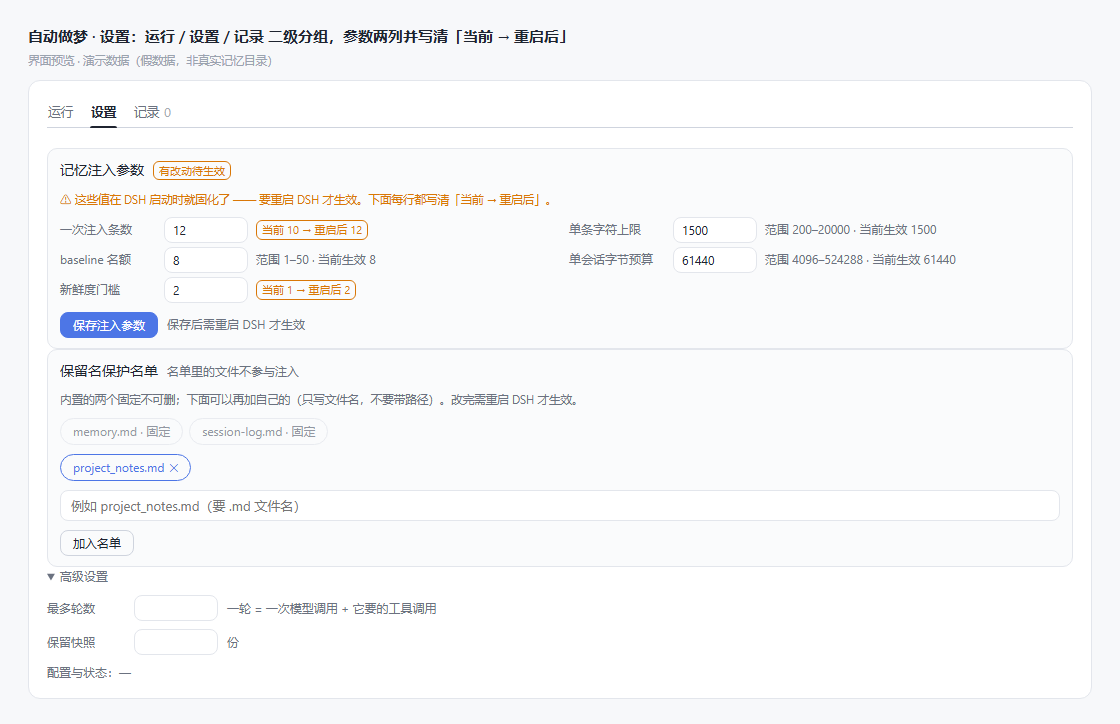
Autodream · settings — run / settings / history as secondary groups; the five injection parameters laid out in two columns, with both 「当前生效」(currently in effect) and 「重启后」(after restart) written out.
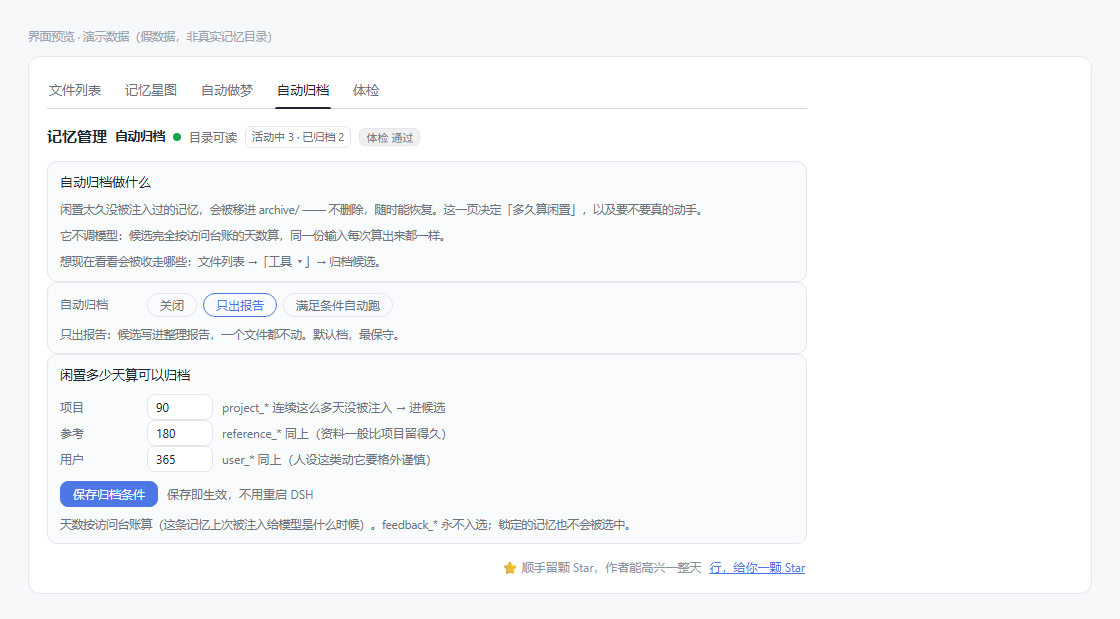
Auto-archive — it is not the same thing as autodream: archiving is a deterministic rule (computed from idle days in the access ledger, no model call), which is why it gets a page of its own. Thresholds take effect on save, no restart needed.
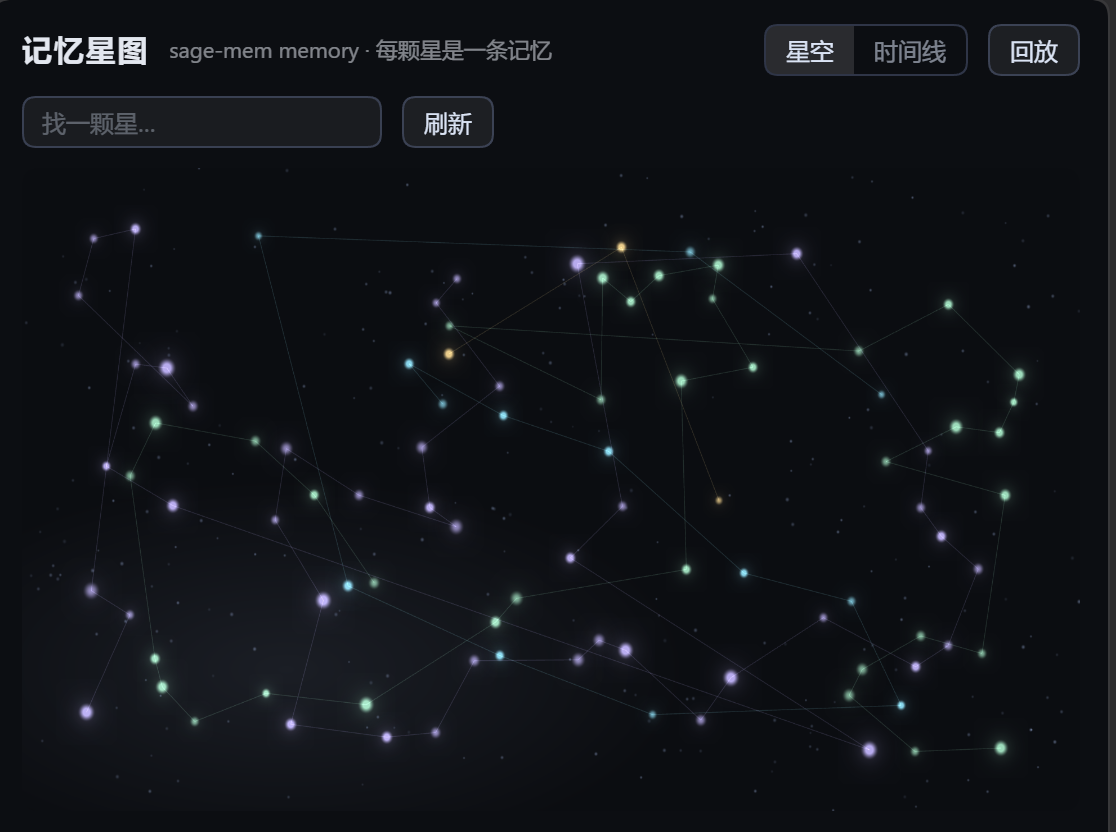
Memory star map in full — the canvas draws only relations and distribution; the file name of a single memory appears only when you hover over or open that star. Rendering is redrawn on demand; no drawing is initiated while the view is static.
Memory File Format
---
name: optional short name
description: one sentence saying exactly what this memory is (retrieval depends on it, so write it accurately)
metadata:
  type: user        # user / feedback / project / reference
tags: [project, todo]   # optional, for filtering on the list page (at most 20, 40 characters each)
aliases: [todo, backlog] # optional: an alternative wording that also retrieves it
baseline: true      # optional: injected unconditionally on a new session's first step (limit 8)
baselinePriority: 10 # optional: among several baseline memories, which is injected first (higher = earlier)
---

The memory body.
The four memory types:
| Type | What it stores |
|---|---|
user |
who the user is |
feedback |
guidance on how to work (recommended to carry **Why:** and **How to apply:** lines, to make the boundaries easy to judge) |
project |
work in progress and its state |
reference |
pointers to where external information can be found |
Single-file limit 512 KB, validated on both the read and the write side (on reading, the size is checked first; if it is over, the file is not read in).
Retrieval and Injection
Something transparent deserves a clear account of how it selects its material, because that directly determines how many tokens get injected.
Two-stage retrieval: summary first, then body. The first stage scores by description + file name + aliases, taking at most 10 candidates; the second stage runs body paragraph retrieval over those candidates (BM25, with Chinese tokenized as two-character units) and injects the most relevant paragraph. What is compared is a paragraph, not a whole file, so one file contributes at most one paragraph, and a long file cannot hog candidate slots through sheer paragraph count.
What the summary does not cover, the body can find again. The summary is one precise sentence, at the cost that body details are inherently unretrievable by it; when not a single summary hits, body retrieval takes over as the fallback. Body retrieval only runs when the question is at least 4 characters long — a two-character question like 继续 ("continue") fed into body matching hits nothing but the word 继续 itself.
A different wording hits too: scoring is lexical overlap, not semantic — ask "我有什么待办" ("what todos do I have") while the file says "代办清单" ("todo list") and one differing character means no hit at all. Adding a line aliases: [待办, todo] to such a memory covers it.
What gets injected is the matching paragraph, not the start of the file. A matching paragraph is labelled ### 项目_部署.md:40-52, so the model can jump straight to those lines to check the source; a line with that memory's description is prepended, saying which memory the passage was cut from. baseline memories and files with no body hit are still injected from the start; a single body over the character limit (1500 characters by default) is truncated and marked …(截断).
Adjacent repeated questions are not injected twice (only one signature is kept per session), so asking twice in a row does not append it again. Note that this is not "the same question is given once for the whole session": ask A → ask B → ask A, and the third one injects again — when recall is requested again, supplying the evidence again is not necessarily a bad thing.
A single session has a budget cap (60 KB by default), split into two ledgers: the body pool = the total cap − the status-card reservation (5%, clamped between 1 and 4 KB). Hitting the top does not mean "not a single character is injected"; the body is simply not injected as before while the gap status card is still sent, telling you what was left out and how to look it up next. After the context is compacted or cleared, both ledgers and the card signatures reset to zero together, and injection can happen again.
⚠️ This cap is soft, not a hard gate.
baselinememories matched by the question are injected regardless and take no part in the degradation, so the cumulative body over one session may exceed the body pool (9.6% overrun was measured in evaluation, all of it from this kind of memory). This is a deliberate tradeoff: the semantics of that kind of memory are "it should be present every session". Do not read it as "a clean cut-off at 60 KB".
The gap status card speaks only when there really is a gap: it appears only when there are candidates that were not read, or candidates omitted by the budget, and it states the scope, the count, the best clue and one action you can take; when not a single thing matched, it speaks only if you asked about your own history, or this task has a checkpoint (otherwise the hint would be ignored as noise). A single card is capped at 512 bytes and deduplicated by content signature.
There is a relevance threshold on the summary side too. In Chinese, units like "怎么" and "什么" appear in a great many descriptions, so an unrelated "今天天气怎么样" can hit a dozen memories off a single "怎么". The threshold is normalized against the corpus's own IDF scale, which brings the candidate count for unrelated questions down to about one seventh; what gets cleared out is mainly the weak summary candidates that should have lost anyway.
The comparison on the offline evaluation set (before and after the threshold): Recall@5 84.1% → 87.0%, spurious injection (memories injected that are unrelated to the question) 14.1% → 5.6%.
⚠️ These are measurements, not promises: what transfers is the relative improvement; the absolute level cannot be extrapolated to a real memory directory — the summaries of that 30-item corpus were written by hand precisely so as to "be retrievable", whereas real memories' summaries are often written casually or are missing entirely. Method and limitations are in the evaluation report.
Intent detection never suppresses repetition on three kinds of explicit request: "we settled on A last time, right?" (verification), "we are not using A any more" (correction), "why did we not pick A before" (asking for the basis) must be given the original text; if it cannot be judged, it does not judge, and it does not guess.
The Model Can Browse Memories Too: Two Tools
The trigger right for retrieval is split in two: half with the plugin (automatic injection — it guesses what you want to see), half with the model (the two tools below — it looks things up on its own).
| Tool | Purpose |
|---|---|
search_memory(query, scope?, limit?, cursor?) |
Compares summaries first, then searches bodies by paragraph; returns candidates, matching passages, line numbers, and coverage information (how many files were scanned, how many paragraphs were filtered out for insufficient relevance, whether there is a next page) |
read_memory(name, startLine?, startByte?, maxBytes?, revision?) |
Reads the body by line, paginated. Pass the revision you last read, and if the content has been changed by someone it returns revision_changed, and does not return the content — otherwise you would read the wrong thing with stale line numbers |
Both tools go through the same safe read path (file name checks → symlink and reserved-name identity checks → size gate); no separate entrance that bypasses the gate was opened for the tools. They register through the tool service the host provides — that is not a hard dependency: when the host does not provide that service, the plugin works as normal, only the status card switches to a "read the memory directory directly" wording.
Relaying the Baton on Long Tasks: Task Checkpoints
When the host compacts context is not something the plugin controls — so it does not promise "save before compaction". What it can do is: if <state directory>/tasks/<task id>/WORKING.md exists, a short handle is appended to the injection, stating the task, the revision and where to read it. After compaction the ledgers reset to zero and that clears the deduplication along with them, so the handle reappears — that is the recovery path.
The task id comes from SAGE_MEM_TASK_ID (for the same task across sessions), otherwise the session id is used. Your raw question text is never used to decide which directory to read. If a "done" item in a checkpoint carries no evidence marker at all (path, command, test result), parsing reports it as such — handover material that is perfectly formatted but factually wrong is still wrong.
Write Safety
Memories are files, so "you are editing" and "the model is changing things" can perfectly well happen at the same time. The default behaviour is the later write wins and the earlier one quietly disappears — the worst kind, because you never find out.
sage-mem adds a version guard to writes into the memory directory: the current version is noted before writing, and the write requires that the version has not changed. If it has, the write is explicitly refused instead of being clobbered — turning "a silent bad result" into "an explicit failure".
The guard has two paths, with different coverage, spelled out:
| Who is writing | How it is protected | When refused |
|---|---|---|
The model changing a memory with the built-in write / edit |
The plugin supplies the "current version" in a pre-event, and the host refuses stale overwrites on that basis | The host refuses outright (reporting FS_STALE_VERSION). A refusal on this path leaves no conflict record — the write gate only supplies the version, it does not perform refusals |
| The plugin itself writing (autodream consolidation) | The caller passes the version it read at write time | A pending record <state directory>/conflicts/<id>.json is written, keeping the version on disk and the version it wanted to write — with only one side there is nothing to judge |
- Conflicts are not merged automatically; which side to keep is your decision (the record is JSON, open it directly when you need to). Silent retry and silent abandonment both decide on your behalf.
- Known boundary: editing memories in a shell does not go through this path. The write gate guards "memory writes that go through the tools", not "all modifications to files"; redirection and the like inside
pwshare not recognized. If it cannot be sure, it does not claim it — so that "cannot see it" is not mistakenly recorded as fact.
Access Ledger: Three Kinds of "Used" Recorded Separately
<state directory>/access.json records three things:
| Field | Meaning |
|---|---|
injected |
the plugin passively injected this memory |
read |
the model actively read it |
use |
the number of times it was explicitly adopted (self-reported) |
They are recorded separately because the three mean completely different things: being injected only says the plugin thought it was relevant, being actively read only says the model picked it, and neither means the content was useful, let alone that it was correct. Merge them into one "heat" score and they can never be separated again.
This ledger is currently used only for diagnostics and the auto-archive threshold; it takes no part in retrieval ranking. The observation has known blind spots: reading memories in a shell is not recognized, so it is not claimed.
Freshness and Citation Discipline
Every memory's heading carries its freshness: (保存于 N 天前), and the frontmatter's updated: takes priority, falling back to the file mtime only when it is missing — a hand-written timestamp is authoritative; filesystem times get changed wholesale by copying / restoring from a backup / checkout.
The reason is: when a stale memory is cited as fact, the act of "citing" itself makes it look more authoritative rather than more suspect. So the injected text also opens with a citation discipline section (confirm a path exists before mentioning it, grep before mentioning a function, verify the current code before acting), and it is a section of its own — what it constrains is how this batch of content is to be used, and compressing it into one list item makes it easy to skip over together with the content.
Memories with baseline: true are injected unconditionally on the first step of every session, at most 8 — for memories like "who you are" and "the todo list" that ought to be present at every opening. ⚠️ "Not subject to paragraph replacement" does not mean the whole file: it is equally truncated by the single-item character limit (1500 characters by default), so key content that falls at the tail will not be seen. baseline suits short summaries; leave the full body for the tools to read. The order among several baseline memories is decided by baselinePriority (higher number = earlier, default 0), not by file name.
If the memory directory cannot be read, or permissions are wrong → it degrades to no injection and writes a log; it does not fail silently. Broken frontmatter is handled leniently: fields that cannot be parsed fall back to defaults (type missing is recorded as reference), and the file itself is still readable — one wrong line does not make a whole memory disappear.
Autodream
The optional memory-consolidation feature (identifier autodream): it reads through the memory directory once — merging duplicates, deleting the overturned, fixing the index and broken links, converting relative dates into absolute dates — so that the next session can find its bearings quickly.
Off by default; turn it on in the settings page under 「记忆管理 → 自动做梦」(Memory management → Autodream). Three things are each optional:
| Option | Values | Description |
|---|---|---|
| Trigger | Manual only / run automatically when conditions are met | Automatic mode goes through three levels of gating, checking the cheapest first: time gate (≥ N hours since last time, one read/write) → session gate (≥ M sessions with updates in between, one directory scan) → lock (against concurrency). A 10-minute scan throttle is sandwiched in between, so that while "the time gate passed but the session gate did not" it does not rescan for nothing every turn |
| Mode of change | Report only / rewrite directly | In "report only" mode the write tools are simply not attached for the model at all — it is not constrained by a sentence saying "please do not write", it has no hands |
| Input source | Memory directory only / memory + session records | The latter decompresses session records (zstd) for targeted keyword search; the cost is that private conversations enter the model context, and the token cost is higher too |
Automatic triggering runs on the plugin's own timer (checks the gates every 30 minutes by default). Consolidation deliberately does not run through your session — the tool set is given by the plugin, the step count is capped, and it is not written into your session records.
The Consolidation Model Can Be Specified Separately
Consolidation is a background batch job and need not be the same model as the one used for chatting. The settings page under 「高级设置 → 模型」(Advanced settings → Model) lets you pick one from the model routes currently configured (the options come from the same catalog as in 「模型选择」/ model selection).
- Once chosen, only that one is accepted: if the route does not exist in the host, it errors before starting work (it compares only against the host's registered catalog and sends no request at all), so it does not fail halfway through, and it does not silently fall back to the default model.
- The panel always shows which one is actually in effect; if the route named in the configuration happens to disappear from the catalog, the dropdown still shows it rather than quietly jumping back to the default.
- When the model catalog cannot be obtained (host differences), it degrades to typing
providerandmodelby hand.
Rollback Points
Whenever this run is a "direct rewrite", a rollback point is created before work starts (a full snapshot of the top-level .md files in the memory directory, each with a sha256), and after the run you can see it in the settings page and roll back to it in one click.
- The rollback point is bound to that run: the report carries the runId, the rollback directory has the same name, and the two match up.
- A rollback can itself be rolled back: before acting, it first saves "now" once more as a protection snapshot (not part of the normal snapshot rotation).
- Scope is selectable: restore only the files that run touched, or take the whole directory back to that point in time.
- No file is deleted at any point: files that "should not exist" during a rollback are all moved into
archive/, recoverable by hand; on a name collision it skips and counts, and never overwrites. - Every rollback leaves a trace: a rollback report is written into the report directory, and a record is appended to the state directory.
Consolidation Manifest: What Changed and Why
Every consolidation leaves a manifest behind, in two forms: the human-readable memory/autodream/<runId>.md (embedded in the report) and the machine-readable .sage-mem/autodream/runs/<runId>/manifest.json.
It records item by item: file / operation (create · rewrite · archive) / reason / byte change, plus a structural audit comparison before and after the run.
reasonshould be filled in. Awrite_memorywithoutreasonwill not be refused — the change takes effect all the same, but the manifest marks it as 「未自述」(not self-described) and attaches what the host can trace (which turn / what operation / byte change). The reason: losing an otherwise correct correction over one missing explanation is the greater cost.archive_memory'sreasonis still required; without it the action is refused outright, and refused actions get a section of their own, 「未能落地的改动」(changes that could not land), rather than disappearing silently.
Three Safety Nets
- The safety boundary is in the tool set, not in the prompt — during autodream the host gives the model only read-only tools, and only rewrite mode adds the rewriting tools; and there is no "delete" capability at all — archiving moves a file into
archive/, recoverable by hand. - A rollback point is created automatically before rewriting, under
<parent of the memory directory>/.sage-mem/autodream/snapshots/<runId>/, keeping the most recent N. The reason: the memory directory is not under any version control and deletion has no recycle bin, so "rollback-ability" has to be built by hand. - An audit runs automatically at the end — dangling index entries, missing index entries,
typedisagreeing with the file name prefix, CRLF, broken wikilinks, "space + #" swallowed as a YAML comment inside frontmatter, missing frontmatter, temporary files left behind by an interrupted archive, plus "unreadable" as a category of its own, and the result and the before/after comparison are written into the report. It only reports, it does not change.
Rename Note
This feature was originally called "dream" (identifier dream) and has been called autodream since 0.7.0. Old data is not dropped: the old configuration .sage-mem/dream.json is read out and migrated to .sage-mem/autodream.json (the old file is left untouched), old reports under memory/dream/ are still listed in the panel and marked 「旧版」(legacy), and old snapshots can still be rolled back to.
Migrating from Claude Code
If you have already raised an agent in Claude Code (CC), sage-mem is part of a "CC → DSH" migration path. Our own memories were migrated exactly this way — at the time the memories on both sides were already Markdown files, so they could simply be copied over.
The two things are moved differently, spelled out:
| What | From | To | How |
|---|---|---|---|
| Persona | CC's CLAUDE.md |
DSH's AGENTS.md |
Both are plain text loaded natively by DSH; copy the content as-is |
| Memories | cross-session material accumulated in CC | sage-mem's memory/ directory |
One .md per memory, with frontmatter, filed under the four types user / feedback / project / reference |
⚠️ The premise is that the shape matches. The four-type division and the frontmatter are sage-mem's own conventions: if your memories in CC were already "one Markdown file per memory + frontmatter" (which is what ours were at the time), just copy them over; if they were not (if they were all piled into a single CLAUDE.md, say), you need to organize them first — and that job can perfectly well be handed to an agent: have it read the old material and lay it out as files under the four types.
Configuration Reference
Environment Variables
| Variable | Default | Description |
|---|---|---|
SAGE_MEM_DIR |
~/.sage-mem/memory |
memory directory |
SAGE_MEM_STATE_DIR |
<parent of the memory directory>/.sage-mem |
state directory (configuration, ledger, locks, conflict queue, rollback points) |
SAGE_MEM_MAX_SESSION_BYTES |
61440 (60 KiB, 4096–524288) |
total injection cap per session |
SAGE_MEM_MAX_RESULTS |
10 (1–30) |
cap on the number of candidate items injected per turn |
SAGE_MEM_MAX_CHARS |
1500 (200–20000) |
character cap for a single memory's injection |
SAGE_MEM_MAX_BASELINE |
8 (1–50) |
number of baseline slots |
SAGE_MEM_STALE_DAYS |
1 (0–365) |
threshold for marking a heading 「保存于 N 天前」(saved N days ago); 0 = mark every one |
SAGE_MEM_TASK_ID |
empty | scope of task checkpoints; empty falls back to the session id |
SAGE_MEM_DEBUG |
off | debug logging; when on, the panel's 工具 ▾ → 注入调试 shows the last 8 injection attempts (read-only, never written to disk) |
Value semantics: out-of-range values are clamped to the boundary, illegal values (including pure whitespace) fall back to the default.
What the Settings Page Can Change
The panel can change the five caps above (written to <state directory>/settings.json, precedence settings page > environment variable > built-in default), as well as reserved names (file names that are protected and that the settings page may not write or delete, written to <state directory>/reserved.json). Some items take effect only after restarting DSH, and the panel writes out both the value in effect now and the value after restart.
Files in the State Directory
| File | Purpose |
|---|---|
access.json |
access ledger (injected / read / use) |
conflicts/<id>.json |
write conflicts awaiting manual handling |
tasks/<task id>/WORKING.md |
task checkpoints |
settings.json / reserved.json / locked.json |
settings, reserved names, locks |
autodream.json, autodream/ |
autodream configuration, snapshots, run records |
dream.json |
the legacy name, read once only during migration |
Apart from access.json, conflicts/ and tasks/, the rest is internal implementation state, and its format may change in minor versions; do not depend on it.
Stability and Versioning Policy
1.0.0 is this project's stability line. From this version on, "what you can rely on" is no longer a piece of self-assessment but a list that can be refuted by a machine:
- Frozen contract — the public surface is characterized item by item, with only four wordings: guaranteed (backed by an assertion; regressions go red) / best-effort (designed that way with empirical basis, but with no regression assertion that would go red) / explicitly cannot do (a capability boundary, a tradeoff rather than a defect) / unverified (we do not know).
- Every "guaranteed" item can point to one concrete assertion (one entry in some test suite), and
test/contract-binding-test.mjschecks on everynpm testthat "this assertion really ran". A commitment that cannot point to an assertion can only be marked "best-effort" or "unverified". - The capability boundaries table is cross-referenced line by line with the contract, and
test/doc-consistency-test.mjschecks that both sides characterize things the same way.
How version numbers go up (semantic versioning):
| Change | Version |
|---|---|
| Changing any item marked "guaranteed" in the contract, changing a tool name or a required parameter, dropping read compatibility with the old ledger format, changing an injection section name | major |
| Changing wording, changing ordering details, changing internal state file formats, changing the panel, adding a new environment variable, changing performance | minor / patch |
Upgrading from 0.9.x to 1.0.0: there are no breaking changes — not one of the tool names, parameters, environment variable names and defaults, injection section names, or ledger format changed. The only behaviour change is: an integer environment variable filled with pure whitespace now falls back to the default (previously it was treated as 0 and clamped to the lower bound). The item-by-item list is in the 1.0.0 section of the CHANGELOG.
Review material (for those who want to dig in):
| File | Content |
|---|---|
| 1.0.0-contract.md | public commitments characterized item by item + the assertion each guarantee points to |
| 1.0.0-boundaries.md | 35 capabilities characterized item by item (with basis and means of verification) |
| 1.0.0-eval-report.md | quantified results for retrieval quality and budget, and what these numbers cannot measure |
| review-findings.md | the permanent ledger of what external review found: each finding, its disposition, and which assertion watches over it |
| release-checklist.md | release discipline (the four sanitization checks, evaluation exit codes, probes, the four anchors) |
Permissions and Privacy
sage-mem does three things only, all of them on your own machine:
| What it does | Concrete scope |
|---|---|
| Reading memories | reads only the top-level *.md under SAGE_MEM_DIR (default ~/.sage-mem/memory), 512 KB per file |
| Writing memories | writes to the same directory through the model's file tools or the settings page; reserved names such as MEMORY.md and session-log.md are protected and the settings page cannot touch them |
| Injection | hands the selected memories to the model as context (at most 10 relevant + 8 baseline, 60 KB cumulative per session — ⚠️ this cap is soft, see Retrieval and Injection) |
What it does not do: it opens no port, starts no long-running process, and needs no API key; it does not capture every event (whether to store is judged by the model according to rules; it is not "everything you say gets recorded").
Two places where it goes out to the network / reads beyond its bounds, spelled out:
- Version check: opening the 「记忆管理」(Memory management) page silently makes one request to
https://api.github.com/repos/gezi-wen/sage-mem/releases/latest(10-second timeout; any failure is reported nowhere). The request carries only the plugin's ownUser-Agent; it contains no memory content, file path or usage statistics. WhenGITHUB_TOKEN/GH_TOKENis present in the environment it is attached (raising GitHub's unauthenticated 60/hour to 5000). This is the only network request. - Session records: when "autodream"'s input source is set to "memory + session records", it additionally reads the session records under
$DSH_HOME/sessionsfor targeted search — that decompresses your raw conversation text (including private content) and sends it into the model context. Off by default.
The only feature that calls a model is "autodream", and it is off by default. Its model follows the current session's default model by default, and can also be specified separately in the settings page — once specified, only that one is accepted, with no silent fallback.
Your memories are the files in that directory, openable at any time for confirmation — which is also why file-based was chosen.
Trust boundary for the memory directory. Anyone who can write the memory directory can change what gets injected into the model — that is inside the trust model, not a vulnerability in the plugin. The read path rejects symlinks, reserved-name aliases and files over 512 KB at check time, and re-verifies file identity when reading (a file swapped in after the check is refused instead of injected); it cannot defend against a writer who is already allowed to modify your memories. Keep the directory's permissions to your own account.
Compatibility
sage-mem is a pure DSH plugin and declares its host requirement through engines.dsh in package.json: >=0.1.2-rc.1 — a one-sided open interval with no upper bound, so no future DSH version will be blocked by this declaration. engines.node requires >= 18.
Version-by-version compatibility record:
| DSH version | Status |
|---|---|
| 0.1.2-rc.1 | compatible |
| 0.1.3-alpha.1 | compatible |
| 0.1.3-alpha.2 | compatible |
| 0.1.5-rc.1 | compatible |
| 0.1.6-alpha.1 | compatible |
| 0.1.6-alpha.2 | compatible |
| 0.1.7-rc.1 | compatible |
| 0.1.7-rc.2 | compatible |
| 0.2.0-rc.1 | compatible |
| 0.2.0-rc.2 | compatible |
| 0.2.1-rc.1 | compatible |
How to read compatible. It means this plugin's codec and manifest contract has been checked against that host generation (code-level comparison plus the unit/contract suite), not that an end-to-end probe was run on that exact host build. The table is a declaration; how each claim was checked is summarized here. Real-host probes so far: headless (2026-10-15) and web (2026-10-16); the desktop profile has not been probed yet (see release-checklist.md §4b). CI runs on Ubuntu against Node 18.x / 20.x / 24.x with the 0.2.0-rc.1 peer generation; macOS and Windows are not CI-covered, and there is no desktop-host probe yet.
Two points worth spelling out:
- A single build covers both the
0.1.xand the0.2.xline. Since DSH0.1.6-alpha.2the TypertCodec contract changed from "readschema" to "read thecreate()factory", and a plugin that still writes onlyschema:throws directly during registration and drags down the whole plugin tree. Every codec in this plugin carries bothschemaandcreate: () => schema, so DSH from both eras can load it. The ranges of the peer dependencies@deepseek-ai/dsh-typert-protocoland@deepseek-ai/dsh-client-localedrop their upper bound, so that some future major version is not mistakenly blocked by this declaration (between0.1.7-rc.2and0.2.0-rc.1these two packages added and removed zero exported symbols; compared byte by byte). - One layer of defensive tracing is included. The event names and fields the injection chain depends on have been very stable across everyday upgrades; if DSH ever changes them to asynchronous or renames them, the plugin will raise an alarm in the log, rather than silently stopping injecting memories.
Architecture
DSH (Cordis plugin host)
  └─ sage-mem plugin (retrieval by question + injection) ← this repository
       │  direct Node fs read / write
       ▼
memory/ directory (markdown files, 4 types)
  ├── user_*.md
  ├── feedback_*.md
  ├── project_*.md
  ├── reference_*.md
  └── MEMORY.md          ← index
No worker, no SQLite, no HTTP port, no long-running process.
Module boundaries (since 1.2.0):
lib/index.js— the composition root plus the three gateways. The typert manifest pinssourceLocationto this file, so the gateway classes stay here (moving them would be a contract drift)lib/recall/— the injection chain: selection (select) / rendering and budget (compose) / text (text) / session state (state)lib/assembly/— the four mounts: autodream / retrieval tools / observation / write gatelib/memory/— pure memory-layer functions and file operations;lib/autodream/— the autodream enginelib/shared/— zero-dependency cross-layer rules: file-name rule / local timestamps / the two size limits (exactly one copy each;test/duplication-test.mjsturns red otherwise)- UI side:
client/*.jsis split per screen (05-shared.jsholds the cross-screen primitives and type tables);npm run build:clientconcatenates them intolib/client.js - Dependency direction:
memorynever importsautodream,recalldepends only onmemory,assemblynever imports the composition root (test/structure-test.mjsturns red if that changes)
Contributing
git clone https://github.com/gezi-wen/sage-mem
cd sage-mem
npm install
npm test          # all assertions (including the three guards)
- The assertion scripts depend only on
node:built-in modules and introduce no test framework; each script hand-writesok()and ends with a summary line. - This repository uses npm for install / test / CI. No
pnpm-lock.yamlis kept: a stale one could not be frozen-installed from a fresh clone (its workspace file was untracked), so it was removed rather than left to mislead. - Three guards watch over "whether the tests themselves hold up":
suite-registry-test.mjs(is there a suite that was written but never runs),contract-binding-test.mjs(is there a commitment that was made but never verified),doc-consistency-test.mjs(do the two documents characterize things identically line by line). - CI runs twice on
ubuntu-latest(the second time withTZ=UTC) — a case-sensitive volume catches defects that are invisible on Windows. - When you change user-visible behaviour, please also update the corresponding line in the contract and the CHANGELOG; a commitment you cannot write an assertion for can only be marked "best-effort".
Questions and suggestions: open an Issue. Small, well-defined fixes are welcome as direct PRs; for changes with a larger surface, open an Issue first to align on direction, so that the work is not wasted.
FAQ
What do I do if my memories are not being injected?
First confirm the memory directory is right (SAGE_MEM_DIR, default ~/.sage-mem/memory), then check whether the files have frontmatter (broken frontmatter is handled leniently — the file is still read, with fields falling back to defaults). The 「体检」(audit) page in the panel reports structural problems such as dangling index entries, missing index entries and broken links.
Why can it not find something when I phrase it differently?
Retrieval is lexical overlap, not semantic. Add a line aliases: [another wording] to that memory. This is a deliberate tradeoff, not a defect waiting to be fixed.
Will it record every word I say? No. Whether to store is judged by the model according to rules: nothing without substance is stored, nothing derivable by reading the code / git is stored.
I want to see what it actually stored. Open the memory directory; it is all Markdown. The 「记忆管理」(Memory management) page in the GUI can also browse, edit and delete.
Is it safe for several DSH instances to share one memory directory? No. Serialized writes guarantee only in-process ordering; there is no file lock across processes — using two instances to write to the same directory at the same time can still lose one write. This is a known boundary.
Can I do without autodream? Yes, it is off by default. It and archiving are two different things: archiving is a deterministic rule (by idle days), calls no model and costs nothing.
The plugin market says "the registry's latest is older than the installed version, updating would downgrade"?
That is a stale /latest cache on the download-region mirror, not a mis-published package: the mirror's full metadata (the document pnpm reads) already has the new version, while the /<pkg>/latest shortcut still serves an old one. Retry after a minute or two; if it persists, temporarily switch the market's download region to "Global" (the origin registry, registry.npmjs.org), update, then switch back. To check what is actually published: npm view sage-mem dist-tags.
Uninstall
dsh plugin --profile web remove sage-mem
Or manually delete the sage-mem dependency from the profile's package.json and remove "sage-mem" from dsh.profile.bundles; then pnpm install and restart DSH.
The memory Markdown files stay in their original directory, unaffected.
Maintainer
Credits
- @bjvgukv25842-cmyk — the earliest Web memory management UI (the starting point of the memory management page).
- DeepSeek Harness — the plugin host and the Cordis plugin system.
Related Projects
- DeepSeek Harness — DSH itself, everything is a plugin
- awesome-dsh-plugin — a catalog of the DSH plugin ecosystem
Legacy
This repository was originally a SQLite + worker architecture, now archived on the sqlite-worker branch. The file-based version is the successor implementation.
License
Apache-2.0 · see LICENSE