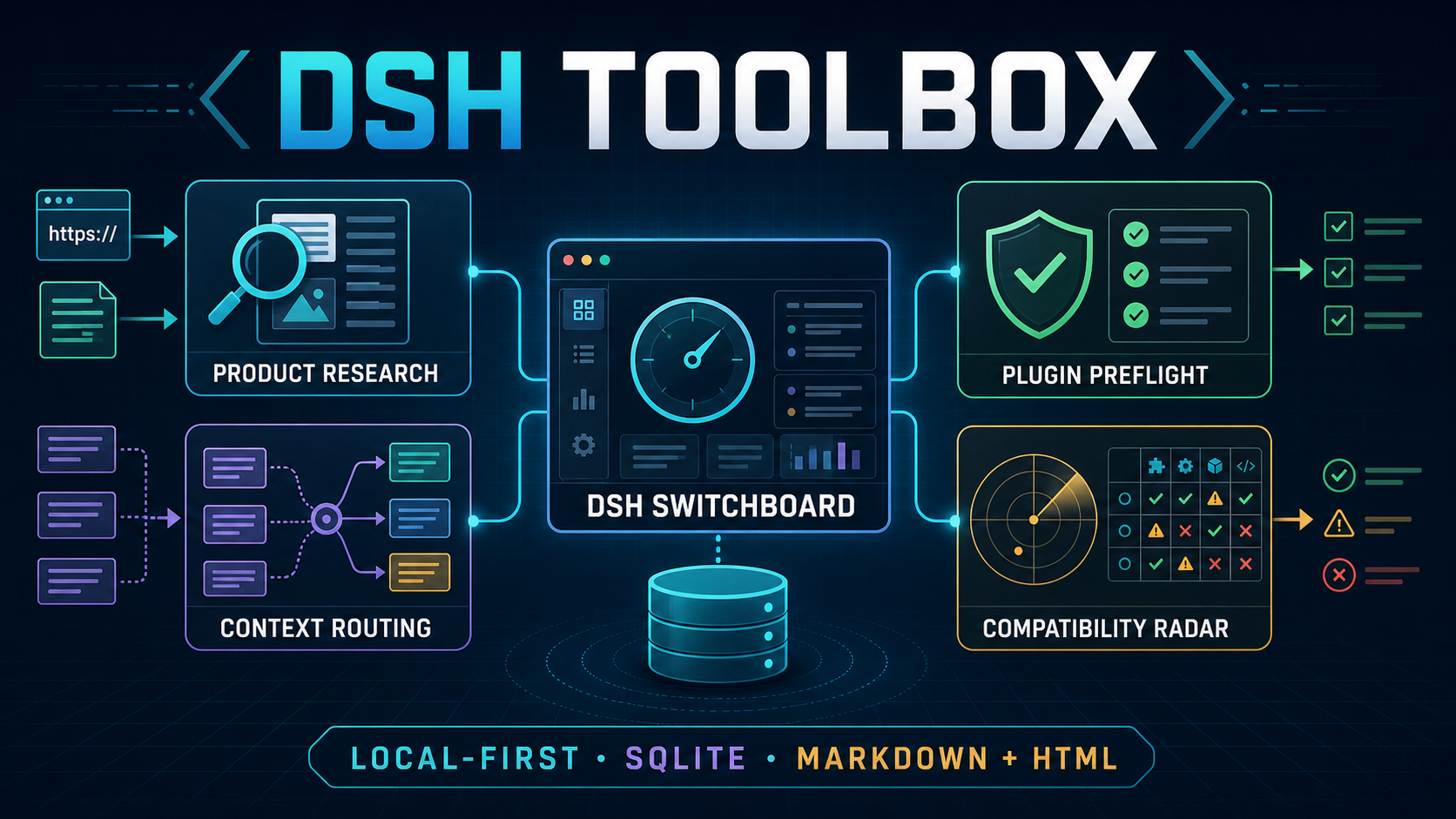
DSH Toolbox
给 DeepSeek Harness 的本地工具箱。
产品研究、上下文切换、插件预检和兼容性监控,都收进一个安全的可视化控制台。





[!NOTE] 在线版是安全演示:健康检查、Bundle 开关、变更计划、活动和回滚只在当前浏览器内存中模拟,刷新即复原。它不会连接访客电脑,也不会读取 DSH Profile、API 凭据或 SQLite 数据。安装本地版后才会接通真实 DSH 链路。
[!IMPORTANT] Experimental MVP · 仅限非商业用途。 DeepSeek Harness 仍处于 Developer Preview,版本升级可能影响 Profile Bundle 兼容性。本项目独立开发,与 DeepSeek 无隶属或背书关系。
DSH Toolbox 是什么
DSH Toolbox 是给单人本地工作流准备的 DeepSeek Harness 配套工具。四个插件作为原生 DSH Profile Bundles 运行;DSH Switchboard 则位于当前 Harness 进程之外,负责查看 Profile、运行健康检查、预览 Bundle 变更、创建备份并安全回滚。
默认没有账号、托管后端、行为分析、遥测、后台注册表检查或自动升级。真实运行数据保存在本机 SQLite;需要修改 Profile 时,一定先生成计划,用户确认后才写入,并保存可追溯的事务记录。
五个组成部分
| 组件 | 日常用途 | 工具数 |
|---|---|---|
@dsh-toolbox/product-research-workbench |
导入 URL/文本证据,整理发现、评估机会、备份项目并生成 Markdown/HTML 报告。 | 12 |
@dsh-toolbox/context-switchboard |
把任务路由到有边界的上下文,激活原生运行时上下文并支持回滚。 | 10 |
@dsh-toolbox/plugin-preflight |
安装前检查本地 Bundle 的包语义、能力、策略、SBOM 与指纹。 | 2 |
@dsh-toolbox/compatibility-radar |
发现 Bundle,对比目标运行时,保存/比较快照并生成升级报告。 | 7 |
@dsh-toolbox/dsh-switchboard |
发现 DSH Profile、检查 Bundle、规划变更、验证、备份、报告与回滚。 | CLI / 控制面 |
前四项是可以独立安装的 DSH Profile Bundles;第五项是统一的本地控制面。Product Research Workbench 和相关报告支持 Markdown + HTML 输出,运行数据默认使用 SQLite 保存。
在线演示与本地完整版
| 能力 | 在线演示 | 本地完整版 |
|---|---|---|
| 查看四个页面和固定右侧活动栏 | 可用 | 可用 |
| 切换 Profile、筛选活动、审阅 Bundle 计划 | 浏览器内存模拟 | 连接真实本地数据 |
运行 dsh --dump-config 健康检查 |
模拟成功结果 | 真实执行 |
| 写入 Profile、备份、回滚、生成报告 | 不写入,刷新即复原 | 计划确认后真实执行 |
| 数据去向 | 当前浏览器内存 | 用户电脑上的 SQLite 与私有目录 |
Requirements
- Node.js
^22.19.0 || >=24.0.0(node:sqliteis built in) - npm, for packing the local bundles
@deepseek-ai/dsh@0.1.1-rc.2- A local DSH profile you are allowed to modify
Read-only Switchboard inspection works without the DSH CLI on PATH. Applying or rolling back a change requires the CLI by default because a successful dsh --profile <name> --dump-config is the runtime safety gate.
The tested runtime combination is:
| Component | Tested version |
|---|---|
| DeepSeek Harness | 0.1.1-rc.2 |
| DSH Tools | 0.1.1-rc.2 |
| Cordis | 4.0.1 |
| Node.js | 24.x and the declared 22.19+ range |
Install the pinned DSH CLI if it is not already available:
npm install --global @deepseek-ai/dsh@0.1.1-rc.2
dsh --version
Five-minute installation
Clone the source, create the four npm tarballs, and install them into one DSH profile:
git clone https://github.com/HiWhaleW/dsh-toolbox.git
cd dsh-toolbox

mkdir -p dist
npm pack --workspace @dsh-toolbox/product-research-workbench --pack-destination dist
npm pack --workspace @dsh-toolbox/context-switchboard --pack-destination dist
npm pack --workspace @dsh-toolbox/plugin-preflight --pack-destination dist
npm pack --workspace @dsh-toolbox/compatibility-radar --pack-destination dist

dsh plugin --profile toolbox add ./dist/dsh-toolbox-product-research-workbench-0.2.1.tgz
dsh plugin --profile toolbox add ./dist/dsh-toolbox-context-switchboard-0.2.1.tgz
dsh plugin --profile toolbox add ./dist/dsh-toolbox-plugin-preflight-0.2.1.tgz
dsh plugin --profile toolbox add ./dist/dsh-toolbox-compatibility-radar-0.2.1.tgz

dsh --profile toolbox --dump-config
The final command should show all four bundle layers. Start DSH with the same profile:
dsh --profile toolbox
You may install only the tarballs you need. Packing does not execute plugin code and does not require repository dependencies to be installed. Direct checkout-path installation is also possible after npm install at the repository root, but tarballs match npm packaging semantics and are the validated portable flow.
Each package pins the small DSH tool-definition runtime needed for reliable out-of-tree installation. There are no install lifecycle scripts.
Open the DSH Switchboard GUI
DSH Switchboard is a local settings app for DeepSeek Harness. It shows which Profiles and Profile Bundles are installed, checks whether a Profile can start, previews every change, and keeps a backup so the change can be rolled back safely.
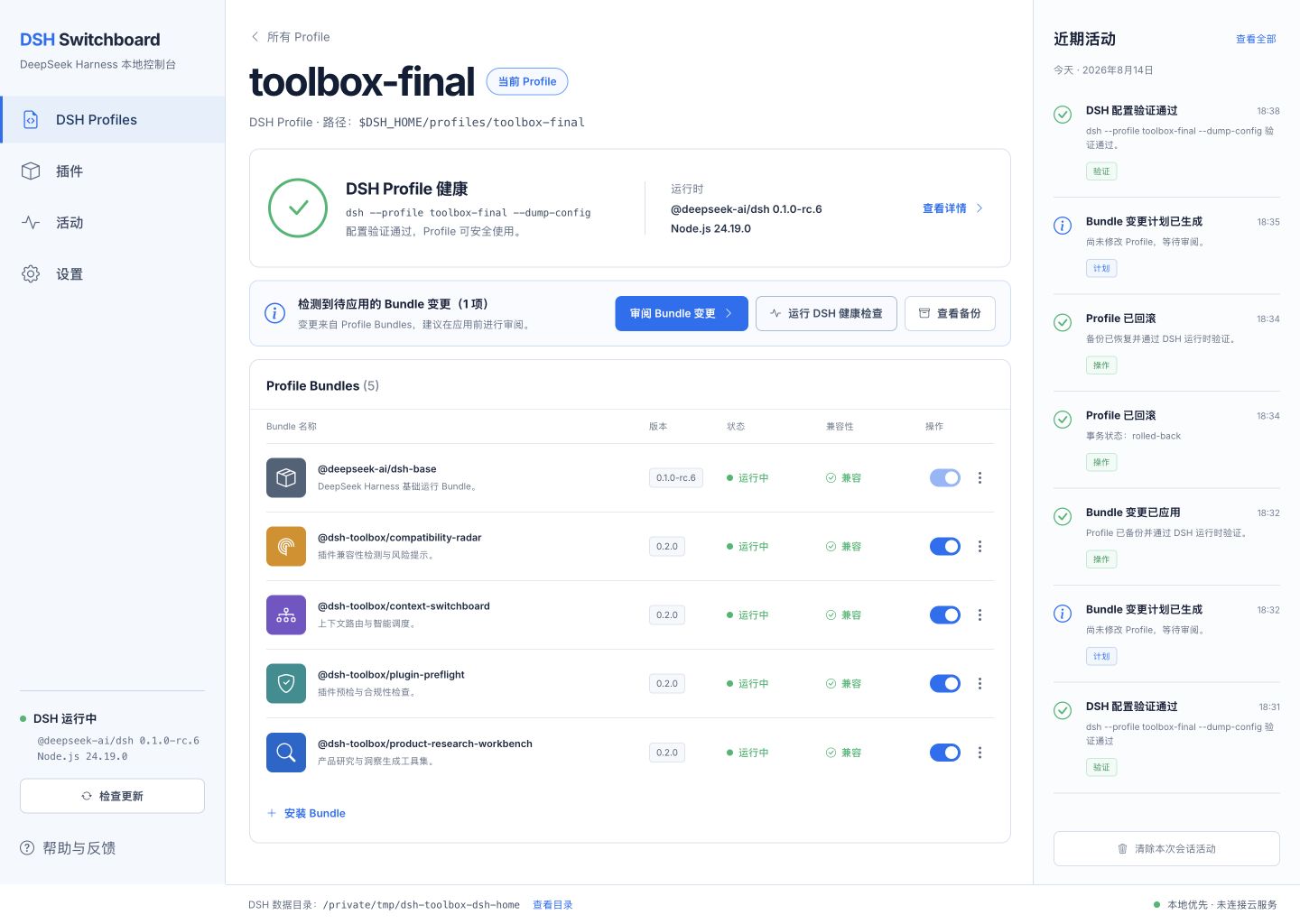
The real light-theme interface: left-side navigation, a task-focused center panel, and a fixed recent-activity panel on the right.
The navigation opens four working views in the center panel:
- DSH Profiles — inspect a Profile, run its DSH health check, review installed Bundles, and plan enable/disable changes.
- Plugins — view the Bundle inventory and its compatibility status.
- Activity — inspect local plans, validations, applied changes, and rollbacks.
- Settings — review the detected DSH runtime and local data locations.
Recent activity remains visible on the right while you move between views. Long lists scroll inside their own panels, so the overall application frame stays fixed and readable.
From the repository checkout:
pnpm install --frozen-lockfile
pnpm switchboard:gui
Then open http://127.0.0.1:4173/. The server listens only on the local computer. It reads Profiles from $DSH_HOME/profiles, never displays API credential values, and requires a review step before writing Profile files.
Use DSH Switchboard from the command line
Switchboard is currently a source-distributed technical preview and is not an npm dependency of any DSH profile. Run it from the checkout:
npm run switchboard -- detect
npm run switchboard -- profiles
npm run switchboard -- inspect toolbox
npm run switchboard -- health toolbox
Mutation commands are plan-first and make no change unless --apply is present:
npm run switchboard -- bundle disable toolbox @dsh-toolbox/context-switchboard
npm run switchboard -- bundle disable toolbox @dsh-toolbox/context-switchboard --apply
npm run switchboard -- history
Switchboard keeps SHA-256 state fingerprints, atomic-write backups, and SQLite receipts. It rejects stale plans and refuses rollback over a later user edit. See the Switchboard README and architecture RFC.
How to use the plugins
These packages register tools inside DSH; they are not standalone shell commands. Ask the agent to run the named tool, or describe the outcome and let DSH select it.
Product Research Workbench
Suggested flow:
research_create → research_add_source → research_extract
→ research_evidence_add (optional human correction)
→ research_analyze → research_report
Example request:
Create a research project called "Local AI research workflows".
Import this pasted interview text, extract evidence, analyze the opportunities,
and generate both Markdown and HTML reports.
URL import accepts public unauthenticated http(s) pages. It blocks loopback, private, link-local, metadata, and other non-public destinations by default. Authenticated crawling, browser cookies, CAPTCHA bypass, and social-media scraping are outside the MVP.
Context Switchboard
Suggested flow:
context_profile_save → context_route → context_activate
→ context_current / context_history → context_rollback
Example request:
Save a context profile named "DSH plugin development" with the keywords
"dsh", "cordis", and "plugin"; use a 1,200-token budget. Route this task,
activate the best profile, and show me the activation receipt.
Activation uses DSH's native systemPrompt.context() registry. It contributes a bounded runtime-context snapshot and does not replace the deployment persona, sandbox policy, or approval policy.
Plugin Preflight
Example request:
Run plugin_preflight_scan on packages/context-switchboard and explain every
finding before I install it. Then create the Markdown and HTML audit report.
Preflight is static and read-only: it does not run scripts, install dependencies, follow symlinks, or contact registries. A clean scan is not a security guarantee.
Compatibility Radar
Example request:
Discover DSH bundles under packages, check them against DSH Tools 0.1.1-rc.2,
Cordis 4.0.1, and my current Node version, then save a compatibility snapshot.
Before changing DSH or Cordis versions, save a second snapshot and use compatibility_diff or compatibility_report to identify regressions. Radar never upgrades software automatically.
Local data and outputs
| Plugin | Default local data |
|---|---|
| Product Research Workbench | ~/.local/share/dsh-toolbox/product-research-workbench |
| Context Switchboard | ~/.local/share/dsh-toolbox/context-switchboard |
| Plugin Preflight | ~/.local/share/dsh-toolbox/plugin-preflight |
| Compatibility Radar | ~/.local/share/dsh-toolbox/compatibility-radar |
| DSH Switchboard | ~/.local/share/dsh-toolbox/dsh-switchboard |
The plugins and control plane use SQLite and create Markdown plus self-contained HTML reports where applicable. Generated reports load no remote scripts. Runtime databases, reports, exports, sessions, environment files, and cookies are excluded by the repository .gitignore, but you should still inspect staged changes before every commit.
Research reports and exports may contain source text, quotations, URLs, local paths, project names, copyrighted material, or personal information. Review them before sharing. See PRIVACY.md and SECURITY.md for the complete boundaries.
License: noncommercial use only
DSH Toolbox 0.2.1 and later is source-available under the PolyForm Noncommercial License 1.0.0.
Permitted uses include personal study, research, experiments, hobby projects, education, charitable/nonprofit work, public research, public safety, environmental protection, and government work as defined by the license.
Commercial use is not permitted. Do not use this software, modified versions, or derived works for direct or indirect commercial advantage, including paid products or services, revenue-generating operations, commercial consulting deliverables, or internal business benefit. The canonical license text controls if this summary differs from it.
This restriction applies to the original DSH Toolbox code. DeepSeek Harness, Cordis, DSH Tools, and other dependencies remain under their own licenses; see THIRD_PARTY_NOTICES.md.
Historical note: copies of earlier versions that were already distributed under MIT remain subject to the grants that accompanied those copies. The 0.2.1 license change does not retroactively revoke rights already granted.
Contributing
Read CONTRIBUTING.md and the Code of Conduct before contributing. By submitting a contribution, you agree that it may be distributed under the repository's current noncommercial license.