AI Context Doctor


AI coding agents read your repository file by file. Some of those files are garbage — build output, logs, lockfiles, a 40 MB data dump. This tool finds them in a few seconds and tells you what to keep away from the agent.
npx ai-context-doctor
No install, no login, no API key, nothing uploaded. It only reads file names and sizes.
What it looks like
Real output from the demo repository in this project:
AI Context Doctor

Repo: demo-ai-context-noise-repo
Scanned: 8 files, 1.50 MB

AI Context Health: 22/100
Status: Too much noise for an AI coding agent

Context noise estimate:
78% likely noise
22% likely useful source context

Top context waste:
1. data/export.json            1.00 MB   large file
2. dist/                      106.9 KB   generated build output
3. package-lock.json           35.2 KB   lockfile
4. logs/dev.log                18.4 KB   local log file
5. coverage/                   16.7 KB   test coverage output

Review before sharing:
- .env.example             environment template (usually safe to share)
- scripts/deploy.sh        deployment script

Suggested .aiignore:
coverage/
dist/
*.log
package-lock.json

Next step:
Run this before asking your coding agent to inspect a larger repo.
How to read it
| Line | What it means |
|---|---|
Scanned: 8 files, 1.50 MB |
What was actually walked. .git/ and node_modules/ are skipped. |
AI Context Health: 43/100 |
Five separate losses, subtracted from 100: noise (30), sheer size (25), one file dominating (20), file count (15), binaries (10). The first is what rules can move; the other four describe the folder itself, so a clean but enormous repository no longer scores 100. |
Status: |
Just the score in words: 85+ clean, 60–84 some noise, below 60 too much. |
Top context waste |
The five biggest offenders with the reason each was flagged. |
Review before sharing |
Files that look like credentials or deploy scripts. The tool does not claim they are secret — it says look before you paste the repo into a chat. |
Suggested .aiignore |
Lines you can paste into an ignore file. Nothing is written for you. |
What you can do with it
- Before you hand a repo to an agent — run it, then
--writethe suggested lines into.aiignoreinstead of copying them by hand. - On a repo you just cloned — see how much of it is generated output before the agent drowns in it.
- In CI —
--jsongives a stable object, so you can fail a build when context health drops. - In your own tool —
require('ai-context-doctor')exposes the same scan as a function. - Inside DeepSeek Harness — install
dsh-aiignoreand the agent is told automatically when a session opens a noisy workspace, so you do not have to remember to run anything.
Install
Run it without installing anything:
npx ai-context-doctor
Or install it once:
npm install -g ai-context-doctor
Requires Node.js 18 or newer.
Usage
ai-context-doctor              # scan the current directory
ai-context-doctor ../some-repo # scan another repository
ai-context-doctor --json       # machine-readable output
ai-context-doctor --write      # add the suggested rules to .aiignore
ai-context-doctor --write --dry-run   # show what --write would add
ai-context-doctor --help
ai-context-doctor --version
Writing .aiignore
npx ai-context-doctor --write
--write appends the rules the report suggests to .aiignore in the scanned
directory. It only appends: comments and rules you already have stay exactly as
they are, and running it twice adds nothing the second time. If the file does
not exist it is created with a two-line header.
--write --dry-run prints what would be added and writes nothing.
It will not follow a symbolic link, and it refuses to replace a directory that
happens to be called .aiignore.
The scan is a heuristic over file names and sizes — it does not read .aiignore
— so the score will not change just because you wrote the file. The file is for
the other tools: your agent, your editor, your teammates.
JSON output
npx ai-context-doctor ./some-repo --json
Returns repo, healthScore, effectiveScore, status, noisePercent, usefulPercent, scannedBytes, scannedFiles, allowedBytes, allowedFiles, topNoise, review, suggestedAiignore, scoreBreakdown (the five-dimension arithmetic behind each score) and scoreLost — plus truncated: true when a scan cap was hit.
With --write it also carries a write object: path, created, added, written, dryRun.
If the path is not a readable directory, --json still prints a single JSON object — never a banner — and exits with code 1, so a CI step can parse the failure:
{
  "error": "not-a-readable-directory",
  "message": "/path/you/passed is not a readable directory.",
  "target": "/path/you/passed"
}
Use it from code
const { scanRepository } = require('ai-context-doctor');

const report = scanRepository(process.cwd());
console.log(report.healthScore, report.topNoise);
writeAiignore(aiignorePath, suggested, { dryRun }) is the writer behind --write, if you want the same behaviour from code.
scanRepository(root, { maxFiles, maxBytes }) is synchronous and has no dependencies. Pass a cap for huge trees; the report then carries truncated: true.
DeepSeek Harness plugin
dsh-aiignore packages the same scan as a Host plugin. When a session opens a workspace, the agent gets one short note naming the files that would waste its context — and nothing at all when the workspace is clean.
dsh plugin --profile web add dsh-aiignore
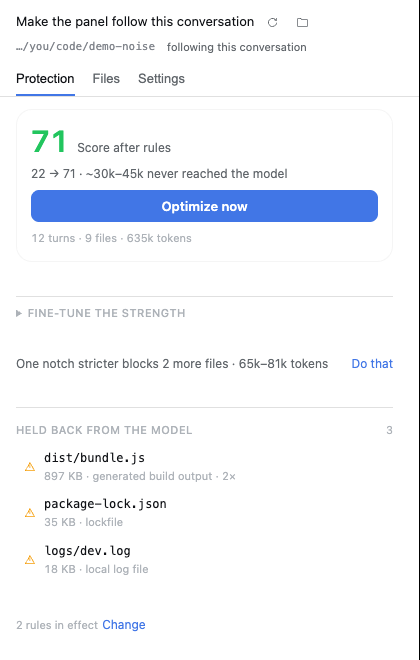
The plugin also adds an AIignore tab to the right sidebar, opened from a
folder button in the composer. It opens on Protection: how many reads in
this conversation are junk and that your rules now hold back, and roughly how
many tokens never reached the model. Before you optimize it says the honest
version — "2 reads are junk and still reach the model" — so the button has
something to be measured against. One primary button, Optimize now, rescans,
writes what is missing, re-reads the conversation and reports the score before
and after; when nothing is missing it says so. A second line offers one notch stricter with
the number attached, so "raise the strength" is a decision instead of advice.
Directly under the counters is the strength ladder: five notches, each
labelled with the score this folder would have at that notch, so the trade is
visible before you take it — and picking one applies it and rescores the page.
Files browses the workspace a directory at a time and spells out what its
three verdicts mean — noise is regenerated by a build, a lockfile or a log,
review is worth a look first, ignored already has a rule — then offers the
rules the scanner would still add, one click each; Settings holds the
.aiignore lines with an × each, the note for the agent, and the
five-dimension arithmetic. It follows the Harness light and dark themes.
It declares engines.dsh: ">=0.2.0" — the Harness checks that range before installing, and refuses the plugin rather than half-loading it — and needs Node.js 18 or newer. In the plugin market index it is filed under Context quality with three labels: No network calls, Works with no setup, Lives in the sidebar. Without a sidebar service the same button opens the panel as a floating card. The source, its configuration and its limits are in plugin/README.md.
What counts as noise
- Directories:
dist/,build/,coverage/,.next/,.turbo/ - Lockfiles:
package-lock.json,pnpm-lock.yaml,yarn.lock - Logs:
*.log - Large files: any single file over 1 MB that no more specific rule already matched
- Review hints: credential-shaped names (
.env*,secrets.env,credentials.json,*.pem,*.key) and paths containingdeploy..env.exampleis recognised as a template and marked usually safe. - Never walked:
.git/,node_modules/,.venv/,venv/,__pycache__/,vendor/
What it does not do
- It does not call an AI service, need an API key, or upload anything.
- It does not modify your repository — it never writes
.aiignoreor any other file. - It is not a
gitignorelinter: it looks at what an agent would read, not what git tracks, so ignored files still show up. - It is not a secret scanner. The review list is a name heuristic; an
id_rsawithout an extension and a key pasted intoconfig.jsboth slip through. - It does not count tokens or parse code. The score is a size heuristic — useful as a signal, not as a measurement.
- It does not have a config file. Caps are available through the API and the Harness plugin only.
Why .aiignore and not .gitignore
Because the two questions are different. dist/ is gitignored in most projects and still gets read by an agent that ignores git. The tool reports on bytes the agent would ingest, whatever git thinks of them.
Privacy
Everything runs locally. The tool reads directory entries and file sizes; it does not read file contents, does not open a network connection, and stores nothing. The only thing it sends anywhere is what npm sends when you install it.
Development
git clone https://github.com/WJDdidi-1/ai-context-doctor.git
cd ai-context-doctor
npm test                       # unit and CLI tests
node bin/ai-context-doctor.js ./demo-ai-context-noise-repo
The demo-ai-context-noise-repo/ directory is a deliberately messy repository, shipped with the source (not with the npm package) to make the output easy to try.
Maintainers: see the release checklist. Publishing happens in CI on a v* tag via npm trusted publishing, and prepublishOnly runs the tests first, so a broken package cannot go out.
Roadmap
- Clear errors for unknown flags instead of treating them as directory names.
- Better noise rules based on real reports from users.
- Optional
--fixthat writes the suggested ignore entries, with a diff you approve first.
License
Apache-2.0 — see LICENSE and NOTICE. The earlier releases were MIT; the licence change applies from 0.22.0 on.