ModWrench


An MCP server that connects your AI assistant to mod platforms and to your own modding setup, so you can ask questions in your AI client instead of clicking through web UIs.
It runs on your machine. No account, no service, no server anyone operates.
Paste a crash log. Get the mod that caused it.
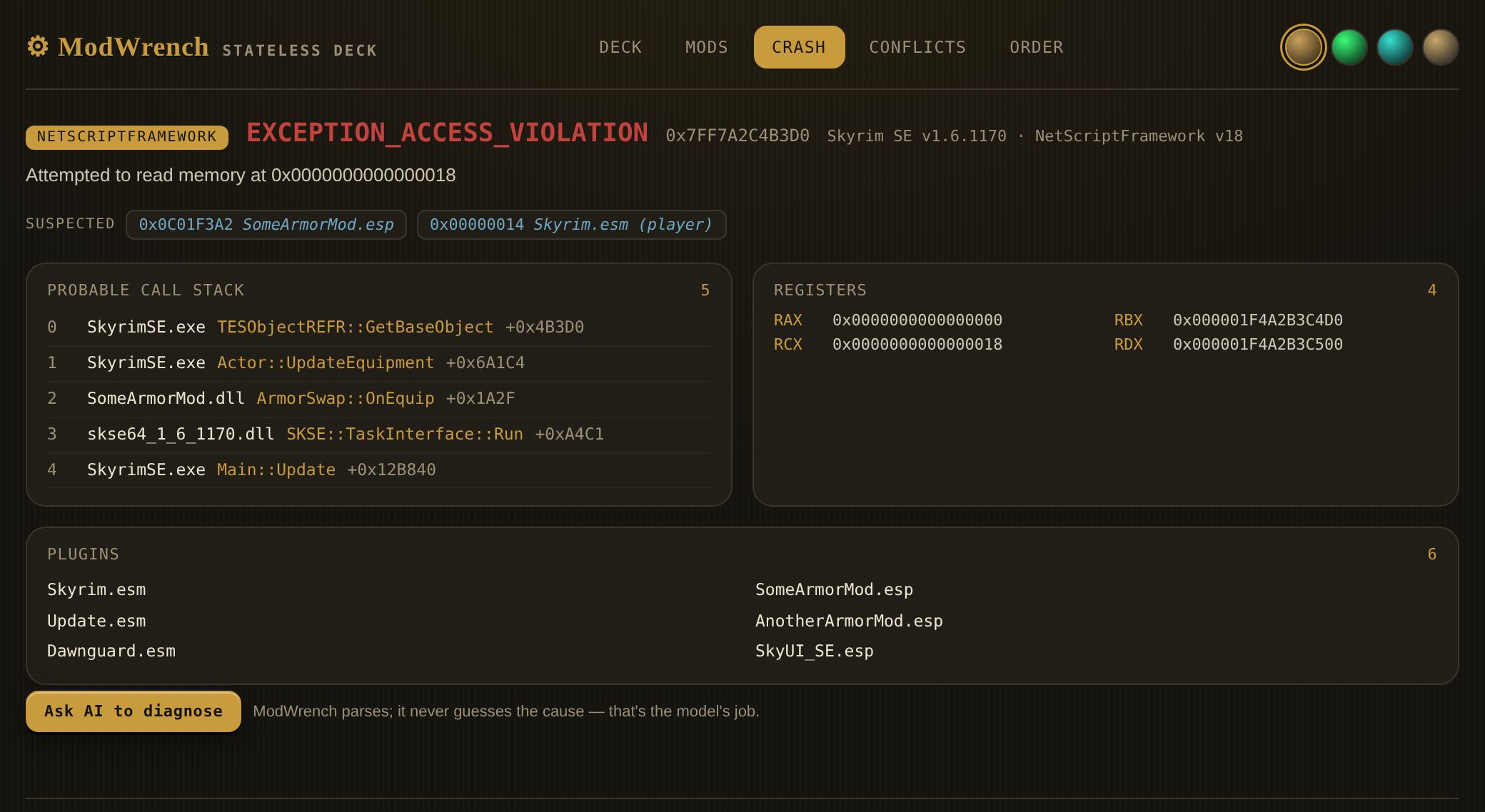
SomeArmorMod.esp is named as a suspect, and SomeArmorMod.dll is sitting at frame 2 of
the call stack. ModWrench parsed the log and laid out what is in it. It did not decide the
cause — that is the model's job, and the panel says so.
Search every platform you have connected, with the author on every row.
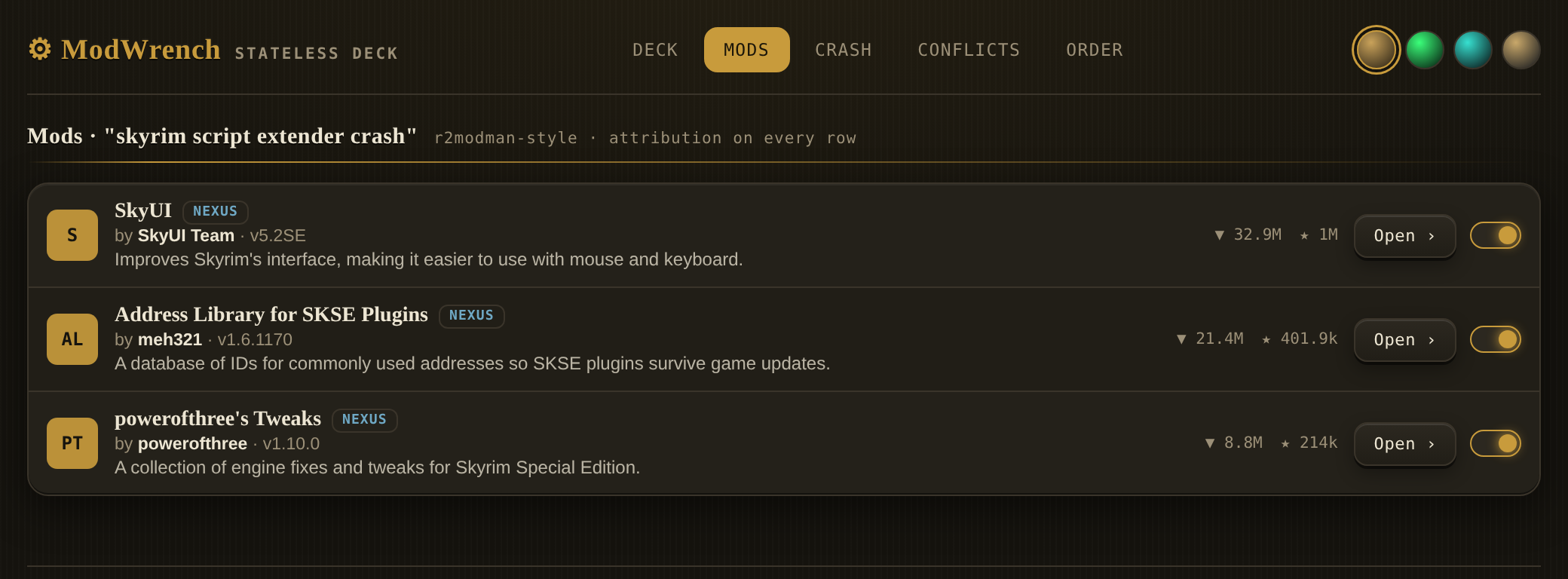
These panels are not screenshots of a website. Each one is an interactive MCP-UI resource that a tool returns inline with its answer — self-contained HTML with no external scripts, no stylesheets, no fetches and no images. Your MCP client renders it locally, or shows the text answer if it does not support MCP-UI yet. Nothing about it reaches a server.
One caveat worth knowing before you hit it. A client that does not support MCP-UI does not quietly ignore the panel — it puts the HTML into the conversation as text, and the model reads markup it can do nothing with. One panel is about 28kb, roughly 8,800 tokens, near 7% of a 128k context window. If that is happening to you, turn panels off:
MODWRENCH_UI=off
Set it wherever your client puts environment variables. The payload drops from 28kb to about 130 bytes — a 219x reduction — and every tool keeps working exactly as before. Panels are on by default; this is opt-out, not opt-in.
What it does
Four attachments. Install one, some, or all — @modwrench/cli composes whichever you've configured into a single MCP entry.
Nexus Mods — search mods, read changelogs and file lists, check versions, browse trending and recently updated, preview what's inside an archive before downloading, reverse-lookup a file by MD5, and endorse a mod when you ask it to. (15 tools)
mod.io — search and browse mods across the games mod.io hosts; pull mod details, files, tags, stats, dependencies and comments. (17 tools)
Thunderstore — browse communities, search mods, read full version history, and resolve dependency trees. No credential needed; the read API is public. (9 tools)
Workbench — local, on your machine. Find your installed games, mod managers and loaders; read your load order out of MO2, r2modman or Vortex; parse a crash log from Crash Logger SSE, Buffout 4, NetScriptFramework or BepInEx; look a mod up across platforms; check known conflicts. (6 tools)
The conflict check reads two sources: LOOT's masterlist, fetched live for Bethesda games, and a small conflict list bundled inside the package for games LOOT does not cover. That bundled list ships empty — all three files contain [] — so today it asserts nothing. It is named here because it is a channel that could carry claims about someone's mod in a future release, and npx pulls the latest version automatically unless you pin.
Plus two meta tools for activating a platform mid-session and opening a visual panel.
49 tools. 48 of them read. One writes — see The one thing it writes.
It also registers five slash commands your MCP client will offer you: /modwrench opens the panel, /mw-find searches every connected platform at once, /mw-crash takes a crash log, /mw-conflicts checks a game's load order, and /mw-order reads your load order. They are shortcuts that call the tools above — they add no capability the tools do not already have.
How to use it
Requires Node.js 20 or newer.
Claude Code
claude mcp add --scope user modwrench -- npx -y @modwrench/cli
VS Code — open the Command Palette (Ctrl+Shift+P), run MCP: Add Server, choose
Command (stdio), and enter npx -y @modwrench/cli. Letting VS Code write the config is
the reliable route, because its key is servers rather than the mcpServers other clients
use. If you would rather edit mcp.json by hand:
{
  "servers": {
    "modwrench": {
      "type": "stdio",
      "command": "npx",
      "args": ["-y", "@modwrench/cli"]
    }
  }
}
MCP tools only load in Agent mode, not Ask — switch the mode dropdown in the chat box.
Claude Desktop, Cursor, Cline, Continue, Roo Code — add to your client's MCP config.
Note the key here is mcpServers, which is not what VS Code uses:
{
  "mcpServers": {
    "modwrench": {
      "command": "npx",
      "args": ["-y", "@modwrench/cli"]
    }
  }
}
Restart your client. Thunderstore and the local Workbench tools work immediately — no account, no key.
Connecting Nexus and mod.io
These two need a credential:
npx -y @modwrench/cli auth key nexus
npx -y @modwrench/cli auth key modio
Each command prompts for the key, verifies it against the platform, and stores it in your OS credential manager. Get them from Nexus API access and mod.io/me/access.
auth status nexus to check one, auth logout nexus to remove it.
Before you connect Nexus. Nexus's API Acceptable Use Policy tolerates personal API keys for personal use, but asks public applications to register for their own client ID. ModWrench is not a registered Nexus application yet, so connecting Nexus means using your personal key with a third-party tool — and Nexus may choose to limit personal keys used that way. That would affect your key, not ModWrench. Skip Nexus if you'd rather not; nothing else depends on it.
Your credentials
Your key lives in your operating system's credential manager — Windows Credential Manager, macOS Keychain, or libsecret on Linux. The server reads it from there and nowhere else: there is no .env path, no config-file path and no environment-variable path in the credential loader. If the credential manager is empty or unreachable, ModWrench stops and tells you why instead of looking elsewhere.
The key is read when its platform activates — at start-up, or mid-session if you activate one later — and held in memory until the process exits. The cross-platform lookup mw_query_mod_metadata re-reads it from the credential manager on each call.
The only things that ever write a credential are auth key and auth login, which put it into that same credential manager; auth logout removes it. Nothing writes it to a file.
You can revoke or rotate it on Nexus or mod.io whenever you want. There is nothing to clean up on this end.
What it connects to
Everything ModWrench talks to, and nothing else:
| Host | When |
|---|---|
api.nexusmods.com |
Nexus mod data, and crash-suspect attribution when you opt in — only if you connected Nexus |
users.nexusmods.com |
only while auth login nexus completes an OAuth sign-in |
api.mod.io |
mod.io mod data — only if you connected mod.io |
thunderstore.io |
Thunderstore's public read API |
raw.githubusercontent.com |
LOOT's public conflict masterlist |
127.0.0.1 |
a local listener that catches the OAuth redirect, during auth login only |
whatever CDN host Nexus names in a file's content_preview_link |
nexus_file_preview only — Nexus serves archive listings off-API, so this one call follows a URL Nexus returns rather than a fixed host. Sent with no credential |
Other domains show up in ModWrench's output — www.nexusmods.com and mod.io links back to mod pages — but it does not fetch them. Your browser does, if you click one.
No telemetry. No analytics. No accounts. Nothing is sent to us, because there is no us to send it to — no server is run for this project.
The one thing it writes
nexus_endorse_mod endorses a mod on Nexus, as you, on your account. It is the only tool in ModWrench that changes anything on any platform.
It cannot fire by accident. Ask for an endorsement and the first thing back is a preview — which mod, which version, and a note that the endorsement is public and shows your username. No network call happens at all unless you confirm. Only a second, explicitly confirmed call sends it. There's a test asserting the unconfirmed path touches the network zero times.
Everything else reads.
Locally, the Workbench tools open files read-only. There is no filesystem write call anywhere in the package.
For mod authors
Every output built from a platform's data carries your name, the platform it came from, and a link to your mod page. That covers all the search, browse and lookup tools across Nexus, mod.io and Thunderstore.
There is one place it does not, and it is the place that matters most to you, so it gets said plainly rather than left for you to find. The crash and conflict tools work from filenames, not platform records. mw_diagnose_crash reads a crash log off the user's own disk and reports the plugin filenames it finds; mw_check_known_conflicts reports pairs from LOOT's masterlist. ModWrench does not inherently know which platform a given .esp came from — finding out means network lookups in a diagnostic that otherwise touches nothing.
That gap is now half-closed, and only ever on request: mw_diagnose_crash takes an opt-in attributeSuspects flag (off by default) that resolves up to five named suspects to their Nexus mod pages — author, link, and the name the search matched, so a mismatch can be spotted before the link is presented as yours. It is a name search, it can be wrong, and every attribution it returns says so (matchedBy: "name-search"). It needs a gameId and a stored Nexus credential; without them it says attribution was skipped and moves on. mw_check_known_conflicts still does not attribute — LOOT's masterlist carries no author pages.
A crash diagnosis can still make a negative statement about your work — "this mod is the likely cause" — with no link back to you when attribution is off (the default), unavailable, or fails to match. Every finding carries a disclaimer saying it is a suspicion from a log, not a verdict. Attribution narrows the gap; it does not close it — the conflict tool has no author data to draw on at all, and that remains a gap and is listed as one.
Where a platform reports an author's permissions, ModWrench passes them through so you see them. It does not enforce them and cannot — this is a metadata bridge, not a gate. What it will not do is help you strip a credit.
The endorse tool exists for the same reason: it's the one way a bridge like this gives something back to the person who made the thing, rather than only taking a page visit away.
Status
Early — pre-1.0. It will have bugs, and it is not perfect.
The source is open so you can check anything on this page rather than taking it on faith. TRUST.md lists each claim with the command to verify it yourself. If you find one that isn't true, that's a bug — file it.
License
MIT