garmin-personal-api-mcp


Ask Claude about your own Garmin data: runs, VO2 max, sleep, HRV, Body Battery, weight. It uses Garmin's official Personal API, so there's no password, no scraping and no reverse-engineered login.

| You use | Install with |
|---|---|
| Claude Desktop (chat) | The Download button above, then three steps |
| Claude Code and Cowork | /plugin install garmin-personal-api-mcp --marketplace aaronhaddad/garmin-connect-mcp-claude-connector (details) |
| Any other MCP app (Cursor and others) | npx garmin-personal-api-mcp setup (details) |
All three need a Garmin Personal API key, which you create in Garmin Connect under Settings → Personal API.
Contents: Install · What you can ask · What it can't do · Your data · Garmin's terms · Claude Code, Cursor and other apps · Contributing
Install in Claude Desktop
macOS or Windows. No terminal, no Node install. You need a Garmin Connect account.
- Create a key. In Garmin Connect, open Settings → Personal API → Create Key, and copy it.
- Download the extension and double-click it, then click Install.
- Add the key. Claude Desktop installs the extension switched off until it has a key. Open Settings → Extensions → Personal Data for Garmin Connect, paste the key, click Save and switch it on.
Then start a new chat and ask away. The 90-second walkthrough shows all three steps and two questions:
https://github.com/user-attachments/assets/84078971-fc1b-4f1c-9f02-168e73e9cbef
When your key expires, create a new one in Garmin Connect and paste it in the same place. Claude tells you when this happens.
Updating: download the latest version with the same button and double-click it. The badge at the top shows the current version, and the releases page lists what changed in each one.
What you can ask
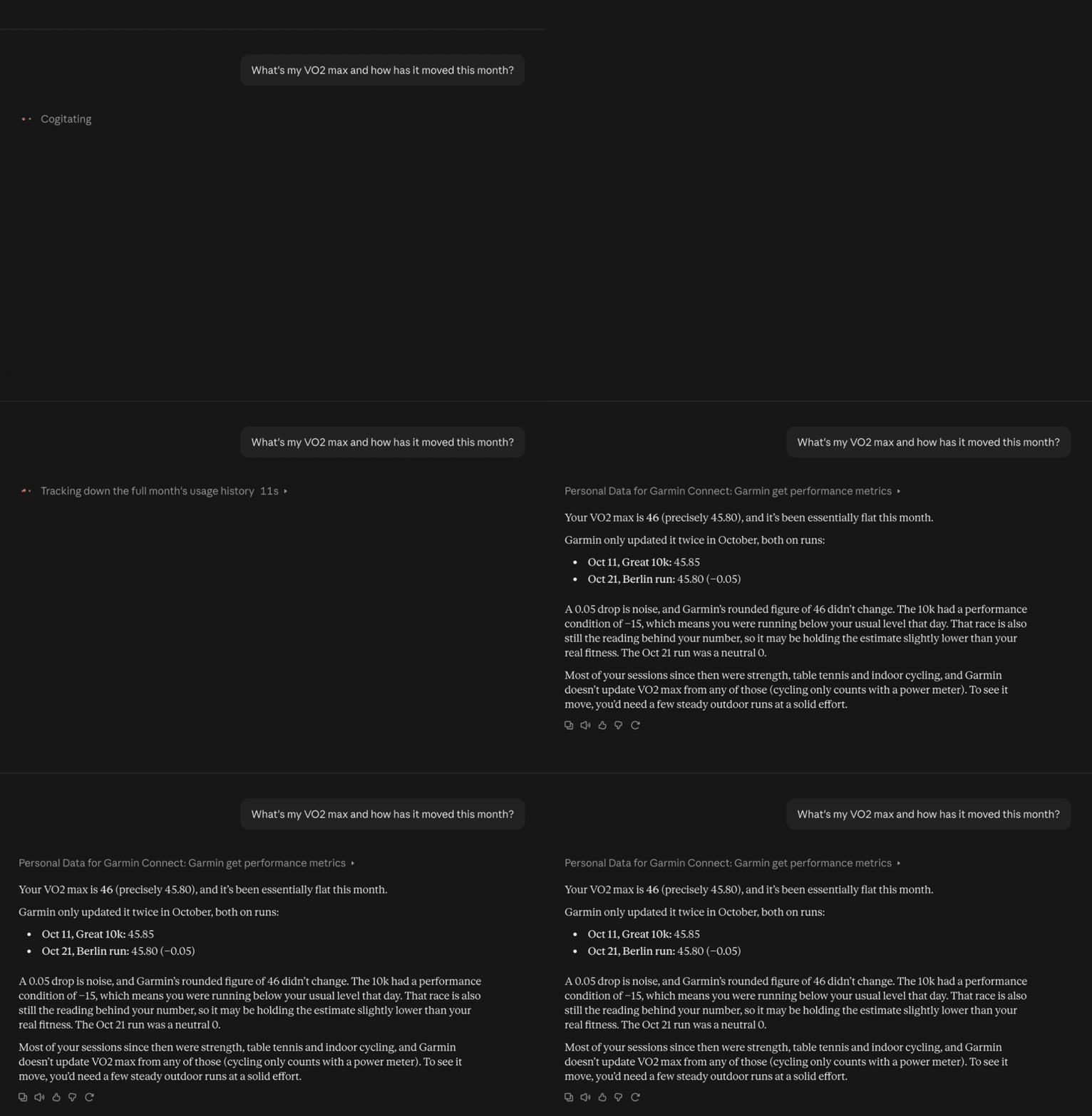
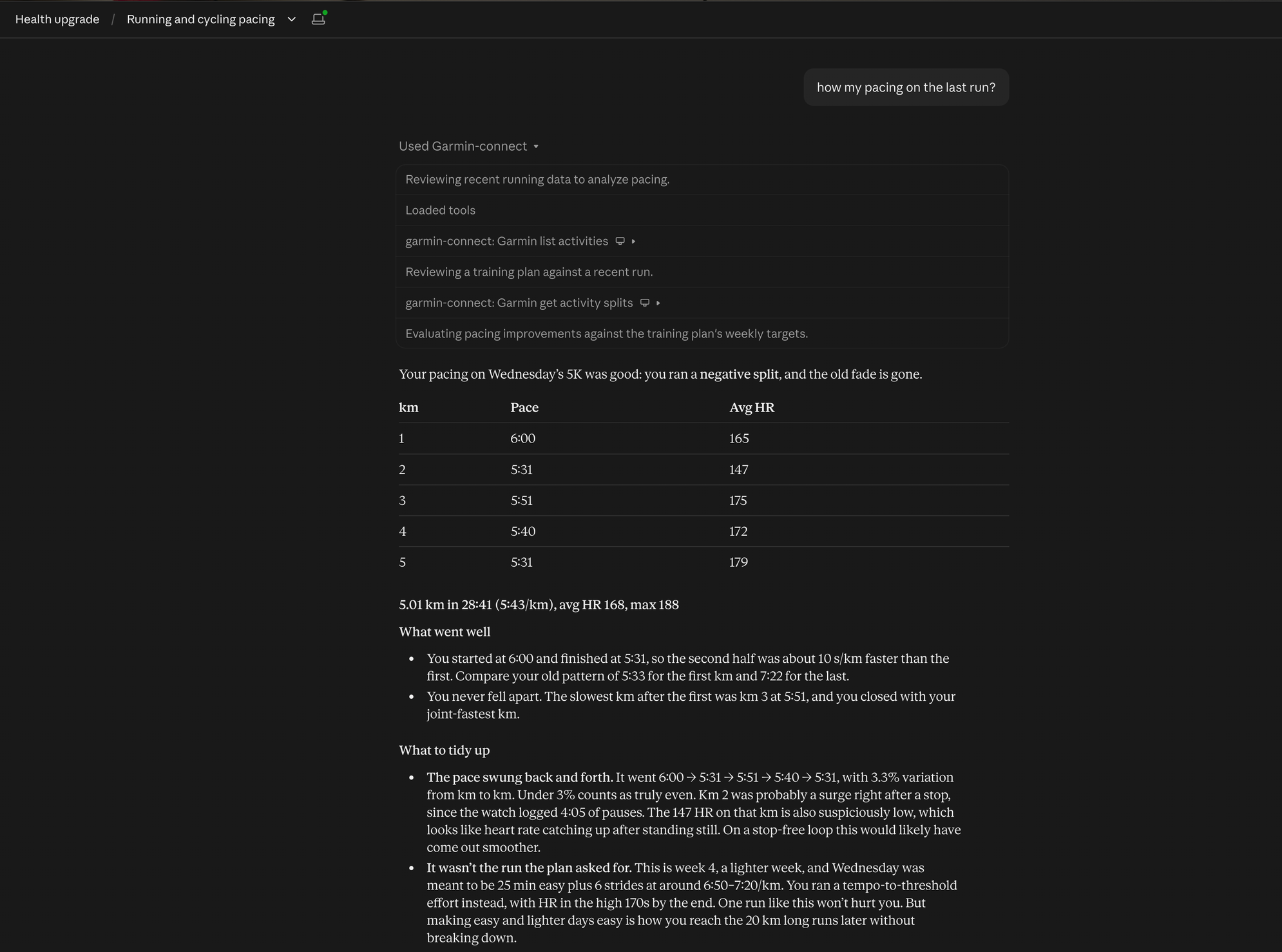
"How was my pacing on yesterday's run? Did I fade?" "What's my VO2 max, and how has it moved this month?" "How recovered am I today?" "Compare my HRV and sleep this week with last week." "Has my weight moved since I started the bulk in September?"
Dates can be YYYY-MM-DD, today, yesterday or N days ago.
All 23 tools and what they give Claude
| Tool | What it gives Claude |
|---|---|
garmin_list_activities |
Your activities with distance, time, pace, heart rate, training effect and Garmin's training load. Filter by date and type |
garmin_get_activity_splits |
Downloads the original .FIT file and computes exact km (or mile, or 400 m) splits, interpolated at each boundary with pauses removed, plus per-split HR, cadence and climb, device laps, and a pacing verdict (even, negative split, faded) |
garmin_get_performance_metrics |
Your VO2 max as Garmin Connect shows it, every VO2 max reading in a window, and per-activity aerobic/anaerobic training effect, recovery time and performance condition, decoded from the activity files |
garmin_get_activity |
Garmin's own summary for one activity |
garmin_get_day |
One call for a day: summary, sleep, HRV, Body Battery and activities |
garmin_get_daily_summaries |
Steps, calories, resting HR, stress and intensity minutes across a date range |
garmin_get_sleep, garmin_get_sleep_detail |
Nightly sleep summaries, or one night in full |
garmin_get_hrv |
Overnight HRV, baseline and status |
garmin_get_body_battery, garmin_get_stress, garmin_get_steps, garmin_get_hydration |
Daily wellness series |
garmin_get_weight, garmin_get_weight_goals |
Weigh-ins and body composition |
garmin_get_wellness_activities |
Breathwork, relaxation and other wellness sessions |
garmin_get_heart_rate, garmin_get_spo2, garmin_get_fitness_age, garmin_get_nutrition |
Single-day detail |
garmin_get_profile |
Units, profile and heart-rate zones |
garmin_download_activity_fit |
Save the original file locally, for Runalyze, Golden Cheetah and so on |
garmin_api_get |
Escape hatch for any other documented Personal API endpoint |
Example prompts for every tool
| Tool | Try asking |
|---|---|
garmin_get_profile |
"What are my heart-rate zones?" |
garmin_list_activities |
"What was my training load this week, activity by activity?" |
garmin_get_performance_metrics |
"What's my VO2 max, and how has it moved this month?" |
garmin_get_activity |
"What was the training effect of my last ride?" |
garmin_get_activity_splits |
"How was my pacing on yesterday's run? Did I fade?" |
garmin_download_activity_fit |
"Save the FIT file of my last run to ~/Downloads." |
garmin_get_day |
"How recovered am I today?" |
garmin_get_daily_summaries |
"How many intensity minutes did I get each day this week?" |
garmin_get_sleep |
"Compare my sleep this week with last week." |
garmin_get_sleep_detail |
"Break down last night's sleep stages." |
garmin_get_hrv |
"Is my HRV within my baseline this month?" |
garmin_get_body_battery |
"How did my Body Battery recharge overnight this week?" |
garmin_get_stress |
"Which day this week was most stressful?" |
garmin_get_steps |
"Did I hit my step goal every day this month?" |
garmin_get_hydration |
"How much water did I log yesterday?" |
garmin_get_weight |
"Has my weight moved since September?" |
garmin_get_weight_goals |
"What's my current weight goal?" |
garmin_get_wellness_activities |
"Show my breathwork sessions this month." |
garmin_get_heart_rate |
"What was my resting heart rate yesterday?" |
garmin_get_spo2 |
"What was my Pulse Ox last night?" |
garmin_get_fitness_age |
"What's my fitness age?" |
garmin_get_nutrition |
"What did I log for food yesterday?" |
garmin_api_get |
"Get my menstrual cycle summary for this month." |
What it can't do
These limits are Garmin's, not this extension's:
- Read-only. It can't push workouts, courses or training plans to your watch. Garmin keeps those APIs for business partners.
- No training readiness, training status or race predictions. Garmin computes those on its servers and doesn't expose them. VO2 max, training effect and recovery time are available, because your watch writes them into each activity file. VO2 max and training effect match Garmin Connect; recovery time and performance condition are approximate.
- Your account only. A key only reads the account that created it.
Your data and your key
- Nothing is collected. Everything runs on your computer: data goes from Garmin to your computer to Claude and nowhere else. See PRIVACY.md.
- Read-only. Every request is a read. Nothing can change or delete your Garmin data.
- Your key stays on your computer. Claude Desktop stores it in its extension settings, and it's only ever sent to Garmin.
- To remove access, uninstall the extension in Claude Desktop and delete the key in Garmin Connect under Settings → Personal API.
This is an independent project, not made or endorsed by Garmin. "Garmin" and "Garmin Connect" are trademarks of Garmin Ltd.
Garmin's terms
When you create a Personal API key, you accept Garmin's Personal API Supplemental Terms (Garmin Connect → Settings → Personal API → Review Terms and Conditions), on top of the Garmin Terms of Use. This project is built to keep you within them:
- Your key is for your own use only. Garmin's terms allow a key to be used only by you, with tools you develop or operate for your own use, and forbid sharing it with anyone. So this tool runs on your computer, uses only your own key, and never sends the key anywhere except Garmin. Never give your key or your Garmin login to anyone else, including friends, support channels or reviewers. Anyone who wants to try the tool creates their own free Garmin account and key.
- Only the official API. Every request goes through the Personal API that Garmin provides for this purpose. There's no scraping and no unofficial login, which Garmin's Terms of Use forbid.
- Personal, non-commercial and read-only. The tool is free, never writes to your account, and has no hosted or shared version.
- Rate limits. Garmin may limit or block requests that are too frequent. Ask for the data you need rather than very long ranges over and over.
- Your responsibility. You're the one bound by Garmin's terms, and breaking them can get your key revoked. Read them when you create the key; Garmin can change them, and the current version is on that page.
Why it isn't in Claude's plugin directory
You won't find this in the directory under Customize → Plugins in Claude, and that's deliberate. Listing there requires agreeing to Anthropic's Software Directory Terms and Policy, and two of the Policy's requirements can't be met without breaking Garmin's terms:
- A test account for reviewers. The Policy asks for a working test account with sample data. Garmin's terms say a Personal API key is for its owner's use only and must never be shared, and Garmin's Terms of Use forbid sharing account logins.
- Owning every endpoint. The Policy asks developers to own or control every API their software calls. This tool calls Garmin's API, which only Garmin controls.
The Terms also make the developer personally liable to Anthropic for claims about the software, which is a lot to take on for a free side project. So it's distributed directly instead: the Claude Desktop extension, the npm package and the plugin below all install from this repository and work the same way.
Claude Code, Cursor and other apps
Claude Code and Cowork: install the plugin, which adds the server plus a skill that tells Claude how to answer training and recovery questions:
/plugin install garmin-personal-api-mcp --marketplace aaronhaddad/garmin-connect-mcp-claude-connector
Claude Code asks for your key when you install it. Cowork doesn't ask, so run the setup below once and the plugin uses the saved key. See the plugin README for details.
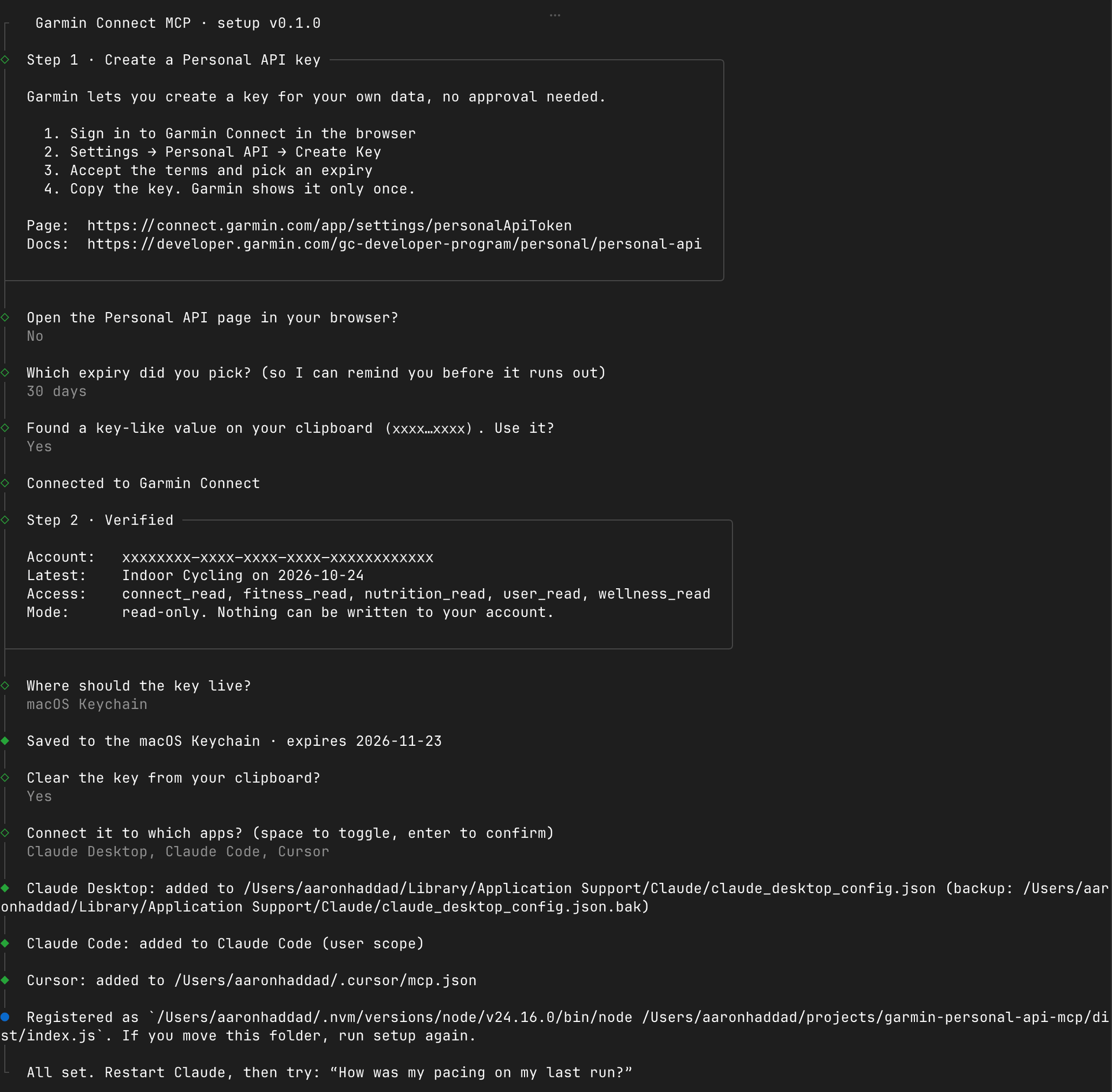
Any other MCP app, or to save the key on your computer: run the setup wizard. You need Node.js 20.3 or later.
npx garmin-personal-api-mcp setup
The setup wizard walks you through creating the key, checks it with Garmin, stores it in your macOS Keychain and connects Claude Desktop, Claude Code or Cursor. Restart those apps afterwards. They run the server with npx, so they pick up new versions automatically.
| Command | What it does |
|---|---|
npx garmin-personal-api-mcp setup |
Interactive setup: key and connected apps |
npx garmin-personal-api-mcp status |
Checks the saved key still works, and when it expires |
npx garmin-personal-api-mcp logout |
Removes the saved key and cached token |
npx garmin-personal-api-mcp |
Runs the MCP server on stdio (what your MCP app launches) |
For scripts and dotfiles: pbpaste | npx garmin-personal-api-mcp setup --key-stdin --storage keychain.
Manual config, if you'd rather not let the wizard edit it
{
  "mcpServers": {
    "garmin-connect": {
      "command": "npx",
      "args": ["-y", "garmin-personal-api-mcp"]
    }
  }
}
Claude Code: claude mcp add --scope user garmin-connect -- npx -y garmin-personal-api-mcp
The server reads the key from $GARMIN_PERSONAL_API_KEY, the macOS Keychain or ~/.config/garmin/connect-personal-api-key, so run setup once to save it even if you write the config yourself.
Contributing
Issues and pull requests are welcome. The server stays read-only and local (one user, their own key); CONTRIBUTING.md has the setup, how it works, how to add a tool and the PR checklist.
Built on the MCP TypeScript SDK v2, Garmin's FIT JavaScript SDK and @clack/prompts. Endpoint paths follow Garmin's Apache-2.0 connect-personal-api-python client.
License
MIT