
SceneScout
Your coding agent, turned into an exploratory QA tester for any web app.
Works with Claude Code · Cursor · VS Code (Copilot) · Codex CLI · Gemini CLI · Copilot CLI · Windsurf · any MCP client


🌐 Website · 📖 Guide · 🐛 What it catches · 🎬 QA with evidence · 🚀 Get started · 🚦 CI · 🔒 Safety · 📚 Docs
Scripted end-to-end tests answer one question: does this exact flow still work? They say nothing about the rest of the app. SceneScout lets the agent you already use explore a running web app like a curious, thorough tester. It clicks, fills forms, switches roles and calls the API behind a hidden button, then writes a report of what is broken and what could be better, with a picture and evidence for every line.
Try it on any app you are allowed to test. No account, no API key, no setup:
npx -y scenescout http://localhost:3000
flowchart LR
  A["🧠 Your coding agent<br/>Claude Code, Cursor, Copilot…"] -- MCP --> S["🔭 SceneScout<br/>browser · checks · memory"]
  S --> App["🌐 Your running app"]
  S --> R["📋 Report<br/>plain words + pictures"]
  S --> E["🎬 Evidence<br/>replay, videos, test report"]
👥 Who it's for
| 🛠️ Developers | 🧑💼 QA, product and non-technical teams |
|---|---|
Findings with the request that failed (GET /api/orders?status=archived → 500), the steps, and a Playwright regression-test skeleton |
Each problem in plain words first: what was done, what was expected, what happened, and a picture of the page |
| Next to the source, the file behind the bug and a likely fix | Visible problems shown, not described: a covered button, a broken image, text too faint to read |
| A deterministic gate for pull requests, with SARIF for code scanning | Journeys recorded step by step, as frames and video, so a pass is something you can watch |
| Runs from your editor's agent, or unattended in CI | A test report laid out by your template, with expected and actual results, deviations and blank sign-off rows |
🐛 What it catches
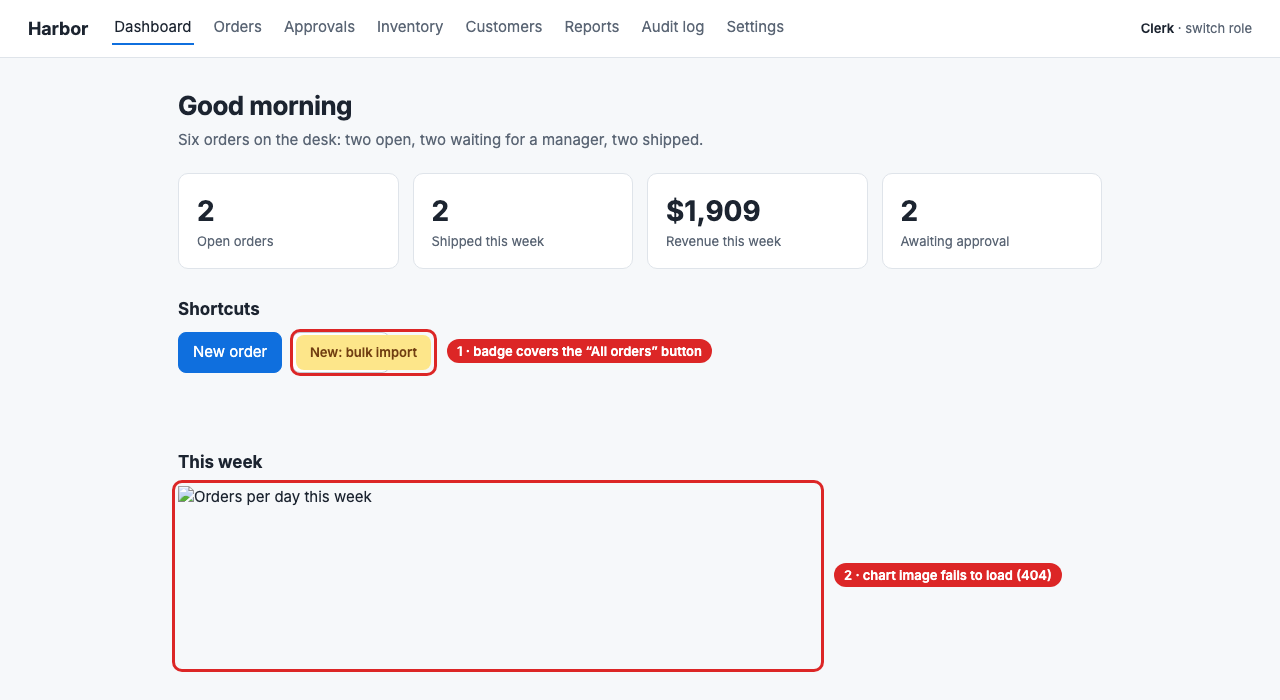
A real run against the small demo app in this repository, which has bugs planted on purpose. The two you can see are outlined:
It filed twelve findings. A few from the report:
🔴 [HIGH] A double-click on Create order creates two orders
2× click fired the same state-changing request 2× (POST /api/orders)🔴 [HIGH] A clerk can approve an order by calling the endpoint the page hides from them
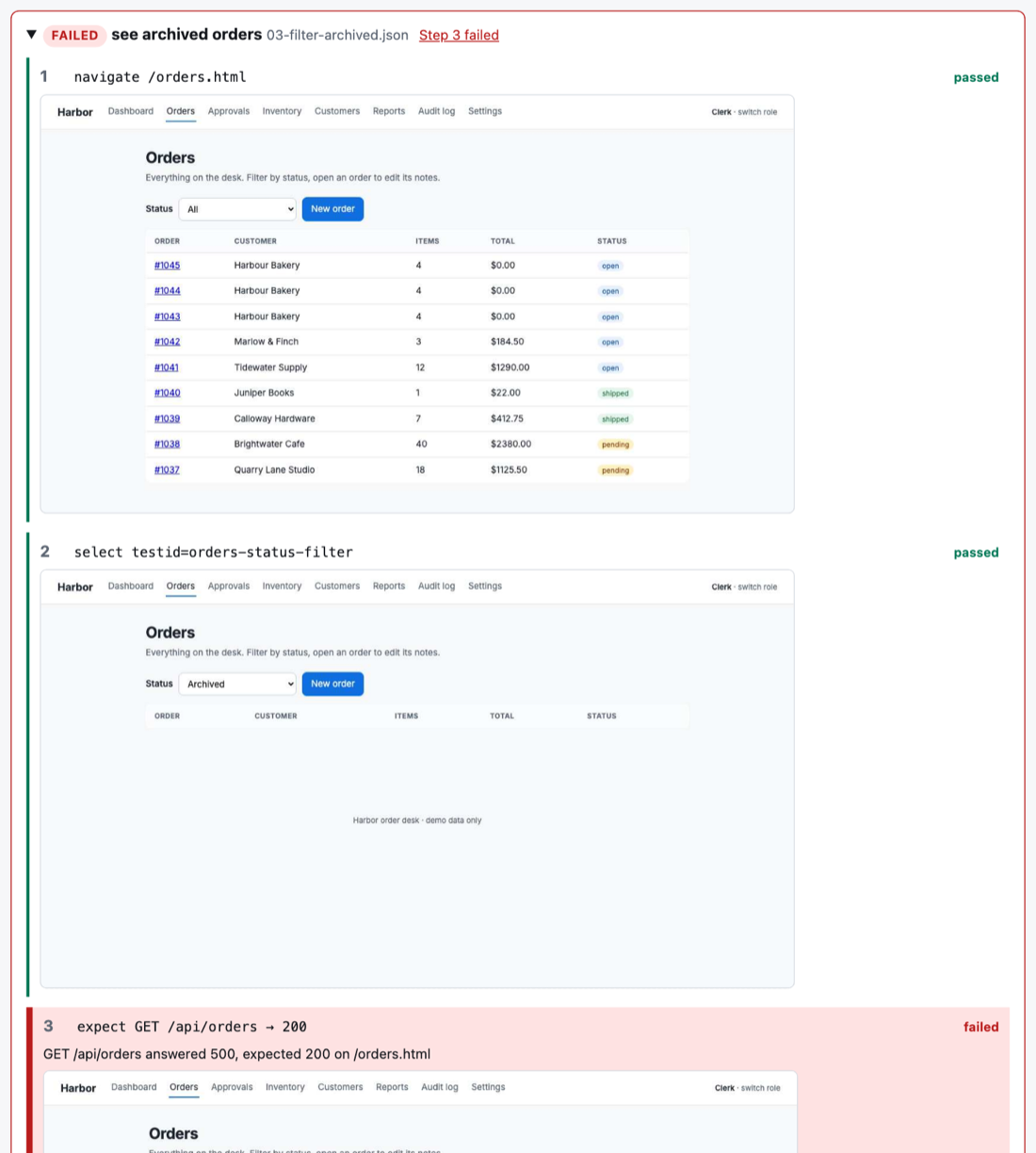
POST /api/orders/1037/approve 200 as clerk: the button was hidden, the server did not agree.🔴 [HIGH] Filtering orders by Archived fails, and the page shows an empty table instead of an error
GET /api/orders?status=archived → HTTP 500🟠 [MEDIUM] The "New: bulk import" badge sits on top of the All orders button (callout 1)
"All orders" overlaps "New: bulk import" (81%), measured from layout boxes, no screenshot needed.
What it looks for, on every page, after every action:
- 📐 Broken layout, from geometry: controls that overlap, sit off-screen, hide under a sticky bar or can never be scrolled into view. The CSS bugs a person spots at a glance, found without one.
- 🧨 Real breakage: console errors, crashes, failed requests, 4xx and 5xx responses, broken images, dead-end pages.
- 🔓 Permission leaks: it calls the app's own API as each role, so "the button is hidden" becomes "the server refuses it", or doesn't.
- 🤥 Pages that lie: "Saved!" after the server refused the save, or an empty table after the request failed.
- 👆 Impatient users: a double-click that sends the same order twice.
- ♿ Accessibility and craft: contrast, focus, labels, target sizes, spacing and type, with a 0 to 100 score per page.
- 🧭 Friction: how many steps a task takes, and where a user had to go back.
- 💉 Security smells: typed markup that comes back as an element, and tokens posted to any window.
🎬 Automated QA with evidence
Save the journeys that matter, the happy paths and the ones that must fail politely, and scenescout check replays them on every pull request with no model involved. Recorded, each run leaves proof you can watch and hand to someone who never opens a terminal.
flowchart LR
  PR["🔀 Pull request"] --> C["🚦 scenescout check<br/>--record --video --template"]
  F["📝 Saved journeys<br/>.scenescout/flows/*.json"] --> C
  C --> G["✅ / ❌ A gate on the pull request"]
  C --> RP["🖼️ replay.html<br/>every step, with frames"]
  C --> V["🎞️ A video per journey"]
  C --> TR["📄 Test report<br/>your template, SHA-256 manifest,<br/>blank sign-off rows"]
A journey is a few lines of JSON, written by hand or kept from a flow your agent just walked. This is the demo's happy path:
{
  "name": "place an order",
  "id": "TC-01",
  "requirements": ["REQ-ORD-1", "REQ-ORD-2"],
  "steps": [
    { "action": "navigate", "target": "/orders-new.html", "expected": "The new-order form is shown" },
    { "action": "type", "target": "testid=new-order-customer", "value": "Harbour Bakery", "expected": "The customer is filled in" },
    { "action": "type", "target": "testid=new-order-items", "value": "4", "replace": true, "expected": "The item count is 4" },
    { "action": "click", "target": "testid=new-order-submit", "expected": "The order is created" },
    { "action": "expect-request", "request": "POST /api/orders", "status": "2xx" },
    { "action": "expect-element", "target": "testid=new-order-created-link", "state": "visible", "expected": "A link to the new order is shown" }
  ]
}
Against the demo app, with the three journeys in examples/flows (one creates an order, so the check is allowed to send it):
npx scenescout check http://127.0.0.1:4173 --flows examples/flows --mode read-only --flow-writes allow \
  --record --video --template examples/report-template.json
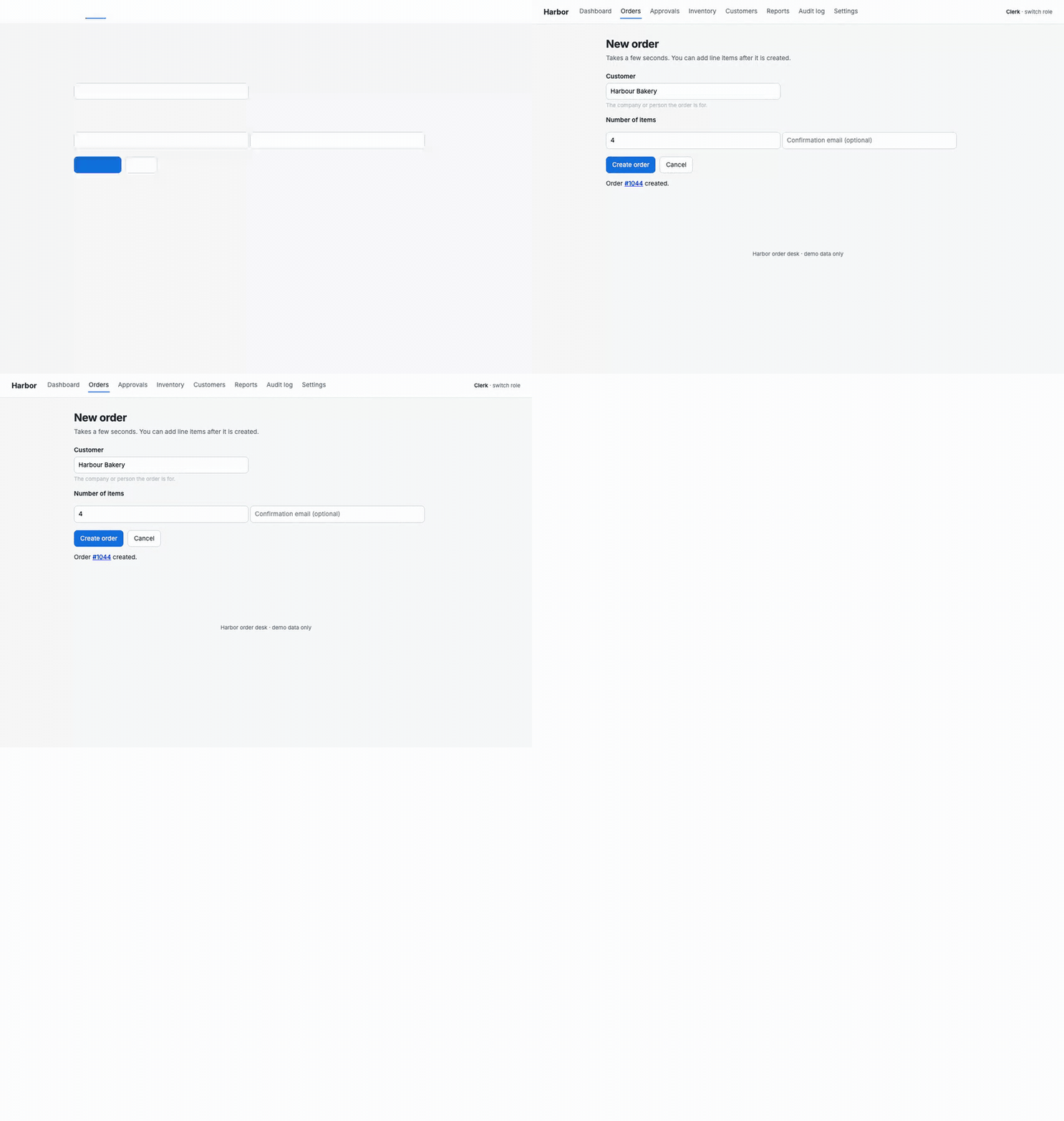
The journey, as it ran (one of the videos it filmed):
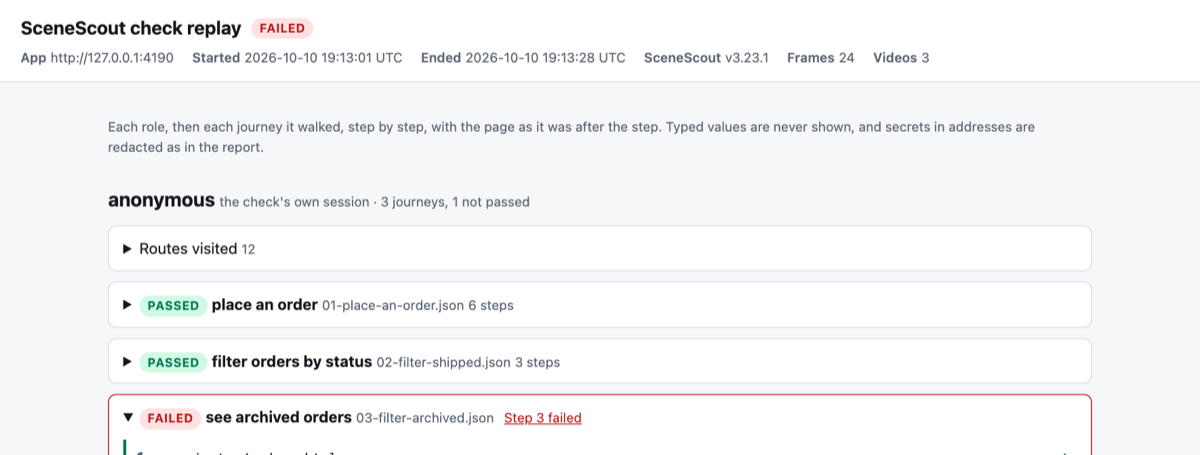
The replay page: each journey with a pass or fail badge. A journey that broke opens at the step that broke, with the page as it was after every step:
The test report, laid out by a template you write once: test IDs, the requirements each covers, expected and actual results, a screenshot per step, every deviation listed again for the reviewer, and the SHA-256 of each piece of evidence. SceneScout signs nothing; the sign-off rows are for your people.
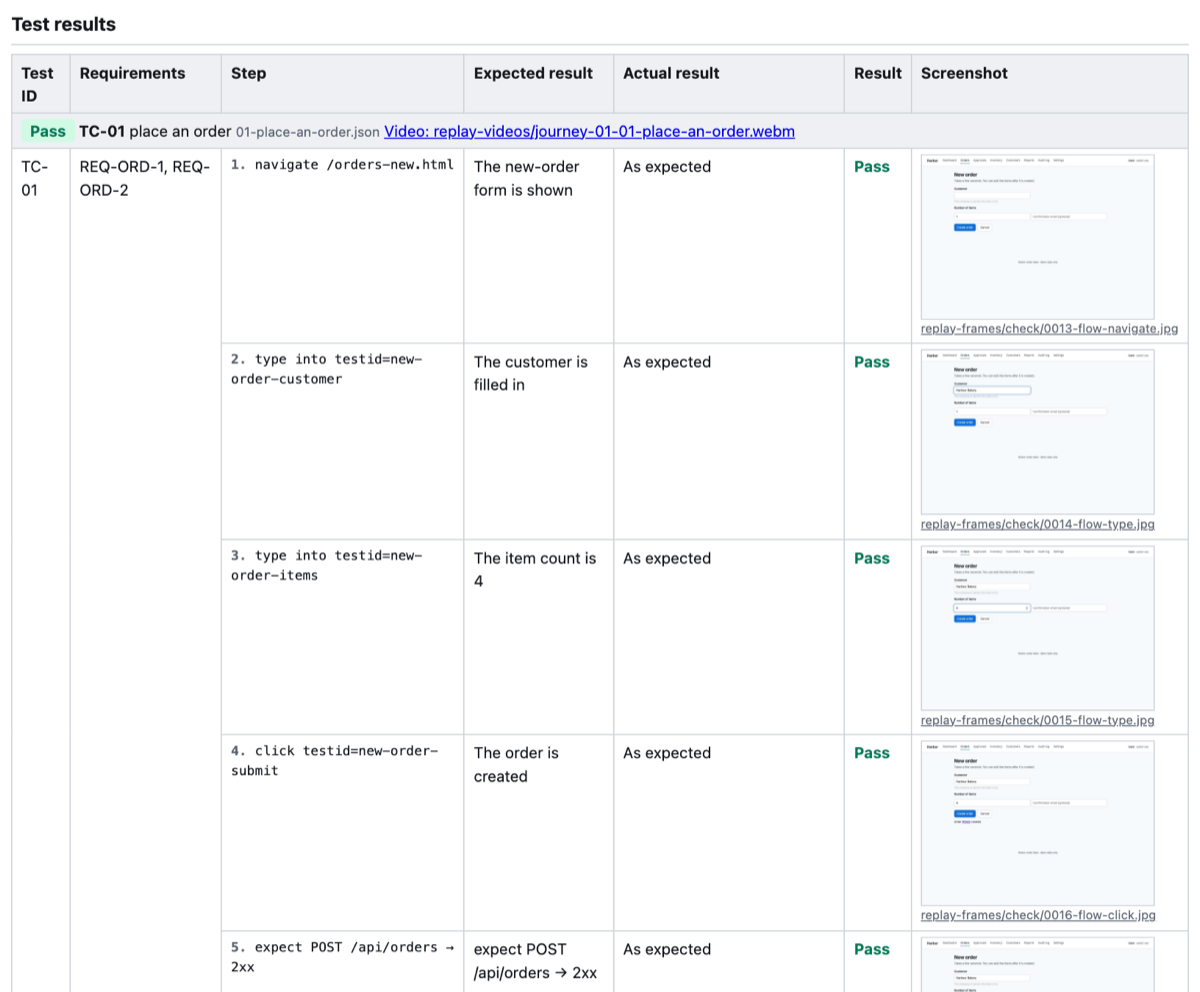

Everything is one self-contained HTML page per report, with no scripts, nothing loaded from the network, and a layout that prints. Recording a check and a test report from a template have the details, including what to keep out of the pictures.
📺 Watch it work
Each exploratory run opens a live view on your machine, with one card per agent: what it is doing, the page it is on, and a feed of every action. Three agents are testing the demo app in parallel here:
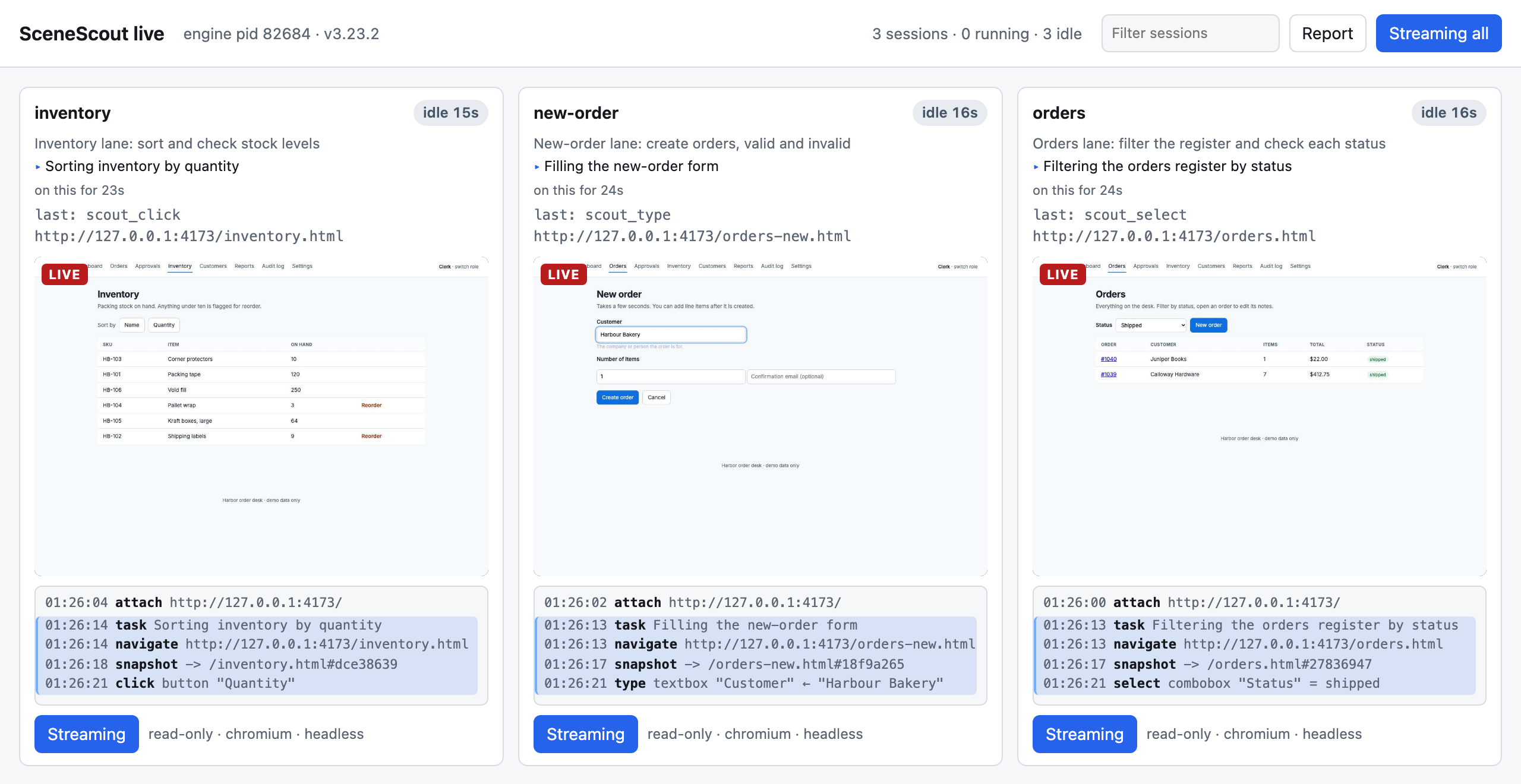
You can read the report while the agents are still working, and scrub back through any session's timeline. Beside report.md, every run writes report.html, the whole run as one self-contained page; ask for a recorded run and it also keeps a frame after every action.
✨ Why it's different
- 🧠 Your agent is the brain, so no extra API key. The engine contains no model. It gives the agent you already pay for deterministic tools and the testing method to use them.
- 📐 It reads structure, not pixels. The agent sees every element with its role, state and layout box, so overlap and broken images are measured, not guessed from a screenshot.
- 🛡️ Safety is enforced on the network, not requested in a prompt. Every request the page sends is judged against the session's write mode, and a request the mode refuses never reaches your server.
- ✅ "Done" is a contract. The report lists everything not tested, and at the
extensivelevel refuses to finish while any known page is unvisited. - 🧠 It remembers. Each run starts from what the last one learned, and re-tests the bugs earlier runs left open.
- 📊 It is measured, not asserted. Every change to how it explores is scored against an app with planted bugs and a held-out app it is never tuned on (the log):
xychart-beta
  title "Planted defects found per run, demo app (13 planted)"
  x-axis "Run" ["0", "1", "2", "3", "4", "5", "6", "7", "8", "9", "10", "11", "12"]
  y-axis "Found" 0 --> 13
  bar [11, 12, 9, 10, 11, 11, 10, 10, 11, 13, 11, 11, 12]
Each bar is one run of eight parallel agents, re-scored against today's answer key. One run is noisy: read the trend across runs, not a single bar.
🚀 Get started
1. Install for your agent (Node 20 or newer):
npx -y scenescout install                      # Claude Code: skill, MCP server and the test browser
npx -y scenescout install --client cursor      # or vscode, codex, gemini, copilot, windsurf
npx -y scenescout doctor                       # every line should be a ✓
Other ways to install: a Claude Code plugin, the Claude Desktop extension, or by hand
- Claude Code plugin:
/plugin marketplace add brunoboto96/SceneScout, then/plugin install scenescout@scenescout-marketplace. The command becomes/scenescout:scenescout. - Claude Desktop: download
scenescout-X.Y.Z.mcpbfrom the latest release and open it. No terminal needed. In the chat, pick Check my site from its prompts to start a guided check without writing a prompt (guided prompts). - Any other MCP client: add a stdio server whose command is
npx -y scenescout@3.29.0 serve. Each client's config.
2. Start your app, then a fresh session of your agent, and ask:
Use SceneScout to test http://localhost:3000
In Claude Code there is a command too: /scenescout --url http://localhost:3000 --level medium. On its own, /scenescout asks instead: where your client can show a form, one guided form (the address, what to check, how you sign in, how careful to be and how thorough), and otherwise four plain questions in chat. A care level that writes on a site that is not on your computer, or that creates test data, asks you to confirm it in a second form the agent cannot answer (care levels). While it runs, scout_status follows the check in plain words, says what went wrong in one sentence with one thing to do (the site does not open, the sign-in ran out, the check ran out of time), and at the end the problems come back as cards you can mark "not a bug". After a fix, Re-check after a fix checks them again in the care level they were found in, never a looser one, and a check you want to repeat can be saved by name (never with a password or token) and run again. Is it safe to run on my live site? Rather press buttons than write prompts? The optional mod's /scenescout-guided panel does the same from a form in the Claude Code CLI or the desktop Code tab (the mod).
3. Read the report in .scenescout/report.md. It opens with a Summary in plain words (what was checked, what was found, the problems as a table, and each problem's steps, what was expected and what happened), then the Evidence (each problem's picture, on a run that has them), with the Technical details and, in report.html, the Steps folded one click away. A complete example. To hand it round, ask for a team report (scout_team_report, or Make a team report in the chat's menu or the guided panel): .scenescout/team-report.html has a cover, each problem as a card with its picture, what was not checked and blank sign-off lines, with an evidence folder beside it holding the pictures and a manifest of every file's SHA-256. To file problems as GitHub or Jira tickets, pick File problems as tickets (or File as tickets on the guided panel): you see a preview first, and SceneScout files only after you say yes in its own form (how).
No app handy? Clone this repository and run npm run demo:serve: the demo app starts on http://127.0.0.1:4173, and its README lists every planted bug.
Behind a sign-in? Sign in once yourself, SSO and MFA included, and every session reuses it:
npx -y scenescout login http://localhost:3000 --role admin # then: /scenescout --role admin
Signing in covers roles, expiry and scripted sign-in for CI.
🚦 In CI
| What it does | Needs a model? | |
|---|---|---|
scenescout check |
A deterministic gate: measures every page, replays your saved journeys and visual baselines, fails only on what it can prove; recorded, it leaves the evidence above | No |
scenescout ci |
An unattended exploratory run, driven by the Anthropic or OpenAI API. It reports and never fails the build | An API key |
/scenescout qa |
A comment on a pull request that tests its preview deploy and replies with the results; /scenescout qa check runs your own check instead |
An API key (qa check: none) |
scenescout export |
Files the findings as GitHub or Jira issues, each once | No |
scenescout preflight |
Checks in seconds, with no browser, that the runner can reach the app, that a saved sign-in has not expired and, when asked, the model's API; each cause has its own exit code | No |
A gate on every pull request that keeps its evidence, as a GitHub Action:
- uses: brunoboto96/SceneScout@v3
  with:
    url: http://127.0.0.1:3000
    record: on
    video: on
    template: tests/report-template.json
docs/ci.md has complete workflows, every option, and the same check on GitLab CI, CircleCI or any shell.
Ask for it on a pull request
Type a command in a pull request comment and SceneScout answers in the thread, with pictures taken by a real browser:
| Comment | Reply |
|---|---|
/scenescout qa |
Explores the pull request's preview and replies with what it found |
/scenescout qa show the Save button |
A picture of that element |
/scenescout qa compare the Save button |
The element on the base and on the pull request, with the changed pixels highlighted |
/scenescout qa check |
Runs your saved journeys on the branch and replies with each one's result; the video of every journey is in the run's files |
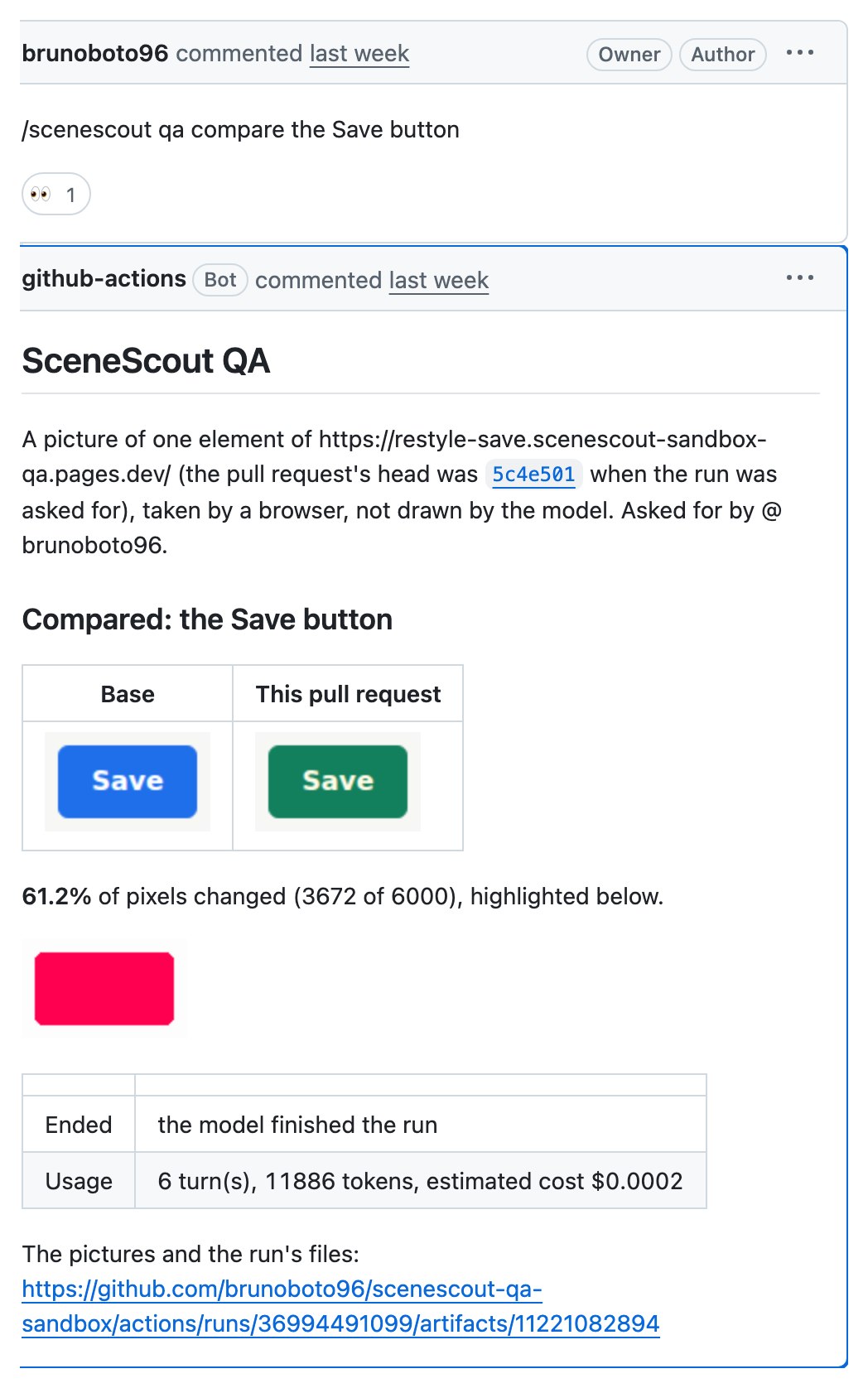
The preview commands test a deployed preview, so the pull request's code never runs beside the model's key; qa check runs your own workflow and uses no key. Setting it up.
🔒 Safe by default
| Mode | What may leave the page |
|---|---|
🔵 observe |
GET, HEAD and OPTIONS requests, signing in, signing out and refreshing a token, and any POST you name as a read that does not look destructive. Any other form that posts is refused. The default for a first look and for an agent's run on a remote site with no source |
🟢 read-only |
Also ordinary form posts, which can create a record or change one that was there. PUT, PATCH, DELETE, requests that look destructive and clicks on controls labelled delete, archive and the like are refused. The default for scenescout check and for an agent's run on a local app |
🟡 safe-write |
Also PUT, PATCH and DELETE, but only on records this run created |
🔴 destructive |
Everything. Only when you say the data is disposable: the agent is told never to choose it, and the config file below can rule it out |
A team can commit .scenescout/config.json to cap what any agent may choose, for example {"preset": "strict"} to keep every run in observe (the config file).
SceneScout sends no telemetry. Every path by which data leaves the machine (the agent's model, scenescout ci, export, /scenescout qa, CI artifacts, downloads), what each carries and how to turn it off is in What leaves the machine. {"egress": "none"} in the config file makes SceneScout refuse every one it sends itself; it cannot stop your coding agent from sending what it reads to its own model.
What the policy cannot stop: a link is opened like any page, so a link that changes something just by being opened (an unsubscribe link) is followed, unless you turn on refusing those in observe and read-only; only HTTP is judged, so messages over a WebSocket are not; and in Firefox and WebKit the later hops of a redirect that keeps a write's method go out unjudged. Which refusals are guarantees and which are pattern matching is in the Safety model, and scenescout policy explain POST <url> says how any one request would be judged in each mode.
The policy sits on the network, so a blocked request never reaches your server. The page gets a refusal instead, which is how SceneScout catches a page that claims success anyway. A saved journey that creates something, like the order above, runs only when the check is told --flow-writes allow, against a test environment. Findings, memory and reports stay in a .scenescout/ folder that keeps itself out of git.
[!IMPORTANT] Only test sites you own or are allowed to test. Safety model.
📚 Documentation
| Start here | A first look, install, a first run, reading the report, the live view |
| Ways to use it | Interactive runs, parallel agents, CI, pull-request QA, filing issues |
| What it checks | Every check and every scout_* tool |
| Signing in · Safety model | Roles and saved logins; what each mode refuses and why |
| What leaves the machine | Every path data leaves by, to whom, and the egress setting |
| Network requirements | Every host each command needs, scenescout preflight to check a runner reaches them, caches, mirrors and self-hosted runners |
| Recipes | Setups for seven kinds of project |
| Configuration reference | Every option, environment variable and action input |
| Troubleshooting | Symptoms and fixes, upgrading and uninstalling |
| Running it in CI | Saved journeys, recording, test reports from templates, every workflow |
| How it works | Diagrams of a run, an action, the write policy, lanes |
| Benchmark · Validation | How runs are scored against answer keys, and runs on public apps |
| Design decisions | Why the rules are what they are |
🔧 Contributing
Start with VISION.md (what is in scope) and CONTRIBUTING.md (local setup and how changes land). AGENTS.md holds the house rules for people and coding agents alike.
Found a way past the write policy, or another security problem? Report it privately: SECURITY.md.
MIT licensed.