


Before your company commits to a name, find out what stands in its way. Give Clearotron the name, the classes you trade in and the territories you sell into: it searches the trademark registers and the open web for conflicts, reasons about the risk the way a clearance lawyer would, and publishes a written report with a machine-readable audit trail behind every finding. It runs headless on your own machine: no gateway, no platform, and nothing about the names you are clearing reaches us.
Quickstart · Install & operate · Docs · Security · Contributing · Licence
Install
See it work first, with nothing installed.
npx clearotron demo
That fetches the published package — it will ask once before downloading — then replays finished clearances into a local portal and prints the portal's address and the passphrase to sign in with. Open the address in your browser. No sign-up, no credentials, no network calls to us.
The demo runs for as long as that window stays open, and removes everything it made when you close it —
nothing of it is left on the machine, and running it again later starts clean. If you want to keep the
sample reports after closing the window, run npx clearotron demo --keep; it prints the one command
that removes the folder when you are done with it. npx clearotron demo --once publishes the reports and
exits, and keeps the folder the same way.
Then install it.
npx clearotron install
Node 22.13 or newer, on macOS, Linux or Windows. It needs no root: it puts the program under ~/.local, with the
clearotron command in ~/.local/bin, then asks one question at a time and checks each credential
before it saves it. Every command below uses the clearotron it installed — the same channel you
installed from — so if ~/.local/bin is not on your PATH yet, type the full path,
~/.local/bin/clearotron, instead. On Windows it runs natively, from PowerShell: no WSL2, no Git and
no administrator rights. Install it with npm install --global clearotron, then run clearotron install.
It runs in the window you start it from, as on a Mac: closing the window stops a search, and the next
clearotron start picks it up again.
Installing with npm's own global form instead is covered in INSTALL.md §2.
npx clearotron install gives you the stable release — the one that has run a real clearance end to
end before it was published. If you want the newest code instead, a beta is published whenever there is
something worth testing:
npx clearotron@beta install
What each channel promises, and when a stable is cut: docs/RELEASES.md. If you are not sure, the first command is the one you want.
Removing it later: INSTALL.md §2a lists every path an install writes, and says which one holds your reports so you can keep them deliberately.
Quick start
With it installed, check what it found before it does anything. doctor only reads — it writes nothing,
calls nobody, and names whatever is still missing:
clearotron doctor
Then start the product and open the portal address it prints:
clearotron start
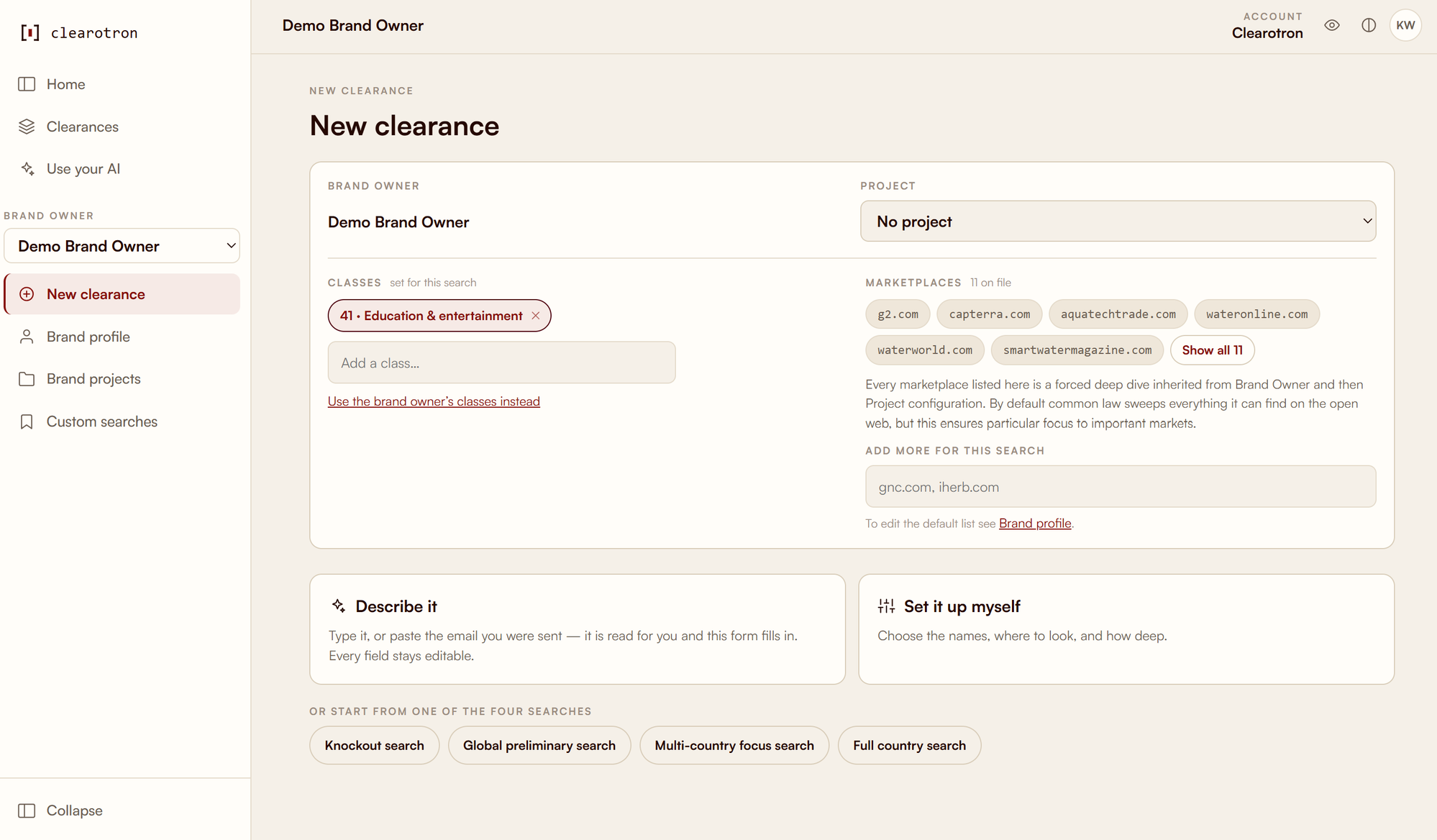
That is the portal everyone at your company uses. Ordering a clearance is the same screen — describe it in a sentence, or set the classes, marketplaces and search depth yourself:
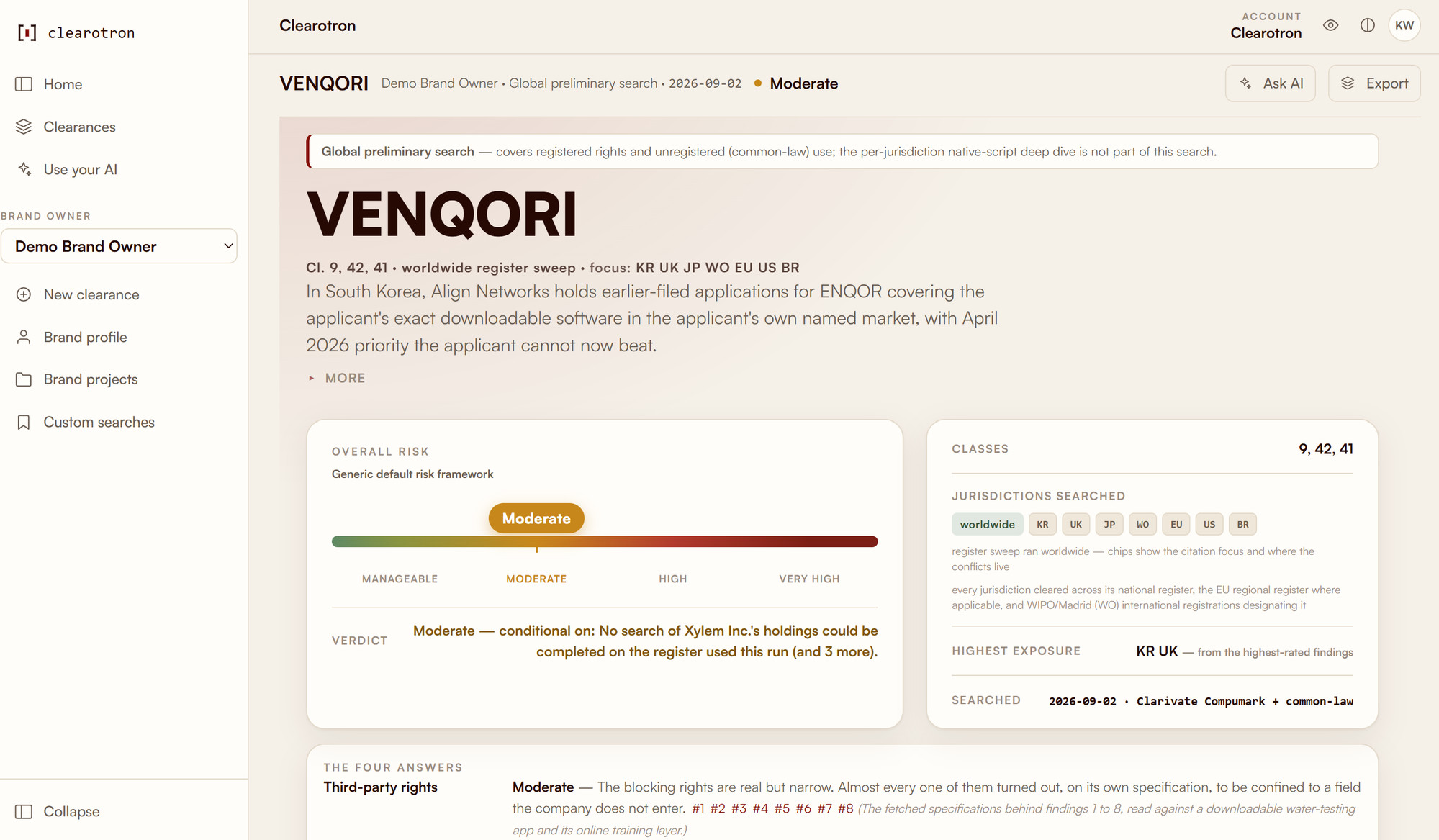
A finished clearance reads like this — the verdict, the risk band and the four answers. The mark VENQORI is invented; the register data behind it is real and live, and the report says so on its own face:
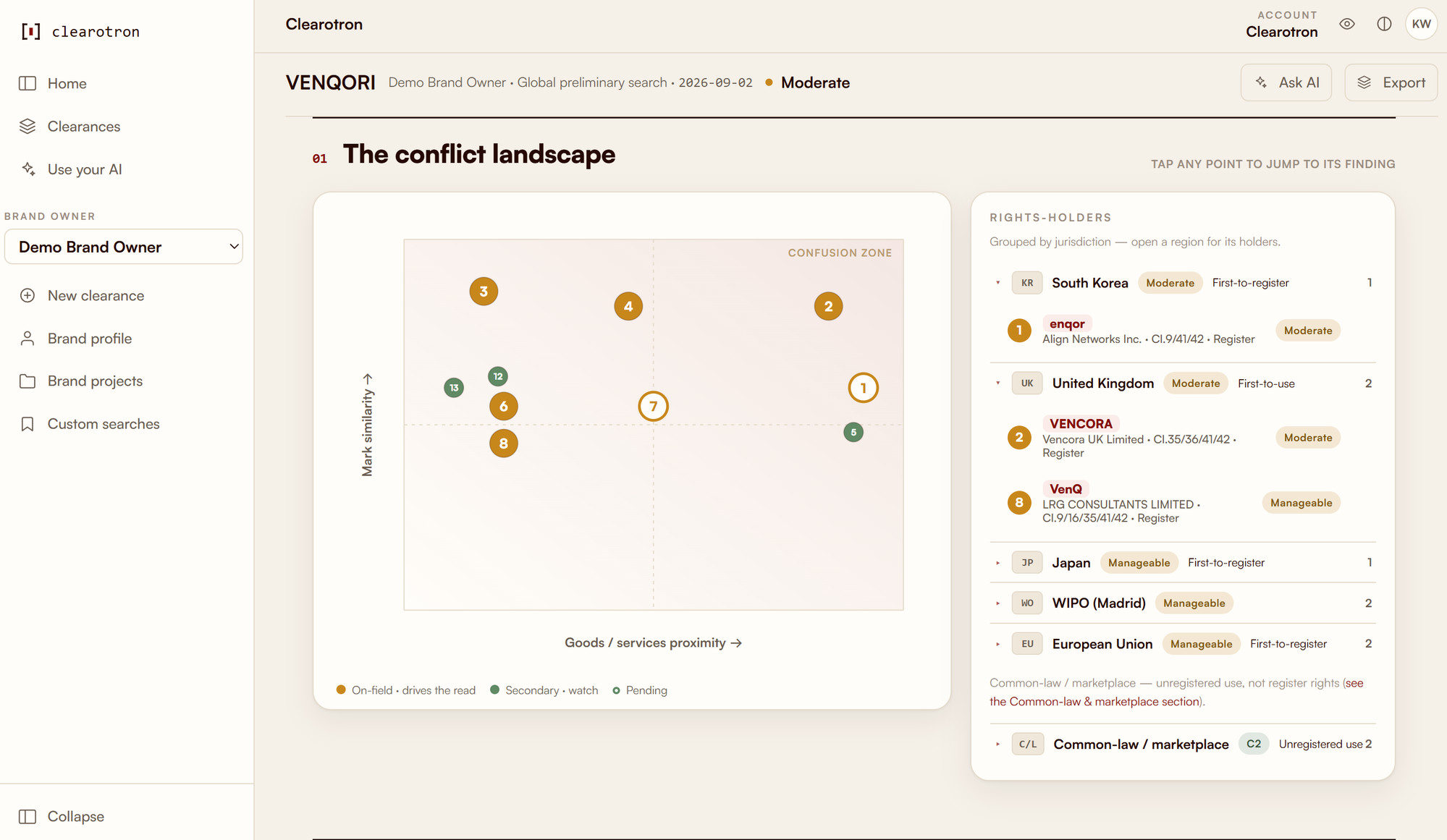
The conflict landscape places every finding by mark similarity and goods proximity, and lists the rights-holders behind them by jurisdiction:
Then run your own: order it in the portal, or hand the engine a job file:
clearotron run --job my-job.json
How it fits together
- A reasoning CLI does the thinking. Every stage runs as a headless turn of the Claude CLI (
claude) or the Codex CLI (codex); setup installs it if the machine has none.CLEAROTRON_AI_BILLINGchooses what pays: your signed-in subscription, an API key, or your own Google, Microsoft or Amazon cloud account. Whichever pays, the CLI is what runs — there is no path that calls the model directly. - One register credential sets coverage and cost.
CLEAROTRON_DATABASEhas no default — a run refuses rather than picking a vendor for you. EUIPO and a local USPTO index cost nothing; Clarivate, Signa and Corsearch are subscriptions. The six, and what each reaches. - One research key.
PERPLEXITY_API_KEYcovers the open web and the marketplaces. A clearance refuses without it at the door, before a register stage has spent. - A run takes hours, and survives interruption. Every finished stage stays on disk; a resume re-runs only what is missing, and a run parked on a provider cap continues by itself.
- A finished run is queryable. An MCP server lets Claude, ChatGPT or your editor read and question
any completed run in plain language: a trusted local stdio face, and an authenticated
HTTP face whose read tools serve a signed-in identity while its write verbs —
start_runamong them, which spends — need an ops token. Connect it. - The engine is not coupled to a vendor.
driver/register-plan.mjs— which decides what gets searched — takes a capabilities object as a parameter and imports no provider at all. An unknown register id throws rather than falling back. - A law firm runs one installation for every company it acts for. Each company is set up once, with its own classes, marketplaces and risk framework, and each person sees only the companies they are given. Adding a company · A connector for those companies' people.
Security
Reports describe names your company has not announced yet. Treat the pool, the archive and the delivery packets as you would any unreleased plan — and, at a law firm, as you would a case file.
The authors of this software receive nothing — no marks, no company context, no results, no usage reports, no crash reports. There is no telemetry in this tree and no endpoint we control: every destination is a register, a reasoning provider or a search provider you configured with your own credential. What leaves the machine, call by call · Report a vulnerability.
Documentation
| Goal | Start here |
|---|---|
| Get one search running | QUICKSTART.md |
| Install, configure and operate it | INSTALL.md — the reference |
| Pick a register, or run without a paid vendor | INSTALL.md § 3a |
| Submit jobs, or consume what a run emits | INTAKE · DELIVERY |
| Read and question a finished run from a chat app | mcp-server/CONNECT.md |
| Check it works before spending anything | docs/E2E.md |
| Understand the architecture | docs/architecture/ · decisions |
| Run it under your own name, or fork it | docs/branding.md · TRADEMARKS.md |
| Write a sentence a user will read | docs/writing-standard.md · docs/writing-rules.md |
Development
A clone is the working tree, not a way to install the product — install it from the package above.
git clone https://github.com/CordilleraSarl/clearotron
cd clearotron
npm install                    # every workspace
npm run build:ui               # the browser bundle is not committed — build it once
npm test                       # the offline suite — no credentials, no network
npx clearotron demo            # replays finished clearances into a local portal
From a clone the commands are npx clearotron …, run from that directory.
npm test is the offline suite and the first thing CONTRIBUTING.md asks of a
contributor; npm run test:full, also free, is the merge gate.
Project documents
Linked explicitly rather than left to GitHub's sidebar. That chrome does not render every Code of Conduct format, it is not there at all when someone is reading this from a tarball or a mirror, and a document nobody can open is the same as one that was never written.
| CODE_OF_CONDUCT.md | How people are expected to behave here, and what happens when they do not |
| CONTRIBUTING.md | What a change needs before it can be reviewed |
| SECURITY.md | How to report a vulnerability, and what to expect back |
| LICENSE · ADDITIONAL-TERMS.md | AGPL-3.0-only, and the section 7 terms that go with it |
| TRADEMARKS.md | The names and marks, which the licence does not grant |
Licence
AGPL-3.0-only, with additional terms under section 7. It covers the code and docs in this repository — not the reasoning CLI you install, not your agreements with the register and research providers, and not the npm dependencies, which carry their own licences. It grants no rights in the names or marks: TRADEMARKS.md.
Consulting, managed hosting and support are available from the people who built it — contact@clearotron.ai. None of it is required to run Clearotron.