anysite-mcp


Turn any website into tools for Claude and other AI agents, signed in as you.
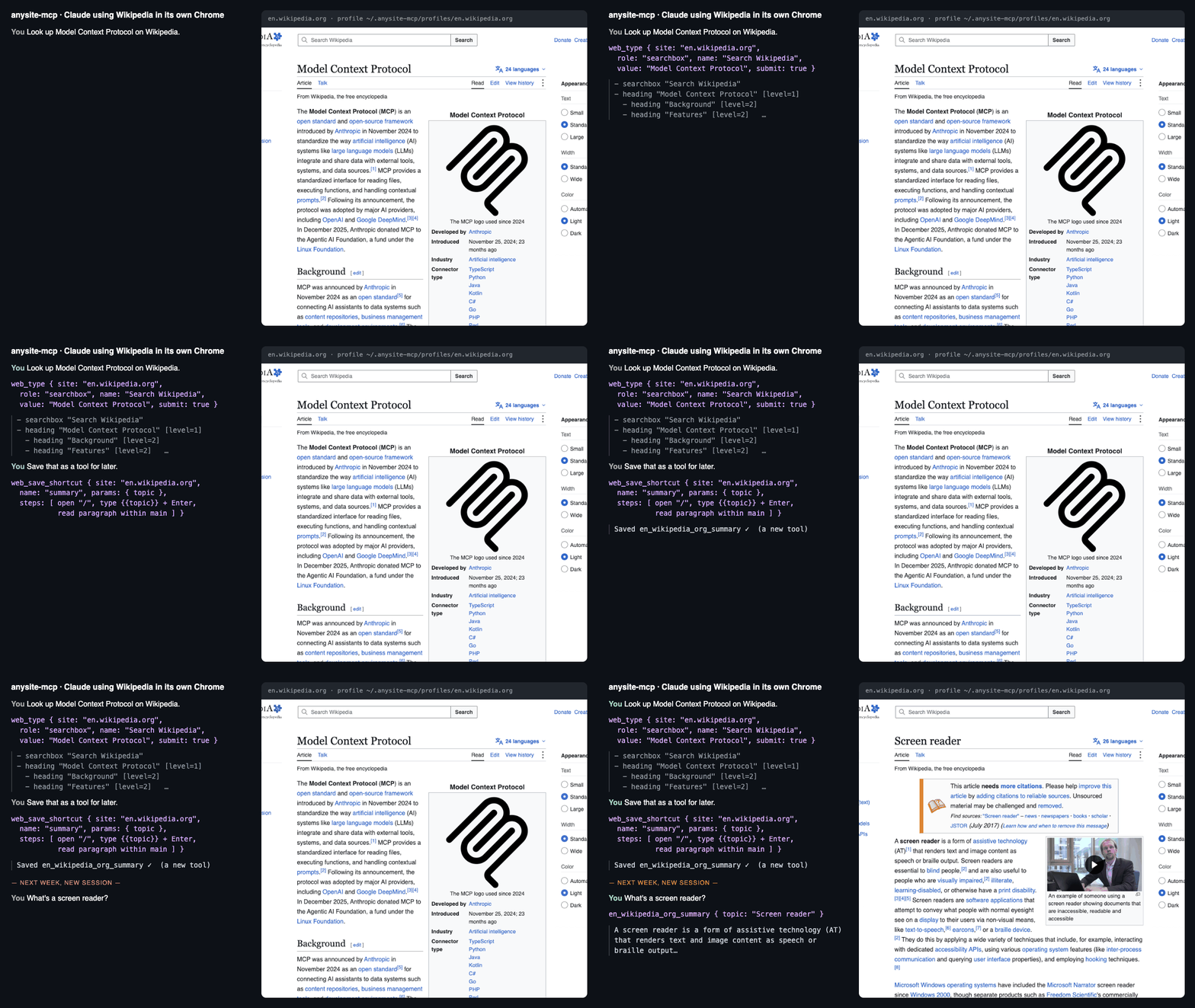
claude mcp add anysite -- npx -y anysite-mcp
anysite-mcp is an MCP server that drives a real Chrome on your computer. Every site gets its own browser profile that you sign in to once, by hand. The agent then works the site the way a screen reader does, by role and name, so small redesigns don't break it. When the agent gets a job done, it can save the steps as a shortcut, and that shortcut becomes a new tool it can call in one step next time.
No API keys, no cloud browser, no extra LLM. Your logins stay on your machine.
- Your accounts, kept apart. One Chrome profile per site, signed in by hand once. Works with Google sign-in.
- Gets faster with use. The agent turns a job it has figured out into a one-call tool that's there next session.
- Survives redesigns. Elements are found by role and name, not CSS selectors.
- Packs for popular sites. Gemini and NotebookLM are included; a new pack is one file.
You:    Ask Gemini to summarise this PDF, then add the summary as a source to my "Thesis" notebook in NotebookLM.

Claude: gemini_ask { prompt: "Summarise this PDF in 10 bullet points", files: ["~/Downloads/paper.pdf"] }
        → - The study compares …   (Chat: https://gemini.google.com/app/…)
        notebooklm_add_source { notebook: "Thesis", text: "- The study compares …" }
        → Added pasted text.

You:    Check my GitHub notifications.

Claude: web_open { site: "github.com", url: "/notifications" }
        → This looks like a sign-in page. Call web_login for "github.com" …
        web_login { site: "github.com" }
        "A Chrome window opened on GitHub. Sign in there, then quit that window and tell me."
You:    done
Claude: web_open { site: "github.com", url: "/notifications" }   → (accessibility tree of your inbox)
        web_save_shortcut { site: "github.com", name: "notifications",
          description: "List unread GitHub notifications",
          steps: [{ "action": "open", "url": "/notifications" }, { "action": "read", "role": "main" }] }
        → Saved github_com_notifications.

(Next week, in a new session)
You:    Anything new on GitHub?
Claude: github_com_notifications {}   → 3 unread: …
Why another browser MCP?
| anysite-mcp | Playwright MCP | browser-use / Stagehand | |
|---|---|---|---|
| Signed in as you | Yes, a separate profile per site, signed in by hand once | One profile for everything, or a fresh one each run | Usually cloud or fresh browsers |
| Google sign-in (Gemini, NotebookLM, Gmail) | Works: sign-in happens in a plain, non-automated window | Often refused as an "insecure browser" | Often refused |
| Gets faster with use | The agent saves working steps as new tools | No | No |
| Site packs | NotebookLM and Gemini included; add your own in one file | No | No |
| Needs an LLM API key | No | No | Yes |
Profiles are kept apart on purpose. Copying a signed-in profile so two browsers share one session gets that session revoked by Google (and other careful sites), which logs you out everywhere.
Install
You need Node 18+ and Chrome (or npx playwright install chromium).
Sign in to the sites you want, once each. A normal Chrome window opens; sign in, then quit it (Cmd+Q on a Mac).
npx -y anysite-mcp login gemini
npx -y anysite-mcp login notebooklm
npx -y anysite-mcp login github.com
Add the server to your agent.
Claude Code:
claude mcp add anysite -- npx -y anysite-mcpClaude Desktop, Cursor and others (
claude_desktop_config.jsonor the client's MCP settings):{ "mcpServers": { "anysite": { "command": "npx", "args": ["-y", "anysite-mcp"] } } }
With no arguments the server offers every site you have signed in to. To pick sites, list them:
npx -y anysite-mcp gemini github.com. The agent can also add a new site at any time by calling web_login.
Tools
Any site (each takes site: a pack name like gemini, or a domain like github.com):
| Tool | What it does |
|---|---|
web_snapshot |
The page's accessibility tree: roles, names and text. Give role/name to see only part of it. |
web_open |
Go to a URL (absolute or relative to the site) |
web_click, web_type, web_press |
Act on an element found by role and name, or by visible text (add within: "dialog" and so on to look only inside one part of the page) |
web_read |
Text of the page or of one element |
web_wait |
Wait, or wait until some text appears |
web_upload, web_download |
Give files to a file picker; save a download |
web_screenshot |
PNG of the page, for when the tree is not enough |
web_login |
Open a plain window so you can sign in |
web_save_shortcut, web_delete_shortcut |
Turn a working sequence into a tool named <site>_<name> |
Packs included
gemini:gemini_ask(prompt, files, model, tools such as Create image or Deep Research; returns the reply as markdown),gemini_list_chatsnotebooklm:notebooklm_ask,notebooklm_add_source(URLs, text, files),notebooklm_create_notebook,notebooklm_list_notebooks
Shortcuts
A shortcut is a list of steps, each one the arguments of a web_* tool plus its action. {{param}} is
filled in from the tool's arguments. It returns the text of its read steps. Shortcuts are saved in
~/.anysite-mcp/sites/<site>.json, which you can edit, share or commit:
{
  "search": {
    "description": "Search Hacker News and return the results",
    "params": { "query": "What to search for" },
    "steps": [
      { "action": "open", "url": "https://hn.algolia.com/?q={{query}}" },
      { "action": "wait", "seconds": 5, "until_text": "results" },
      { "action": "read", "role": "main" }
    ]
  }
}
If a site changes and a step fails, the error says which step, and the agent can redo the job with the web_*
tools and save the shortcut again.
Write a pack
For logic that steps can't express (waiting for a streamed answer, parsing a list), write a pack: a file in
~/.anysite-mcp/sites/<name>.js. It needs no dependencies; z (zod) and some helpers are passed in. The bundled
sites/gemini.js and sites/notebooklm.js are full examples.
export default ({ z, kit }) => ({
  url: 'https://news.ycombinator.com/',
  tools: {
    top: {
      description: 'Titles and links of the Hacker News front page',
      input: { limit: z.number().optional() },
      run: async (page, { limit = 10 }) => {
        await page.goto('https://news.ycombinator.com/');
        const links = await page.locator('.titleline > a').evaluateAll(as => as.map(a => `${a.innerText}\t${a.href}`));
        return links.slice(0, limit).join('\n');
      },
    },
  },
});
Then run npx -y anysite-mcp login hn (or just use site: "hn"), and the agent gets hn_top. A pack in
~/.anysite-mcp/sites with the same name as a bundled one replaces it. Pull requests with new packs are welcome.
How it works
- Each site's Chrome runs with its own
--user-data-dirin~/.anysite-mcp/profiles/<site>and a debugging port it picks itself. The server reconnects to it if it is still open, so tabs survive restarts. - Sign-in uses a plain Chrome with no debugging port, because Google and others block sign-in in automated browsers.
- Elements are found with Playwright's role, label and text locators, never CSS selectors. When a click is blocked by an overlay, the element is operated from the keyboard instead.
Settings (environment variables): ANYSITE_HOME (default ~/.anysite-mcp), ANYSITE_CHROME (browser binary),
ANYSITE_DOWNLOADS (default ~/Downloads/anysite).
Safety
The agent acts as you on the sites you sign in to. Only sign in to sites you are happy for it to use, and keep an
eye on anything that sends, buys or deletes. Profiles hold your cookies: never share or commit
~/.anysite-mcp/profiles.
Development
npm install
npm test   # starts the server on example.com, saves and runs a shortcut
MIT License.