





AI agents are brilliant and blind — brilliant at writing code, blind to your
project's rules. speclaw hands them what they're missing: the codebase's
written laws (a constitution built from your real code), a local map to
navigate it without burning tokens, and a disciplined workflow for every change.
One command. No cloud, no LLM, no API keys — everything runs on your machine.




[!TIP] One command. Detects your agents and wires only those. Paste
npx @esneiderbravo/speclaw@latest init— speclaw detects Claude Code, Cursor, Codex, Windsurf, and genericAGENTS.mdsurfaces, scaffolds the constitution + lawbook, indexes your code, and registers the local MCP server — only for the agents you pick. This one-liner is a stable contract (see CONTRIBUTING.md); do not invent alternate install commands in directories or newsletters.
 Quick start
npx @esneiderbravo/speclaw@latest init
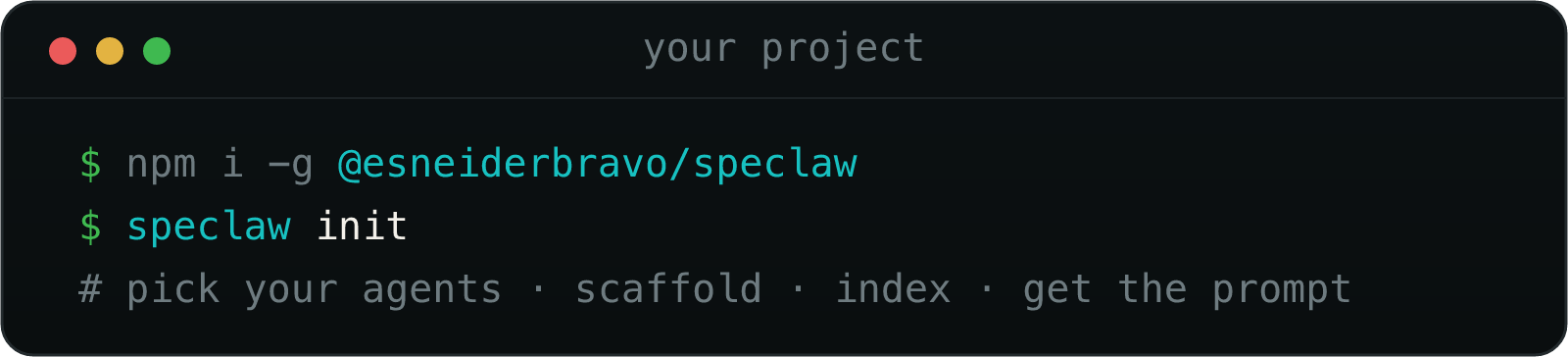
Prefer a global install for repeated CLI use?
npm i -g @esneiderbravo/speclaw
speclaw init
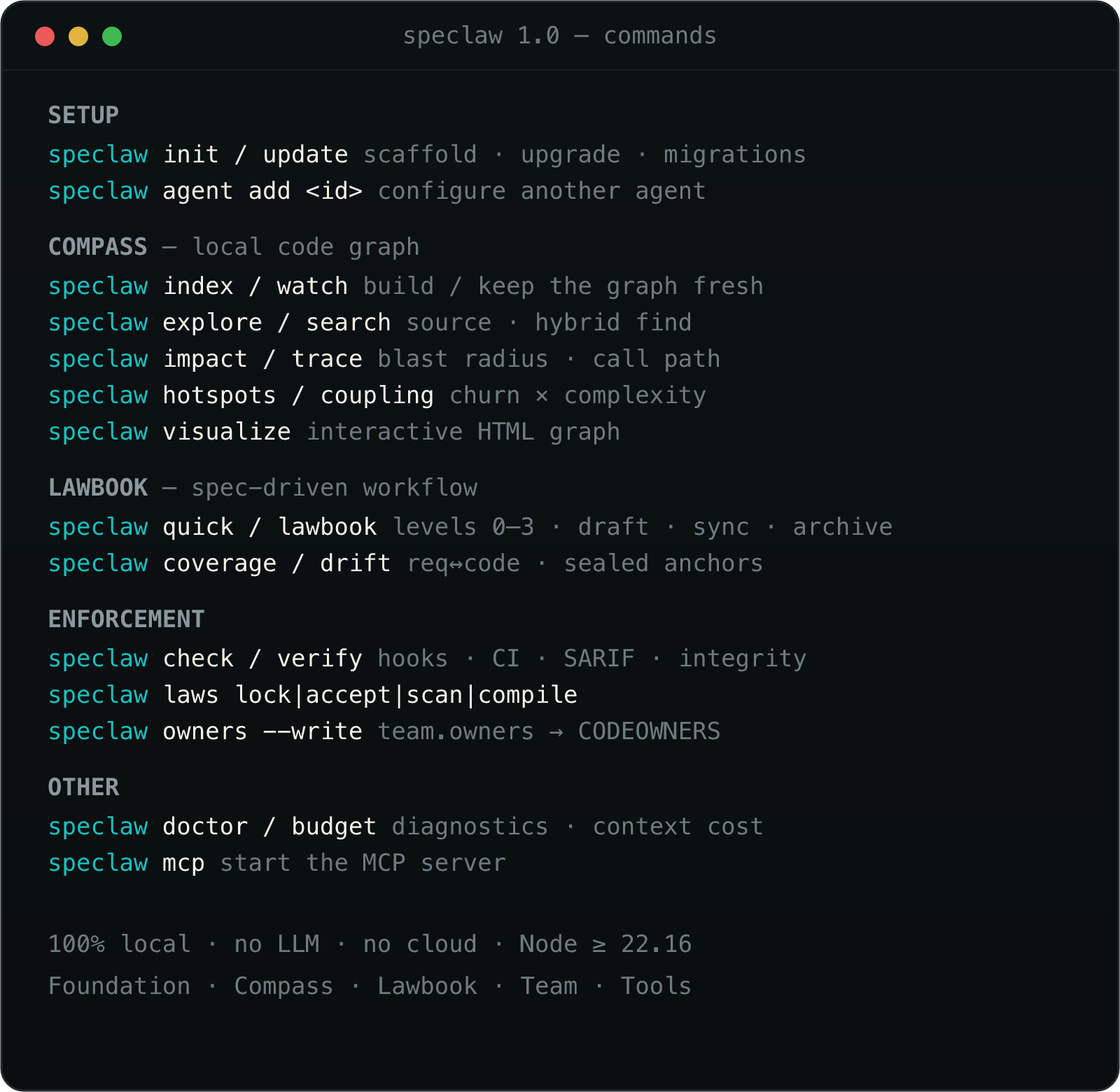
The speclaw command is then available everywhere — run speclaw index,
speclaw doctor, speclaw visualize, or speclaw lawbook … directly.
init will:
- Ask which agents you use (Claude Code, Cursor, Codex, Windsurf, …) — and configure only those. Add more later; nothing is forced on you.
- Write the foundation (constitution + standards) and the lawbook workflow, and compile your blocking laws into agent hooks for the agents that support them.
- Index your code with a live progress bar and a summary of what it found.
- Register the speclaw MCP server in each chosen agent's config.
- Print a prompt to paste into your agent so it fills the constitution with your project's real architecture and conventions.
When something breaks, run speclaw doctor --json and paste it into an issue
(required on bug reports). Output is redacted by default.
Verify a release (provenance)
Every npm publish is signed via Trusted Publishing (OIDC) and carries a SLSA provenance attestation tied to this repository and workflow. That proves where the tarball was built — not that its contents are benign. Pair it with your own review and (later) law-integrity pinning.
npm audit signatures
# After downloading the tarball from the registry:
gh attestation verify <tarball> --owner esneiderbravo
It looks like this
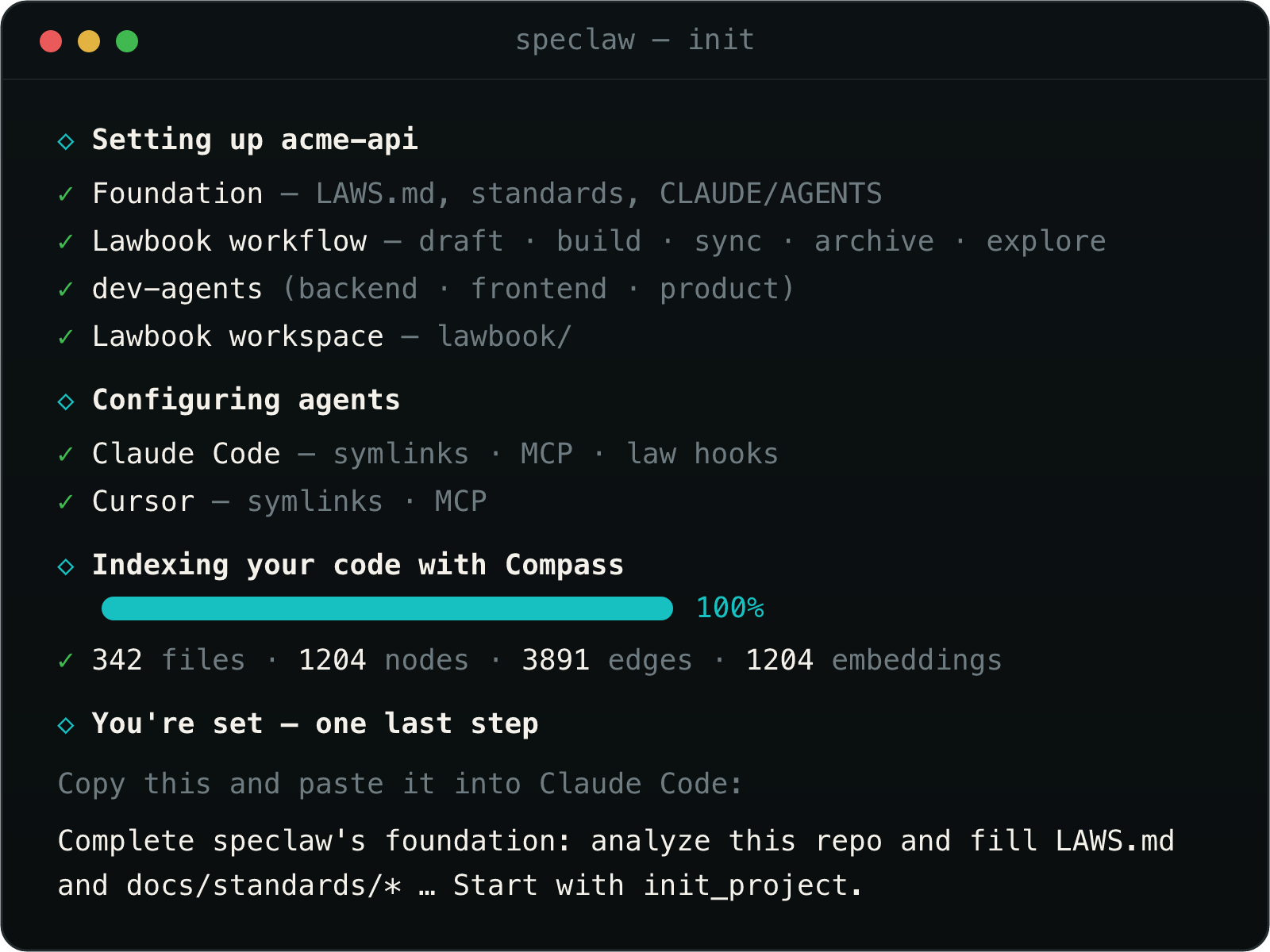
Teal steps, green checks, a live progress bar — themed with the speclaw palette.
The suite — four modules
| Module | What it does |
|---|---|
| Foundation | The project's constitution: LAWS.md binding a set of granular standards under docs/standards/ (base, architecture, backend, frontend, testing, documentation, conventions, lawbook), plus strict CLAUDE.md / AGENTS.md agent contracts — filled from your real codebase. It also enforces them: blocking laws compile into agent hooks that deny a forbidden edit at the keystroke (speclaw check / speclaw_check), and architectural laws are verified deterministically against the Compass graph — dependency rules (deps) and cycles (graph) — via speclaw verify (CI orchestrator: exit codes, SARIF, markdown) and speclaw laws verify / law_verify. Each law is reported as passed, failed, skipped, or unknown (an unresolved reference is unknown, never a silent pass). |
| Compass | speclaw's own local code graph. Parses your code (tree-sitter) into nodes + edges plus a local vector store, so an agent finds and understands code with a fraction of the tokens a grep/read loop would cost. No LLM, 100% local, lives in .speclaw/ (gitignored). |
| Lawbook | speclaw's own spec-driven workflow: draft → build → sync → archive (and explore), backed by lawbook_* engine tools. No external CLI. |
| Tools | Opt-in packs of skills and subagents (currently the dev-agents) that agents use for specific tasks. |
Compass is inspired by CodeGraph and the Lawbook module by OpenSpec — both MIT. speclaw reimplements the ideas as its own code and gives full credit; see ATTRIBUTION.md.
Context cost
speclaw publishes and gates its own always-on context cost. Measured with a
deterministic offline estimator (speclaw/estimate-v1, about ±8% vs Anthropic's
tokenizer on this corpus — not a BPE dependency):
| Tokens | |
|---|---|
| speclaw budget (always-on) | ~12.9k (8 MCP tools · ceiling 13.0k) |
| Spec Kit commands alone | ~18.6k (spec-kit#1401) |
speclaw budget          # human table
speclaw budget --json   # machine-readable; used by the suite gate
speclaw coverage        # requirement → impl → test coverage (TAP / table)
speclaw coverage --json # machine-readable coverage report
speclaw drift           # sealed spec ↔ code drift (default --fail-on semantic)
speclaw drift --reseal  # photograph current bodies into lawbook/anchors/
speclaw init --minimal  # omit setup/lifecycle MCP tools from registration
Raising a number in committed token-budget.json is a reviewable PR. Optional
calibration (never CI): npm run budget:calibrate with ANTHROPIC_API_KEY.
MCP servers cannot mark tools defer_loading — savings come from shorter
definitions, omitted registration (--minimal), and JIT skill steps.
The spec-driven workflow (Lawbook)
Lawbook is speclaw's answer to the biggest risk with AI agents: code that drifts from intent. The intent is written first, the code is made to match it, and the spec is promoted to the project's canonical record — so nothing non-trivial lands without a spec change. It's a loop of five steps:
   ┌─────────┐    ┌───────┐    ┌───────┐    ┌──────┐    ┌─────────┐
   │ explore │ ─▶ │ draft │ ─▶ │ build │ ─▶ │ sync │ ─▶ │ archive │
   └─────────┘    └───────┘    └───────┘    └──────┘    └─────────┘
| Step | What happens |
|---|---|
| explore | Think an idea through before committing to it — should we do this, and how. Writes nothing. |
| draft | Capture the intent as a change under lawbook/changes/<name>/ — four artifacts plus a reports/ folder, always (see below). |
| build | Implement the tasks in order, keeping code and spec in agreement, and record test results under reports/. |
| sync | Reconcile the delta specs against what was actually built, then promote them into the canonical lawbook/specs/ — the always-true description of how the system behaves. |
| archive | Reconcile, then validate, promote, and move the change to lawbook/changes/archive/ — in the same PR, never a post-merge chore. Gated: refused while any task is unchecked, reports/ is empty, or the specs are unsynced. |
Every draft writes four artifacts under lawbook/changes/<name>/ — none optional:
| Artifact | What it captures |
|---|---|
proposal.md |
The why — motivation, what changes, non-goals, and whether migrations are needed. |
specs/<capability>/spec.md |
The delta specs — one per affected capability, normative and testable. |
design.md |
The how — approach, alternatives weighed, and the trade-offs behind the decision. |
tasks.md |
The plan — ordered, checkable steps, including the mandatory ones from config.yaml. |
Plus a reports/ folder — scaffolded at draft, filled at build with one report per discipline (backend.md, frontend.md, …) recording the real unit/integration/e2e results. Evidence of testing travels with the change, and lawbook_archive refuses to archive without it.
[!NOTE] Delta specs are normative and testable. Requirements use
SHALL/MUSTunder### Requirement:headers, each with one or more#### Scenario:blocks whose acceptance criteria hold without production integrations.lawbook_validatechecks that the code matches what the spec promises before you sync or archive.
Three ways to drive it — same engine, no external CLI:
- In your agent — the
/lawbook:explore,/lawbook:draft,/lawbook:build,/lawbook:sync,/lawbook:archivecommands (installed as skills). - MCP tools — eight canonical tools:
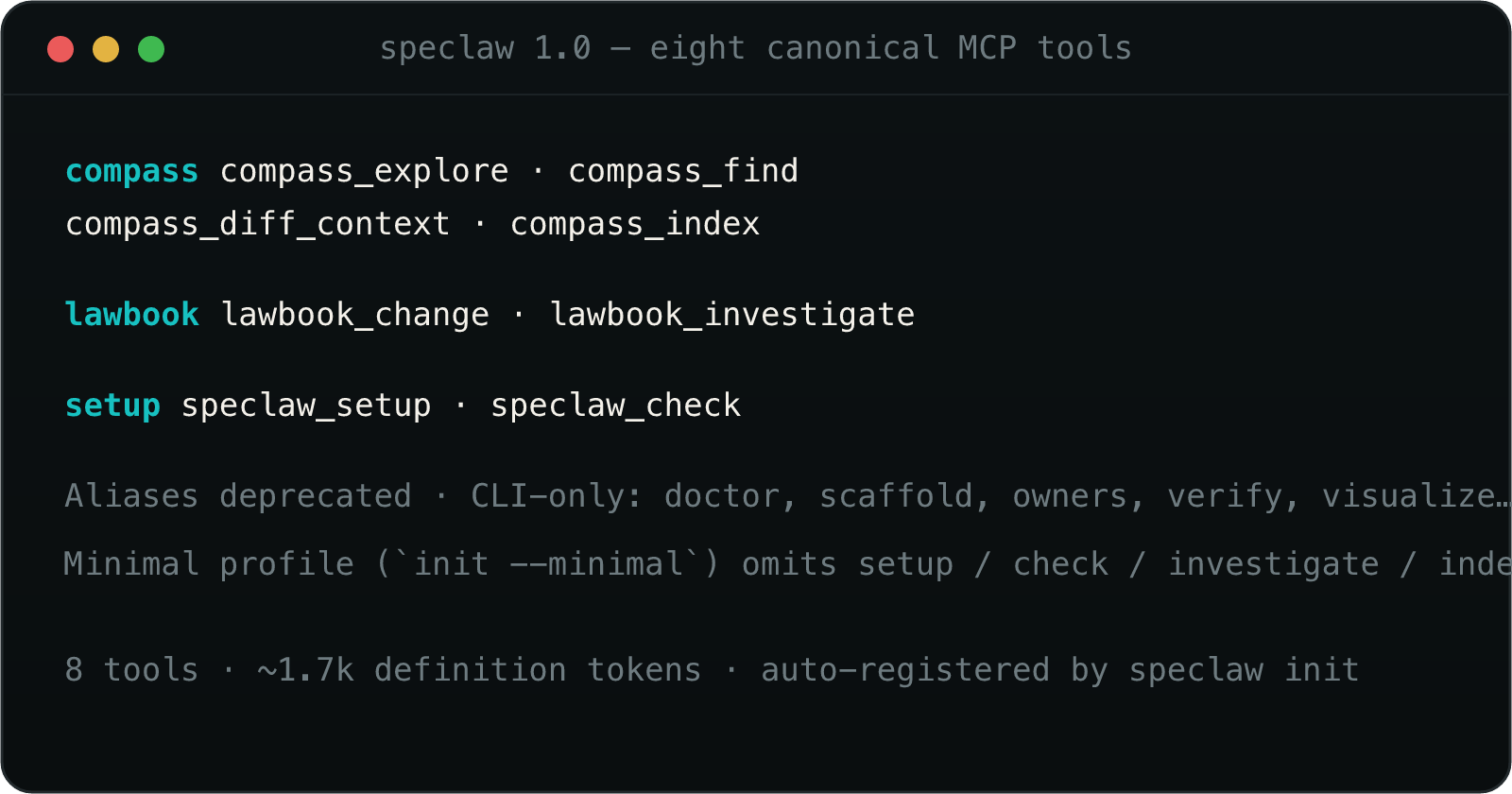
compass_explore,compass_find,compass_diff_context,compass_index,lawbook_change,lawbook_investigate,speclaw_setup,speclaw_check. - CLI —
speclaw lawbook init | list | validate | sync | archive.
The workspace is committed under lawbook/: specs/ (canonical), changes/
(in-flight), changes/archive/ (shipped), and config.yaml (the mandatory task
steps every change must include). The standards themselves are amended the same
way — through a spec change reviewed by a human.
Two ways to use it
speclaw meets you where you are. Everything works through the CLI — so no one is blocked by MCP setup — and the same capabilities are exposed as MCP tools for a smoother, integrated experience once configured. An agent without MCP can still use Compass and the lawbook engine by calling the CLI from its shell.
CLI — the installer & operator, runs anywhere node does
MCP — the integrated agent surface, auto-registered by init
What lands in your project
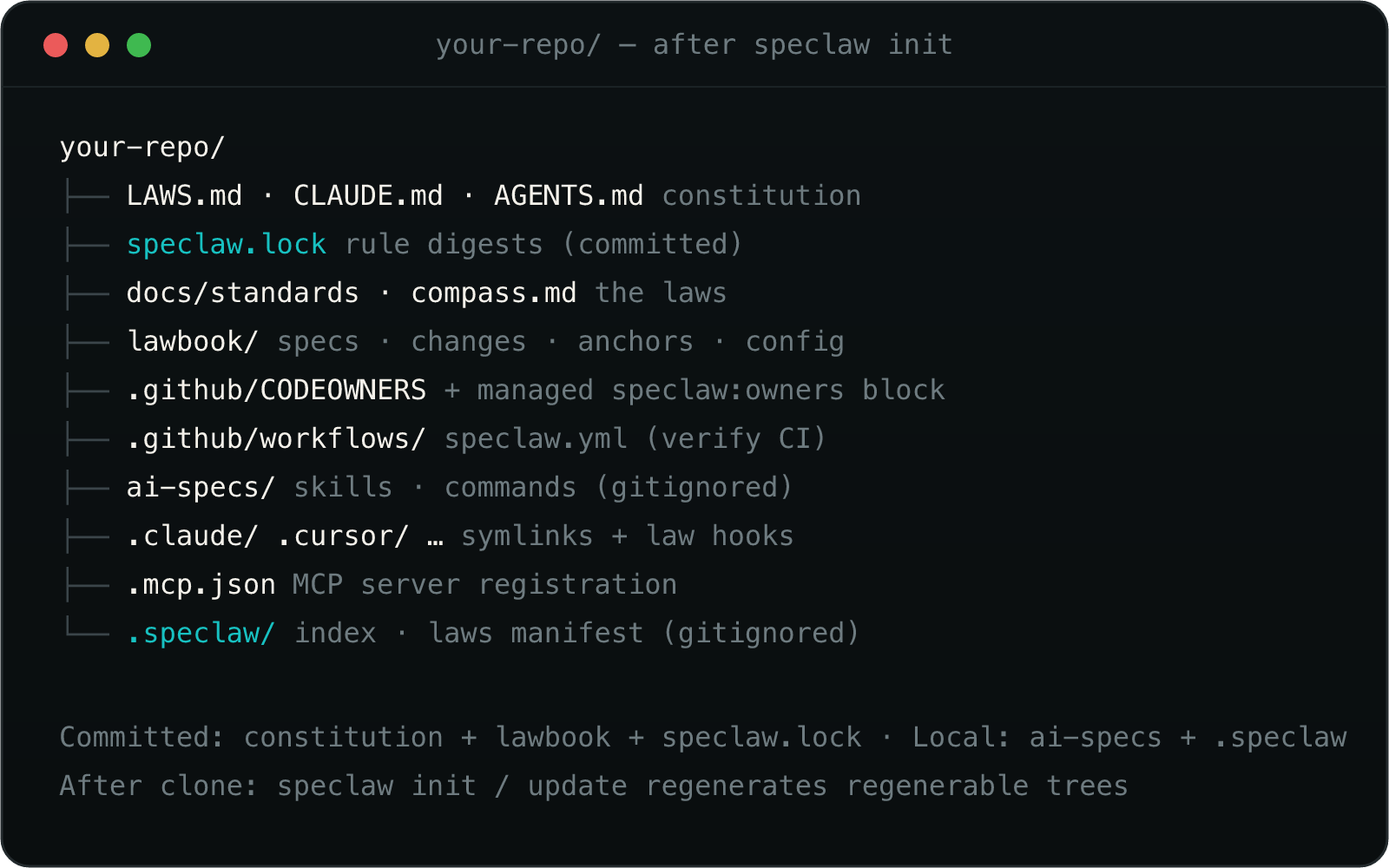
Committed vs. local. Your personalized source is committed — LAWS.md,
CLAUDE.md, AGENTS.md, docs/standards/*, docs/compass.md, and the
lawbook/ workspace. speclaw's regenerable workflow content is local, not
committed: only ai-specs/ (skills, commands, rules, agent packs, and its
.speclaw.json manifest) is gitignored, because init/update reconstruct it
from the package — like a dependency. So after cloning a speclaw project, run
speclaw init (or speclaw update) to regenerate ai-specs/ locally, which
the agent IDE symlinks point into. If a project committed ai-specs/ before
this behavior existed, init/update print the exact git rm -r --cached ai-specs command to stop tracking it (they never touch your git index
themselves). The agent directories (.claude/, .cursor/, …) are left to
you — commit your own skills and commands there if you want to.
Enforcement artifacts. For agents that support hooks, speclaw merges its law
hooks into that agent's settings (e.g. .claude/settings.json) by identity —
it never touches hooks you added yourself. Each speclaw mcp_tool hook includes
an input map Claude Code substitutes from the hook event (${cwd},
${hook_event_name}, ${tool_input.file_path}, …) so speclaw_check receives
projectPath / event / payload. The compiled law manifest lives in
.speclaw/laws-manifest.json (gitignored, regenerated on init/update), and a
context-coverage log in .speclaw/context-log.jsonl feeds speclaw doctor.
Philosophy — why "laws"?
[!NOTE] A guideline is a suggestion. A law is enforced. The most common failure mode of AI coding agents isn't lack of capability — it's working without the project's tacit knowledge: the rules the team actually lives by. speclaw makes that knowledge explicit, executable, and binding, and gives agents a local map (Compass) and a disciplined workflow (Lawbook) to act on it — without burning tokens.
This is why "enforced" is literal, not a metaphor. Anthropic's own guidance puts it plainly:
"An instruction like 'never edit .env' in CLAUDE.md or a skill is a request, not a guarantee. A
PreToolUsehook that blocks the edit is enforcement. If a rule must hold every time, make it a hook rather than a prompt instruction." — Claude Code — Hooks
So speclaw init compiles your blocking laws into agent hooks: a law marked
bloqueo is denied at the keystroke (PreToolUse), citing the law's id, text,
and source. speclaw check --dry-run --path <file> previews what would block, and
speclaw doctor reports how many of your laws actually reached the agent's
context. Agents without hooks (Cursor, Codex) enforce the same laws in CI via
speclaw verify.
Verify in CI
speclaw verify evaluates your deps and graph laws against the local Compass
index. It is deterministic: no model, no API key, no network.
speclaw verify --ci --sarif speclaw.sarif --json speclaw.json
| Exit | Meaning |
|---|---|
| 0 | No findings at or above --fail-on (default error) |
| 1 | At least one finding at or above --fail-on |
| 2 | Usage error (unknown --fail-on / --format) |
| 3 | Environment (shallow clone under --ci, or an unwritable --sarif/--json path) |
| 4 | At least one law was skipped, and --strict-engines was set |
On GitHub:
- uses: esneiderbravo/speclaw@v1
init / update write .github/workflows/speclaw.yml only when that path is
missing — they never overwrite your CI. Make the check required in branch
protection yourself; speclaw does not.
Staying up to date
speclaw checks for new releases in the background (at most once a day) and nudges you when one lands. To upgrade:
speclaw update
update upgrades the global package and brings the current project up to date
without a re-init, splitting files by who owns them:
Managed files (speclaw's workflow machinery — the skills, commands, rules, and agent packs under
ai-specs/) are refreshed to the new version, so improvements actually reach your project. They live locally (gitignored, see What lands in your project) and are reconstructed from the package. If you edited one locally,updatereports the overwrite; pass--backupto keep a<file>.bak(itself gitignored) before it is refreshed.Personalized files (your constitution and standards —
CLAUDE.md,AGENTS.md,LAWS.md,docs/standards/*,docs/compass.md,lawbook/config.yaml) are never auto-edited. When a release changes their speclaw-authored content,updateprints a prompt for the agent you're using to apply the change while preserving your project's specifics.speclaw update --check— report whether an update exists, change nothing.NO_UPDATE_NOTIFIER=1— silence the reminder.
Requirements
- Node.js ≥ 22 — uses the built-in
node:sqlite. - No native builds, no services, no API keys, no LLM download. Tree-sitter parsers ship as WASM; the vector store is local.
MIT · built on ideas from OpenSpec & CodeGraph · see ATTRIBUTION.md
speclaw · where specs become law