🧭 browser-atlas
A map of the web for browser agents: where things are, what you may touch, and when to stop.






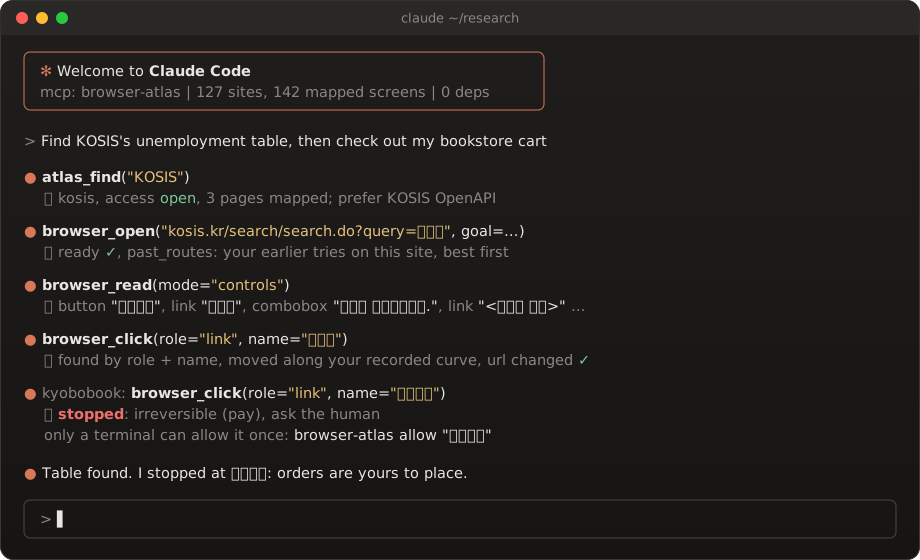
Browser drivers teach an agent how to click. Nobody tells it where the search box is on a government statistics site, whether that site's terms allow a robot at all, or that the button it is about to press spends your money.
browser-atlas is that missing layer: a reviewed, shared map of real sites, a Chrome driver
that reads it, and safety rules written in code instead of in a prompt.
  you ──► Claude Code ──► browser-atlas (MCP) ──► your own Chrome (CDP)
                               │
              ┌────────────────┼──────────────────┐
              ▼                ▼                  ▼
        atlas/sites.json   safety rules      experience memory
        where, and         stop before       what worked last
        whether at all     pay and submit    time, per site
✨ What you get
| 🗺️ Site atlas | 80 sites, each with an access level (open, session, api, blocked), entry URLs, the official API to prefer, and for blocked ones the reason, quoted from robots.txt or the terms and dated. |
| 🔘 Button maps | 106 real screens with the 5 to 15 controls people actually use, stored as role + accessible name (button "검색") instead of brittle CSS. Every one was seen on the live page; all but two pass check (a dialog that has no URL, and a signed-in form that hides its fields when the account is at its plan limit). |
| 🛑 Safety in code | Pay, order, submit, send and delete controls stop with ask the human. Only a person at a terminal can allow one click (browser-atlas allow "주문하기"); no MCP tool can. Blocked hosts are refused, even after a redirect. |
| 🧠 Experience memory | Every tab is an episode, judged from signals (captcha means blocked, never reading means fail). Next time, browser_open hands back the routes that worked on that site, best first. |
| 🖱️ Your own pointer | Record your mouse for a few minutes and clicks follow your Fitts' law timing and your path shapes, landing on a point that really hits the target. Typing goes key by key, Hangul composition included. |
| 🔎 Research mode | browser_search asks five engines at once and interleaves one result per domain, so no single ranking decides what gets read. Long pages start with an outline. |
🗺️ What is in the map
🔘 marks a site with a button map. Everything else has entry URLs and an access verdict.
| Area | Open | API instead | Blocked, with the quote |
|---|---|---|---|
| 📊 Statistics and open data | KOSIS 🔘, data.go.kr 🔘, Seoul Open Data 🔘, MDIS 🔘, Data.gov 🔘, World Bank 🔘 | Bank of Korea ECOS, V-World | |
| 🏛️ Finance and regulators | FSS 🔘, FSC 🔘, KDIC 🔘, FINE 🔘, DART, KRX press, Naver Pay Securities | Toss Securities, TradingView, IMF Data, Apple IR, NVIDIA IR | |
| ⚖️ Law, patents, parliament | National Law Information Center, USPTO 🔘 | KIPRIS, National Assembly bills | |
| 🩺 Health and safety | KDCA 🔘, HIRA hospital finder 🔘, Food Safety Korea 🔘, WHO 🔘 | PubMed (E-utilities) | MFDS drug portal |
| 🌦️ Weather and environment | KMA weather 🔘, KMA open data 🔘, AirKorea 🔘 | ||
| 🎓 Science and learning | arXiv 🔘, solved.ac 🔘, Hacker News 🔘, DACON 🔘 | KCI, Academy Info, JEDEC | |
| 📚 Culture and libraries | National Library of Korea 🔘, National Museum of Korea 🔘, Culture Portal 🔘, Korea Heritage 🔘, Namuwiki 🔘, Watcha Pedia 🔘, Kyobo Book 🔘 | ||
| 📰 Company newsrooms | Samsung Electronics 🔘, SK hynix 🔘, Hyundai Motor 🔘 | ||
| 🗺️ Maps, places, travel | Kakao Map 🔘, Naver Map 🔘, KOBUS 🔘, Starfield 🔘, COEX events 🔘, real estate prices 🔘 | SRT, MOLIT transaction prices | |
| 🛒 Shopping and local | Daangn 🔘, Joongna 🔘, Ohouse store 🔘 | Baemin | |
| 🎮 Games, 3D and design | Google Play 🔘, Steam 🔘, Steamworks docs 🔘, Kenney 🔘, Quaternius 🔘, Poly Pizza 🔘, Fab 🔘, Blender mirror 🔘, ArchDaily 🔘, Unsplash 🔘 | ||
| 🛠️ Developer consoles (sign in once by hand) | GitHub repository pages 🔘, Supabase dashboard 🔘, Resend 🔘 | GitHub REST API, Supabase Management API | |
| 🤖 AI apps and chat | Claude.ai, Perplexity, Kling AI, KakaoTalk client, Blind |
Each entry is plain JSON (schema). Agents decide with the closed fields
(role, name, act, access); where and does are for people, and today they are mostly Korean.
A taste, straight from the file:
"arxiv": {
  "label": "arXiv", "access": "open", "hosts": ["arxiv.org"],
  "pages": {
    "abs": {
      "url": "https://arxiv.org/abs/{arXiv ID}",
      "ready": "!!document.querySelector('#abs')",
      "controls": [
        {"role": "link", "name": "View PDF", "where": "오른쪽 Access Paper 상자 맨 위",
         "act": "download", "does": "논문 PDF를 연다", "css": "a[href^='/pdf/']"},
        {"role": "button", "name": "Export BibTeX Citation", "where": "오른쪽 Export BibTeX 상자",
         "act": "expand", "does": "BibTeX 인용문을 화면에 펼친다"},
        ...
⚡ Plug it into Claude Code
git clone https://github.com/Gachon-junghyun/browser-atlas
cd browser-atlas
pip install -e .          # standard library only, nothing else is pulled in

claude mcp add browser-atlas -- python -m browser_atlas mcp
Then just ask:
> open KOSIS and find the latest unemployment table
> what's new on arXiv's cs.AI list today?
> look up a company's filings on DART, but don't submit anything
The agent starts its own Chrome with a separate profile on a debug port (browser_launch), so
your everyday browser is never touched. When a site needs a login, sign in by hand once in that window.
🧰 CLI
python -m browser_atlas launch --port 9222          # Chrome with its own profile
python -m browser_atlas guard https://example.com   # may an agent act here?
python -m browser_atlas controls --tab example.com  # role and name of what is on screen
python -m browser_atlas check kosis                 # are the mapped controls still there?

python -m browser_atlas atlas validate              # schema, safety and personal-trace checks, offline
python -m browser_atlas atlas merge new.json --dry-run

python -m browser_atlas lesson kosis --page search "Results load after the filter bar; wait for it"
python -m browser_atlas learned                     # lessons and button fixes this machine picked up
python -m browser_atlas share                       # preview what would be shared (nothing is sent)
python -m browser_atlas share --yes                 # submit it to the review queue
python -m browser_atlas share sync                  # pull what maintainers merged

python -m browser_atlas mouse record --seconds 300  # teach it your mouse
python -m browser_atlas mouse fit
python -m browser_atlas mouse plot                  # grey: yours, blue: generated
🛡️ The rules it lives by
- A captcha or a rate limit means stop for the day. It does not solve captchas and never will.
- Terms first. A site whose robots.txt or terms forbid automation goes in as
blocked, with the sentence quoted and dated, and the pointer will not act there at all. - The map can only tighten. Whether a control is irreversible is decided on your machine from the live control. Shared map text can mark more things dangerous, never fewer. Why shared text must not become instructions
- Page text is data. Everything read from a page comes back labelled
untrusted_page_content. - Your traces stay home. Mouse recordings, credentials and private sites live in
~/.browser_atlas/and never enter this repository. Credentials go from the OS store straight into the page; the model never sees them.
📚 Learn once, share on review
Every run leaves something behind, and the next run starts from it:
- Routes are recorded by the server itself;
browser_openhands back the ones that worked on that site. - Lessons are one-sentence pitfalls (
lesson_record, orbrowser-atlas lesson <site> "..."). The server's instructions ask the agent to leave one whenever something tripped it up, andbrowser_openreturns the page'smap_trapsbefore the next attempt. - Renamed or new buttons found while working are applied to your own map at once.
All of it stays on your machine. When you say "share it", share_upload sends a sanitized copy to a
review queue, GitHub-style: anyone can submit without an account, nobody but maintainers can read the
queue, and only what a maintainer merges (browser-atlas share review, share merge ID) becomes public.
Everyone then pulls merged rows with share sync.
Join the shared database. Save this as ~/.browser_atlas/shared.json. The key is a publishable
key: it can only submit to the queue (rate-limited) and read what was merged.
{"url": "https://sfgjkzwvagjelkgldrmt.supabase.co",
 "anon_key": "sb_publishable_gqj5LVr_ub6tVmWw_XZW7g_4Bjn_yoY"}
Without the file nothing is shared or pulled, and everything else works the same.
Run your own shared database
- Create a Supabase project and run
server/schema.sqlin its SQL editor. It creates the public tables, the review queue, the limits (120 submissions a minute, 5000 waiting) and the merge functions. - Create the maintainer in Authentication > Users, then run
insert into maintainers (user_id) values ('<that user id>'); - On the maintainer's machine:
python -m browser_atlas set-cred shared_emailandset-cred shared_password(hidden prompts; the values go to the OS credential store). - Optional mail when submissions arrive: add Vault secrets
resend_api_key(a sending-only Resend key),notify_from(a sender on a domain verified in Resend) andnotify_to. At most one mail an hour, and it carries only the count: submitted text never leaves the database.
🤝 Add a site
The map grows by pull request. One site is one JSON object.
- Open the site with the MCP tools and collect controls with
browser_read(mode="controls"). Write role and name exactly as Chrome exposes them, and mark result-dependent namesdynamic. - Read robots.txt and the terms. If either forbids automation, the entry is
blockedwith the quote. - Run
python -m browser_atlas atlas validate new.json, thencheck <site>until nothing is missing. - Run
python -m browser_atlas atlas merge new.jsonand open a pull request.
Field notes from real sites (iframes, overlays, sites that rename a button between screens) are in docs/LESSONS.md. Read them before your first map; they will save you an evening.
🔬 Under the hood
Experience memory: a loop that runs even when the agent forgets it
The MCP server records every browser call itself. One tab is one episode; when the tab is closed,
sits idle for 15 minutes, or the server exits, the episode is judged from signals and stored:
captcha or rate limit means blocked, never reading content means fail, ending on an error means
partial, otherwise success, with quality lowered by errors and wasted steps.
browser_open(url, goal=...) returns past_routes for that site and goal, ranked by similarity,
Bayesian route quality and recency, plus one rarely tried route to explore. Failed routes fade and
confirmed ones rise. memory_rate lets a human or a second source re-grade.
Button-map repairs are learned too: a mapped control that goes missing and then succeeds under
another name becomes a rename, and a working control that is not mapped becomes a new one. They go
into your personal layer (~/.browser_atlas/sites.learned.json) and apply from the next call.
How the mouse learner works
- Record: poll the cursor and the left button (Windows, via
ctypes). Keys are never recorded. - Segment: one movement runs from the last rest (120 ms without motion) to the moment the cursor reaches within 3 px of a click. Drags and wandering paths are dropped.
- Normalize: rotate and scale each movement onto (0,0) to (1,0) and resample it on a normalized time axis, so the shape and the speed profile are kept.
- Fit: least squares on
T = a + b·log2(1 + D/W)gives your speed; the normalized paths become the library. - Plan: for a new start and end, blend two of your movements recorded at a similar distance and direction, stretch the blend onto the new segment, and give it a Fitts-predicted duration.
Your recordings are a behavioural fingerprint. They stay in ~/.browser_atlas/mouse/ and are never
part of this repository.
Python API
from browser_atlas import CDP, Pointer

with CDP(9222, match="example.com") as c:
    p = Pointer(c)                     # your fitted style if present, else a minimum-jerk curve
    p.click_control("button", "Search")
    p.type_control("textbox", "Company", "Example", clear=True)
🧪 Tests
python -m unittest discover tests
📄 License
MIT. The map describes public pages; each site's own terms still govern how you use it.