Keen
The complete Atlassian platform CLI and MCP Server.





1,843 API endpoints across Jira, Confluence, Agile, Marketplace, Service Desk, Assets, Compass, Bitbucket and Admin — in a single Go binary. SQLite-backed local sync with full-text search. MCP server for AI agents. Built for automation first, humans second.
What is Keen?
Every Atlassian workflow you automate is a wall of curl calls with hand-rolled JSON payloads and fragile jq parsing. Every AI agent that touches Jira hits rate limits after a few dozen operations.
Keen replaces all of that with typed commands, structured output, local SQLite caching with FTS5 full-text search, and an MCP server that gives AI agents fast, uncapped access to your entire Atlassian stack.
Free and open source. Apache-2.0 license. No account required. No telemetry.
API Coverage
| API | Endpoints | What you get |
|---|---|---|
| Jira Platform v3 | 630 | Issues, transitions, search, bulk ops, fields, workflows, permissions |
| Jira Agile | 105 | Sprints, boards, backlogs, epics, ranking, velocity |
| Confluence | 130 | CQL search, spaces, labels, templates, attachments, permissions, content states |
| Confluence v2 | 252 | Pages, blog posts, spaces, folders, databases, whiteboards, comments, attachments, space roles |
| Marketplace v2 | 143 | Addons, versions, vendors, distribution, reviews, reporting |
| Service Desk | 75 | Requests, queues, customers, SLAs, approvals |
| Assets | 64 | Objects, object schemas and types, AQL search, imports (keen assets-...). keen finds your cloud and workspace ids from the site |
| Compass | 11 | Events, metric values, attachments and API specs for components |
| Teamwork Graph | 18 queries | Org chart (manager, direct reports, report chain), teams, a person's created, commented, mentioned and viewed work, over GraphQL (Teamwork Graph). Plus keen graphql for any read query |
| Bitbucket | 300 | Repositories, pull requests, pipelines, branches, commits, snippets, workspaces (keen bitbucket-...). Public data works without a token; private data needs a Bitbucket-scoped token (Authentication) |
| Admin | 133 | Organizations, directories, groups, domains, policies, user management, user provisioning (SCIM), API tokens and service accounts, data loss prevention. Needs an admin API key (Authentication) |
Your First 5 Minutes
# 1. Install (macOS or Linux with Homebrew; see Install for other ways)
brew install imogenlabs/tap/keen

# 2. Save your credentials
mkdir -p ~/.config/keen
cat > ~/.config/keen/auth.json <<'JSON'
{ "base_url": "https://yoursite.atlassian.net", "username": "you@example.com", "password": "your-api-token" }
JSON
chmod 600 ~/.config/keen/auth.json

# 3. Check connectivity
keen doctor

# 4. Sync your Jira data locally
keen sync

# 5. Search instantly (no API calls)
keen search "authentication bug" --data-source local
Generate an API token at id.atlassian.com/manage-profile/security/api-tokens.
Environment variables work too, and override the file:
export JIRA_CLOUD_PLATFORM_USERNAME="you@example.com"
export JIRA_CLOUD_PLATFORM_PASSWORD="your-api-token"
export JIRA_CLOUD_PLATFORM_URL="https://yoursite.atlassian.net"
Install
Homebrew (macOS and Linux)
brew install imogenlabs/tap/keen
This installs both keen and keen-mcp. brew upgrade keen picks up new releases; the formula follows each release within a day.
Binary download
Download from GitHub Releases:
# macOS (Apple Silicon)
curl -L https://github.com/imogenlabs/keen/releases/latest/download/keen_darwin_arm64.tar.gz | tar xz
sudo mv keen_darwin_arm64/keen /usr/local/bin/
sudo mv keen_darwin_arm64/keen-mcp /usr/local/bin/

# macOS (Intel)
curl -L https://github.com/imogenlabs/keen/releases/latest/download/keen_darwin_amd64.tar.gz | tar xz
sudo mv keen_darwin_amd64/keen /usr/local/bin/
sudo mv keen_darwin_amd64/keen-mcp /usr/local/bin/

# Linux (x86_64)
curl -L https://github.com/imogenlabs/keen/releases/latest/download/keen_linux_amd64.tar.gz | tar xz
sudo mv keen_linux_amd64/keen /usr/local/bin/
sudo mv keen_linux_amd64/keen-mcp /usr/local/bin/

# Linux (arm64)
curl -L https://github.com/imogenlabs/keen/releases/latest/download/keen_linux_arm64.tar.gz | tar xz
sudo mv keen_linux_arm64/keen /usr/local/bin/
sudo mv keen_linux_arm64/keen-mcp /usr/local/bin/
Each release also publishes checksums.txt.
From source
git clone https://github.com/imogenlabs/keen.git
cd keen
make build-all   # builds bin/keen and bin/keen-mcp
Requires Go 1.26.10 or newer.
What changed in each release: CHANGELOG.md.
MCP Server
Keen includes an MCP server (keen-mcp) that gives AI agents every keen command (1,939 tools). Works with Claude Code, Cursor, Windsurf, and any MCP-compatible host.
It offers two tools: keen_search finds the tools for a task ("transition an issue", "list sprints on a board") and returns them with their parameters, and keen_run runs one by name. Listing all 1,939 tools one by one would take about half a million tokens, more than most models can hold, so an app connecting to keen would fill up before doing any work. To get the full list anyway, set KEEN_MCP_TOOLS=all in the server's environment.
Tool calls arrive as JSON-RPC over stdio. Finding a tool happens inside keen-mcp with no call to Atlassian. Running one goes to Atlassian, except that a read repeated within 5 minutes is answered from keen's cache, so a busy agent stays under Atlassian's rate limits. Any successful write clears the cache, so a read after a write is fresh. Set KEEN_MCP_CACHE=off to make every read live. If a tool's API has been switched off by Atlassian, the result says what to use instead.
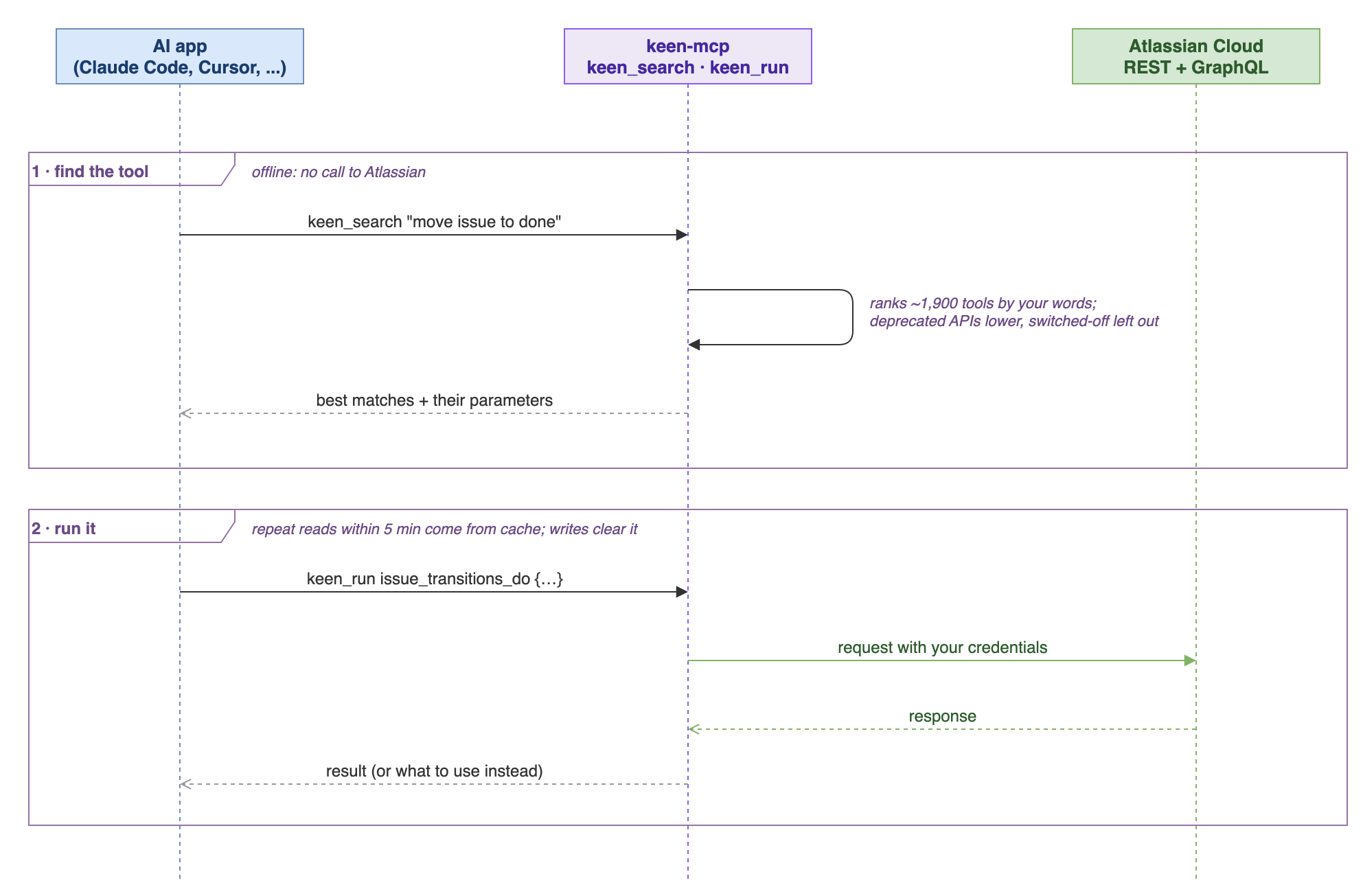
Source: docs/diagrams/mcp-flow.drawio.
Claude Desktop, and the MCP registry
On a Mac, download keen-mcp.mcpb from the latest release and open it: Claude Desktop installs keen and asks for your Atlassian site, email and API token. keen is also listed in the official MCP registry as io.github.imogenlabs/keen, updated with every release.
keen-mcp finds credentials the same way the CLI does: environment variables first, then ~/.config/keen/auth.json or config.toml. If you already set up the CLI, claude mcp add --transport stdio keen -- keen-mcp is enough. To pass them explicitly instead:
Claude Code
claude mcp add --transport stdio keen \
  --env JIRA_CLOUD_PLATFORM_USERNAME=you@example.com \
  --env JIRA_CLOUD_PLATFORM_PASSWORD=your-api-token \
  --env JIRA_CLOUD_PLATFORM_URL=https://yoursite.atlassian.net \
  -- keen-mcp
Cursor
Add to .cursor/mcp.json:
{
  "mcpServers": {
    "keen": {
      "command": "keen-mcp",
      "env": {
        "JIRA_CLOUD_PLATFORM_USERNAME": "you@example.com",
        "JIRA_CLOUD_PLATFORM_PASSWORD": "your-api-token",
        "JIRA_CLOUD_PLATFORM_URL": "https://yoursite.atlassian.net"
      }
    }
  }
}
Windsurf
Add to ~/.codeium/windsurf/mcp_config.json with the same structure.
Local Sync & Offline Search
Keen syncs your Atlassian data to a local SQLite database with FTS5 full-text search. Queries run in under 100ms against the local cache instead of hitting the Jira Cloud API.
keen sync                                          # hydrate local cache
keen search "sprint bug" --data-source local        # FTS search (sub-100ms)
keen analytics                                      # analytics on synced data
keen stale --days 30                                # find stale items
keen orphans                                        # find orphaned items
keen load                                           # workload distribution
This is especially useful for AI agents that need to make many queries without hitting Atlassian's rate limits.
Agent Mode
Every command supports --agent which sets JSON output, no interactive prompts, compact format, and no color in one flag. Designed for AI agent consumption.
keen agile get-all-boards --agent
keen issue transitions get PROJ-42 --agent | jq '.results.transitions[] | {id, name}'
The everyday Jira calls have short forms:
keen find-issues --jql "project = PROJ AND status = 'In Progress'" --agent
keen get PROJ-42 --agent
keen transition PROJ-42 --transition-name "In Progress" --agent   # name resolved to its id
keen sprints 42 --state active --agent
Key Flags
| Flag | What it does |
|---|---|
--agent |
JSON + no prompts + compact (use this for all scripted calls) |
--compact |
Only key fields (id, name, status, timestamps) |
--json |
Force JSON output |
--csv |
CSV output |
--dry-run |
Show what would be sent without sending |
--stdin |
Read request body as JSON from stdin |
--select "key,fields.summary" |
Keep only these fields (dotted paths reach nested ones). A mistyped field fails with a suggestion |
--output-summary[=N] |
If the output is over N bytes (default 4096), save it to a private temp file and print a one-line JSON summary with the file path, size and record count |
--quiet |
One value per line |
--data-source local |
Query local SQLite cache only |
Command Discovery
keen which "sprint"          # find commands by keyword
keen which "create page"     # natural language search
keen api                     # browse all API interfaces
keen api wiki                # browse Confluence endpoints
keen api agile               # browse Agile endpoints
Common Workflows
Sprint Management
keen agile get-all-boards --agent
keen agile get-all-sprints BOARD_ID --state active,future --agent
keen agile create-sprint --stdin <<< '{"name":"Sprint 5","originBoardId":42}'
keen agile move-issues-to-sprint-and-rank SPRINT_ID \
  --stdin <<< '{"issues": ["PROJ-42", "PROJ-43"]}'
keen agile partially-update-sprint SPRINT_ID --stdin <<< '{"state": "active"}'
Release Tracking
Record git release tags as Jira versions and tag the issues they shipped:
# every release tag so far, plus an unreleased "next" for work merged since
keen release sync --repo-path . --project PROJ --backfill --head origin/main --dry-run
# after publishing a release: "next" becomes the tag, a fresh "next" is created
keen release sync --repo-path . --project PROJ --tag v1.4.0 --head origin/main
A version is named as the tag, released on the tag's commit date and linked to its GitHub release. An issue gets the first release whose commits name its key as a Fix Version; existing Fix Versions are added to, never replaced.
Issue Lifecycle
keen jira-cloud-platform-search and-reconsile-issues-using-jql-post \
  --jql "project = PROJ AND status != Done" --agent
keen issue transitions get PROJ-42 --agent
keen issue transitions do PROJ-42 --transition-id 41 --agent
keen issue comment add PROJ-42 --body "Done."    # plain text is wrapped into ADF
Confluence
keen wiki search-content-by-cql --cql "type=page AND space=DOCS" --agent
keen wiki create-page --space DOCS --title "Release notes" --stdin < notes.xhtml
keen wiki update-page PAGE_ID --stdin < notes.xhtml   # version bumped for you
keen wiki get-page PAGE_ID --agent
keen wiki get-content-descendants PAGE_ID --agent
keen wiki add-labels-to-content PAGE_ID --stdin <<< '[{"prefix":"global","name":"adr"}]'
Page bodies are Confluence storage format (XHTML); Markdown is not converted.
Marketplace
keen addons get io.example.my-addon --agent
keen addons list-search --q "story points" --agent
keen addons versions get io.example.my-addon --agent
Comparison
| Feature | Keen | mcp-atlassian | Atlassian Rovo MCP | jira-cli | ACLI (Appfire) |
|---|---|---|---|---|---|
| Endpoints | 1,843 | 98 tools | 46+ | Jira only | Many |
| Local cache | SQLite + FTS5 | No | No | No | No |
| MCP server | Yes | Yes | Yes (official) | No | No |
| Products | 9 (Jira, Confluence, Agile, Marketplace, Service Desk, Admin, Assets, Compass, Bitbucket) | 2 (Jira, Confluence) | 5 | 1 | 4 |
| Server / Data Center | No | Yes | No | Yes | Yes |
| Price | Free (Apache-2.0) | Free (open source) | Free with Cloud | Free (MIT) | $360-$6,195/yr |
| Binary | Single Go binary | Python (uvx, pip, Docker) | Remote server | Single Go binary | Requires JVM |
| Offline search | Yes | No | No | No | No |
More detail, and when to pick something else: Comparison.
Architecture
The keen CLI and the keen-mcp server share one set of commands over 1,843 REST endpoints and 18 GraphQL queries. Calls go to Atlassian, with repeat reads within 5 minutes answered from a short response cache that every write clears. keen sync copies data into a local SQLite + FTS5 store, which keen search and offline reads (--data-source local, or automatically when Atlassian cannot be reached) use.
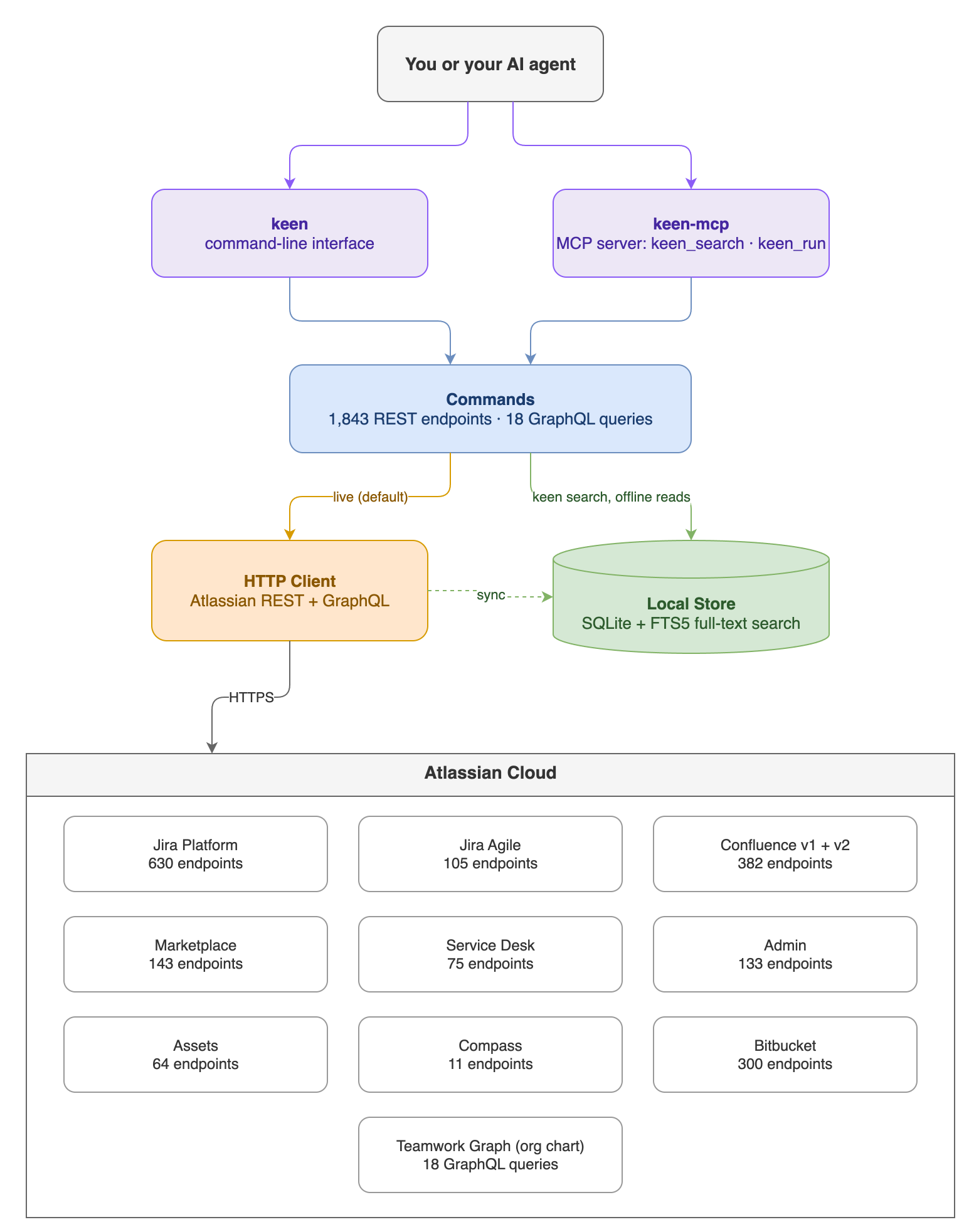
Source: docs/diagrams/architecture.drawio (editable in draw.io).
Regeneration
keen is generated from 15 official Atlassian OpenAPI specs (in specs/) by CLI Printing Press, then carries its own changes on top. The list of specs lives in one place, SPECS in scripts/regen/config.sh. One script refreshes keen from Atlassian's current specs without losing those changes:
git switch -c build/refresh-specs
scripts/regen/regen.sh        # download current specs, generate, merge onto keen
scripts/regen/check.sh        # build, tests, lint, vulnerabilities, old-name and help checks
How it works: the generator's previous output (renamed to keen) is kept on GitHub as the hidden ref refs/regen/base (not a branch; regen.sh fetches it). regen.sh generates again from today's specs, renames that output the same way, and does a three-way git merge onto keen. Spec changes land, and keen's own edits stay. Files keen writes by hand (README, docs, changelog, the patch list) always keep keen's version. scripts/regen/postfix.py applies keen's standing rules to code the generator adds for the first time. scripts/regen/placeholders.py gives help examples a placeholder that fits each argument (the generator puts your-token-here in every *Key argument), and check.sh fails if one slips back.
If the merge stops on a conflict, the script lists the files. Resolve them in the work folder it prints (scripts/regen/resolve.py ours|theirs <file> takes one side for a whole file), then run scripts/regen/finish.sh. When the branch is merged to main, move the base forward as regen.sh says.
To see what Atlassian has changed since the last refresh, without changing anything, run scripts/regen/specdiff.py. It lists the operations added, removed or changed in each spec. A weekly GitHub workflow (.github/workflows/spec-check.yml) runs the same check, opens one issue when anything differs and closes it once keen is current again, so a change is never missed.
scripts/mcp-check.py <dir with keen and keen-mcp> tests the MCP server against a live site the way an AI app uses it: it asks keen_search for ten everyday tasks in plain words, runs the tool through keen_run and compares the answer with the CLI's. It fails when the right tool is not in the top three, or when a tool ranked above it is one Atlassian has switched off. With --claude it also hands Claude Code keen-mcp as its only tools and checks it answers real questions with no failed call. It picks its test data from the site, and check.sh runs it alongside the live smoke test.
To add an Atlassian API, add one name=URL line to the end of SPECS and run the two commands above. Nothing else needs editing.
The org chart and Teamwork Graph commands come from Atlassian's GraphQL schema instead of an OpenAPI spec. scripts/regen/graphql.py reads it (no login needed), keeps a snapshot in specs/graphql.json and writes the command table; the refresh runs it, and the weekly check compares the live schema with the snapshot.
If Atlassian retires an API, the generator stops producing its command. Add it to internal/compat/compat.go so the old command and MCP tool keep their name and tell people what replaced it. Every local change is listed in .printing-press-patches.json.
Atlassian also keeps deprecated APIs in its specs, sometimes after switching them off. scripts/regen/deprecated.py lists every operation the specs mark deprecated (the refresh runs it, and check.sh fails if the list is out of date); keen labels those commands and tools, and keen_search ranks them below the alternatives. When one starts answering 410 Gone, add it to RemovedEndpoints in internal/compat/deprecated.go with what to use instead: keen then hides it, its command and tool name the replacement, and keen sync skips it.
Security
See SECURITY.md for vulnerability reporting. Keen reads API credentials from environment variables or from ~/.config/keen/auth.json. If you use the file, keep it readable only by you (chmod 600). The local SQLite database contains cached API responses and should be treated as sensitive.
Contributing
See CONTRIBUTING.md. Bug fixes welcome. Open an issue before submitting PRs for new features.
License
Apache-2.0
Built by Imogen Labs