home-monitor
Built for dsh 0.2.0-rc.2. Also runs standalone as an MCP stdio server.
Read-only health checks for a small self-hosted setup, packaged two ways:
- A DSH plugin — five tools registered straight into the agent (
monitor_http,monitor_tcp,monitor_ssl,monitor_docker,monitor_targets). - A standalone MCP stdio server — the same checks behind
check_http,check_tcp,check_ssl,check_docker,monitor_status, usable from any MCP client.
Both read the same server/config.json, so the inventory of things to watch lives in one file.
Nothing here writes, restarts, or "fixes" anything. Every check opens a socket, reads, and closes it.
What it looks like
Every image below is a capture of real output, not a mock-up. The capture scripts live in docs/_capture/; they are dev helpers and are not part of the shipped package.
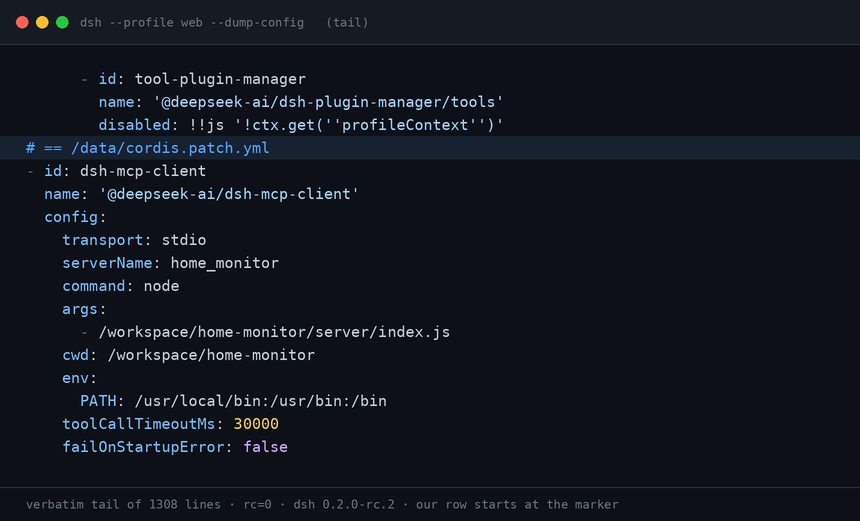
1. The patch row lands in the config the server actually loads. Tail of dsh --profile web --dump-config (1308 lines, rc=0); our row starts at the marked line and is applied verbatim.
2. The model picks the MCP tool by itself. The provider is stubbed so the run is reproducible; the MCP bridge, the five-tool list and the 401 behind TOOLRESULT are real.

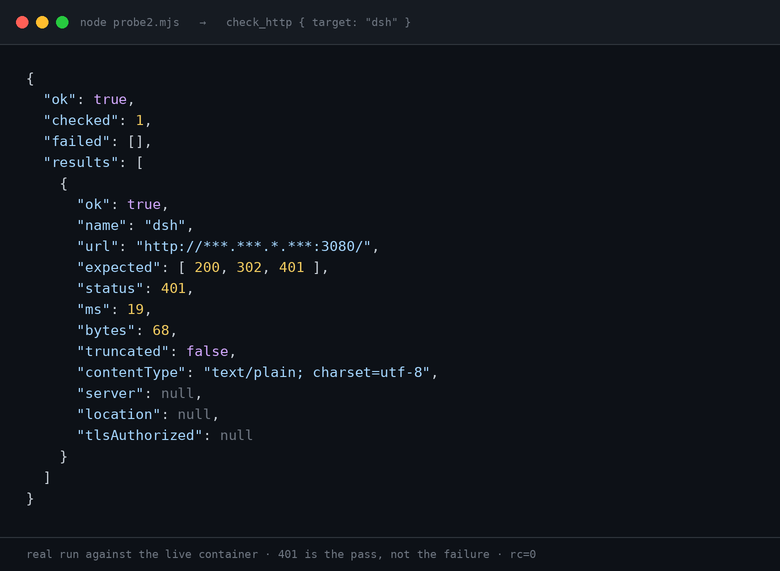
3. One real probe against the live container. 401 on / is the pass, not the failure — that is the auth gate answering.
Layout
home-monitor/
├── package.json            plugin manifest (dsh.bundle.patch → cordis.patch.yml)
├── cordis.patch.yml        patch row that wires the MCP server into DSH
├── lib/index.js            DSH plugin: registers the five tools
└── server/
    ├── package.json        separate package — owns the MCP SDK dependency
    ├── config.json         the whole inventory: http / tcp / ssl / docker
    ├── index.js            MCP stdio server
    └── monitors/
        ├── http.js         status code + latency + body size
        ├── tcp.js          connect / close
        ├── ssl.js          expiry, days left, issuer, chain trust
        └── docker.js       engine ping + per-container state
server/ is its own package on purpose: it has exactly one dependency
(@modelcontextprotocol/sdk), and the plugin layer does not depend on it at all —
lib/index.js imports the monitor modules directly, so a broken MCP link never
takes the DSH tools down with it.
Prerequisites inside the DSH container
Exactly one bare name has to be made resolvable by hand. Everything else
ships with the image. Checked against dsh 0.2.0-rc.2.
@deepseek-ai/dsh-tools— required.lib/index.jsimportsdefineToolfrom it by bare name.package.jsonlists it only as an optional peer dependency, sonpm iwill not fetch it, and Node's upward walk from/workspace/home-monitor/lib/cannot reach dsh's nested tree. In the stock image it sits at/usr/local/lib/node_modules/@deepseek-ai/dsh/node_modules/@deepseek-ai/dsh-tools. Link it next to the plugin:
mkdir -p /workspace/home-monitor/node_modules/@deepseek-ai
ln -sfn /usr/local/lib/node_modules/@deepseek-ai/dsh/node_modules/@deepseek-ai/dsh-tools \
        /workspace/home-monitor/node_modules/@deepseek-ai/dsh-tools
If you would rather not keep a foreign symlink inside the package, make it a
real file: dependency in package.json and reinstall — same effect, more
moving parts.
@deepseek-ai/dsh-mcp-client— nothing to do. It is a declared dependency of thedshpackage itself (one of 82), and the plugin loader resolves patch rows withcreateRequire(import.meta.url)from.../dsh/node_modules/@deepseek-ai/cordis-plugin-loader/lib/index.js— that is, straight into.../dsh/node_modules/. Verified on a stock image: the row loads with no extra links anywhere,/usr/local/lib/node_modules/@deepseek-ai/holding onlydshand/data/profiles/web/having nonode_modulesat all.Linking it beside
dsh-toolsis harmless and makes ad-hoc resolution checks from the plugin directory pass; it is not required for the row to load.
ln -sfn /usr/local/lib/node_modules/@deepseek-ai/dsh/node_modules/@deepseek-ai/dsh-mcp-client \
        /workspace/home-monitor/node_modules/@deepseek-ai/dsh-mcp-client   # optional
Pointing the row at the nested directory as file:///usr/local/lib/…/dsh-mcp-client
does not work: the loader wants a package entry (exports['.'] → ./lib/index.js),
and a nested absolute path is not an install layout it accepts. Name the package
and let resolution do the rest.
Check resolution the way the loader does it — from dsh's own package directory.
Resolving from /data/profiles/web throws MODULE_NOT_FOUND even on a working
install (that directory has no node_modules), so it proves nothing:
docker exec dsh sh -c 'cd /usr/local/lib/node_modules/@deepseek-ai/dsh && node -e "console.log(require.resolve(\"@deepseek-ai/dsh-mcp-client\"))"'
The functional check, after a restart, is the row showing up in the merged config plus the tools appearing:
docker exec dsh dsh --profile web --dump-config | grep -n 'home-monitor\|mcp-client'
# then: the harness should expose mcp__home_monitor__check_http
Quick start (DSH plugin)
Get the code:
git clone https://github.com/lowspecai/dsh-home-monitor.git
The default install path in the patches below assumes the source lives at
/workspace/home-monitor inside the DSH container (./workspace on the host).
# 1. dependencies for the MCP server
cd /workspace/home-monitor/server && npm i

# 2. make the plugin resolvable from the profile directory
#    (see "Wiring" below — pick A or C)

# 3. restart and look for the tools
#    DSH's HMR root is empty in the stock config, so a restart is the reload.
docker restart dsh && docker logs --tail 40 dsh
Rebuilding from scratch in a fresh container
# copy the package in (from the host, where ./workspace is mounted)
docker cp home-monitor dsh:/workspace/home-monitor

# MCP server dependency — 95 packages, ~10 s on a domestic mirror
docker exec dsh sh -c 'cd /workspace/home-monitor/server && npm i'

# the one bare-name symlink from "Prerequisites" (dsh-mcp-client needs none)
docker exec dsh sh -c 'mkdir -p /workspace/home-monitor/node_modules/@deepseek-ai && ln -sfn /usr/local/lib/node_modules/@deepseek-ai/dsh/node_modules/@deepseek-ai/dsh-tools /workspace/home-monitor/node_modules/@deepseek-ai/dsh-tools'

# confirm both halves before touching the live config
docker exec dsh dsh --profile web --dump-config | grep -n 'home-monitor\|mcp-client'
npm i needs a registry that answers from inside the container. The image
defaults to npmmirror; npm config get registry tells you what you are on.
Set npm_config_registry if you are rebuilding somewhere else.
Verify the plugin before restarting the live container, using a throwaway overlay so a broken row cannot restart-loop production:
# /tmp/ol.yml
- insert:
    - id: home-monitor
      name: '/workspace/home-monitor/lib/index.js'
docker exec dsh sh -c 'cd /workspace && dsh --profile headless --patch /tmp/ol.yml \
  --dump-config' | grep -n home-monitor
--profile is required even when you pass --patch; the overlay is applied
after the profile, so it cannot be shadowed by it.
Wiring, option A — install into the profile
docker exec dsh sh -c 'cd /data/profiles/web && corepack enable pnpm && pnpm add /workspace/home-monitor'
Then add one row to /data/profiles/web/cordis.patch.yml:
- insert:
    - id: home-monitor
      name: home-monitor
Wiring, option C — point the profile at the source directory
No pnpm, no node_modules — just an absolute-ish path the profile can resolve:
- insert:
    - id: home-monitor
      name: '/workspace/home-monitor/lib/index.js'
Both rows go in the profile patch (or the home patch, or a --patch
overlay — order only matters for conflicts, see below). Back up
cordis.patch.yml before editing it; a syntactically valid but schema-invalid
row will restart-loop the container.
Verify without booting
docker exec dsh dsh --profile web --dump-config | grep -n 'home-monitor'
Each applied patch file is echoed at the end of the dump under # == <path>, so
you can see which layer contributed the row.
server/config.json
JSON on purpose — the server parses it with JSON.parse, so there is no YAML
dependency and no extra failure mode. Keys starting with _ are documentation
and are ignored by the code.
| Key | Meaning |
|---|---|
http.timeoutMs |
Per-request timeout, default 8000 |
http.targets[] |
{ name, url, expect?, headers? } — expect is a code or an array of codes; [200, 302, 401] means "any of these is healthy" |
tcp.timeoutMs |
Connect timeout, default 5000 |
tcp.targets[] |
{ name, host, port } |
ssl.timeoutMs |
Handshake timeout, default 10000 |
ssl.warnDays |
Global expiry warning window, default 21 |
ssl.targets[] |
{ name, host, port?, warnDays?, servername?, allowSelfSigned? } |
docker.enabled |
Default false. When false the tool returns status: "unavailable" instead of an error |
docker.socket |
Default /var/run/docker.sock |
docker.expectRunning[] |
Container names that must be in state running |
targets[].name is the handle you pass as { "target": "name" }. Omit the
argument to check everything in that group.
Why expect takes an array
Auth-protected endpoints are healthy when they say 401. Pinning 200 alone
turns "the service is up and correctly refusing anonymous requests" into a false
alarm, which is the fastest way to make a monitor untrustworthy.
Why Docker is off by default
Mounting the Docker socket into an agent is a privilege escalation. It is opt-in so that a copied config never hands out more than it says on the tin.
Standalone MCP server
cd server && npm i
node index.js        # speaks JSON-RPC over stdio, logs to stderr only
Register it in any MCP client:
{
  "mcpServers": {
    "home_monitor": {
      "command": "node",
      "args": ["/workspace/home-monitor/server/index.js"],
      "env": { "PATH": "/usr/local/bin:/usr/bin:/bin" }
    }
  }
}
If you wire it through @deepseek-ai/dsh-mcp-client instead, note that
env is scrubbed unless you pass it explicitly — leave it out and node
will not be on PATH. serverName must match [A-Za-z0-9_-]{1,32}.
One smoke test, no client needed
printf '%s\n' \
  '{"jsonrpc":"2.0","id":1,"method":"initialize","params":{"protocolVersion":"2025-06-18","capabilities":{},"clientInfo":{"name":"t","version":"0"}}}' \
  '{"jsonrpc":"2.0","method":"notifications/initialized"}' \
  '{"jsonrpc":"2.0","id":2,"method":"tools/list"}' \
  | node index.js
Result shape
Every tool returns one JSON object. Failures are values, not exceptions:
{ "ok": false, "checked": 3, "failed": ["hermes-api"], "results": [ ... ] }
ok— false if any check in the batch failedfailed— names only, so a caller can act without parsing the detailsresults[]— one entry per target, each withname,ok,ms, plus protocol-specific evidence (status code, certificate dates, container states)- Unknown target name →
ok: false, error: "unknown target …", known: [...]
check_docker / monitor_docker returns a single object rather than a batch,
because there is only ever one Docker socket.
Patch layering (for when a row does not take effect)
Later layers win, per row, matched by id:
bundle patches → profile → $DSH_HOME/cordis.patch.yml → --patch overlays
Two consequences worth remembering:
configis replaced wholesale. If you override a row to change one field, restate the rest, or schema validation fails and the container restart-loops.- Row order carries no loading semantics. Moving a row up or down in the file changes nothing.
Debug ordering with dsh --profile web --dump-config | tail -60: applied
patches are listed under # == <path> markers in application order.
Security
- Read-only by construction:
GETrequests, TCP connects, TLS handshakes, and DockerGETendpoints. No writes, no restarts, no shell. - There is no outbound address filter — the whole point is checking private
addresses. Treat
config.jsonas trusted input, and never expose this server or its socket to an untrusted network. sslchecks connect withrejectUnauthorized: falseso it can report an untrusted chain instead of crashing on it. Trust is a value in the result (authorized), andallowSelfSigned: trueis what decides whether an untrusted chain counts as a problem.- Do not mount the Docker socket unless
docker.enabledis true.
Known limits
No auto-reconnect at the MCP layer; if the child process dies, restart it.
timeoutMsinside DSH only honours itself when the tool-call-timeout policy plugin is loaded. The plugin here also races every call against a hard 20-second deadline so a hung check cannot wedge a turn.Tool discovery is snapshotted at startup — edit
config.jsonand restart.The container has no
ps. To see whether the MCP child exists, read/proc/<pid>/status(Name:,PPid:), or list children from PID 1:docker exec dsh sh -c 'cat /proc/1/task/1/children' docker exec dsh sh -c 'grep -H "^PPid:" /proc/[0-9]*/status | grep -w 1' docker top dshFrom the host,
docker top dshis the least error-prone of the four.Occasionally the stdio child survives the turn that started it. In one observed case the
node /workspace/home-monitor/server/index.jsprocess was reparented to PID 1 and stayed there:PPid: 1,wchan: do_epoll_wait, sockets on fd 0 and 1, the only entry in/proc/1/task/1/children, started ~452 s after the container booted. The same probe run twice more tore the child down normally, so this is an intermittent teardown race in the MCP client, not a wiring problem — tool calls still worked while it lingered. If you find a stale child, kill it yourself:docker exec dsh sh -c 'kill $(cat /proc/1/task/1/children)'Check the command line first (
cat /proc/<pid>/cmdline | tr "\0" " ") so you do not kill something else PID 1 happened to inherit.