Clypmint B-Roll
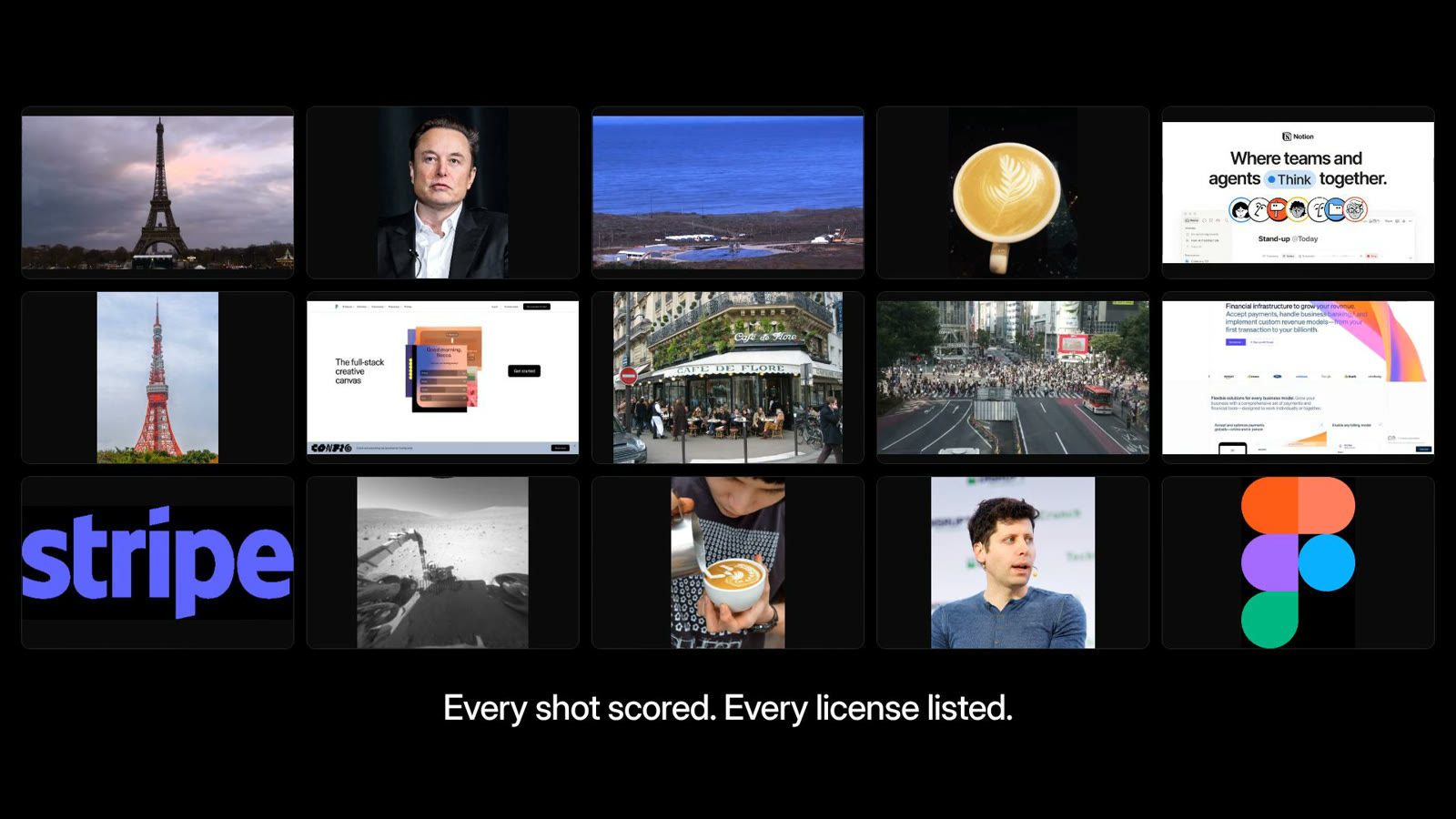
B-roll for agents. One call returns real photos and footage of exactly what your script says: the person, the company, the app, the place, the moment. Every shot is checked by a vision model, scored 0-10, and labelled with its license.
claude mcp add --transport http clypmint-broll https://clypmint.com/mcp/broll \
  --header "Authorization: Bearer $CLYPMINT_API_KEY"
Then ask your agent: "find b-roll for every name in this script."
Get a key (100 free searches a month) · Try it in the browser · Docs
Why
AI video agents are good at scripts and voices. They are bad at pictures. They reach for stock ("a man at a laptop") or scrape image search and get watermarks, fan art and the wrong person.
Clypmint B-Roll gives the agent the shot an editor would pick:
| You ask for | You get |
|---|---|
Sam Altman |
Licensed portraits of Sam Altman, scored 9-10, with the credit line |
Notion + "I plan every video in Notion" |
The live notion.com interface, recorded on your machine, plus Notion's own share image |
booster + "SpaceX just landed the booster again" |
Public-domain footage of a Falcon 9 booster touchdown |
Eiffel Tower, type video |
Five 9/10 clips, including a vertical one |
answering phone + "she spends half her day answering calls" |
A real office photo of someone on a desk phone |
On 69 real subjects named in Clypmint customer edits, it found a shot scoring 7+/10 for 62%, against 23% for the web image search pipeline we used before. A search takes about 5 seconds.
How it works
- Plan. Send the subject and, ideally, the line it plays over. The line decides which "Claude" or "Apple" you mean.
- Find. We look up what the name means (Wikidata), then search sources that publish for reuse: Wikimedia Commons, NASA, Internet Archive public-domain film, the subject's own website and its official YouTube channel.
- Check. One vision call scores every candidate against what the shot must show. Wrong person, watermark, collage, book cover: dropped.
- Drop it in. Each image has a
download_urlat a working size (at most 1920 px). Each video has one command that cuts just the seconds you need, or records the live site, on your machine.
Use it
MCP (Claude Code, Cursor, Codex, any MCP client)
Server: https://clypmint.com/mcp/broll · tools: find_broll, plan_broll, broll_usage · listed on the official MCP registry as com.clypmint/broll
Cursor (~/.cursor/mcp.json)
{
  "mcpServers": {
    "clypmint-broll": {
      "url": "https://clypmint.com/mcp/broll",
      "headers": { "Authorization": "Bearer cm_live_YOUR_KEY" }
    }
  }
}
Codex (~/.codex/config.toml)
[mcp_servers.clypmint-broll]
url = "https://clypmint.com/mcp/broll"
bearer_token_env_var = "CLYPMINT_API_KEY"
REST
curl https://clypmint.com/api/v1/broll/search \
  -H "Authorization: Bearer $CLYPMINT_API_KEY" \
  -H "Content-Type: application/json" \
  -d '{"query": "Sam Altman", "context": "Sam Altman just walked on stage", "type": "image", "limit": 1}'
{
  "request_id": "2b9d7f0e-6c1a-4f53-9d0e-6a1f3c8e2b41",
  "query": "Sam Altman",
  "interpreted": {
    "subject": "Sam Altman",
    "kind": "person",
    "entity": {
      "id": "Q7407093",
      "label": "Sam Altman",
      "description": "American entrepreneur and investor (born 1985)",
      "url": "https://www.wikidata.org/wiki/Q7407093"
    },
    "look_for": "Sam Altman walking onto a stage at a conference or event"
  },
  "verified": true,
  "results": [
    {
      "id": "commons:File:Sam Altman speaking at TED.jpg",
      "type": "image",
      "title": "Sam Altman speaking at TED",
      "shows": "Full shot of Sam Altman seated on stage at TED",
      "score": 9,
      "url": "https://upload.wikimedia.org/wikipedia/commons/0/06/Sam_Altman_speaking_at_TED.jpg",
      "thumbnail_url": "https://thumb.wikimedia.org/wikipedia/commons/thumb/0/06/Sam_Altman_speaking_at_TED.jpg/500px-Sam_Altman_speaking_at_TED.jpg",
      "width": 2184,
      "height": 2633,
      "orientation": "portrait",
      "duration_seconds": null,
      "source": {
        "name": "Wikimedia Commons",
        "page_url": "https://commons.wikimedia.org/wiki/File:Sam_Altman_speaking_at_TED.jpg"
      },
      "license": {
        "name": "CC BY 2.0",
        "url": "https://creativecommons.org/licenses/by/2.0",
        "commercial_use": true,
        "attribution": "Steve Jurvetson / CC BY 2.0 / https://commons.wikimedia.org/wiki/File:Sam_Altman_speaking_at_TED.jpg"
      },
      "official": false,
      "delivery": "direct"
    }
  ],
  "considered": 14,
  "sources_used": [
    "Wikimedia Commons"
  ],
  "took_ms": 7578,
  "cached": false,
  "usage": {
    "billed_searches": 0,
    "free_searches_left_this_month": 99,
    "price_per_search_usd": 0.02
  }
}
Whole script at once (each moment comes back with the exact words it starts on, and its time if you send word timings):
curl https://clypmint.com/api/v1/broll/plan \
  -H "Authorization: Bearer $CLYPMINT_API_KEY" -H "Content-Type: application/json" \
  -d '{"transcript": "Last week I flew to Tokyo to meet the Figma team...", "max_beats": 8}'
JavaScript
import { createClient } from '@clypmint/broll';

const broll = createClient(); // reads CLYPMINT_API_KEY
const { results } = await broll.search({ query: 'Figma', context: 'we design everything in Figma' });
Python
pip install "git+https://github.com/nuttallp/clypmint-broll#subdirectory=python"
from clypmint_broll import Broll

broll = Broll()  # reads CLYPMINT_API_KEY
shots = broll.search("Eiffel Tower", type="video")["results"]
OpenAPI
https://clypmint.com/api/v1/broll/openapi.json: import it into Postman or Insomnia, or generate a client in any language.
CLI
export CLYPMINT_API_KEY=cm_live_...
npx -y github:nuttallp/clypmint-broll search "Eiffel Tower" --type video
npx -y github:nuttallp/clypmint-broll get "Notion" --type video --out notion.mp4   # records the live site
npx -y github:nuttallp/clypmint-broll cut "https://www.youtube.com/watch?v=..." --start 12 --duration 4 --aspect 9:16
npx -y github:nuttallp/clypmint-broll capture https://stripe.com --duration 5
cut needs ffmpeg (and yt-dlp for YouTube, X or TikTok pages). capture uses the Chrome, Edge, Brave or Chromium you already have. Every command takes --json for agents.
Agent skill
skills/broll/SKILL.md teaches an agent how to source b-roll well: what to search for, what to skip, how to place a shot on the word, and how to credit it. Drop it in your skills folder (Claude Code: ~/.claude/skills/broll/SKILL.md).
Where the footage comes from
Only from sources whose terms allow reuse, and every shot says which:
- Wikidata (CC0) tells us who or what a name is, its official photo, logo, website and YouTube channel.
- Wikimedia Commons: freely licensed photos and video. The license and author ride along with each file.
- NASA image and video library (generally not copyrighted).
- Internet Archive: public-domain and CC0 film only.
- The subject's own website and official YouTube channel: returned as a link plus a command. The clip is cut, or the site recorded, on your machine. We never host it.
license.commercial_use is true (free for commercial use under its terms), false (non-commercial only; ranked last) or null (the owner holds the rights; official channels and websites). Use the attribution line whenever one is given. You are responsible for how you use what you publish.
Pricing
- 100 searches a month free. No card.
- Then $0.02 per search that finds a shot. A search that finds nothing is never billed.
- Pay as you go, billed monthly. Default cap $50 a month, adjustable in the dashboard.
FAQ
Is this a stock library? No. Stock shows a CEO. This shows the CEO your script names. For generic scenes it finds real, freely licensed photos and footage.
Why not just scrape image search? Search engines' API terms forbid reselling results, scraped images carry no license, and nobody checks that the picture shows the right person.
What does "verified" mean? A vision model saw every candidate on one numbered sheet and scored it against what the shot must show. verified: false means the check could not run, and results are ranked by source alone.
Does it work for vertical video? Pass "orientation": "portrait" to rank vertical shots first, and cut --aspect 9:16 to fit any clip (contain by default, --fit cover to crop).
License
The client, CLI and skill in this repository are MIT. The API is a hosted service by Clypmint.