
Pome
Test mode for your integrations, built for the way agents build.
Local, stateful twins of GitHub, Slack, Stripe, Gmail and Linear, over REST and MCP.
No test account, no OAuth app, no API key.




Documentation · Pome · CLI reference
What is Pome
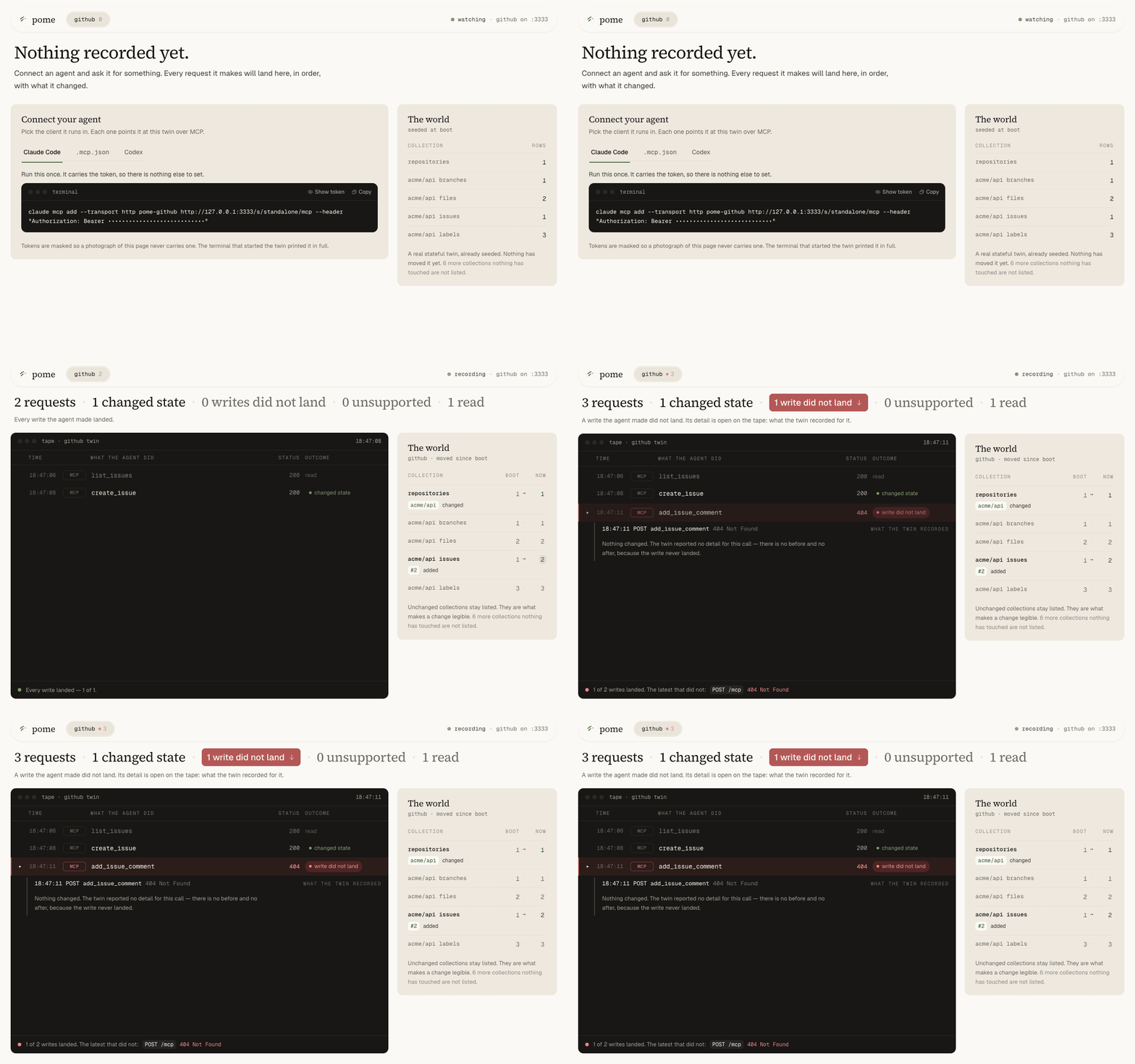
Pome runs a stateful copy of GitHub, Slack, Stripe, Gmail or Linear on your machine. Your agent, or your own code, calls it the way it calls the real API, and every call lands on a tape.
The dashboard shows that tape as it happens: what the agent did, what it changed, and which step never happened. Stripe has a test mode. GitHub and Slack do not, and none of them hands you the tape.
What is a digital twin
A digital twin answers the same calls as the real API, in the same shapes, from its own small database instead of the real service. Open an issue on the GitHub twin and the issue exists, in the twin. List the issues and it is there. Stop the twin and it is gone.
- Not a mock. A mock returns what you told it to return, and forgets. A twin remembers, because it has state: the issue your agent opened is still there when it lists them.
- Not a recording. A recording replays responses you captured once, and breaks the moment your agent does something new. A twin answers calls nobody anticipated.
- Not the real API. No twin delivers webhooks, and each one publishes its coverage route by route, so you know exactly where it stops.
Quick start
You need Node.js 24 or newer. The twins run on Node's built-in SQLite.
npx @pome-sh/cli@latest twin start github
- Open the
Dashboard:link the command prints. Every call lands there as it happens. - Connect your agent. Paste the
claude mcp addline it printed, or copy the.mcp.jsonor Codex stanza from the dashboard. - Ask the agent for something small: "Open an issue in acme/api for the login page returning 500 after the deploy."
The twin starts with one repository, acme/api, and one open issue, so your agent has something to act on before you write a seed.
Features
One command, five APIs. No account, no OAuth app, no API key.
twin start github slack linearboots three twins, each on its own port, sharing one token the command minted itself. There is nothing to sign up for and nothing to revoke.
Watch it happen.
- The dashboard puts every call on screen as it lands, with what it changed. A write that did not land turns red and opens itself, so a step your agent only claimed shows up as a step that did not happen.
State that behaves.
- Open an issue and it exists. Comment on one that does not and the twin answers
404, as GitHub would.--seedsets the world your agent wakes up in, and replaces the default rather than merging into it.
REST and MCP on the same twin.
- Your agent reaches it over MCP. Your code reaches it through Octokit, Slack's
WebClient, Stripe's client, googleapis or Linear's SDK. One tape records both.
Fidelity you can check.
- Every route is marked
semantic,shapeorunsupported. Every day Pome replays the same requests against the real vendor API and publishes the result per route at status.pome.sh.
Use cases
- You are building an agent that writes to GitHub, Slack or Stripe. Let it act on a twin, watch the dashboard, and see which of its writes actually landed before it touches a real account.
- Your CI has no test account. Start a twin in the job and point your integration tests at it. The token is minted on the runner and dies with it, so no secret goes in the repository.
- You need to show what an agent did. The tape is the record: every call, what it changed, and what it did not. Attach it to a bug report with
pome twin tape --json. - You need failures that production will not hand you on demand. A seed decides the world the agent wakes up in: an issue that does not exist, a merge blocked by failing checks, a Gmail send that gets throttled.
What twin start prints
Pome github twin listening at http://127.0.0.1:3333/s/standalone
POME_GITHUB_REST_URL=http://127.0.0.1:3333/s/standalone
POME_GITHUB_MCP_URL=http://127.0.0.1:3333/s/standalone/mcp
POME_AUTH_TOKEN=eyJ…

Claude Code:
  claude mcp add --transport http pome-github \
    http://127.0.0.1:3333/s/standalone/mcp \
    --header "Authorization: Bearer eyJ…"

Dashboard: http://127.0.0.1:52341/?k=7f3a…
The rest of the connect block — Codex, .mcp.json, your own code
Codex, .mcp.json and the SDK line read the token from your shell. Export it once:
export POME_GITHUB_REST_URL=http://127.0.0.1:3333/s/standalone \
       POME_GITHUB_MCP_URL=http://127.0.0.1:3333/s/standalone/mcp \
       POME_AUTH_TOKEN=eyJ…
Codex, appended to ~/.codex/config.toml:
[mcp_servers.pome-github]
url = "http://127.0.0.1:3333/s/standalone/mcp"
bearer_token_env_var = "POME_AUTH_TOKEN"
.mcp.json, project scope, in the repo. Claude Code expands ${POME_AUTH_TOKEN}, so the file you commit carries no token:
{
  "mcpServers": {
    "pome-github": {
      "type": "http",
      "url": "http://127.0.0.1:3333/s/standalone/mcp",
      "headers": { "Authorization": "Bearer ${POME_AUTH_TOKEN}" }
    }
  }
}
Your own code, through GitHub's SDK (Octokit):
new Octokit({
  baseUrl: process.env.POME_GITHUB_REST_URL,
  auth: process.env.POME_AUTH_TOKEN,
})
The twin mints the token when it starts. It is not an account credential. State lives in the twin's process and is gone when you stop it. --seed decides where it starts.
The dashboard is served on a random local port and keyed to this run, so its link works only while the twin is up. --open opens it for you, and --no-dashboard leaves it off.
Several twins at once is one command: twin start github slack linear. Each takes its own port, and one connect block and one dashboard cover all of them.
Ports, paths, and the file the twin writes
- The twin listens on port 3333.
--portpicks another. - It serves everything under
/s/standalone, the one session a standalone twin has. - It writes its address and token to
.pome/twin-status.jsonin the folder you ran it from, readable only by you..pome/git-ignores itself. - Started with several twins, that file lists them under
twins, and its top-level fields describe the twin you started last.
Connect your agent
Paste the block for your client, exactly as printed. Claude Code takes the one-liner. Codex takes the table. Any client that reads .mcp.json takes the stanza, and the stanza reads the token from your shell, so run the printed export line first.
Your own code takes the SDK line. GitHub's Octokit, Slack's WebClient, Stripe's client, googleapis for Gmail and Linear's SDK each get their own. The connect guide covers Cursor and the other clients.
If your client already has a real GitHub MCP server, the twin registers under its own name, pome-github. Disable the real one while you test. Otherwise the agent picks whichever it likes.
Read the tape
The dashboard is one view of the tape. The terminal is another, and it is the one CI uses:
npx @pome-sh/cli@latest twin tape --diff
github twin at http://127.0.0.1:3333/s/standalone — 3 requests

TIME          REQUEST            STATUS  FIDELITY  STATE
19:04:49.743  list_issues        200     semantic  read
19:04:53.762  create_issue       200     semantic  changed
19:05:00.780  add_issue_comment  404     semantic  no change  ← did not land

3 requests: 1 changed state · 1 write did not land · 1 read

State diff since boot (seed → now):
  repositories                   ~1 changed: acme/api
  repositories[acme/api].issues  +1 added: #2
One line per request, REST or MCP. A call through Octokit shows as POST /repos/acme/api/issues. In the STATE column, changed means the write landed in the twin's state, and no change on a write is a step that did not happen.
Here the agent listed the issues, created #2, then commented on issue #17, which does not exist, so the twin answered 404. An agent that reports "commented" after that is what the tape is for.
The diff is what the run left behind, measured against the state the twin booted with. --json prints the same as one object.
If the tape showed you a step that did not happen, star the repo. That is how the next person finds it.
Run it in CI
The same command works in a GitHub Actions job. The job below starts the twin, waits for it, hands its address and token to your tests, and prints the tape at the end. Pin the version you tested. The CLI is pre-1.0 and @latest moves.
- uses: actions/setup-node@v4
  with:
    node-version: 24
- name: Start the GitHub twin
  run: |
    npx @pome-sh/cli@0.46.0 twin start github --no-dashboard > twin.log 2>&1 &
    for _ in $(seq 60); do
      curl -fsS http://127.0.0.1:3333/healthz >/dev/null && break
      sleep 1
    done
    status=.pome/twin-status.json
    echo "POME_GITHUB_REST_URL=$(jq -r .rest_url $status)" >> "$GITHUB_ENV"
    echo "POME_GITHUB_MCP_URL=$(jq -r .mcp_url $status)" >> "$GITHUB_ENV"
    echo "POME_AUTH_TOKEN=$(jq -r .auth_token $status)" >> "$GITHUB_ENV"
- run: npm test
- name: What the tests did
  if: always()
  run: npx @pome-sh/cli@0.46.0 twin tape --diff
The twin from the first step keeps running for the rest of the job, and twin tape finds it through .pome/twin-status.json. --no-dashboard because nobody watches a runner.
There is no account and no secret in the repository: the twin mints the token on the runner, and the token dies with the twin. Your tests read POME_GITHUB_REST_URL and POME_AUTH_TOKEN the way they would read a real base URL and token.
Supported twins
Pome includes 5 digital twins and 115 MCP tools. Each twin publishes a route-by-route fidelity record. Every day Pome replays the same requests against the real vendor API, with its own accounts, and publishes the result per route at status.pome.sh.
| Twin | MCP tools | Main API coverage | Details |
|---|---|---|---|
| GitHub | 36 | Repositories, issues, pull requests, reviews, and merges | Fidelity |
| Stripe | 26 | PaymentIntents, refunds, charges, balances, events, and x402 payments | Fidelity |
| Slack | 18 | Channels, messages, threads, reactions, and search | Fidelity |
| Gmail | 13 | Messages, drafts, threads, labels, and uploads | Fidelity |
| Linear | 22 | GraphQL, OAuth with PKCE, and webhook registration | Fidelity |
Each route has one of these fidelity levels:
semantic: The route implements and tests provider behavior.shape: The response has the provider's shape.unsupported: The twin returns501.
The twins answer requests. They do not call your app, and no twin delivers webhooks today. Stripe's twin exposes /v1/events to poll, and Linear's twin records webhook registrations without delivering them.
A flow that starts from a vendor event needs you to post that event to your app yourself.
Swap to the real API
Three things change, and nothing else in your code should:
- The base URL.
POME_GITHUB_REST_URLbecomeshttps://api.github.com. The MCP URL becomes the vendor's own MCP server, or yours. - The credential. The twin's bearer becomes a real token with real scopes.
- Vendor-side setup the twin never asked for: OAuth apps, app installation, webhook registration. Gmail needs a Google OAuth client. The twin does not.
A green run on a twin says your integration behaves against the API as far as the fidelity record covers it. It does not say the vendor will behave the same tomorrow. Run one smoke test against the real API after the swap.
Why not mocks, why not Emulate
| Hand-written mocks | Vercel Emulate | Pome twins | |
|---|---|---|---|
| State that persists across calls | Whatever you wrote by hand | Yes | Yes |
| A tape of every request your code made | Only if you wrote one | No | Yes |
| Fidelity measured against the vendor and published | No | No | Yes, daily |
| MCP surface for agents | No | No | Yes, 115 tools |
The Emulate column comes from its README as of 2026-09-16. Emulate targets application code in a dev loop, and it is Apache-2.0 like this repo.
Going further
pome below is the same CLI. npm install -g @pome-sh/cli puts it on your PATH, or keep using npx @pome-sh/cli@latest.
Everything above runs locally with no account. Hosted grading is optional. Nothing leaves your machine unless you use it, apart from the daily usage event (see Telemetry).
- Your own world:
pome twin new-seed github --out seed.json, edit it, thenpome twin start github --seed seed.json. Several twins from one file:pome twin new-seed github slack --out seed.json, thenpome twin start github slack --seed seed.json. See the local twin guide. - Graded tasks, locally:
npx @pome-sh/cli@latest initscaffolds a project.pome run --local tasks/01-bug-happy-path.mdrecords a run.pome inspect latestreads it. A local run records evidence and does not score. - Scoring:
pome login, thenpome run tasks/01-bug-happy-path.mdrecords and grades in one hosted workflow. Or score a local tape with Braintrust or LangSmith, seeintegration-examples/.
Examples
agent-examples/contains complete agents and graded tasks.integration-examples/connects Pome to Braintrust and LangSmith.showcases/demonstrates individual twin behaviors without an agent or grading.skills/contains skills that help coding agents author and run Pome tasks.
Repository layout
@pome-sh/cli contains the CLI and the twin runtimes. Users do not install the twin packages separately.
The shared runtime provides HTTP routing, bearer authentication, MCP dispatch, recording, and SQLite state. Each twin adds its provider-specific domain behavior.
See packages/README.md for the package map. See CONTRACT.md for the twin runtime contract.
Contributions are welcome, and the easiest first ones are seeds and showcases. The good first issues are the shortest way in, and CONTRIBUTING.md says what a pull request needs.
A new twin is a package that satisfies the runtime contract in CONTRACT.md. A bug report is most useful with the tape attached (pome twin tape --json). A security problem goes to SECURITY.md, not to a public issue.
Telemetry
The CLI sends one anonymous usage event per day, at most. The event carries a random id, the CLI version, the OS, the Node major, and the command's name (twin start, init). The CLI mints the id once and keeps it in ~/.pome/telemetry.json.
The event never carries an argument, a path, a repo name, a seed, a token or anything from a tape. The first send prints a one-line notice.
The dashboard page sends nothing anywhere.
Turn it off with POME_TELEMETRY=0. The CLI also honours DO_NOT_TRACK=1. It sends nothing when CI is set, and nothing from a build made without an ingest key. The code is cli/src/cli/usageTick.ts.
Status and license
Pome is in beta. CLI behavior and dependencies can change before version 1.0.
This repository uses the Apache-2.0 license.