Argus QA MCP
Let Claude (or any MCP-capable AI agent) QA-test your web app, and leave evidence behind.
Website: https://rileyhall99.github.io/argus-qa-mcp/
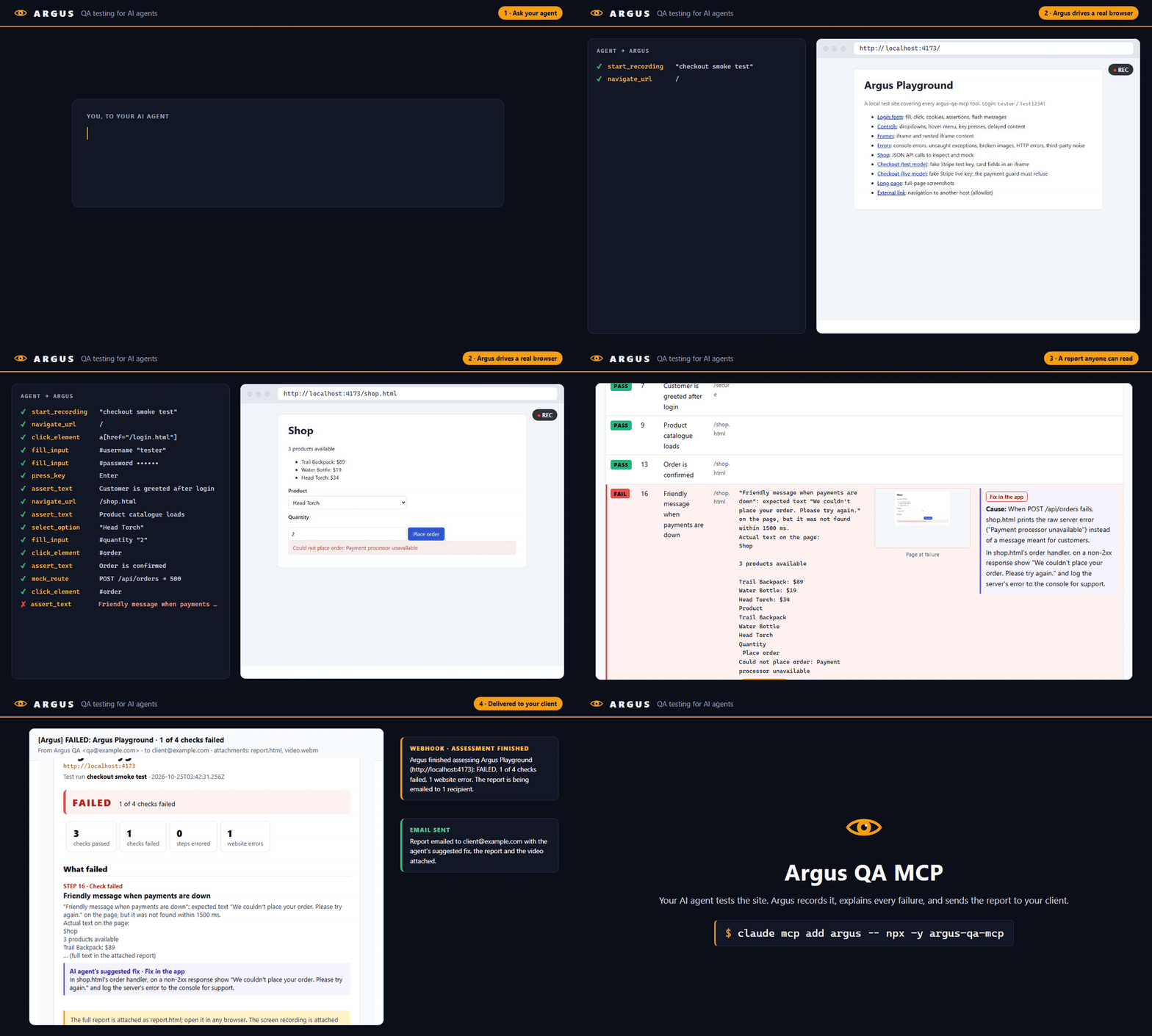
Argus is a Model Context Protocol server that gives an AI agent a real Chromium browser through Playwright, plus the things you need to trust its results:
- Recordings for review: every session can produce a video, a Playwright trace (DOM snapshots, network and console for each step) and an HTML report of every action the agent took.
- Real test verdicts:
assert_text/assert_visiblereturn PASS or FAIL, and the report tallies them. - Network mocking: simulate API errors, payment declines, outages and slow responses without touching your backend.
- Safety guards: refuses to enter card details on pages using a live payment environment, blocks live payment API traffic, optionally restricts which sites the agent may visit, and masks passwords and card numbers in recordings.
Quick start
Requires Node.js 22+.
1. Install the browser (once):
npx playwright install chromium
Or skip this and use your installed Google Chrome by setting ARGUS_BROWSER_CHANNEL=chrome (see Configuration).
2. Add Argus to your client.
Claude Code:
claude mcp add argus -- npx -y github:RileyHall99/argus-qa-mcp
Claude Desktop: add this to claude_desktop_config.json (on Windows %APPDATA%\Claude\, on macOS ~/Library/Application Support/Claude/) and restart:
{
  "mcpServers": {
    "argus": {
      "command": "npx",
      "args": ["-y", "github:RileyHall99/argus-qa-mcp"]
    }
  }
}
3. Ask for a test:
Start a recording called "login flow". Go to https://the-internet.herokuapp.com/login, log in as tomsmith / SuperSecretPassword!, assert that "You logged into a secure area!" is shown, report any console errors, then stop the recording and suggest a fix for anything that failed.
Argus writes the recording to ~/argus-qa/recordings/<date>_login-flow/. Open report.html to review it.
Tools
| Tool | What it does |
|---|---|
navigate_url |
Open a URL; returns status code, final URL and title. Resets the console and network logs. |
get_page_snapshot |
Accessibility tree of the page (including iframes) with [ref=eN] handles. Pass aria-ref=eN as a selector to any other tool. |
click_element |
Click an element; waits for any navigation it triggers. |
fill_input |
Clear and fill a field. Password and card values are masked in recordings. |
select_option |
Choose option(s) in a <select> by value or label. |
press_key |
Press a key or chord (Enter, Tab, Control+A), optionally on an element. |
hover_element |
Hover an element (menus, tooltips). |
wait_for |
Wait for an element or text to become visible, hidden, attached or detached. |
take_screenshot |
Save a PNG (viewport or full page) and optionally return it. |
assert_text |
PASS if text is visible on the page or in an element, otherwise FAIL with the actual text. Optional label names the check in the report. |
assert_visible |
PASS if an element is visible (or hidden), otherwise FAIL. Optional label. |
get_console_errors |
Console errors, uncaught exceptions, failed requests, HTTP errors and guard blocks, deduplicated, optionally first-party only. |
get_network_requests |
The page's HTTP requests with status, timing, failures and mock hits. |
mock_route |
Answer matching requests with a canned response, a network error or a delay. |
clear_mocks |
Remove one mock or all of them. |
start_recording |
Start recording a trace, an optional video and the action log. |
stop_recording |
Save the recording and report; returns the verdict, failures (with screenshots and video times) and paths. |
suggest_fix |
Add the agent's diagnosis and suggested fix for a failed step to the report, tagged as an app, test or environment fix. |
Element tools accept a frame parameter (an iframe selector, or a list for nested iframes), though aria-ref selectors reach into iframes without it.
When a step fails, Argus explains it in plain language instead of returning Playwright's raw output, e.g. "Element is covered: "#pay" was found, but another element is on top of it: <div class="cookie-banner">. Try: close the overlay first." It recognizes missing, hidden, disabled and covered elements, stale aria-refs, bad selectors, dropdown and field mismatches, wait and page-load timeouts, network errors (DNS, refused connections, certificates) and guard blocks.
Configuration
All settings are environment variables, set in your client's MCP config ("env": { ... }, or -e NAME=value with claude mcp add).
| Variable | Default | Purpose |
|---|---|---|
ARGUS_HEADLESS |
true |
false shows the browser window. |
ARGUS_BROWSER_CHANNEL |
(bundled Chromium) | chrome, msedge (or -beta) to use an installed browser. |
ARGUS_ALLOWED_HOSTS |
(any) | Comma-separated hosts the agent may open as pages, e.g. staging.myapp.com,localhost. Subdomains included. |
ARGUS_RECORD |
false |
true records every session automatically; saved when the client disconnects. |
ARGUS_RECORDINGS_DIR |
~/argus-qa/recordings |
Where recordings are written. |
ARGUS_SCREENSHOT_DIR |
~/argus-qa/screenshots |
Where screenshots are written. |
Email and notifications (see Delivering reports):
| Variable | Default | Purpose |
|---|---|---|
ARGUS_EMAIL_TO |
(off) | Comma-separated recipients of every report, e.g. client@acme.com,qa@yourco.com. |
ARGUS_EMAIL_FROM |
ARGUS_SMTP_USER |
Sender address. |
ARGUS_SMTP_HOST / ARGUS_SMTP_PORT |
— / 587 |
Your SMTP server (Gmail, Microsoft 365, SendGrid, Amazon SES, Postmark, ...). |
ARGUS_SMTP_USER / ARGUS_SMTP_PASS |
— | SMTP login (for Gmail, an app password). |
ARGUS_SMTP_SECURE |
true on port 465 |
Implicit TLS. Otherwise STARTTLS is required, except to localhost. |
ARGUS_EMAIL_WAIT_SECONDS |
180 |
How long to wait for the agent's suggested fixes before emailing anyway. 0 sends at once. |
ARGUS_EMAIL_ATTACH_VIDEO |
true |
Attach the screen recording when it fits. |
ARGUS_EMAIL_MAX_MB |
20 |
Size limit for the email; videos that don't fit are left out. |
ARGUS_NOTIFY_WEBHOOK |
(off) | URL notified when an assessment finishes: a Slack or Discord incoming webhook, or any endpoint (Teams/Power Automate, Zapier, your own API) that accepts JSON. |
Safety model
Argus is meant for testing sites you own or are authorized to test, ideally staging environments with test payment credentials.
| Guard | Behavior |
|---|---|
| Payment guard (always on) | Blocks requests that use Stripe live keys (pk_live_/sk_live_/rk_live_) or that reach Adyen live, Braintree production or PayPal live REST APIs, and refuses to type into card fields on a page that loads a live key. Test and sandbox modes are unaffected. |
| Host allowlist (opt-in) | With ARGUS_ALLOWED_HOSTS set, top-level navigation to any other host is refused, whether by navigate_url or by a link click. Sub-resources such as CDNs still load. |
| Secret masking | Values typed into password and payment-card fields are replaced with •••••• in actions.json and report.html. |
| Fixed recipients | Reports are emailed and notifications sent only to the addresses and webhook in the server's environment, never to anything an agent supplies. |
Limits you should know about:
- The Playwright trace (
trace.zip) and the video still contain typed values (card numbers are visible on screen in the video). Treat recordings as sensitive. The video is emailed with the report unlessARGUS_EMAIL_ATTACH_VIDEO=false, so use test card numbers. - The payment guard recognizes Stripe, Adyen, Braintree and PayPal only. It can't detect other providers, or a backend that charges cards server-side with its own secret key. It is a safety net, not proof that a site is in test mode.
firstPartyOnlycompares the last two labels of the host name, so it treats e.g.a.co.ukandb.co.ukas the same site.
Recordings
start_recording → (test steps) → stop_recording produces:
~/argus-qa/recordings/2026-10-24_22-43-42_login-flow/
├── report.html     # verdict, test results, explained errors, website errors, video, screenshots, full log
├── trace.zip       # open with: npx playwright show-trace trace.zip  (or drag onto trace.playwright.dev)
├── video.webm
├── actions.json    # machine-readable log of every tool call
├── failures/       # automatic screenshot of the page at each failed check or step
└── screenshots/    # screenshots taken with take_screenshot
The report is headed with the website tested: its name (the home page's title, or the brand part its page titles share, such as "Acme Shop" from "Log in | Acme Shop") and its address, followed by the test run's name and times. stop_recording returns the same as site.
It opens with a PASSED / FAILED verdict (failed if any check fails or any step errors), then:
- Test results: every
assert_text/assert_visiblecheck with PASS or FAIL, the page it ran on, and for failures the expected-vs-actual detail. - Errors during the run: each failed step with what went wrong, why, and what to try.
- Errors from the website: console errors, uncaught exceptions and failed requests the site produced during the run, collected automatically and de-duplicated.
The report uses the Argus theme: a branded header bar with the verdict, light or dark to match the viewer's system setting, and always light when printed. It is a single self-contained file with no external fonts or scripts, so it works offline and sends nothing anywhere.
Every section can be hidden: click its heading, or use Show all / Hide all sections at the top. A hidden section's heading still shows a count (e.g. Errors from the website · 11 errors). Hidden sections are left out when the report is printed or saved as PDF, so you can share a trimmed version.
Every failure comes with evidence: a screenshot of the page at the moment it failed, shown beside the explanation (click it for full size), and an approximate video timestamp such as "▶ 0:12 in video". Clicking it jumps the embedded player to just before the failure. Password and card fields are blacked out in failure screenshots.
stop_recording returns the same verdict, failed checks and step errors, each with its screenshot path and video time, so the agent can summarize the outcome directly.
The agent's suggested fixes. When something failed, stop_recording asks the agent to call suggest_fix for each failed step. The agent's diagnosis and fix then appear in an AI agent's suggested fix column of the test results, and on each error card, tagged Fix in the app (a real bug), Fix in the test (wrong selector or expectation) or Fix the environment (e.g. server down). This is separate from Argus's built-in Try: hints. The report is rewritten after each suggestion, so this works after the recording has stopped, and each suggest_fix reply lists the failures still without one.
Delivering reports
When the agent runs on a server the client can't access, Argus can deliver each recording itself:
- Notification when the assessment finishes. As soon as
stop_recordingruns, Argus posts toARGUS_NOTIFY_WEBHOOK. Slack gets the message astext, Discord ascontent, and any other URL gets JSON withevent: "assessment.finished", the verdict, site, counts and failed checks. - The report by email. Argus emails
ARGUS_EMAIL_TOa branded summary of what failed, with each failure's explanation and the agent's suggested fix. It attachesreport.htmland the video. The attached report is a single file with screenshots built in, so it opens anywhere.- A run where nothing failed is emailed right away.
- A run with failures is emailed once the agent has called
suggest_fixfor every failure, so the client gets the fixes too. If that doesn't happen withinARGUS_EMAIL_WAIT_SECONDS, it is sent anyway. It is also sent when the next recording starts or the client disconnects.
stop_recording and suggest_fix report what was sent (or why not) under delivery.
Recipients and the webhook come only from the server's configuration. No tool takes an address, so a page under test can't trick the agent into sending the report elsewhere. The Playwright trace is never emailed, because it holds every typed value.
claude mcp add argus \
  -e ARGUS_EMAIL_TO=client@acme.com \
  -e ARGUS_SMTP_HOST=smtp.sendgrid.net -e ARGUS_SMTP_USER=apikey -e ARGUS_SMTP_PASS=SG.xxxx \
  -e ARGUS_EMAIL_FROM=qa@yourco.com \
  -e ARGUS_NOTIFY_WEBHOOK=https://hooks.slack.com/services/REDACTED \
  -- npx -y github:RileyHall99/argus-qa-mcp
Starting a recording with video reloads the current page into a new browser context. Cookies, localStorage and the URL are kept; unsaved in-page state is not. Use video: false to record just the trace without a reload.
Development
npm install
npx playwright install chromium
npm run build       # compile src/ to dist/
npm run typecheck   # strict type-check without emitting
npm run dev         # run the server from source with tsx
To try a local build in Claude Code: claude mcp add argus-dev -- node /path/to/argus-qa-mcp/dist/index.js.