Wiki Agent
Connect a folder. Let a CLI agent build and keep a Markdown wiki from your documents, with a citation on every sentence and your approval on every write.
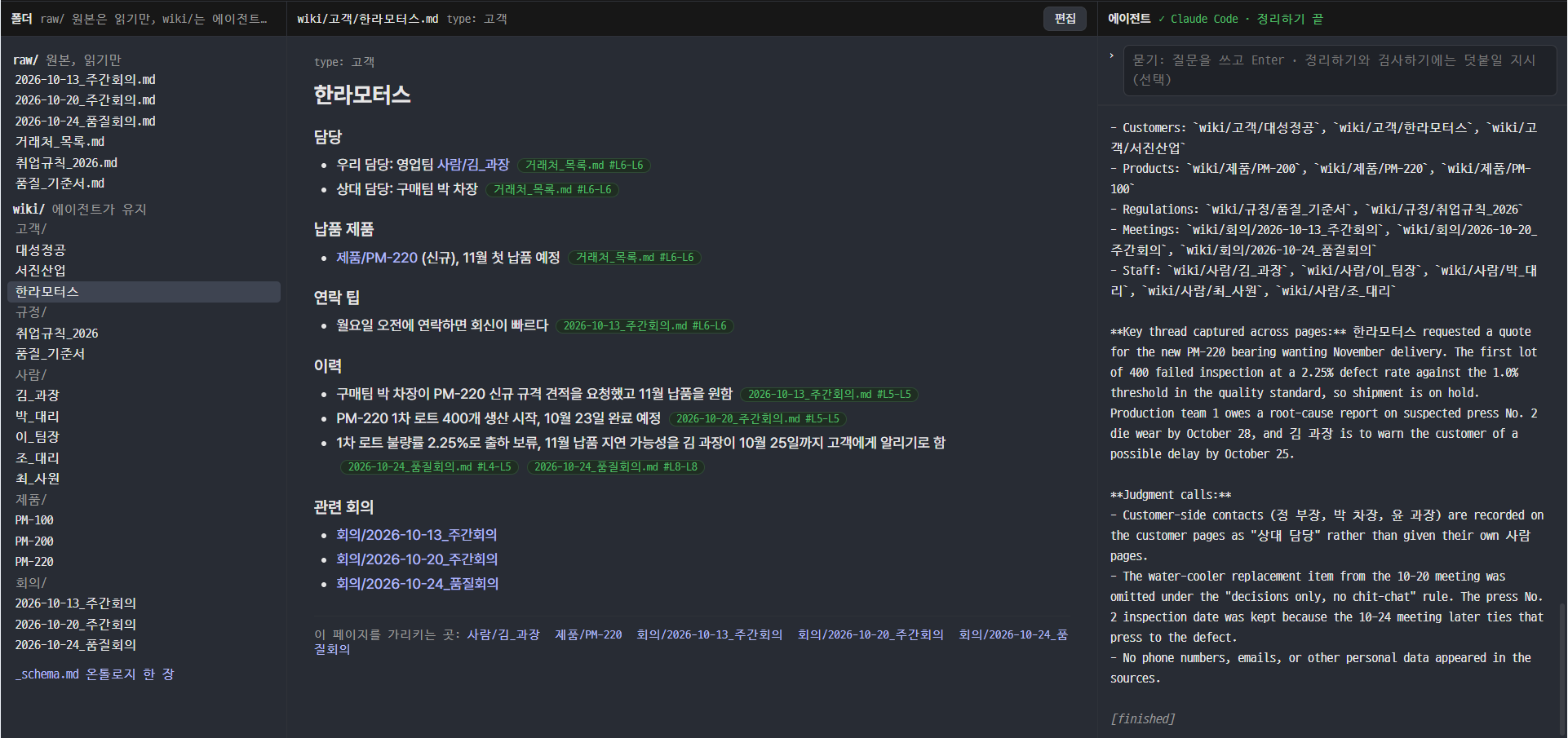
Wiki Agent is a companion to any Markdown vault (Obsidian included). You point it at a folder, drop source documents into raw/, and press 정리하기 (fold in). The agent you pick (Claude Code, Codex, Antigravity, or any CLI that speaks MCP) reads the sources, reads your _schema.md (the ontology: entity types, relations, rules), and creates or updates pages under wiki/. Every fact carries a citation to the source line. Every write shows up as a diff you approve or decline.
- Pages the agent maintains, not pages you file. New meeting notes change the customer page, the product page and the rule page they touch.
- No citation, no claim.
[^raw/2026-10-24_품질회의.md#L8-L11]on each sentence. Click the chip and the source opens at that line. - One page of ontology.
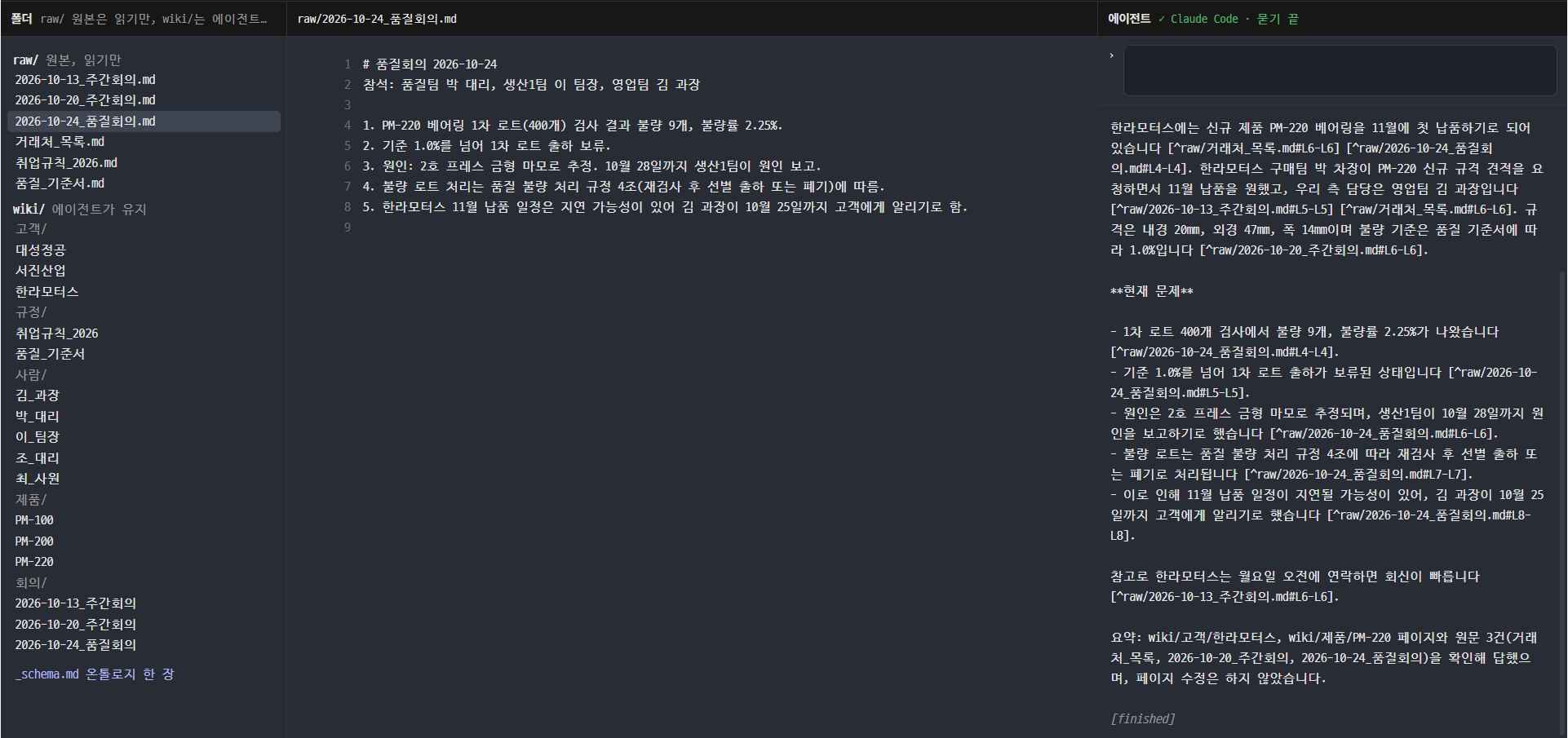
_schema.mdsays what entities exist, how they relate, and what the rules are. The agent reads it before writing; the linter checks pages against it. - Ask with sources. 묻기 answers from the wiki, cites every sentence, and never writes.
- Lint. Broken links, numbers without a source, entities outside the schema, personal data: checked in code. Conflicting or stale facts: handed to the agent.
- Your folder, your files. Plain Markdown with
[[wikilinks]]. Open the same folder in Obsidian; nothing breaks. Local only, no server, no account.
Status: v0.1 prototype, Windows. Built on the agent runner from Agent Workbench.
Folder layout
your-folder/
  raw/          source documents, read only (md, txt; pdf/docx/xlsx convert in the app)
  wiki/         pages the agent writes, grouped how _schema.md says
  _schema.md    the ontology: entities, relations, rules (you edit this)
  _log/         one JSON line per write: when, which page, which agent, why
Install
Windows: download Wiki Agent-<version>-win-x64.exe from Releases and run it. Not code-signed, so SmartScreen shows "Windows protected your PC": More info, then Run anyway. Per-user install.
macOS: no build yet; run from source below.
Either way you need at least one CLI installed and signed in (claude, codex, agy); the app only launches them.
Run from source
Requirements: Node 20+, and whichever CLI you use, signed in (claude, codex, agy). For pdf/docx/xlsx conversion, Python with markitdown (pip install markitdown).
git clone https://github.com/stanlee7/wiki-agent
cd wiki-agent
npm install
npm start
Antigravity reads MCP servers from its own config; register the wiki once:
agy mcp add wiki http://127.0.0.1:7789/mcp
Try it on the sample company: connect samples/hanbit (copy it first; the agent writes into it), press 정리하기, approve the pages, then ask 「한라모터스에 11월에 뭘 납품하기로 했고 지금 문제가 뭐야?」.
Build an installer
npm run dist:win   # Windows NSIS installer, output in dist/
npm run dist:mac   # macOS dmg, on a Mac
Tools the agent gets
| Tool | What it does |
|---|---|
list_pages |
Wiki pages and sources, with sources not yet folded in marked pending |
read_page(path) / read_source(path, from, to) |
Numbered lines, so the agent can cite them |
search(query, where) |
Lines matching a word or regex across raw/ and wiki/ |
schema |
_schema.md |
write_page(path, content, reason) |
Create or replace a page; waits for your approval |
lint |
The rule checks, as text the agent can act on |
Agents
The list lives in ~/.wiki-agent/agents.json, same format as Agent Workbench: a command line with {mcpConfig}, {url}, {prompt} and {session} placeholders, plus an optional follow-up command. Claude Code, Codex and Antigravity are set up out of the box.
Safety notes
- Sources are untrusted data; the agent is told never to follow instructions found in them. Keep that in mind when you drop in documents from outside.
- The agent can only write under
wiki/, and only after you approve the diff.WIKI_AGENT_AUTO_APPROVE=1skips the card for smoke tests; do not run it on a folder you care about. - Codex runs read-only in its sandbox (it writes through the MCP tool, not the file system). Claude Code runs with only the
wikiMCP tools allowed. Antigravity runs with permissions skipped because its print mode cannot prompt.
License
MIT