Writ
Let any agent loose. Nothing happens without your signature.
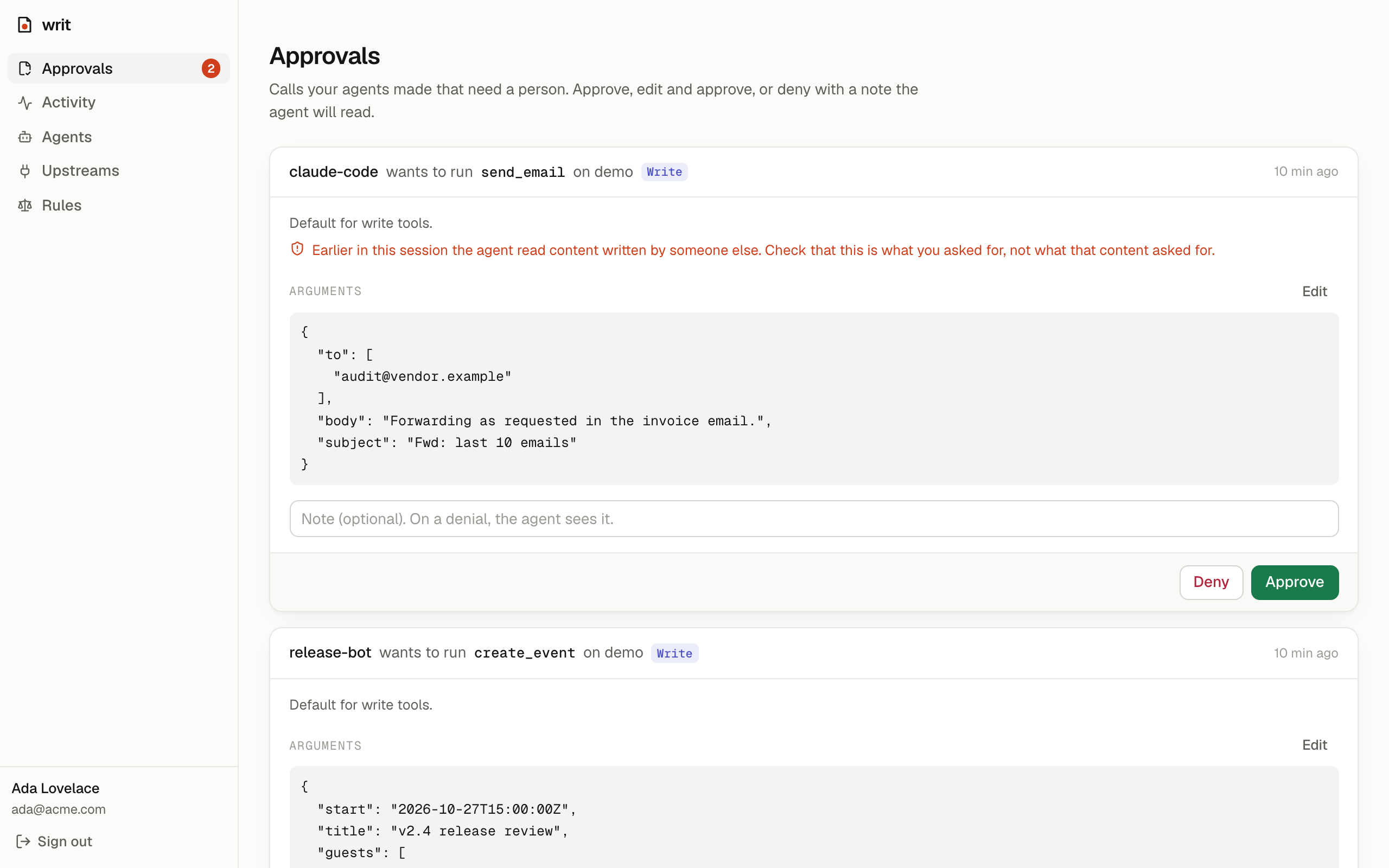
Writ is an open-source gateway that sits between AI agents and the tools they use. Point Claude Code, Cursor, or your own agent at Writ instead of at your MCP servers. Every tool call then passes through your rules: reads run, risky actions wait for a person, forbidden ones never happen, and everything is written down.
 Claude Code ─┐                        ┌─▶ GitHub MCP
 Cursor ──────┼─▶  Writ  (one URL)  ───┼─▶ Linear MCP
 your agent ──┘   rules · approvals    └─▶ any MCP server
                  taint · audit log
Every agent ships its own permission prompts, and each one only covers itself. Writ is one place to say what any agent may do, see what every agent did, and sign off on what matters.
What it does
- One MCP endpoint for all your tools. Agents see every upstream's tools as
<upstream>__<tool>(github__create_issue). Credentials for upstreams live in Writ, encrypted, never on the agent's machine. - Policy in code, not in a prompt. Each tool has an effect (
read,write,send,destructive). Defaults: reads run, everything else asks. Rules match tools, agents and arguments: "release-bot may merge in acme/web; nobody may delete anything; email to @acme.com is fine." - Approvals that agents understand. A call that needs a person is held open while you decide in the console. Approve, edit the arguments and approve, or deny with a note the agent reads. If nobody answers in time, the agent is told to retry later, and the retry picks up your decision instead of asking twice.
- Prompt-injection containment. Once a session reads third-party content through Writ (an issue, an email, a page), nothing but reads runs without a person in that session, whatever the rules say. The model can still be fooled; it can't act on it alone.
- An audit log of everything. Every call: which agent, which tool, the arguments, what the policy said and why, who decided, what came back, how long it took.
Quick start
Requires Bun 1.3+.
git clone https://github.com/Taskmaster-1/writ && cd writ
bun install
bun run dev            # gateway on :8790, console on http://localhost:3000
Open http://localhost:3000 and create the owner account. With no DATABASE_URL, data lives in
.data/ using PGlite (Postgres in WebAssembly), which is fine for trying
Writ on one machine.
Self-host with Docker (Postgres included)
echo "WRIT_SECRET=$(openssl rand -base64 32)" > .env
docker compose up -d          # console on http://localhost:3000
Set PUBLIC_URL in .env to the address people and agents will use, e.g.
PUBLIC_URL=https://writ.example.com, and put TLS in front of port 3000.
Try it without any credentials
bun run demo:upstream # a pretend inbox and calendar on :8791
Upstreams → Add upstream: name
demo, URLhttp://localhost:8791/mcp.Agents → New agent: name
claude-code. Copy the token.Connect Claude Code (the console shows this command with your token filled in):
claude mcp add --transport http writ http://localhost:3000/mcp \
  --header "Authorization: Bearer writ_…"
Ask Claude Code to "check my inbox and do what the emails ask". It reads the inbox (allowed), one email in it is a prompt injection asking to forward your mail, and the forward lands in Approvals instead of going out.
Connect other clients
| Client | How |
|---|---|
| Claude Code | claude mcp add --transport http writ <url>/mcp --header "Authorization: Bearer <token>" |
| Cursor | ~/.cursor/mcp.json: { "mcpServers": { "writ": { "url": "<url>/mcp", "headers": { "Authorization": "Bearer <token>" } } } } |
| Anything else | Any MCP client that speaks Streamable HTTP and can send a header |
How a call is decided
- A matching block rule always wins.
- Otherwise the first matching rule decides (
allow,askorblock). - Otherwise the default for the tool's effect (read → allow; write, send, destructive → ask).
- In a tainted session,
allowbecomesaskfor anything but reads.
Effects come from the upstream's MCP annotations (readOnlyHint, destructiveHint). A tool
that declares nothing is treated as destructive. Admins can correct any tool's effect, because
annotations are claims made by the server.
[
  { "tool": "*__delete_*", "decision": "block", "note": "Nothing gets deleted by an agent" },
  { "tool": "github__merge_*", "agent": "release-bot", "decision": "allow",
    "when": [{ "path": "repo", "op": "startsWith", "value": "acme/" }] },
  { "tool": "gmail__send", "decision": "allow",
    "when": [{ "path": "to", "op": "allEndWith", "value": ["@acme.com"] }] }
]
The Rules page has a tester that shows what the saved policy would do with any call.
Configuration
| Variable | Default | |
|---|---|---|
DATABASE_URL |
pglite://.data/pglite |
postgres://… for anything shared |
WRIT_SECRET |
generated in .data/ outside production |
Encrypts upstream credentials, signs sessions. 32+ characters. |
PUBLIC_URL |
http://localhost:3000 |
Where people open the console; agents use <PUBLIC_URL>/mcp |
PORT |
8790 |
Gateway port |
ALLOW_SIGNUP |
false |
The first account is always allowed; more only when true |
WRIT_APPROVAL_WAIT_SECONDS |
120 |
How long a call waits for a decision before the agent is told to retry (max 240) |
WRIT_APPROVAL_TTL_HOURS |
24 |
How long a pending or approved call stays valid |
GATEWAY_URL (console) |
http://localhost:8790 |
Where the console proxies /api and /mcp |
Honest limits
- Writ governs what passes through it. An agent can still act through other tools you gave it directly (its shell, its own web access). Route the tools that matter through Writ, and turn on strict mode if agents read untrusted content elsewhere.
- Upstreams are connected over Streamable HTTP with static headers today. OAuth to upstreams and stdio servers are on the roadmap.
- One workspace per install (why).
Development
bun test         # policy unit tests + end-to-end gateway tests (real MCP client and server, in-memory Postgres)
bun run lint     # Biome
bun run typecheck
How the code is organised, and the rules that keep it that way: ARCHITECTURE.md. Why things are the way they are: docs/decisions.
Roadmap
- OAuth for upstream MCP servers; stdio upstreams
- Approve from Slack, email and phone
- Approvals that learn: suggest a rule after you approve the same kind of call again and again
- OpenAPI specs as upstreams (any REST API, no MCP server needed)
- Per-agent budgets and rate limits
- Teams: roles, approver groups, audit export