cad-eye-mcp
An MCP server that gives an AI a CAD viewer it can operate itself. Instead of being handed one flat screenshot, the AI opens a drawing and then zooms, pans, clicks on objects, toggles layers and measures, looking at the result after every step, the way a person studies a drawing. It can also compare two revisions and walk through what changed, region by region.
Works with DXF, DWG, and PCB Gerber / Excellon files (single files, folders or zips). Chinese (Taiwan, Hong Kong/Macau, Mainland), Japanese and English text all render with the right glyphs.
cad-eye only reads drawings. Creating, editing and modifying them, with version history, will be the job of cad-hand, a separate MCP server made to work alongside it. cad-hand's first release will be 2.0.0, together with cad-eye 2.0.0, which adds the interface between the two; from then on both share version numbers. Keeping them apart is deliberate:
- Safe to give to any AI. cad-eye writes nothing but its own cache of converted files. Saving, exporting, plotting, autosave and every other command that writes is refused or switched off. Reviewing a drawing never puts it at risk, so a client can let cad-eye work without confirming each step. Write access comes only with cad-hand, where you choose to add it.
- Edits checked by a tool that did not make them. Once cad-hand has changed a drawing, cad-eye
compares the result with the original (
compare) and reports anything it cannot show (check). - Fewer tools when only reading. Reviewing, measuring and comparing need no editing tools, so a model that only has to read a drawing is not handed any.
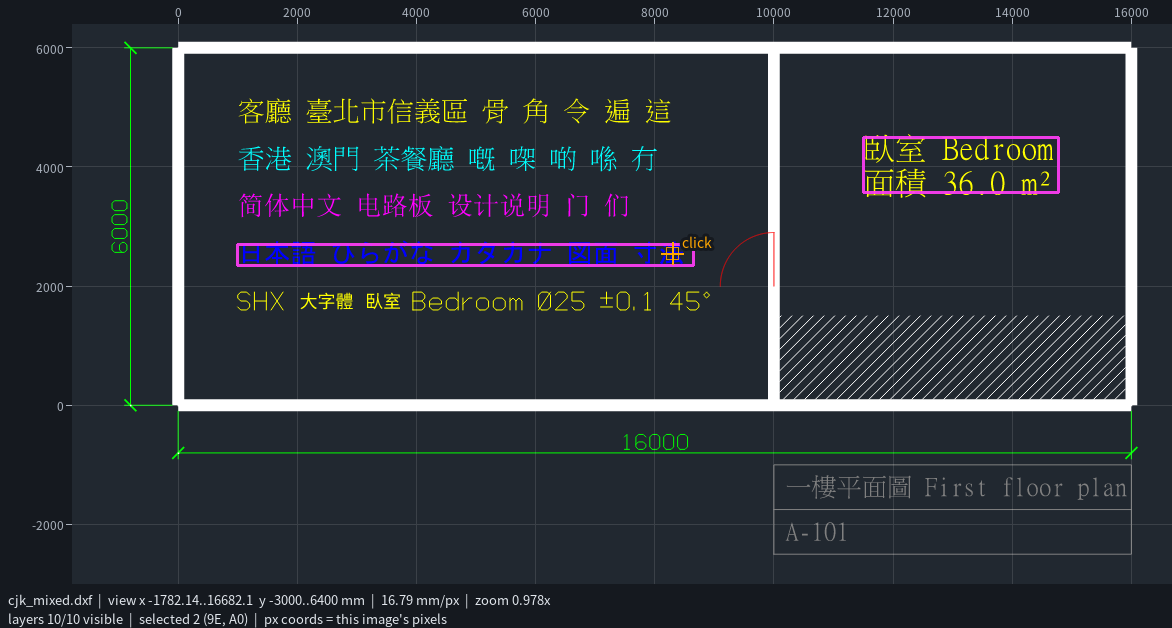
What the AI gets
Every action returns the new screen (PNG) plus a short JSON state:
- Coordinate rulers (top and left) in drawing units and a light grid, so positions can be read straight off the image.
- Selection highlights in magenta, with a ring around objects too small to see.
- Markers and measurement lines in orange.
- A minimap of the whole drawing with the current view when zoomed in.
- A status bar with the visible range, units per pixel, zoom, visible layers and the selection.
- When comparing revisions, the drawing is dimmed and the differences drawn over it: added in green, removed in red, changed in blue with the old version in thin red, each group in a numbered region box.
Tools accept positions as px (pixels of the image the AI was just shown) or world (drawing
units), so the AI can point at what it sees.
| Tool | What it does |
|---|---|
open_drawing |
Open a DXF, DWG, Gerber/drill file, folder or zip and show all of it |
look |
Show the current screen again |
zoom / zoom_window / zoom_extents / zoom_to |
Wheel-style zoom around a point, zoom to a rectangle, to everything, or to given entities |
pan / back |
Move the view; return to the previous view |
click |
Select what is under a point and get its exact data (type, layer, coordinates, text, block attributes, length...) plus nearby alternatives |
select_window / select / clear |
Box-select (with type/layer filters), select by handle, clear |
inspect |
Every DXF attribute of entities, effective colour, bounding box, length/area, block content (also for entities of a compared baseline) |
find |
Find text (labels, reference designators, attributes) or entity types, then jump to them |
measure |
Distances, angles and area between points, or an entity's length/area |
layers |
List layers; show, hide or isolate them |
layout |
Switch between model space and paper-space layouts (sheets with title blocks, viewports, notes, tables); clicks and measurements inside a viewport reach the part behind it |
compare |
Compare the open drawing with another revision (DXF, DWG or Gerber): what was added, removed, moved or edited, grouped into numbered regions to visit one by one |
check |
Completeness and integrity report: what of the file is not on screen and why (entities that cannot be drawn, entities the engine could not read, missing xrefs and image files, hidden layers, other layouts, audit problems, unconverted Gerber data), with the problems marked on the drawing |
mark |
Put labelled markers on the drawing to point out findings |
screen_settings |
Screen size, grid, minimap, CJK glyph region |
cad_command |
Run CADCraft's 400+ AutoCAD-style commands for inquiries (list, dist, area, massprop...) and display changes (draw order); a command that changes the drawing is undone, one that writes a file is refused |
Files are never modified.
Install
The installer puts everything into runtime/ inside this folder: a portable Python, the Python
packages, the CADCraft engine and CJK fonts. It does not touch your system Python, PATH, registry
or system fonts. Every download is pinned and checked against a SHA-256 in
runtime.lock.json. To uninstall, delete the folder.
git clone https://github.com/trajis-tech/cad-eye-mcp.git
cd cad-eye-mcp
Windows (PowerShell):
powershell -ExecutionPolicy Bypass -File install.ps1
Linux / macOS:
./install.sh
Download size is about 150 MB. The installer ends with a self-check and prints the line to register the server.
Connect your MCP client
The server speaks MCP over stdio. The command is cad-eye-mcp.cmd (Windows) or cad-eye-mcp
(Linux/macOS) in this folder.
Claude Code
claude mcp add cad-eye -- "/path/to/cad-eye-mcp/cad-eye-mcp" # Windows: ...\cad-eye-mcp.cmd
Claude Desktop, Cursor, VS Code and other clients (JSON config):
{
  "mcpServers": {
    "cad-eye": { "command": "C:\\path\\to\\cad-eye-mcp\\cad-eye-mcp.cmd" }
  }
}
Then ask, for example: "Open D:\boards\rev3.zip and check whether any trace on the top copper passes closer than 0.2 mm to the mounting holes."
How it works
AI client ──MCP──▶ cad-eye-mcp (Python) ──MCP──▶ cadcraft-cli mcp (headless CADCraft)
                     │  view state, rulers, picking,          opens DXF/DWG, layer state,
                     │  highlights, minimap, measuring        renders PNG of a window
                     └─ ezdxf: exact entity data, geometry for picking and highlighting
                        gerbonara: Gerber/Excellon → layered DXF
- CADCraft is the view engine. It renders a window of the drawing (about 0.1 to 0.4 s per frame even on 200,000-entity boards), keeps layer visibility and reads DWG.
- ezdxf reads the same DXF. Both engines keep the original handles, so a pixel click maps to an exact entity. For DWG files, CADCraft writes a DXF copy to the cache for ezdxf.
- Gerber and drill files are converted with gerbonara
into filled DXF geometry, one DXF layer per PCB layer (
F.Cu,B.Cu,In1.Cu,F.SilkS,Edge.Cuts,Drill.PTH...). Mask, paste and bottom silkscreen start hidden. Conversions are cached. - Entity types CADCraft cannot draw get stand-ins: custom objects of AutoCAD Mechanical, Civil 3D
and similar applications (proxy entities) show their proxy graphics, the fallback drawing
AutoCAD itself shows without the application; arc and large radial dimensions show their
dimension geometry; ACIS solids with flat faces and meshes show a wireframe. Clicking a stand-in
reports the original object under
drawn_for, and anything left undrawn is listed undernot_drawnwhen the drawing opens. - Tables (
ACAD_TABLE) can be clicked and searched;inspectreturns their cell text row by row. - Old DXF files without entity handles (R12 writers such as I-DEAS or CAM tools) are copied by CADCraft first, so both engines number the entities the same way.
- External references are loaded when the referenced files sit next to the drawing; missing ones are listed when the drawing opens.
- On a sheet, a click inside a viewport is mapped through the viewport's scale and rotation to
model space, so the AI gets the part's own entity (and
measurethe model-space distance). comparematches entities by content rather than by handle: type, layer, attributes and geometry within a tolerance. Files re-saved or exported by another program, which renumbers the handles, still compare entity by entity. Unmatched entities are paired up as edits when they share a handle, have the same shape elsewhere (moved) or overlap (edited in place). Each change says what differs:movedby how much, or old and new values (a radius, a text, an attribute, a block definition). Paper-space layouts are compared too, and two Gerber revisions of a board compare layer by layer.
What is not on screen
A viewer that silently leaves things out invites wrong answers ("there is no hole there").
Whenever part of the file cannot be shown, the status bar says so, open_drawing says so, and
check reports it. The report starts with a verdict (complete / complete with stand-ins /
incomplete), followed by findings:
- Not drawn: entities that cannot be drawn, grouped by reason, with their handles (which
inspectstill reads). For example: a custom object saved with empty proxy graphics, an ACIS solid with curved faces, ACIS data that cannot be parsed. - Not read by the engine: entities in the file that the engine could not read at all. For a DXF, the exact entities, found by matching the handles of both readers; for a DWG, the count only.
- Missing files: external references and image or underlay files that are not there.
- Hidden on purpose: entities on layers that are off or frozen, entities flagged invisible, layers frozen in viewports, and drawable content in other layouts.
- Problems in the file: what the engine's audit finds, without changing anything (zero-length lines, missing layers or blocks), and whether the DXF had to be recovered.
- PCB sets: Gerber objects that could not be converted, files not recognised as a layer, and where negative polarity is approximated.
Problems with a position are marked on the drawing.
Compared with CADCraft's own MCP server
CADCraft has an MCP server of its own, so it is fair to ask what this layer adds.
docs/benchmark.md runs the same tasks through both on the same files and
shows what each returned. Generated by scripts/bench_native.py, it includes:
- Gerber boards (CADCraft cannot open them).
- Sheets of AutoCAD Mechanical assemblies (CADCraft draws 0 entities, cad-eye 2,683).
- Arc dimension values, and text inside tables.
- Naming the entity the engine could not read (CADCraft reports only a count).
- Clicks and measurements through a 1:2 viewport.
- Revision comparisons: CADCraft's own compare describes every change as "geometry" and, once the handles are renumbered, reports most edits as delete plus add.
Where both return the same data, it says so.
CJK text
The runtime includes Noto Sans CJK, one font collection that covers Traditional Chinese, Hong Kong
characters (HKSCS), Simplified Chinese and Japanese. On open, the server looks at the drawing's
text and picks the matching glyph forms (TC, HK, SC or JP). Set it yourself with
screen_settings(cjk=...) or the CAD_EYE_CJK environment variable. Text styles that name fonts
you do not have (SHX big fonts such as chineset.shx, mingliu.ttc, simsun.ttc...) still
render: missing characters come from the bundled font.
Settings
| Environment variable | Meaning |
|---|---|
CAD_EYE_CJK |
tc, hk, sc or jp: fixed glyph region (turns off auto-detection) |
CAD_EYE_CADCRAFT |
Use this cadcraft-cli binary instead of the bundled one |
CAD_EYE_RUNTIME |
Use a runtime folder other than ./runtime |
CAD_EYE_CACHE |
Cache folder for converted Gerber/DWG files (default: system temp) |
Limitations
- Read-only by design: nothing is saved. Editing comes with cad-hand (see the top of this page).
- Viewports on a sheet are clickable when they show a plan view (looking straight down); 3D views
are drawn but not clickable. Box selection and
findwork on the sheet's own entities; switch toModelfor the part. If model space has nothing to draw, the first layout opens instead. compareneeds both versions in the same coordinate system. Identical copies of a shape (holes, pads) that were removed in one place and added in another are reported as moved. Two files from different CAD programs can differ in how they write the same thing; raisetoleranceor read the listed attributes when a "change" looks cosmetic. Comparing two 200,000-entity boards takes about 30 to 40 s.- Proxy graphics are what the authoring application chose to save: 3D-only objects (such as AutoCAD Mechanical parts) have none and stay invisible. ACIS solids with curved faces need a modeling kernel and are not drawn; wireframes of the others are plan views with hidden edges.
- DWG goes through CADCraft. Objects it cannot read yet are skipped (see its
file-format parity);
checkreports how many, but for a DWG it cannot tell which. - Gerber "clear" (negative) polarity is drawn in a near-background colour on a
<layer>.clearlayer rather than cut out. - Text boxes used for clicking and highlighting are estimated, and lean wide for CJK text.
- The first open of a large Gerber set converts it, which takes a while (about 20 s for a 200,000-entity board); later opens use the cache and take a few seconds.
- On very large drawings the first
click/inspectwaits for ezdxf to finish reading the file (about 15 s for 200,000 entities). Rendering does not wait. - Tested on Windows x64 and Linux x64; the test suite also passes on macOS (Apple Silicon) in CI. Windows ARM, Linux ARM and Intel Mac builds are pinned but untested.
Development
runtime/python/python -I scripts/fetch_samples.py           # sample DXF/DWG/Gerber files into samples/
runtime/python/python -I -m unittest discover -s tests      # tests (Linux/macOS: runtime/python/bin/python3)
runtime/python/python -I scripts/try_tools.py scenario.json out/   # drive the server like a client
scenario.json is a list of [tool, {arguments}] pairs. Every returned screen is saved to out/.
tests/test_samples.py runs fixed checks on the fetched samples and writes open and compare times
to samples/regress-timings.json, flagging anything slower than 10 s. Without the samples, those
checks are skipped. The samples cover:
- mechanical drawings
- sheets with tables and scaled viewports
- proxy objects with xrefs
- ACIS solids
- a 200,000+ entity board and its previous revision
scripts/bench_native.py regenerates docs/benchmark.md (add --large for the
board revisions).
License
MIT. Third-party components and their licenses are listed in THIRD_PARTY_NOTICES.md.