NextMCP
An agent-oriented framework built on the Model Context Protocol that separates pipeline-agnostic execution control from pipeline-specific expertise.
NextMCP connects an AI agent on a client computer to a controlled Nextflow execution interface on an analysis server. The server provides a common execution layer for preparing launches, tracking runs, inspecting outputs, and recovering from failures. Client-side expert skills guide pipeline-specific input selection, parameter choices, quality control, and troubleshooting.
13 expert skill packages · 17 MCP tools · Project-based run records · Prepare before launch
Installation · Configuration · Connect a client · Expert skills · First analysis · Authoring and evaluation
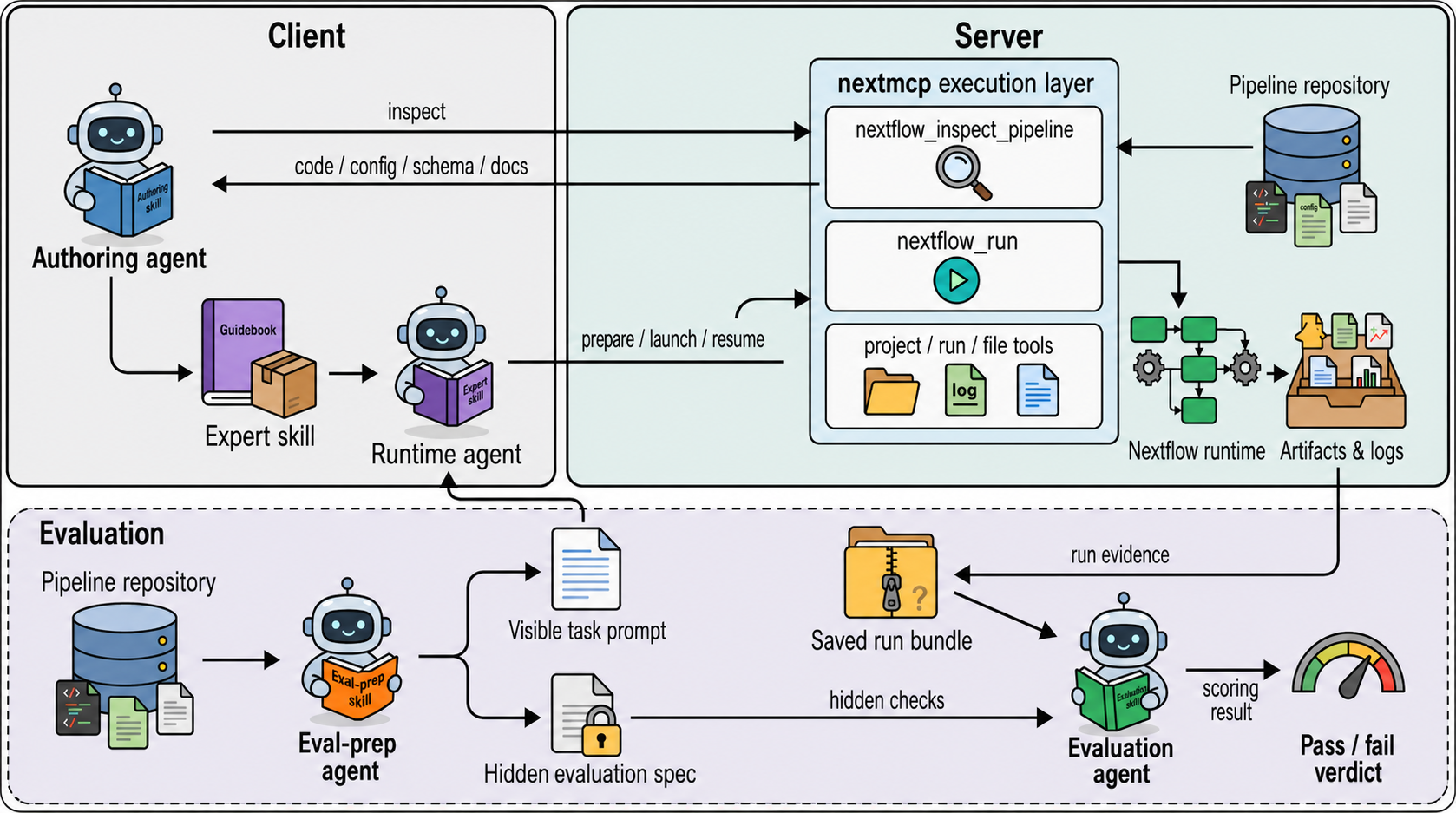
The upper panel illustrates the client–server architecture, comprising a pipeline-agnostic execution layer for Nextflow and client-side expert skills. An authoring agent retrieves pipeline source materials through the execution layer to generate pipeline-specific expert skills, which guide the runtime agent in configuring and executing existing pipelines. The execution layer provides controlled pipeline inspection, workflow preparation, launching, monitoring and resumption, together with restricted filesystem access and persistent project-level run records. The lower panel illustrates the evaluation workflow used in this study. An evaluation-preparation agent derives visible task prompts and hidden evaluation specifications from pipeline repository materials. Visible prompts were provided to the runtime agent, whereas hidden specifications were withheld from it and used by the evaluator after execution. A separate evaluation agent assesses saved run evidence against predefined criteria for task-to-configuration fidelity, execution completion and required-output presence. Skill authoring and evaluation are performed separately from runtime workflow execution.
What NextMCP provides
- Preparation: inspect a normalized launch plan, path checks, and run locations before starting Nextflow.
- Execution: launch versioned workflows in project-owned directories and record their state.
- Inspection: retrieve progress, logs, outputs, and diagnostic summaries through MCP tools.
- Recovery: inspect a previous run and request a restart using its recorded identifier.
- Pipeline guidance: use client-side skills for parameters, output review, and assay-specific QC.
NextMCP leaves workflow execution to Nextflow and the selected pipeline. It does not expose a general shell-command tool. File tools enforce configured path permissions; these controls do not sandbox all workflow code. Compute allocation, container availability, reference selection, and scientific interpretation remain deployment or user responsibilities.
Deployment model
| Location | Components | Role |
|---|---|---|
| Analysis server, normally Linux | NextMCP, Nextflow, Java, container runtime, inputs and references | Execute workflows and store run records, logs, and results |
| Client computer | Codex or Claude Code, expert skills | Interpret requests and call MCP tools |
| SSH connection, when needed | Local port forwarding | Reach a server bound to loopback |
Installing a client skill does not install a pipeline on the server. Nextflow resolves remote workflow identifiers. This deployment does not require a vendored pipeline directory.
Installation
1. Prepare the analysis server
Use Linux with Conda, Git, and a container runtime supported by the selected pipeline. This example uses Java 21 and Nextflow 25.10.2:
# Set Up the Environment
conda create -y -n nextmcp -c conda-forge -c bioconda python=3.12 openjdk=21 nextflow=25.10.2
# Activate Environment
conda activate nextmcp
# Install UV
python -m pip install uv
# Verify Tools
java -version
nextflow -version
command -v nextflow
See the Nextflow installation documentation.
# Verify that Docker is installed and ready to use
docker info
Installing Apptainer alone does not make a Docker profile work. The nf-core CLI is optional; NextMCP does not require it to launch workflows.
2. Install NextMCP
git clone https://github.com/wanghwlab/NextMCP.git
cd NextMCP
uv sync --locked
cp config/config.example.yaml config/config.yaml
uv sync creates or updates .venv from pyproject.toml and uv.lock.
Conda supplies Java and Nextflow; uv run supplies the Python environment
for NextMCP. Keep the Conda environment activated when starting the service.
Configuration
Edit the copied configuration before starting. The template contains deployment placeholders; copying it alone is not a complete configuration.
See the configuration reference for every YAML field, optional local pipeline materials, configuration reload, and connection troubleshooting.
This example uses a loopback listener and an SSH tunnel. Replace every /srv/ path with an absolute server path, and replace the Nextflow executable with the output of the command shown above. Point input and reference roots to existing directories.
server:
  host: 127.0.0.1
  port: 8321
  base_dir: /srv/nextmcp
  logging_level: INFO
  reload_config_on_change: false
  reload_config_interval_seconds: 1.0

auth:
  enabled: true
  bearer_token: "REPLACE_WITH_A_LONG_RANDOM_TOKEN"

paths:
  allowed_read_roots:
    - /srv/nextmcp
    - /srv/data
    - /srv/references
  allowed_write_roots:
    - /srv/nextmcp

state:
  db_path: /srv/nextmcp/state/processes.db

projects:
  root: /srv/nextmcp/projects

audit:
  file_path: /srv/nextmcp/logs/audit.log
  max_bytes: 5242880
  backup_count: 3

nextflow:
  executable: /absolute/path/to/conda/envs/nextmcp/bin/nextflow
  pipeline_roots: []
  default_profile: docker
  igenomes_ignore: false
  expose_pipeline_materials: false
  env:
    NXF_HOME: /srv/nextmcp/.nextflow
    NXF_OFFLINE: "false"
    NXF_VER: "25.10.2"
Generate a token locally and transfer it securely to the client; do not commit it:
python -c 'import secrets; print(secrets.token_hex(32))'
| Setting | Meaning |
|---|---|
allowed_read_roots / allowed_write_roots |
Directories permitted by server file/path checks; client paths are not server paths |
state.db_path |
SQLite process-record database, created by the service |
projects.root |
Parent directory for analysis projects and runs |
pipeline_roots: [] |
Disable the local catalogue; use an explicit remote identifier and release |
default_profile |
Default launch profile; the pipeline and installed runtime must support it |
expose_pipeline_materials |
Enable full local source/documentation inspection for authoring |
igenomes_ignore |
When true, generate a Nextflow config setting igenomes_ignore=true and igenomes_base=/tmp/igenome_tmp; use only with compatible pipelines |
NXF_HOME |
Nextflow home directory, including its default downloaded-pipeline location |
NXF_OFFLINE |
When true, restrict Nextflow repository and plugin downloads; does not provision containers or data |
NXF_VER |
Version selection for Nextflow launchers that honor it; keep consistent with the installed runtime |
Leaving igenomes_ignore false lets the workflow and supplied parameters decide reference
handling; it does not imply every run downloads iGenomes. Setting it true does not locate
or validate reference files. Supply explicit reference parameters when using local references.
Quote environment-variable values as strings in YAML. See the
Nextflow environment-variable reference.
For optional local discovery, set pipeline_roots to directories containing pipeline checkouts.
Enable material exposure only when needed for authoring. Disabling the catalogue does not
remove Nextflow's downloaded workflow cache.
Validate and start
After replacing paths, create the corresponding writable directories. For this example:
mkdir -p /srv/nextmcp/state /srv/nextmcp/projects /srv/nextmcp/logs /srv/nextmcp/.nextflow
# Validate config only
uv run nextmcp --config config/config.yaml --check-config
# Print effective config with secrets redacted
uv run nextmcp --config config/config.yaml --dump-config
# Run
uv run nextmcp --config config/config.yaml
The configuration check does not validate a biological workflow. Initialization can create state directories and the SQLite database. The configuration dump redacts the bearer token.
With this configuration, the MCP endpoint is http://127.0.0.1:8321/mcp. The example template uses the same 127.0.0.1:8321 listener; always use your effective host and port. Keep the service running in a persistent terminal or managed service. Restart it after configuration changes when reload is disabled.
Connect a client
Install and sign in to Codex or Claude Code on the client computer. These commands configure existing clients; they do not install them or change the server.
1. Open the SSH tunnel
In a terminal on the client computer, replace USER and SERVER:
ssh -N -T -p 22 -o ExitOnForwardFailure=yes -o ServerAliveInterval=60 -o ServerAliveCountMax=3 -L 127.0.0.1:8321:127.0.0.1:8321 USER@SERVER
This also works directly in Windows PowerShell. A successful connection normally remains open without a shell prompt. Keep the window open; closing it disconnects the tunnel. No PowerShell script or execution-policy change is required.
A running SSH process maintains this forwarding connection: requests to the client's
127.0.0.1:8321 are carried to the server's 127.0.0.1:8321. If the process exits, that route
is gone even if NextMCP is still running. On Windows, check the local listener with
Test-NetConnection 127.0.0.1 -Port 8321; this checks TCP access, not MCP authentication.
If port 8321 is occupied, use -L 127.0.0.1:18321:127.0.0.1:8321 and change the client
MCP URL to http://127.0.0.1:18321/mcp.
The SSH password is the server account's login password. The MCP bearer token is a separate credential from the server configuration. They are not interchangeable.
Skip the tunnel if the client runs on the server itself. For an independently configured HTTPS deployment, use its reachable MCP URL. Each additional client computer needs its own connection, client configuration, token access, and installed skills.
2. Make the MCP token available
Open a second client terminal. Read the actual server token without placing it in command history.
Windows PowerShell:
$tokenInput = Read-Host "NextMCP bearer token" -AsSecureString
$env:NEXTMCP_TOKEN = [System.Net.NetworkCredential]::new("", $tokenInput).Password
Remove-Variable tokenInput
Bash on Linux/macOS:
read -rsp 'NextMCP bearer token: ' NEXTMCP_TOKEN
echo
export NEXTMCP_TOKEN
These variables apply to this terminal and processes started from it. Repeat the step in
a new terminal. A desktop client must also inherit NEXTMCP_TOKEN: setting it in an unrelated
terminal does not update an already running app. Use your operating system's user environment
settings or launch the app from the prepared environment, then fully restart it.
3a. Codex
Run in the terminal containing NEXTMCP_TOKEN:
codex mcp add nextmcp --url http://127.0.0.1:8321/mcp --bearer-token-env-var NEXTMCP_TOKEN
codex mcp get nextmcp
codex mcp list
codex
Alternatively, merge this entry into ~/.codex/config.toml on the client
(%USERPROFILE%\.codex\config.toml on Windows):
[mcp_servers.nextmcp]
url = "http://127.0.0.1:8321/mcp"
bearer_token_env_var = "NEXTMCP_TOKEN"
Use one registration method; edit an existing entry rather than duplicating it. Fixed-token
authentication does not require OAuth login. In Codex CLI, use /mcp to inspect the connection,
then request the server_info tool. See the
official Codex MCP documentation.
3b. Claude Code
Run in the terminal containing NEXTMCP_TOKEN:
claude mcp add --transport http --scope user nextmcp http://127.0.0.1:8321/mcp --header 'Authorization: Bearer ${NEXTMCP_TOKEN}'
claude mcp get nextmcp
claude mcp list
claude
The registration command also works in PowerShell. Keep the single quotes: they preserve
the environment-variable reference for Claude Code's configuration expansion instead of
writing the token into the command. In Claude Code, use /mcp to inspect the connection.
See the official Claude Code MCP documentation.
4. Confirm a real tool call
Ask the agent:
Use the nextmcp server_info tool without arguments.
Report readiness, allowed paths, and the configured runtime profile.
Do not launch an analysis.
A saved server registration alone does not prove connectivity. A successful tool response
establishes that the current client can reach and authenticate to the service. /nextmcp is
not a command defined by this server.
Expert skills
These are the current package targets, not a statement that all versions were used in the manuscript experiments.
| Pipeline | Version | Main application |
|---|---|---|
| fetchngs | 1.12.0 | Public sequencing-data acquisition |
| rnaseq | 3.22.2 | Bulk RNA-seq processing and quantification |
| riboseq | 2.0.0 | Ribosome profiling and translational analysis |
| ampliseq | 2.16.1 | Amplicon sequencing |
| atacseq | 2.1.2 | Chromatin accessibility |
| chipseq | 2.1.0 | ChIP-seq analysis |
| epitopeprediction | 3.1.0 | Epitope prediction |
| mag | 5.4.2 | Metagenome assembly and genome reconstruction |
| methylseq | 4.2.0 | Methylation sequencing |
| nanoseq | 3.1.0 | Nanopore sequencing |
| rnafusion | 4.1.0 | RNA fusion detection |
| sarek | 3.8.1 | Germline and somatic variant analysis |
| scrnaseq | 4.1.0 | Single-cell RNA-seq |
Supplementary Table 3 describes a historical ten-pipeline panel. This release targets the paper versions except riboseq, which remains at 2.0.0 rather than the table's 1.1.0. fetchngs, rnaseq, and sarek use the versions recorded for the representative cases. See the version comparison.
Install on the client
Obtain a repository copy on the client. Install complete expert skill directories, including
SKILL.md, assets, and references. Keep evals in the source distribution for maintenance;
it is not required for ordinary analysis. Do not install evaluation workspace directories.
| Client | User-wide skill directory |
|---|---|
| Codex | ~/.agents/skills/ |
| Claude Code | ~/.claude/skills/ |
For an initial installation of all 13 expert skills, run from the client repository root. Back up existing same-named skills before replacing them.
Windows PowerShell, Codex:
$skillDestination = Join-Path $HOME '.agents/skills'
New-Item -ItemType Directory -Force -Path $skillDestination | Out-Null
Get-ChildItem -Path './skills/experts' -Directory -Filter '*-expert-skill' |
  Copy-Item -Destination $skillDestination -Recurse
For Claude Code, use '.claude/skills' as skillDestination instead.
Linux/macOS, Codex:
mkdir -p ~/.agents/skills
cp -R skills/experts/*-expert-skill ~/.agents/skills/
For Claude Code, replace the destination with ~/.claude/skills. Open a new session after installation. See the official Codex skill locations and Claude Code skill locations.
The commands above are for an initial installation. Before an update, move each existing same-named package to a dated backup outside the client's skill directories, then copy the reviewed complete replacement. Merging files can retain obsolete assets. Source packages and installed copies are independent; no server restart is needed for a client skill update.
For authoring or evaluation, also install the selected package from skills/meta using the same directory layout. The contract builder needs all four pipeline-test-* packages. See the meta skill guide for their roles and examples.
First analysis
Prepare an RNA-seq request
Place the samplesheet, reads, and references on the server within readable directories.
Confirm that the samplesheet uses server paths. In Codex, select or mention
$rnaseq-expert-skill; in Claude Code, invoke /rnaseq-expert-skill or request it by name.
Then provide a task such as:
Use rnaseq-expert-skill and nextmcp to prepare nf-core/rnaseq 3.22.2.
Project: rnaseq-demo
Samplesheet: /srv/data/rnaseq/samplesheet.csv
Genome FASTA: /srv/references/genome.fa
Annotation GTF: /srv/references/genes.gtf
Use STAR-Salmon and the server's configured container profile.
Check server files and the samplesheet. Return the prepared launch plan and
output locations. Do not launch until I have reviewed the plan.
The paths are examples, not included datasets. The corresponding MCP tool arguments could be:
{
  "project": "rnaseq-demo",
  "pipeline": "nf-core/rnaseq",
  "extra_args": ["-r", "3.22.2"],
  "params": {
    "input": "/srv/data/rnaseq/samplesheet.csv",
    "fasta": "/srv/references/genome.fa",
    "gtf": "/srv/references/genes.gtf",
    "aligner": "star_salmon"
  },
  "prepare": true
}
This JSON describes a nextflow_run tool call, not a shell command. Preparation does not run
Nextflow, download the remote workflow, or verify biological suitability. For remote targets,
leave validate_params_schema disabled: NextMCP's optional schema check requires a local schema.
Workflow-level validation happens when Nextflow runs.
Launch, inspect, and recover
After review, ask the agent to launch with confirmed inputs and prepare=false. Place workflow
parameters in params; place resource limits and executor settings in a Nextflow configuration
file supplied through config_files. Resource-limit syntax depends on the pipeline and
Nextflow release.
Record the returned run identifier. Start monitoring with
run_get(include=["progress","artifact_summary","diagnosis","next_actions"]), then use
run_artifacts and run_logs. Completion does not replace inspection of MultiQC, mapping
statistics, and assay-specific QC.
For a restart, inspect the source run and request nextflow_run(from_run_id=...).
Do not also provide project, pipeline, or run_id. Cache availability, input changes, and
workflow compatibility determine whether work can be reused.
For combined rRNA + tRNA depletion in riboseq, the skill explicitly selects
remove_ribo_rna=true and ribo_removal_tool="bowtie2". The reference manifest must cover
both RNA classes; the default rRNA reference set does not establish tRNA coverage.
Records and results
With the configuration above, the default layout is:
/srv/nextmcp/
├── state/processes.db
├── logs/audit.log
└── projects/<project>/
    ├── project.json
    ├── runs/<run_id>/
    │   ├── run.json
    │   ├── generated_configs/
    │   ├── job/
    │   └── work/
    └── results/<run_id>/
Published output locations can change when explicitly configured. Use locations returned by the tools. Preserve run records and work/cache directories when resume is required. The SQLite database is runtime state, not a source file to commit.
MCP tools
The server registers 17 tools:
| Purpose | Tools |
|---|---|
| Service readiness | server_info |
| Files | fs_list, fs_read, fs_write, fs_mkdir, fs_copy, fs_move |
| Projects | project_list, project_get |
| Runs | run_list, run_get, run_artifacts, run_logs, run_stop |
| Workflows | nextflow_list_pipelines, nextflow_inspect_pipeline, nextflow_run |
Local discovery and inspection require a configured catalogue. A disabled catalogue does not prevent launching an explicit remote pipeline. Tools return structured results with an ok field and structured error details when an operation fails.
Authoring and evaluation
Use pipeline-expert-skill-creator to create or update a package from a selected official pipeline release:
- Obtain the exact release's schema, workflow code, configuration, and documentation.
- Record version and source provenance; retain applicable existing knowledge.
- Update parameters, prerequisites, output conditions, QC, and explicit knowledge gaps.
- Validate the package and evaluate its answers without launching Nextflow.
- Review changes, back up the installed skill, and install the accepted package on the client.
Authoring from a separate checkout does not require server-side material inspection or upgrading a workflow used by an existing run. Scaffolding scripts produce editable starting packages; they do not complete scientific review automatically.
uv run python skills/meta/pipeline-expert-skill-creator/scripts/validate_expert_skill.py \
  --skill-root skills/experts/rnaseq-expert-skill
Each expert package's evals/evals.json contains evaluation prompts and assertions. Generated
answers and scores belong in a separate workspace. Offline evaluation means no real workflow
execution; a model CLI may still contact its provider. Heuristic grading and static validation
do not establish biological correctness. See the
evaluation guide for package contents and limitations.
To evaluate all 13 current expert skills with an authenticated Codex CLI, run in Bash:
bash skills/experts/all_evals.sh
This requests gpt-6-astra explicitly and writes new results under evaluation-output/.
It starts independent model sessions.
The model generates answers and local heuristic rules grade them. Model access is required;
the script does not silently substitute another model. Use --dry-run to create deliberately
failing placeholders without invoking a model. Configure an evaluation client without live
analysis MCP connections. Full options and a PowerShell single-package example are in the
expert evaluation guide.
The meta skills also support visible tasks, hidden evaluation specifications, and run-level assessment. These are separate from ordinary analysis and question-based skill checks.
The authoring guide provides source collection, staged generation, validation, evaluation, and client replacement commands. It also explains the six meta skills and the distinction between offline questions and tests that require completed workflow evidence.
Research scope and reproducibility
The study examines workflow reuse through data-acquisition handoff to RNA-seq, variant calling from prepared intermediate inputs, and specification-based comparisons with and without expert skills. Current skill versions and the worked example above are not an exact reproduction of the historical experiments.
To reproduce a reported experiment, use its archived code and skill revisions, pipeline release, input/reference versions, containers, visible task, hidden specification, and run evidence. Installing current skills or obtaining a successful prepare response does not reproduce a manuscript result. These instructions do not claim a benchmark score or a freshly completed biological analysis.
For scholarly use, record the exact software revision and pipeline/skill versions. Associate the final article and archived software release with those records when available.
Development
uv sync --locked --extra dev
uv run ruff format .
uv run ruff check .
uv run mypy src/nextmcp
uv run pytest
uv sync --extra dev includes the optional development dependencies such as pytest;
--locked also prevents an implicit lockfile update. uv run pytest runs the test suite
inside the project environment. Ordinary analysis does not require running these tests.
Tests cover service behavior, file permissions, launch handling, and skill maintenance. Schema checks cover packaged group consistency and generator behavior using a small synthetic schema. They do not establish complete coverage of an upstream release. Workflow-task definitions under tests/pipeline_support are separate from expert-skill questions. See the test directory guide for each module, retained task inputs, and the scope and limitations of these checks.
Repository map
| Path | Purpose |
|---|---|
src/nextmcp/ |
Server implementation and MCP tools |
config/config.example.yaml |
Template; keep the actual config.yaml private |
config/README.md |
YAML field reference, deployment setup, and troubleshooting |
skills/experts/ |
Versioned expert skill source packages |
skills/meta/ |
Skill authoring and evaluation methods |
tests/ |
Software tests and reusable evaluation task specifications |
Img/ |
README architecture image |
pyproject.toml, uv.lock |
Package definition and Python environment |
Runtime databases, data, logs, work directories, model answers, and evaluation workspaces are not required in a public source checkout. Vendored pipelines are optional for remote execution; test and authoring dependencies must be handled separately.
Usage and maintenance instructions are maintained in this README and the READMEs under skills/experts, skills/meta, and tests, with configuration details in config/README.md.
License
MIT. See LICENSE.